What Is the Basic Workflow for Generating Custom AI Vocals?
Custom AI vocals, step by step: pick the job, prep lyrics or a dry guide vocal, generate takes, comp, tune, time, mix, export stems and check rights.
The basic workflow for generating custom AI vocals has eight steps: decide the job, prepare clean inputs, generate several takes, pick and comp the best phrases, fix pitch and timing, clean and mix the vocal, export stems, and check the rights before release. What you feed in, whether lyrics, a guide vocal or training audio, decides most of the result.
"Custom" can mean three jobs, each starting in a different tool; from Step 3 on, the workflow is shared. Each step shows how it works in Soundverse, per its feature pages on 19 November 2026.
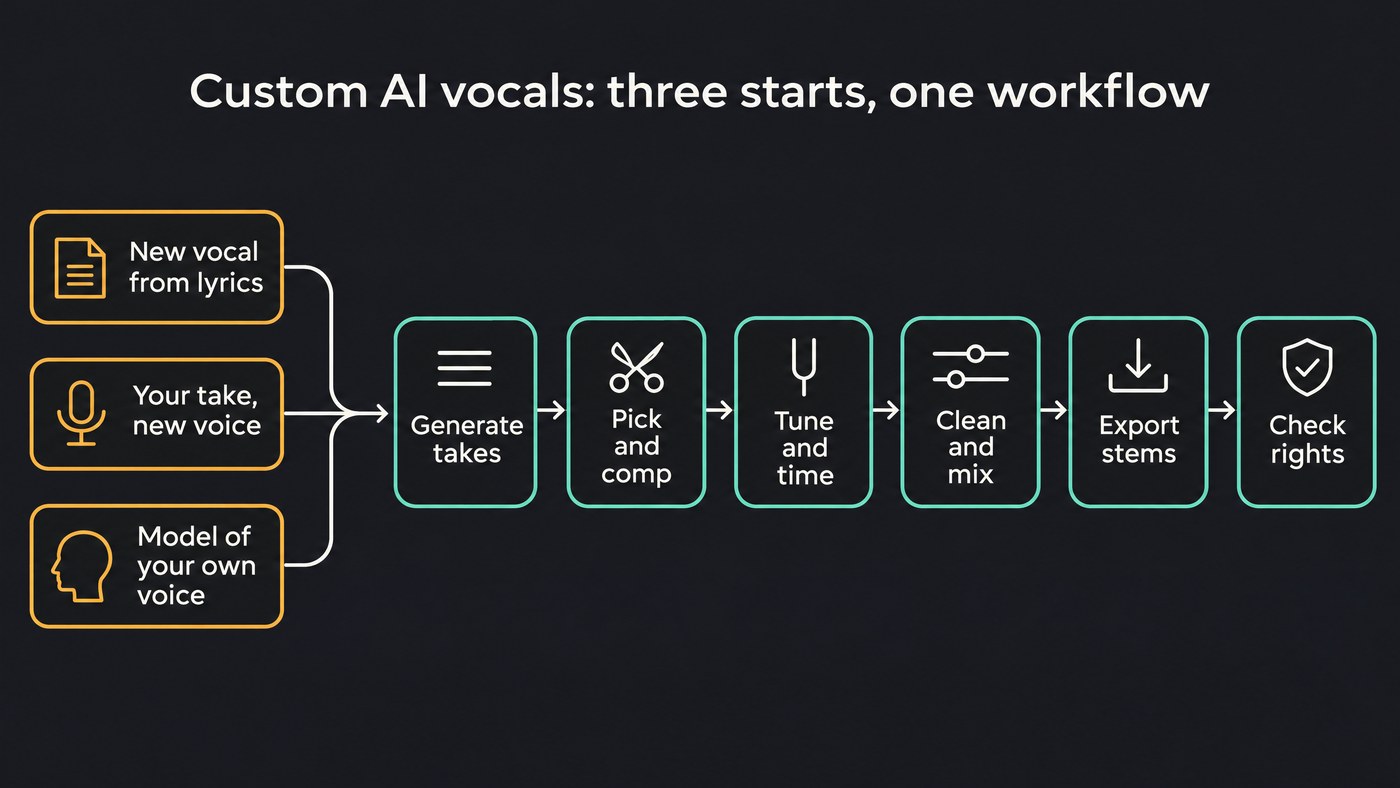
Step 1: Decide which kind of custom AI vocal you need
- A new vocal from your lyrics. AI Singing Generator sings your words as an a cappella, ready to layer over your beat. Pick a Vocal style such as Pop (Female), Rap, Rock or Choir, or add a voice reference of at least 30 seconds of a voice you may use. For your lyrics sung over a full arrangement, use AI Song Generator in Custom mode, which sings them word for word.
- Your recorded take in another voice. Voice Swap re-sings a vocal in a different voice model and keeps your phrasing and timing, for when the performance is right but the voice isn't.
- A model of your own voice. Train Voice Clone turns one recording with at least 15 seconds of singing into a voice AI Song Generator can sing new songs in. Train Voice Model trains on 10 minutes or more for a higher-fidelity model you use in Voice Swap. Both need Creator or above. For the training itself, see our guide to training an AI on a vocal timbre.
Step 2: Prepare the inputs
Lyrics. Mark the structure with section tags such as [Verse], [Chorus] and [Bridge], which AI Song Generator's Lyrics box accepts. Make every line singable: read it aloud over the beat, keep matching lines close in syllable count, and spell names the way they're sung. AI Singing Generator sings about the first 350 characters per take, roughly a verse and a chorus, so lead with your strongest lines. Our walkthrough on AI vocals for custom lyrics goes further on the writing.
A guide vocal for Voice Swap. Record it dry: lead only, no reverb, delay or doubles. Voice Swap can separate the lead from a full song, but backing vocals are left out of the result. Sing it the way you want the final to feel: the new voice inherits your timing. If the part sits outside the target voice's range, Pitch shifts it up to 24 semitones either way; 12 is one octave.
Training audio. Use your own voice, or a singer who has given explicit consent, ideally in writing. Both training tools stay locked until you confirm it.
- Train Voice Clone: one MP3, WAV or FLAC up to 10 MB with at least 15 seconds of actual singing (a long intro doesn't count), clean, dry and across a range of notes.
- Train Voice Model: at least 10 minutes of clean, dry, solo voice, each clip at least 60 seconds, sung at varied pitches. Background music, noise, reverb and takes on a few notes all lower quality.
Step 3: Generate several takes
Every take comes out differently, so plan for a handful, changing one thing per run.
- Same lyrics, another voice: run the hook with Pop (Female), then Pop (Male).
- Same lyrics, another style: in Custom mode, change only Style of Music or the Quick Style tags (up to five).
- Same take, other voices: in Voice Swap, convert one guide into several voice models and play them back to back.
- Your own voice: turn on Use custom voice in AI Song Generator and pick your clone. The same clone on every track keeps one lead voice across an EP.
Judge each take like a producer: every word clear, stresses on the beat, a chorus that lifts. Note the best parts of each take ("take 3: best chorus"). Soundverse v9, the newest model, is included on Pro and Max.
Step 4: Pick the best take and comp it
Move your keepers into AI Studio: Generate in Studio places an AI Singing Generator vocal at the playhead, and AI Song Generator songs open there directly (split a full song with Stem Separator first). AI Studio has no take comping, so comp by hand:
- Put each take on its own track.
- Split the takes at phrase boundaries, in the gaps between words or on hard consonants, where edits hide best.
- Keep the best version of each phrase and mute the rest.
- Add short fades at each edit so the joins don't click.
Step 5: Fix pitch and timing
AI Autotune corrects pitch only. Leave Key on Auto detect and add the instrumental, which its page calls more accurate than reading the key from the vocal alone. Natural corrects at 80%, Tight at 90% and Hard tune at 100%; Custom lets you lower the strength and keep Adaptive strength on, which eases off on breathy sounds.
AI Vocal Quantizer fixes timing without touching pitch. Add the beat so it finds the tempo, keep the default 1/16 grid, and stay near the default 50% strength; the page says vocals usually sound best between 30% and 60%. It moves whole phrases, keeps any stretch between 0.94× and 1.08× of the original speed, and returns a file the same length, so it drops back into place.
Push either too far and it sounds machine-made; see what makes an AI voice sound robotic.
Step 6: Clean and mix the vocal
Clean before you add character. AI Vocal Cleaner removes background noise, hum and clicks, at a Cleanup strength of 70% by default, with De-ess and De-plosive on.
For a quick finished sound, AI Vocal Effects runs one preset chain: Transparent, Modern Pop, Intimate, Wide Lead or Lo-fi, adjustable with five sliders. For a hands-on mix, build the chain on the vocal track in AI Studio:
- EQ. EQ One's Low Cut clears rumble; a narrow Notch tames a ringing note.
- Compression. Even out the level so quiet words stay audible.
- De-essing. De-Esser One starts with SPLIT at −28 dB; lower it until harsh S sounds sit back, and use Δ DELTA to hear only what it removes. Switch DELTA off before export.
- Reverb and delay last. De-Esser One goes before Reverb One so sibilance doesn't splash into the tail. For a vocal plate, the Reverb One page suggests PRE at 20 to 30 ms and LO CUT near 150 Hz.
Chain presets such as Pop Vocals load De-Esser One with EQ and compression in one click. For more, read how to mix vocals like a pro.
Step 7: Export the vocal and stems
In AI Studio, click Export and choose Audio, Stems or Video. Stems come as one file per track in WAV, FLAC or MP3, packed in a ZIP, with each track's effects baked in or not; stems and WAV need Creator. WAV exports can be 16-bit, 24-bit or 32-bit float at 44.1, 48 or 96 kHz.
Export the lead dry and processed, so a mix engineer can redo the effects. VocalTune One corrects pitch live only and exports dry, so print tuning with AI Autotune.
Step 8: Check the rights before release
- The voice. Your own, or a singer who agreed to this use; never impersonate a real person. Spotify's policy of 25 September 2025 allows vocal impersonation only when the artist has authorized it, and explains why: "Unauthorized use of AI to clone an artist's voice exploits their identity, undermines their artistry, and threatens the fundamental integrity of their work."
- Everything you fed in. You need the rights to the vocal you converted, any voice or song reference, and the instrumental.
- Your plan. Licensing is set by plan: the Free plan is for personal use, and the Creator plan comes with a royalty-free license.
- Disclosure. An update to that post says Spotify launched a beta on April 16, 2026 that shows AI credits for vocals, lyrics or production in Song Credits, when artists disclose them through their label or distributor.
Custom AI vocals in other tools
Elsewhere only Step 1 changes. In ACE Studio you draw the melody as notes and type lyrics onto them; its lyrics guide says each note carries one syllable, which buys note-level control for more setup. Kits.ai covers conversion: "The Kits AI Voice Changer lets you transform any audio into a different voice while maintaining the unique delivery of the original audio." For training, its dataset guide says 30 to 60 minutes of clean, varied audio gives the highest-quality models.
Where Soundverse fits
Soundverse is an AI music platform that takes you from idea to audience, built for independent artists who release music. All three starting points sit in one place: AI Singing Generator for a new vocal from lyrics, Voice Swap for your take in another voice, and Train Voice Clone or Train Voice Model for your own voice, with a consent check before any training starts. Comping, tuning, timing, de-essing and stem export happen in AI Studio and the vocal tools beside it, in the browser.
Where it's less suited: AI Studio doesn't load VST or AU plugins and has no take comping, so for heavy comping or a favourite plugin chain, export stems to your DAW.
This video records a short sample, creates an AI voice from it, then has AI Song Generator sing a full song in that voice.
FAQ
What's the difference between Train Voice Clone and Train Voice Model?
Train Voice Clone is the fast option: one recording with at least 15 seconds of singing becomes a voice AI Song Generator sings new songs in. Train Voice Model needs at least 10 minutes of audio, trains for 10 to 350 epochs over hours, and builds a higher-fidelity model for re-singing existing vocals in Voice Swap.
How many takes should I generate?
Enough for a real choice in every section, changing one setting at a time. If a line fails in every take, rewrite it; crowded syllables and misplaced stresses are the usual culprits.
Can I release custom AI vocals?
Only when the voice is yours or the singer has agreed, and you hold the rights to everything you fed in. Licensing is set by plan: the Free plan is for personal use, and the Creator plan comes with a royalty-free license.
Sign up for Soundverse free and generate your first custom vocal today.
More guides on vocals and production on the Soundverse blog.

