Edit & enhance · Free
Put a vocal in tune, from a light touch to the hard-tune effect
AI Autotune finds the key or uses yours, then pulls each note toward it in the style you pick. 21 tokens a minute of vocal, on every plan.
1,000 free tokens to start · No card needed · Cancel paid plans anytime
Do more with AI Autotune on Creator — from $9.99/mo, or ₹399/mo in India. 4,000 tokens a month. Billed $119.88 a year, or $12.49 month to month.
What you get
Notes on key
Each note is pulled toward the key, and the result says which key was used and the average correction.
The style you want
Natural for a touch-up, Tight for a closer hold, Hard tune for the effect, or Custom settings of your own.
The key from your beat
Add the instrumental and the key is read from it, which is more accurate than from the vocal alone.
Who it's for
Singers
Fix the pitchy notes in a good take instead of singing it again.
Rappers and hip-hop artists
Get the hard-tune sound on a hook or a whole verse.
Producers
Tune a client's vocal or backing vocals before the mix.
Songwriters
Tidy up a demo vocal so the song is heard, not the slips.
When to use it
- A few notes in a good take are off
- You want the robotic hard-tune effect
- Backing vocals need to sit on the key
- You know the song's key and want the vocal held to it
- A demo vocal distracts from the song
What you can make with it
A touched-up lead vocal
Run a lead vocal on Natural to correct the slips and keep the voice's character.
A hard-tune hook
Pick Hard tune to snap every note of a chorus for the robotic effect.
Backing vocals on key
Tune backing vocals on Tight so they sit with the lead.
A vocal in a set key
Pick the song's key from the list so the vocal is held to it.
A chromatic tune
Choose Chromatic to pull each note to its nearest semitone when there's no clear key.
Gentler correction
Use Custom at a lower strength, with Adaptive strength on, for a lighter hand on breathy lines.
Screenshots
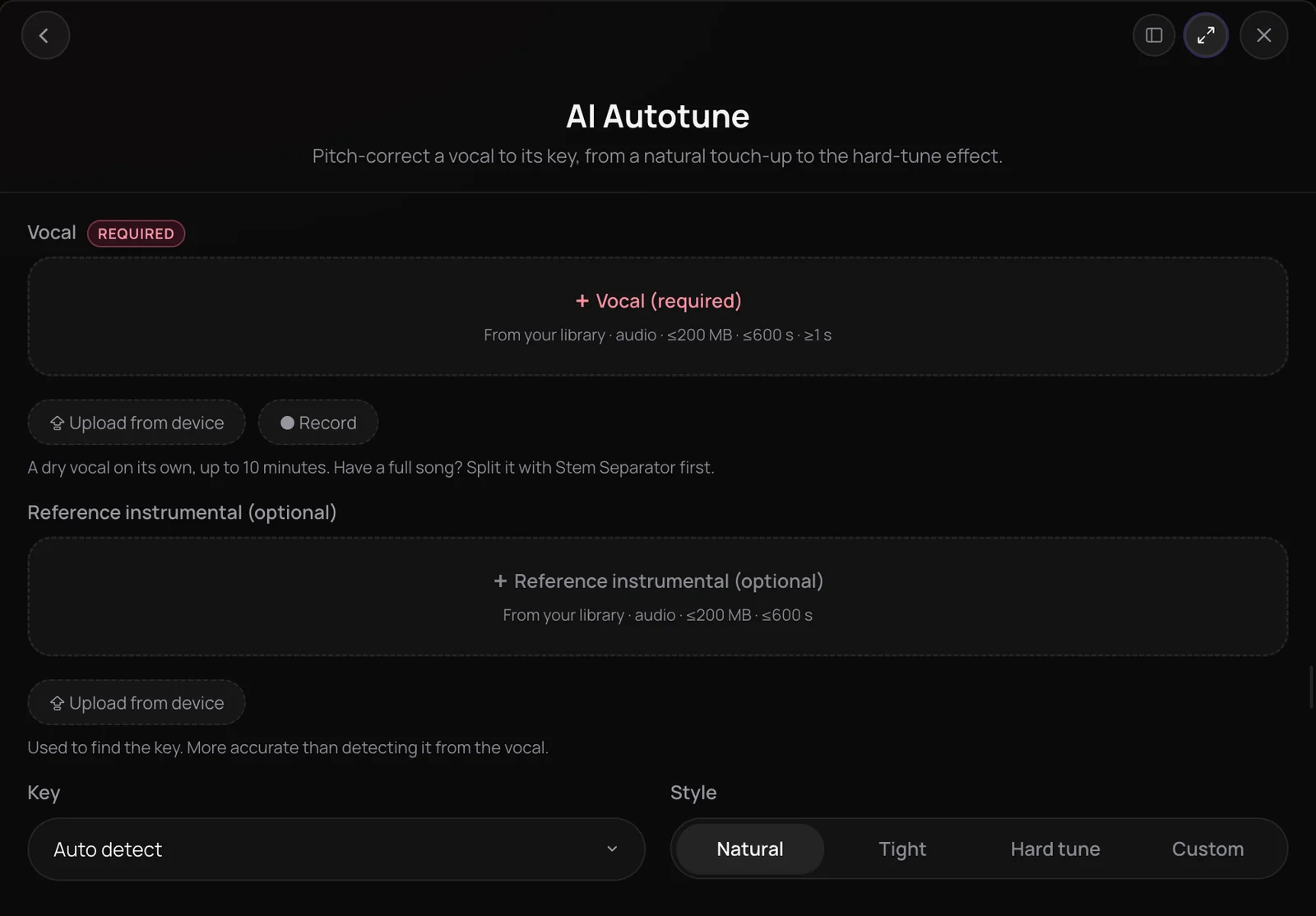
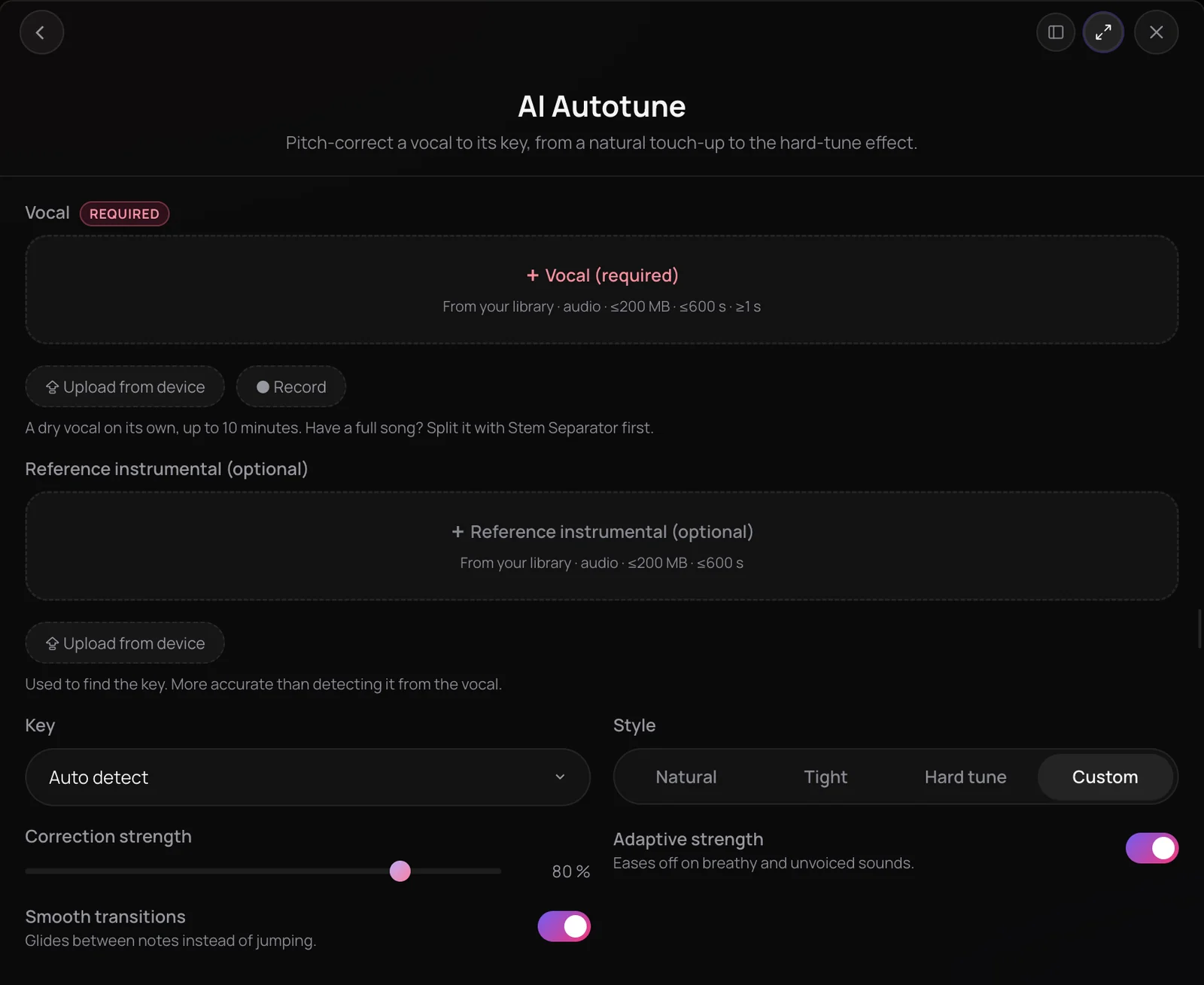
AI Autotune is Soundverse's pitch correction for a vocal. It detects the key from your instrumental or from the vocal itself, or uses one you pick, and pulls each note toward that key with the strength of the style you choose: Natural, Tight, Hard tune or your own Custom settings. You get the tuned vocal as a new file, with the key it used and how much correction it applied. It's for singers who want a cleaner pitch and artists who want the hard-tune sound.
What you can do
The controls
A key, a style and, on Custom, three settings of your own.
Key
Auto detect (the default), Chromatic for the nearest semitone, or one of the 24 major and minor keys.
Style
Natural (80% correction), Tight (90%), Hard tune (100%) or Custom.
Correction strength
On Custom: from 0% (no correction) to 100% (a full snap), 80% by default.
Adaptive strength
On Custom, on by default: eases off on breathy and unvoiced sounds.
Smooth transitions
On Custom, on by default: glides between notes instead of jumping.
Reference instrumental
Optional: used only to find the key, and never mixed into the result.
How it works
Open AI Autotune
Choose AI Autotune in the Vocal Production section of AI Tools.
Add the vocal
Pick a vocal from your Library, upload one or record it in the panel: WAV, MP3, M4A or FLAC, up to 10 minutes. Add the instrumental as the reference to find the key more accurately.
Set the key and style
Leave Key on Auto detect, choose Chromatic or pick one of the 24 major and minor keys. Then choose Natural, Tight, Hard tune or Custom.
Tune and listen
Click Tune Vocal. The tuned vocal arrives in your chat and is saved to your Library, with the key it used and the average correction per note.
Why use AI Autotune
From subtle to hard-tune
Natural touches up the pitch, Tight holds it closer, and Hard tune snaps every note for the robotic effect.
The key, found for you
Auto detect reads the key from your instrumental when you add it, which is more accurate than reading it from the vocal alone.
Your own settings
Custom sets the correction strength and lets you ease off on breathy sounds and glide between notes.
The same voice, in tune
It corrects pitch only: the timing, the melody you sang and the voice itself stay as they were.
What it costs
Works on the Free plan. New accounts get 1,000 free tokens, enough for about 15 3-minute vocals.
- Tune a 3-minute vocal: 63 tokens at 21 tokens a minute (about $0.16–$0.20 on Creator, or ₹6–₹8 in India).
A vocal is charged for its real length, with a one-minute minimum, and the total is rounded up to a whole token. Before a run, the panel shows its price for your vocal, or the rate a minute until the vocal's length is known.
Running the same vocal with the same settings again soon after returns the earlier result, and nothing is charged.
Creator $12.49 a month, or $9.99 a month billed yearly ($119.88 a year) · Pro $31.24 a month, or $24.99 a month billed yearly ($299.88 a year) · Max from $72 a month, or $60 a month billed yearly ($720 a year).
In India (PayU): Creator ₹499 a month, or ₹399 a month billed yearly (₹4,788 a year) · Pro ₹1,299 a month, or ₹1,039 a month billed yearly (₹12,468 a year) · Max from ₹2,999 a month, or ₹2,399 a month billed yearly (₹28,788 a year).
Prices outside India are in US dollars, billed through Stripe; in India they are in rupees, billed through PayU. Monthly tokens reset each month and don't roll over.
Good to know
One solo vocal
Start from a vocal on its own, 1 second to 10 minutes long. For a full song, split out the vocal with Stem Separator first.
Pitch only
It doesn't change the timing, the melody you sang or the voice. AI Vocal Quantizer tightens timing.
Frequently asked questions
Is AI Autotune free?
AI Autotune works on every Soundverse plan, including Free, and each run uses tokens: 21 a minute of vocal, with a one-minute minimum, so a 3-minute vocal costs 63 tokens. The panel shows the price for your vocal before you run it. Soundverse is free to sign up, and new accounts get 1,000 free tokens.
Will AI Autotune sound natural?
On the Natural style it can. Natural corrects at 80% strength, Tight at 90% and Hard tune at 100%, which is the deliberate robotic sound. For the most natural result, keep Natural or use Custom with a lower strength and Adaptive strength on, which eases off on breathy and unvoiced sounds. A correct key matters most, so add the instrumental or pick the key yourself.
Can I use the tuned vocal commercially?
On the Free plan, what you make on Soundverse is for personal use. Paid plans add a commercial license; the Pricing page lists what each plan covers. AI Autotune processes a vocal you bring, so you need the rights to the recording and to any instrumental you add.
What can't AI Autotune do?
It pulls notes toward the key, so it doesn't transpose the vocal, rewrite the melody you sang, change the timing or change whose voice it is. It works on one solo vocal, not a mixed song, so split a song with Stem Separator first. A vocal can be 1 second to 10 minutes long.
What is AI Autotune?
AI Autotune is a Soundverse tool that pitch-corrects a vocal to its key. It detects the key from your instrumental or the vocal, or uses one you choose, then pulls each note toward it with the strength of the style you pick, and saves the tuned vocal as a new file in your Library.
What's the difference between Natural, Tight, Hard tune and Custom?
They set how strongly notes are pulled to the key. Natural corrects at 80% for a gentle touch-up, Tight at 90% for a closer hold, and Hard tune at 100%, with smoothing and adaptive strength off, for the snapped effect. Custom lets you set the correction strength yourself and turn Adaptive strength and Smooth transitions on or off.
How does AI Autotune find the key?
On Auto detect it reads the key from the instrumental when you add one, which is more accurate, else from the vocal, and the result says which key it used. If the key can't be read reliably, the tuner works it out itself and the result says so. You can also pick one of the 24 major and minor keys, or Chromatic to pull each note to the nearest semitone.
Does AI Autotune fix timing too?
No. AI Autotune corrects pitch only. To tighten the timing to the beat without changing the pitch, use AI Vocal Quantizer, or use AI Vocal Producer to clean, tune, time and polish a vocal in one run.
Ready to tune your vocal?
Add a vocal, pick the key and a style, and get it back in tune, from a light touch to the hard-tune effect.
