Edit & enhance · Free
Take the noise and harsh sounds out of a vocal recording
Remove background noise, hum and clicks, soften S and P sounds and set the loudness, in one run. 36 tokens a minute of vocal, on every plan.
1,000 free tokens to start · No card needed · Cancel paid plans anytime
Do more with AI Vocal Cleaner on Creator — from $9.99/mo, or ₹399/mo in India. 4,000 tokens a month. Billed $119.88 a year, or $12.49 month to month.
What you get
A cleaner take
Background noise, hum and clicks come out, and the result says how many decibels were removed.
Smoother S and P sounds
De-ess and De-plosive turn down harsh S sounds and pops only where they jump out.
The right loudness
Level the vocal for streaming, broadcast or a loud master, with its peaks kept under −1 dB.
Who it's for
Home-studio singers
Take the room noise and hum out of vocals recorded without a treated booth.
Podcasters and voice-over artists
Clean a spoken track and set it to a standard loudness in one run.
Producers
Clean a client's vocal before you tune it or add effects.
When to use it
- You can hear background noise or hum under the vocal
- The S sounds in a take are sharp
- P and B pops thump on the mic
- A vocal needs a standard loudness before mixing
- You want a clean take to process further
What you can make with it
A bedroom take, cleaned
Run a vocal recorded in a bedroom and get it back without the background noise.
A spoken intro
Clean a podcast intro or a voice-over and level it to −18 LUFS.
Softer S sounds
Leave De-ess on to calm harsh S and SH sounds in a bright vocal.
Fewer pops
Leave De-plosive on to reduce the thump of P and B sounds from a close mic.
A clean stem for effects
Clean the vocal first, then add a sound with AI Vocal Effects.
A broadcast-level vocal
Pick −23 LUFS for a vocal headed to broadcast.
Screenshots
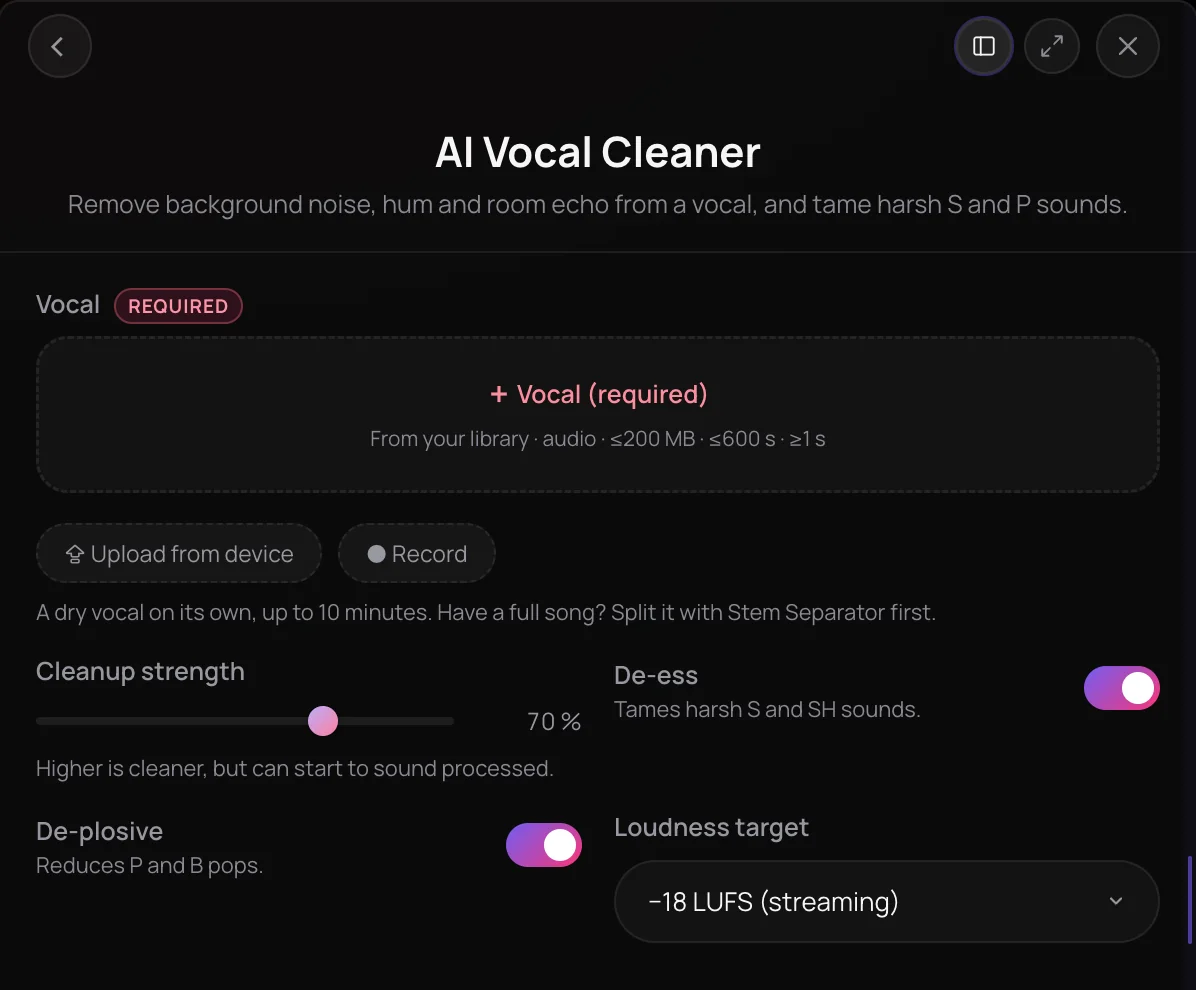
AI Vocal Cleaner is Soundverse's cleanup step for a raw vocal recording. It removes background noise, hum and clicks, softens harsh S and SH sounds, reduces P and B pops, and sets the vocal to a standard loudness, −18 LUFS by default. You get the cleaned vocal as a new file, with a note of how much noise came out. It's for singers, podcasters and producers whose takes were recorded outside a treated studio.
What you can do
The controls
Four settings, all with sensible defaults.
Cleanup strength
How much noise is removed, 70% by default. Higher is cleaner, but can start to sound processed.
De-ess
On by default: softens harsh S and SH sounds where they spike.
De-plosive
On by default: reduces P and B pops where the low end bursts.
Loudness target
None, −23 LUFS (broadcast), −18 LUFS (streaming, the default) or −14 LUFS (loud), with peaks kept under −1 dB.
How it works
Open AI Vocal Cleaner
Choose AI Vocal Cleaner in the Vocal Production section of AI Tools.
Add the vocal
Pick a vocal from your Library, upload one or record it in the panel: WAV, MP3, M4A or FLAC, up to 10 minutes. A full song needs Stem Separator first.
Set the cleanup
Set Cleanup strength, 70% by default, leave De-ess and De-plosive on or turn them off, and pick a Loudness target: None, −23, −18 or −14 LUFS.
Clean and listen
Click Clean Vocal. The cleaned vocal arrives in your chat and is saved to your Library, with the noise removed, the S and P sounds tamed and the loudness it was set to.
Why use AI Vocal Cleaner
Noise out, voice in
Background noise, hum and clicks are removed from the take, and the voice is kept.
Harsh sounds tamed
De-ess softens sharp S and SH sounds and De-plosive reduces P and B pops, only where they jump out.
Loudness set for you
Level the vocal to −18 LUFS for streaming, −23 for broadcast or −14 for a loud master, or leave it as it is.
A report, not a guess
The result says how many decibels of noise came out, how many S and P sounds were tamed, and the noise floor left.
What it costs
Works on the Free plan. New accounts get 1,000 free tokens, enough for about 9 3-minute vocals.
- Clean a 3-minute vocal: 108 tokens at 36 tokens a minute (about $0.27–$0.34 on Creator, or ₹11–₹13 in India).
A vocal is charged for its real length, with a one-minute minimum, and the total is rounded up to a whole token. Before a run, the panel shows its price for your vocal, or the rate a minute until the vocal's length is known.
Running the same vocal with the same settings again soon after returns the earlier result, and nothing is charged.
Creator $12.49 a month, or $9.99 a month billed yearly ($119.88 a year) · Pro $31.24 a month, or $24.99 a month billed yearly ($299.88 a year) · Max from $72 a month, or $60 a month billed yearly ($720 a year).
In India (PayU): Creator ₹499 a month, or ₹399 a month billed yearly (₹4,788 a year) · Pro ₹1,299 a month, or ₹1,039 a month billed yearly (₹12,468 a year) · Max from ₹2,999 a month, or ₹2,399 a month billed yearly (₹28,788 a year).
Prices outside India are in US dollars, billed through Stripe; in India they are in rupees, billed through PayU. Monthly tokens reset each month and don't roll over.
Good to know
One solo vocal
Start from a vocal on its own, 1 second to 10 minutes long. For a full song, split out the vocal with Stem Separator first.
Cleanup only
It doesn't tune, re-time or add effects. AI Vocal Producer does all of those in one run.
Frequently asked questions
Is AI Vocal Cleaner free?
AI Vocal Cleaner works on every Soundverse plan, including Free, and each run uses tokens: 36 a minute of vocal, with a one-minute minimum, so a 3-minute vocal costs 108 tokens. The panel shows the price for your vocal before you run it. Soundverse is free to sign up, and new accounts get 1,000 free tokens.
How clean will my vocal be?
AI Vocal Cleaner removes background noise, hum and clicks, and the result says how many decibels of noise came out and the noise floor that's left. A higher Cleanup strength removes more but can start to sound processed, so raise it a step at a time and listen. Start from a vocal recorded on its own, without music in the background.
Can I use the cleaned vocal commercially?
On the Free plan, what you make on Soundverse is for personal use. Paid plans add a commercial license; the Pricing page lists what each plan covers. AI Vocal Cleaner processes a vocal you bring, so you need the rights to the recording.
What can't AI Vocal Cleaner do?
It cleans one solo vocal, not a mixed song, so split a song with Stem Separator first. It doesn't tune, re-time or add effects to the vocal, and its loudness is a fixed target, not a match to another track. A vocal can be 1 second to 10 minutes long.
What is AI Vocal Cleaner?
AI Vocal Cleaner is a Soundverse tool that cleans up a raw vocal recording. It removes background noise, hum and clicks, softens harsh S sounds, reduces P and B pops and sets the vocal to a standard loudness, then saves the cleaned vocal as a new file in your Library.
What do De-ess and De-plosive do?
De-ess calms harsh S and SH sounds by turning down the top of the voice only where it spikes, so the vocal doesn't sound dull. De-plosive reduces the thump of P and B pops by turning down the low end only where it bursts. Both are on by default, and each can be turned off in the panel.
Which loudness target should I pick?
−18 LUFS, the default, suits a vocal for streaming. −23 LUFS is the broadcast level, and −14 LUFS makes a loud vocal. Choose None to keep the vocal's own level. Whichever you pick, AI Vocal Cleaner keeps the peaks under −1 dB.
How is AI Vocal Cleaner different from AI Vocal Producer?
AI Vocal Cleaner only cleans the recording. AI Vocal Producer runs the cleanup and then corrects the pitch, tightens the timing, adds effects and levels the vocal, all in one run, at 59 tokens a minute instead of 36. Clean first when you want to tune or add effects your own way.
Ready to clean up your vocal?
Add a raw vocal, set the cleanup and get it back with the noise and harsh sounds taken out.
