What Is the Process for Training an AI to Replicate a Specific Vocal Timbre?
AI vocal timbre training, step by step: consent, 10 to 50 minutes of dry vocals, gentle cleanup, pitch extraction, epochs, the index and fixing artifacts.
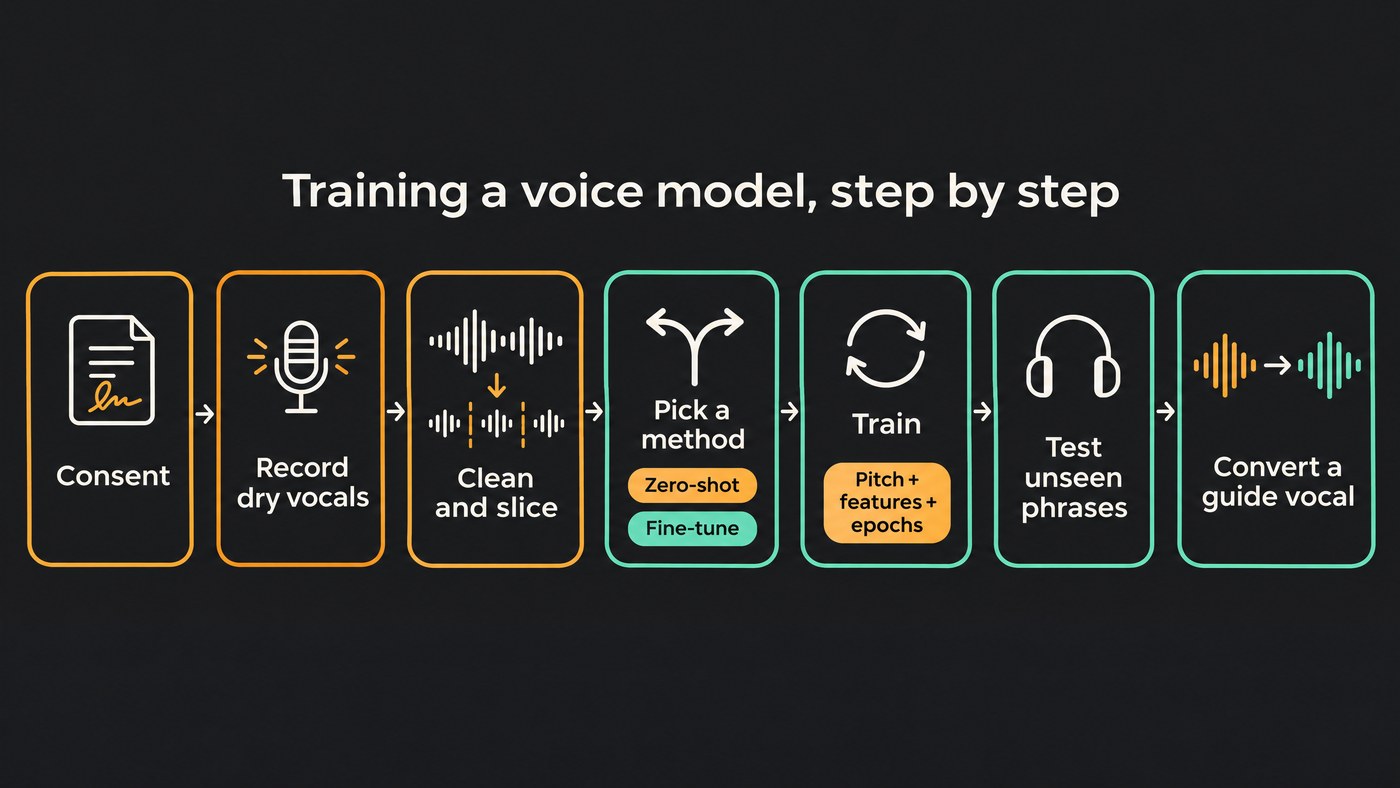
AI vocal timbre training is a seven-step process: get the singer's consent, record 10 to 50 minutes of dry solo vocals across their range, clean and slice that audio, choose a zero-shot or fine-tuned model, train it, test it on phrases it never heard, then sing a guide vocal through it. The recordings decide most of the result.
The steps follow the documentation of the open-source projects most producers start with (RVC, the RVC-based Applio, so-vits-svc and Seed-VC), read on 19 November 2026. Hosted tools hide most of these settings, but the recording advice applies to them too.
A voice conversion model doesn't learn songs; it learns to separate what is sung from who is singing. RVC's training tips describe turning every clip into content features with HuBERT, tracking its pitch separately, and learning to rebuild the audio in the target voice. Training starts from pretrained weights rather than from zero, which is why a modest dataset can work.
Step 1: Get consent and the rights to the recordings
Train your own voice, or the voice of a singer who has agreed in writing to this use: which tool, which project, whether the model stays private, and what happens to it afterwards. Never train on a famous singer's voice because you like it.
The recordings need clearing too: ask for fresh takes rather than a cappellas from released songs, whose masters usually belong to someone else. The open-source projects put this on you: the so-vits-svc README makes the user fully responsible for any unauthorized training data, and Applio's pre-training checklist opens by asking you to confirm permission to use the recordings. Our guide to cloning a voice for royalty-free music lists what the agreement should cover.
Step 2: Record clean solo vocals for timbre training
How much audio. RVC's FAQ recommends a dataset of around 10 to 50 minutes. It says 5 to 10 minutes can be enough for a clean, distinctive voice, and that nobody has made a model work from under a minute. Applio's dataset guide adds that no fixed duration guarantees quality, and that a smaller clean, varied set can be more useful than a big repetitive one.
What to record:
- Dry and solo. No reverb, delay, doubles or harmonies, and no click bleeding from the headphones. Leave tuning and compression off too.
- The whole voice. Low and high notes, soft and belted lines, every vowel, held notes and fast phrases. Applio's guide says singing models should include the relevant pitch ranges and delivery.
- One signal chain. Same mic, room and distance for every take. The model hears the mic and room as part of the voice.
- Lossless files. WAV or FLAC. Converting a lossy file to WAV doesn't restore what was lost.
- A held-out test set. Keep two or three phrases out of training to judge the model on audio it never learned from.
Step 3: Clean, isolate, slice and level the audio
Clean gently. Applio's guide puts it plainly: "Avoid strong gating, compression, denoising, or reverb removal simply because they are available." Breaths and unvoiced consonants are part of the timbre, and heavy processing teaches the model its artifacts.
- Isolate only when you must. If a take has music behind it, separate the vocal, then listen for leftover instruments and separation artifacts before keeping it. RVC's WebUI ships with a vocal separation tool, and our roundup of free ways to isolate vocals compares others.
- Fix or drop damaged clips. Light de-noise and de-reverb on the worst takes, and delete anything clipped, since lowering a clipped file's level doesn't undo the clipping. For repair tools, see software for cleaning up vocal recordings.
- Slice. RVC does this for you: it splits on silence, then cuts 4-second pieces with a 0.3-second overlap. so-vits-svc recommends 5 to 15 second clips, with a lower Minimum Interval in the slicer (around 100, or even 50) for singing. Remove clips that end up very long or very short.
- Level carefully. so-vits-svc warns that its default loudness matching to 0 dB can damage sound quality and suggests levelling in your own editor instead. Keep clips consistent, with some peak headroom.
Step 4: Choose a method: zero-shot or fine-tuned
Zero-shot models copy a timbre from a short reference without training. Seed-VC's README says it can clone a voice from a 1 to 30 second reference, with a singing mode, and that fine-tuning needs as little as one utterance per speaker and 100 steps (about 2 minutes on a T4 GPU). Fine-tuning improves similarity to that speaker but may slightly raise word errors.
Fine-tuned models such as RVC, so-vits-svc and DDSP-SVC train a model on your dataset. For singing in RVC, turn pitch guidance on: its training tips say a model without pitch is lighter but not suitable for singing.
- Sketching ideas or auditioning a voice quickly: zero-shot.
- One voice you'll use across an EP: a fine-tuned model on 10 minutes or more.
- No local setup: a hosted tool, compared in our guide to AI tools for cloning a specific vocal timbre.
Step 5: Train the model: pitch, features, epochs and the index
RVC's pipeline is typical:
- Preprocess. Slice and resample. Pick the sample rate once; the FAQ warns against changing it mid-training.
- Extract pitch (F0). RMVPE, from an Interspeech 2023 paper, was built to estimate vocal pitch even with accompaniment and held up across noise levels in the authors' tests. RVC's README says it gives the best results by a clear margin and runs faster and lighter than CREPE full. CREPE, a neural pitch tracker from 2018, is what so-vits-svc suggests for noisy training sets.
- Extract content features with the encoder the model expects, and use the same one at conversion time.
- Train. Set the batch size as high as your GPU memory allows. For epochs, RVC's FAQ suggests 20 to 30 for a noisy dataset and up to about 200 for a clean, long one, adding: "Setting it too high won't improve the audio quality of your low-quality training set."
- Guard against overfitting. Applio's training guide calls the epoch count a stopping target rather than a quality guarantee, and says a lower loss alone doesn't prove a better voice. Save checkpoints every few epochs, convert the same held-out phrase with each, and keep the best-sounding one, not the latest.
- Build the index. RVC stores its training features in a search index. At conversion time it pulls the closest training features to cut "tone leakage", where the guide singer's timbre bleeds through. Keep the index with the model file. Per the FAQ, an index rate near 1 leans hardest on the training timbre, but it can lower quality if your dataset is rougher than the guide vocal.
Step 6: Test on unseen material and fix artifacts
Convert your held-out phrases plus a fresh guide vocal from a different singer, with identical settings for every checkpoint. Then match symptoms to causes, following Applio's conversion guide:
- Robotic or unstable pitch: check that the encoder matches training, check the input, and try another pitch method.
- The target voice sounds weak: confirm you loaded the matching index and try a moderate retrieval ratio.
- Harsh consonants or breaths: raise the protection for voiceless consonants (in Applio, a value below 0.5).
- Distortion: look for clipping in the input and turn effects off.
- Pitch drifting on a sung vocal in so-vits-svc: turn off automatic pitch prediction, which its README warns causes serious pitch problems on singing.
- A thin or strained top end: the dataset probably lacked those notes. Record more and retrain; extra epochs won't fill the gap.
Then check it in the mix.
Step 7: Use the model: convert a guide vocal
As Applio's guide notes, voice conversion keeps the guide's words, rhythm and pitch contour, so the guide take is the performance. Direct it the way you want the final vocal to feel: phrasing, vibrato, where the breaths fall.
- Transpose to the target's range. Shifts are in semitones; +12 is one octave. Keep the model inside notes it learned.
- Feed it a dry, isolated lead. Convert doubles and harmonies as separate passes, then add reverb and effects afterwards.
- Edit like any new take. Comp the best passes, tune lightly and check the sibilants.
Where Soundverse fits
Soundverse is an AI music platform that takes you from idea to audience. Its Train Voice Model handles the training side for you: you add at least 10 minutes of clean, dry, solo recordings, in clips of 60 seconds or more sung at varied pitches, then slide Training quality from 10 epochs (Fast) to 350 (Studio), with about 180 as the default. The page suggests a 10-epoch test run to check your recordings first. Training stays locked until you switch on a consent confirmation, runs in the background for hours, and new models start Private. The finished model appears in Voice Swap, which re-sings a guide vocal in your voice, keeps the performance, and shifts pitch up to 24 semitones either way. Train Voice Model needs the Creator plan or above. Licensing is set by plan: the Free plan is for personal use, and the Creator plan comes with a royalty-free license.
This video trains a voice model on a singer's own clean recordings, then puts that voice on another vocal in Voice Swap.
FAQ
How many minutes of vocals do I need to train an AI voice model?
RVC's FAQ recommends about 10 to 50 minutes, and 5 to 10 can work for a clean, distinctive voice. Zero-shot Seed-VC starts from a 1 to 30 second reference, and its README says fine-tuning on your own data improves similarity. Range coverage matters as much as length.
How many epochs should I train a voice model for?
There's no single number. RVC's FAQ suggests 20 to 30 for a noisy dataset and up to about 200 for a clean, long one. Let held-out phrases decide which checkpoint you keep.
Can I train a voice model on vocals separated from a finished song?
You can, if you have the rights, but expect a softer result. Separation leaves artifacts and leftover instruments that the model learns as part of the voice. Fresh, dry takes from the singer are always the better dataset.
Sign up for Soundverse free and try Voice Swap before you train your own voice.
More guides on vocals and production on the Soundverse blog.
