Can AI Synthesize Multi-Part Vocal Harmonies Effectively?
AI vocal harmonies work when you write the notes and render each part on its own track. How to build a 3-part stack and fix timing, vowels and phasing.
AI vocal harmonies can sound convincing when you write the notes yourself and let AI render each part as its own vocal track. They fall short when you expect one click to deliver a finished three-part stack. The weak spots are voice leading, matching vowels and timing between parts, phasing, and every part sounding like the same singer.
Below are the three methods people use today, where each one breaks, and a 3-part stack built step by step with mix settings. Tool details come from each maker's own pages, checked on 14 November 2026.
Three ways to make AI vocal harmonies today
1. Render each harmony line as its own vocal
Note-based vocal synths such as ACE Studio, Synthesizer V and VOCALOID sing whatever notes you draw, so each harmony is a separate track with its own MIDI. ACE Studio's choir guide treats one choir track as one harmony part, such as the sopranos. To add parts, you create vocal doubles of a finished track, then edit the notes on the new tracks into alto and tenor lines.
Voice conversion does the same job from audio. Sing each part yourself, even if your tone is wrong for it, and a tool such as Soundverse Voice Swap re-sings it in another voice while keeping your timing and phrasing. For how these engines work, see how AI voice synthesis generates singing vocals.
- Works for: anything you plan to release, and harmonies that move against the lead.
- Fails when: you don't know which notes to write.
2. Harmony plugins and pitch-shifted doubles
Harmony plugins build extra voices from one take. iZotope's Nectar 4 page describes a Voices module with 11 auto-harmony styles, which iZotope says lets you layer vocals without learning voice leading, and a Backer module that creates background singers in eight styles. iZotope notes that Backer is trained only on English.
Plain pitch shifting is the oldest trick: copy the lead and shift it. A fixed shift moves every note by the same number of semitones, so 4 semitones up gives a major third on every note, even where the key needs a minor third. Scale-aware harmonizers pick the interval per note instead. Large shifts also change the voice's character, so the part sounds smaller or bigger than the singer.
Doublers copy the same notes for width and add no harmony.
- Works for: quick pads, demos, unison and octave layers.
- Fails when: a part needs to move on its own, with held notes, passing tones or contrary motion, or when it's exposed.
3. Whole-song generators with stacked backing vocals
Song generators often put stacked harmonies in the chorus, and the result can sound finished on first listen. You can't choose the notes or the voicing, though, and the harmonies are printed into the mix. Stem separation can pull vocals out, but lead and backing parts don't always come apart cleanly.
- Works for: demos and sketching what a stack could sound like.
- Fails when: you need to change one note in one part, or rebalance the parts.
Where AI harmonies go wrong
Voice leading. A harmony stack is several melodies at once, and each needs to make sense alone. The Magenta team put it well when introducing Coconet, the model behind Google's 2019 Bach Doodle: "It’s hard to write a good melody, let alone counterpoint, where multiple melodic lines need to sound good together." Coconet was trained on 306 Bach chorale harmonizations and can fill in four-part harmony for a melody. So AI can propose notes, but a Bach chorale is a long way from a pop chorus. Expect to edit.
Timing between parts. Parts rendered separately each decide where consonants land and notes end. Ragged "s" and "t" endings are the first giveaway.
Vowel matching. Two parts can shape the same vowel differently, a bright "ah" on the lead and a darker "aw" on the harmony, and the chord stops blending. Different vibrato on each part smears it further.
Phasing. Two near-identical renders of the same voice on the same notes interfere with each other and sound hollow. ACE Studio's Doubles docs explain why you shouldn't just copy a track: "If you just duplicate, the contents will be exactly the same to the original one. In this case, AI will generate the same audio result for the duplicated one, this would cause phase issues." The same page suggests a similarity of 85 to 90% for doubles.
The same-singer sound. Plenty of records stack one singer on every part. What gives AI stacks away is identical timbre plus identical timing and vibrato, so vary the voice model or at least the humanize settings per part. For more on why expression is hard to synthesize, see the common challenges of expressive AI vocals.
How to build a 3-part AI harmony stack, step by step
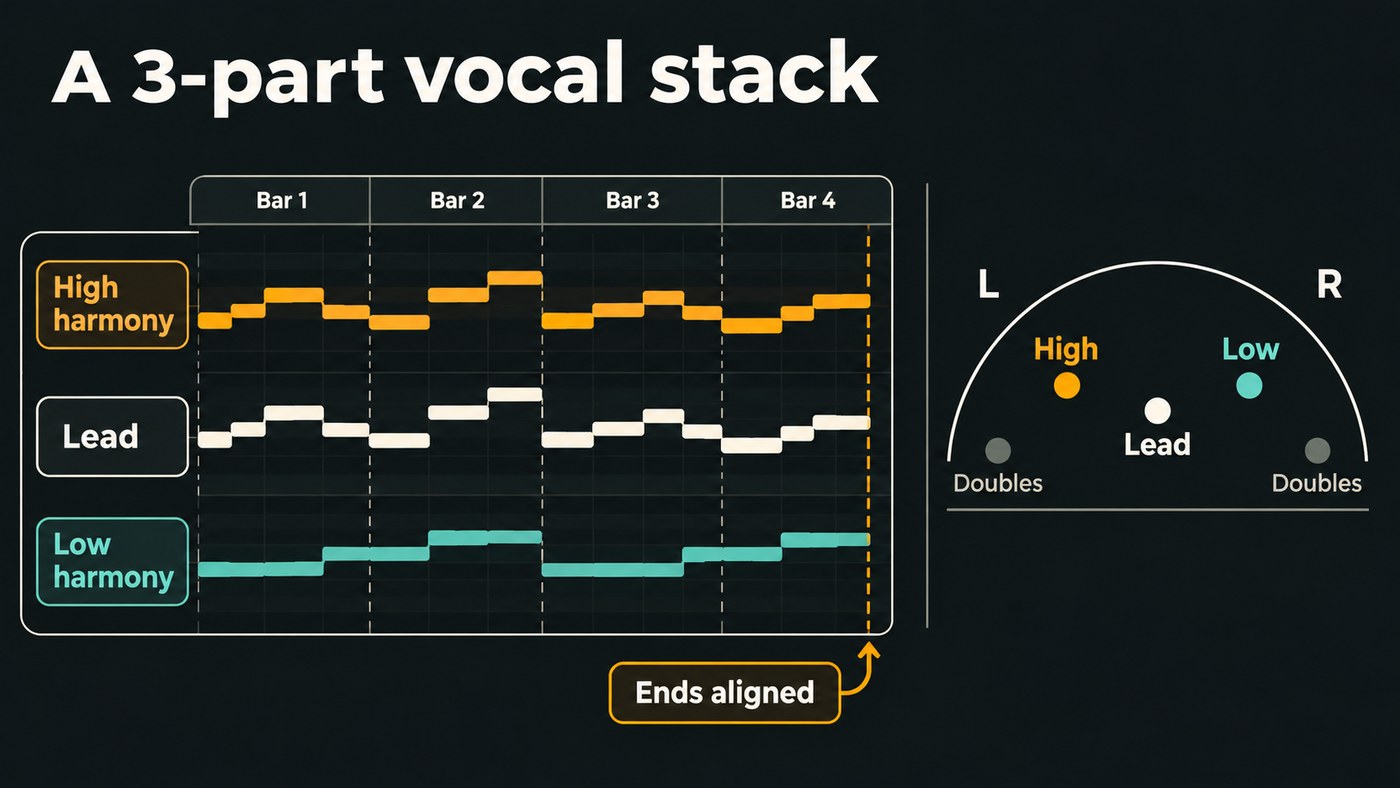
- Finish the lead first. Tune it, comp it and lock the timing, because every harmony follows it.
- Write the two harmony parts as MIDI. For a classic pop stack, keep the high part mostly a third above the lead within the key, and the low part mostly a third or a fourth below. On long held notes, put each voice on a different note of the chord. If you don't play keys, sing each line into Soundverse's VocalMIDI One, which turns singing and humming into MIDI notes on the AI Studio timeline.
- Check the voice leading. Move each part by step where you can and hold shared notes when the chord changes. If both harmonies jump whenever the lead jumps, it sounds like a pitch shifter.
- Keep each part in a comfortable range for the voice that will sing it.
- Render each part on its own track. In a vocal synth, give each part a different singer or voice blend. With conversion, sing guides for all three parts and run each through Voice Swap, using a different voice model per part or your own trained model for a one-singer stack. Spell the lyrics identically in every part.
- Match vowels and endings. Solo pairs of parts on long notes and regenerate any part whose vowel colour doesn't match. Trim the final "s", "t" and "k" from the harmonies so only the lead pronounces them.
- Align the timing. Line up note starts and, above all, note ends with the lead. Synchro Arts VocAlign aligns timing and pitch across a whole vocal stack. On harmonies, align timing and leave pitch matching off unless the tool says it preserves harmonies, or the harmony turns into a unison.
- Add doubles last. If the chorus needs width, double the harmony parts and leave the lead single.
Mixing the stack: panning, EQ and timing offsets
These are starting points to adjust by ear:
- Panning. Keep the lead in the centre. Pan the high harmony about 30 to 50% to one side and the low harmony the same amount to the other. ACE Studio's docs describe doubles as usually panned anywhere from 50 to 100%, so put doubles wider than the harmonies.
- EQ. High-pass the harmonies higher than the lead, around 150 to 250 Hz depending on the voice, and dip their upper mids slightly so the lead stays in front. De-ess them harder, because stacked "s" sounds add up.
- Level and compression. Start the harmonies 6 to 10 dB under the lead, compress them a little harder so the blend stays steady, and ride them up in the last chorus.
- Timing offsets. Keep harmonies tight on consonants. For doubles, an offset of roughly 10 to 30 ms plus a little pitch drift reads as a second singer rather than a hollow, phasey copy. Soundverse's VocalDuality One sets this with a TIMING control from 1 to 120 ms, 18 ms by default, and its page warns that very short timing at a high level can sound phasey.
- One shared reverb. Send every part to the same reverb so the stack sounds like one room, and put reverb after any doubler.
- Check in mono. If the stack thins out or a part disappears when summed, nudge its timing or change its voice.
For general background-vocal mixing moves, see how to mix background vocals.
This walkthrough of Soundverse's Edit tools shows Voice Swap from 2:18, the step that turns a harmony part you sang into another voice.
Where Soundverse fits
Soundverse is an AI music platform that takes you from idea to audience, built for independent artists who release music. For harmonies, it covers the render-each-part route and the mix. In AI Studio you can open an Agent One song, arm a track and record harmonies over it, draw pan curves and add EQ, compression and de-essing. Voice Swap re-sings each part you recorded in a Community, Public or your own trained voice, and shifts pitch up to 24 semitones either way. VocalDuality One adds up to four doubles on every plan, Free included, and the Stacked Doubles chain preset loads EQ, compression, the doubler and reverb together. AI Singing Generator has a Choir style for a group pad.
Soundverse has no tool that writes harmony notes for you, and VocalDuality One copies your melody rather than harmonizing it. Count your tracks: the backing song, the lead and two harmonies already make four, and AI Studio projects hold 3 tracks on Free and 8 on Creator.
FAQ
Can AI make harmonies from just my lead vocal? Yes, with harmony plugins such as the Voices module in Nectar 4, which builds layers from presets. That suits pads and demos. For exposed parts, write the notes and render each part separately.
Should every harmony part use the same AI voice? It can, since many records stack one singer. Vary the timing, vibrato and humanize settings between parts, or use different voice models, so the stack doesn't sound copied. To build a voice model of your own, see which AI tools clone a specific vocal timbre best.
Why do my AI harmonies sound hollow or phasey? Usually two parts or doubles are too similar and too close in time. Lower the similarity, offset doubles by 10 to 30 ms, and check the stack in mono.
Which AI singing tools give me the most control over each part? Note-based vocal synths give the most, because you draw every note and pitch curve. Voice conversion comes next, since it follows what you sing. Our comparison of the best AI singing generator platforms covers the options.
Sign up for Soundverse free and try stacking a harmony in AI Studio. More vocal guides on the Soundverse blog.
