What Are the Common Challenges When Using AI to Synthesize Expressive Vocal Performances?
The common challenges with expressive AI vocals: breath, vibrato, dynamics, diction, emotion and language, with what causes each and how to fix it.
The common challenges with expressive AI vocals are breath, vibrato, dynamics, diction, emotional intent and language. Models usually hit the right notes and words, then smooth away the small variations that make a singer sound convincing. Most of it is fixable: give the AI a human performance to follow, write singable lines, and edit the vocal like a real take.
Below, each problem gets the same treatment: what you hear, why it happens and what to do about it. Tool details come from each maker's own pages, checked on 7 November 2026.
Why expressive singing is still hard for AI
Researchers describe the same gap you hear. "Synthetic Singers", a review of deep-learning singing voice synthesis by Changhao Pan and colleagues, accepted at IJCNLP-AACL 2025 and posted to arXiv on 20 January 2026, notes that current systems already do well on lyric and pitch accuracy, yet a substantial gap remains between their output and what listeners expect. It names the target plainly: "A key frontier in SVS is achieving human-like expressiveness, with subtle variations in pitch, timing, dynamics, and timbre that convey emotion and artistry."
Three causes come up again and again:
- There's no single right answer. One melody and lyric can be sung many good ways. The review describes the fundamental challenge as producing stable, high-quality output despite this one-to-many mapping from score to waveform. A model that plays safe lands in the middle, and the middle sounds flat.
- Singing data is scarce. The same review contrasts speech datasets of more than 100,000 hours with open-source singing data that is far smaller and uneven across styles and languages.
- The model doesn't know what the words mean to you. It can't tell which line is the confession and which is the throwaway unless you show it.
The six most common challenges with expressive AI vocals
1. Breath and phrasing
What you hear: lines that start with no intake of air, the same breath pasted before every phrase, or a long line nobody could sing on one breath.
Why: breaths are quiet and easy to smooth away, and a melody typed into a piano roll never has to breathe.
Fix it:
- Leave a rest before long lines, so a singer would have somewhere to breathe.
- In a note-based synth, add a breath at the start of long lines and before high notes. ACE Studio's breath guide recommends exactly those spots.
- In your DAW, record a handful of your own breaths and place them by hand, varying length and level.
- Don't gate breaths out in the mix. Turn them down if they're loud, but keep them.
2. Vibrato and pitch movement
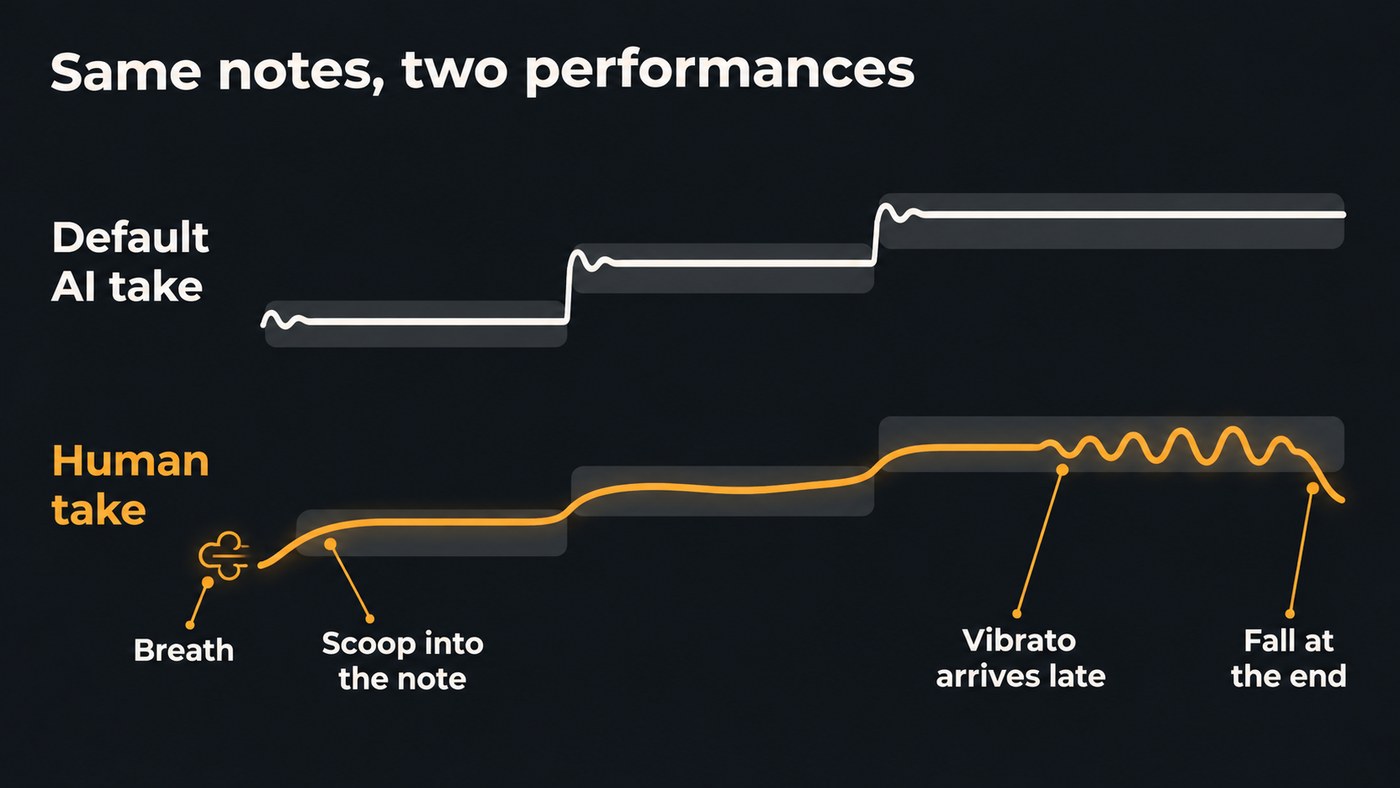
What you hear: identical vibrato on every held note, starting the instant the note begins, or a pitch line so straight it sounds tuned to death. No scoop into a note, no fall at the end of a phrase.
Why: the default is a guess. ACE Studio's vibrato guide explains: "The AI vocal synth model generates vibrato effects at certain points based on MIDI information and the characteristics of the AI voices, among other factors." The same guess on every note is what makes it sound mechanical.
Fix it:
- Keep vibrato for long, steady notes, where ACE's guide says it suits best, and let it arrive halfway through the note.
- Vary the depth: wider on the last long note of the chorus, little or none in the verse.
- Strip vibrato from short notes and fast runs.
- Leave a small scoop into the first note of a line. A slightly imperfect attack sounds more human than a perfect one.
3. Dynamics
What you hear: verse and chorus at the same intensity, every word at the same level, a whisper as loud as a belt.
Why: a model given no direction often picks one energy and stays there, and many generated vocals come out evenly loud.
Fix it:
- Ask for contrast section by section: "soft, close verse; full, belted chorus" gives the model more to work with than a single mood.
- Use a different voice for a different energy. Soundverse's Train Voice Clone page suggests training one clone from a breathy take and another from a belted one, then picking the one each song needs.
- Ride the vocal level with automation instead of flattening it with heavy compression.
- Let the arrangement help: pull instruments out under the quiet line so it reads as quiet.
4. Diction and consonants
What you hear: "s" and "t" sounds that smear or turn metallic, swallowed final consonants, stress on the wrong syllable, a word stretched over the wrong note.
Why: consonants are short, noisy sounds that are hard to generate cleanly, and lyrics written to be read don't always sit on a melody.
Fix it:
- Put stressed syllables on strong beats. "Remember" wants its middle syllable on the beat.
- Give high, long notes open vowels such as "ah" and "oh", and keep tight vowels like "ee" off them.
- Respell words the AI gets wrong: phonetic spelling, hyphens, numbers written out as words.
- De-ess before you add reverb. A long, bright reverb makes sibilance artifacts more obvious.
5. Emotion and intent
What you hear: a clean, in-tune vocal that doesn't seem to mean anything, with a heartbroken line and a hopeful one delivered the same way.
Why: a text prompt describes one mood for a whole song, and the model fills in everything else.
Fix it:
- Give it a human performance. Soundverse's Melody to Song Generator takes 5 to 60 seconds of a tune you hum, sing or play and builds a song that follows it, singing your lyrics word for word.
- Sing it yourself and change the voice. Voice Swap changes the voice, not the performance, so the phrasing and timing of your take carry through.
- Generate several takes and comp them. Soundverse's AI Singing Generator notes that every take comes out differently, so keep the best phrase from each, the way you would with a real singer.
- Describe the delivery as well as the genre. "Half-spoken, close to the mic, voice cracking on the last word" says far more than "sad pop".
6. Language and accent
What you hear: a Hindi or Spanish vocal with an English accent, vowels the wrong length, stress patterns borrowed from another language, clumsy switches in bilingual lines.
Why: singing data is thin for many styles and languages, as the review above points out, so less common languages get less.
Fix it:
- Test a short verse first. Soundverse's v9 page gives exactly this advice for Hindi and other languages, since no language list is published.
- Translate for singing. Translate Lyrics has a Match syllables option that aims for each line's original syllable count, so the new words fit the same tune.
- Try both spellings. If a romanised lyric comes out wrong, try the native script, and the other way round.
- Ask a native speaker to listen before you release.
This walkthrough of Soundverse's Edit tools shows Voice Swap from 2:18 and Translate Lyrics from 3:34, two of the fixes above.
How to fix AI vocals in the right order
Work from the cheapest fix to the most expensive, and you'll spend far less time editing:
- Fix the writing. Stress on strong beats, open vowels on high notes, rests before long lines. This costs nothing and fixes the most.
- Change the input. Hum or sing a guide melody, or add a clean voice reference, so the model has a performance to follow.
- Regenerate and comp. Make several takes of each section and choose phrase by phrase.
- Edit the performance. Add breaths, reshape vibrato, nudge timing off the grid.
- Mix for expression. Automate the level, de-ess, and add something real, such as your own double or harmony. Our guide to layering vocals covers doubles and harmonies.
- Check on two systems. Headphones reveal artifacts, and a phone speaker tells you whether the emotion still comes through.
Which kind of tool gives you the most control over expression
Each type of AI vocal tool trades control against effort:
- Full-song generators give the least direct control and the most natural blend with the music. You steer them with prompts, references and hummed melodies.
- A cappella generators give you the vocal on its own, to edit and mix like any recorded take.
- Note-based vocal synths such as ACE Studio let you draw breaths, vibrato and dynamics note by note. They give the most control and take the most work.
- Voice conversion gives the most human expression if you can sing the part, because the performance is yours.
For a tool-by-tool comparison, see the best AI singing generator platforms for independent artists.
Where Soundverse fits
Soundverse is an AI music platform that takes you from idea to audience, built for independent artists who release music. Its strongest routes to expressive vocals start with your own performance. Melody to Song Generator builds a song around a tune you hum, sing or play, and Voice Swap re-sings a take in another voice, or your own trained model, while the phrasing and timing stay yours. Voice Swap runs on every plan, Free included. For songs in other languages, Translate Lyrics keeps translated lines singable on the same melody.
If you want to draw breaths and vibrato curves note by note, a piano-roll vocal synth such as ACE Studio is built for that job.
FAQ
Why do AI vocals sound robotic even when the pitch is perfect? Perfect pitch is often the giveaway. Real singers scoop into notes, drift slightly on long ones and let vibrato arrive late. A vocal that sits dead on every note, with the same vibrato everywhere, reads as machine-made.
Can AI vocals carry real emotion? They can carry a lot, especially when the phrasing comes from a person: a hummed melody, a sung guide or your own take run through voice conversion. Prompt-only vocals tend to land on one general mood for the whole song.
Why does my AI singer mispronounce words? Usually the stress pattern or the spelling. Move stressed syllables onto strong beats, respell the problem word phonetically, and test a short verse before generating a whole song, especially in a language other than English.
Are expressive AI vocals good enough to release? In a full, busy mix they often are. In an exposed ballad, every missing breath and repeated vibrato shows, so do the editing pass above and play the result to someone who doesn't know how it was made.
Sign up for Soundverse free and try your next vocal from a hummed melody. More vocal guides on the Soundverse blog.
