What Are the Industry-Standard Tools for AI-Assisted Music Distribution and Editing?
AI music distribution and editing standards: the DAWs and AI tools studios use, plus the ISRC, UPC, ISWC, DDEX, audio and artwork rules stores expect.
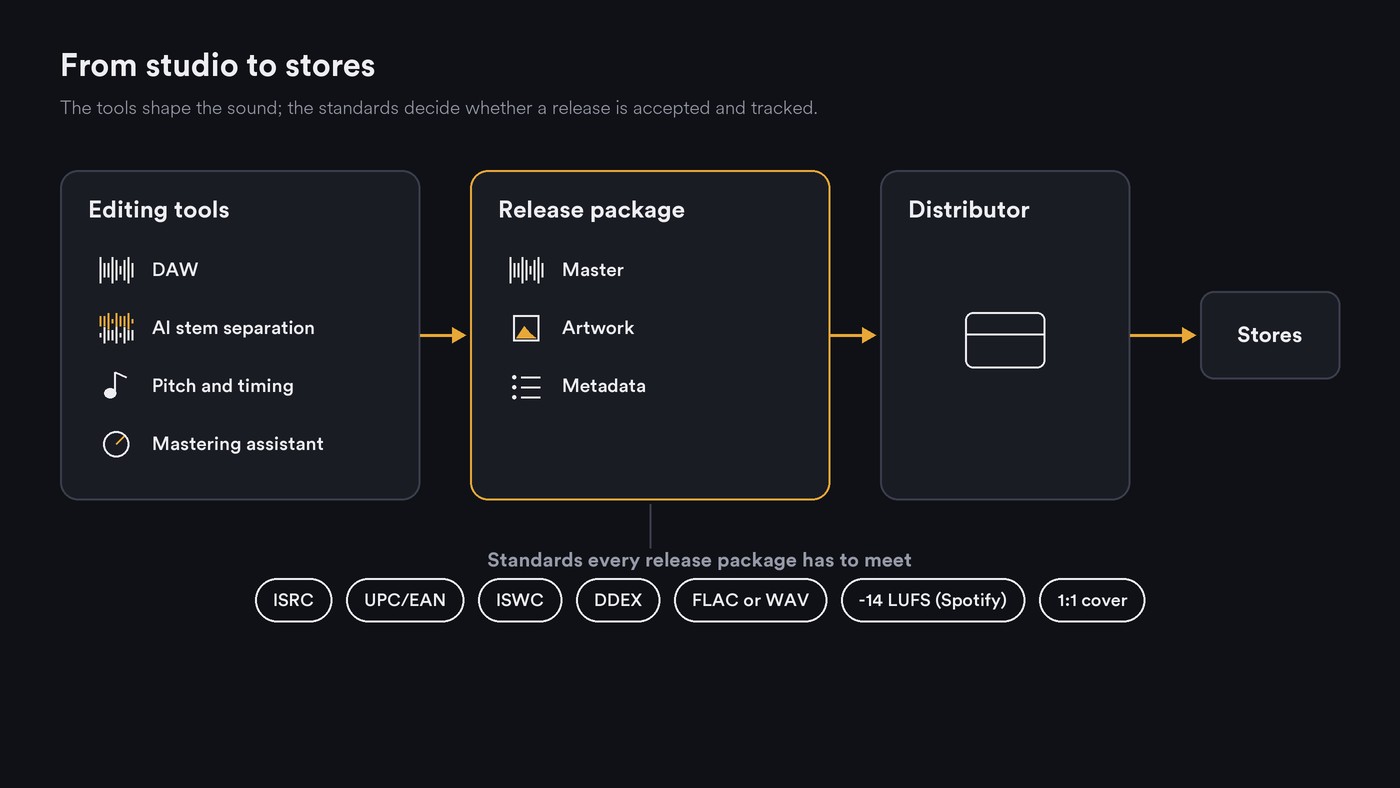
For AI music distribution and editing, "industry standard" covers two things: the editing tools studios open every day, such as Pro Tools, Logic Pro, Ableton Live, FL Studio and Cubase, now with AI stem separation and assistants built in, and the delivery standards every release must pass: ISRC, UPC/EAN, ISWC, DDEX metadata, lossless audio and store artwork specs.
Editing tools are standards by habit: nobody certifies a DAW. Delivery standards are formal, written by bodies such as ISO, the International ISRC Agency at IFPI, CISAC and DDEX, and enforced by distributors and stores. AI is changing the first layer fast and the second hardly at all. We checked every page cited below on 21 November 2026.
Industry-standard DAWs and the AI built into them
For the wider studio picture, including mastering editors and repair suites, see our guide to high-end audio editing programs professional studios use. Here we stick to the AI-assisted parts, as each maker describes them.
Pro Tools
Avid's Pro Tools 2026.11 release notes (released 3 November 2026, updated to 2026.11.1 on 18 November) add Pro Tools Stem Separator, an Avid-developed extension that splits audio into up to six stems: vocals, drums, bass, guitar, keys and other. Avid says all AI analysis and processing runs locally with no cloud upload, and the extension is listed for Intro, Artist, Studio and Ultimate. Avid's product page blocked our request.
Logic Pro
Apple's Logic Pro page lists Session Players, AI-powered synth, bass, keyboard and drum players that follow your chords and take direction. Stem Splitter separates drums, bass, vocals, guitar, piano and other instruments. Mastering Assistant listens to the track and applies a master you can adjust.
Ableton Live
Ableton's Live 12 release notes show built-in stem separation arriving in Live 12.3 Suite. It runs locally and splits audio into vocals, drums, bass and others, in a High Speed or High Quality mode, and Live 12.4 added separating only a time selection. Ableton has announced Live 13 for early 2027 with ARA 2 support, and says Live 13 Suite will include Melodyne essential.
FL Studio
Image-Line's FL Studio page lists AI-powered Stem Separation for bass, synth, drum and vocal layers (Producer Edition and up), plus Gopher, an AI assistant trained on the official manual that answers questions and can control features in FL Studio and its plugins. AI mastering comes with the optional FL Cloud subscription.
Cubase
Steinberg's Cubase 16 feature page lists Stem Separation in Cubase Pro, now with dedicated piano and guitar separation, plus Omnivocal Basic, a lightweight tool for sketching vocal ideas, and a connection to Waves' Illugen sample generator.
Stem separation is now built into all five, though not into every edition: Ableton keeps it to Suite, Cubase to Pro and FL Studio to Producer Edition and up.
AI-assisted editors that work across DAWs
Melodyne. Celemony's page describes note-based editing of pitch, timing, vibrato and formants, including polyphonic piano and guitar, inside a DAW through ARA, as a plugin or on its own. Its engine is an analysis that recognizes notes, scales, keys, chords, timing and tempo.
iZotope RX and Ozone. iZotope makes RX for audio repair and Ozone for mastering. Its site answered our checks with rate-limit errors on 21 November 2026, so we couldn't confirm current versions; check izotope.com before you buy. Our guide to audio editing tools that support AI mastering covers Ozone's Master Assistant alongside Logic's.
The delivery standards every release must meet
On the distribution side, "standard" is literal: these are the codes, formats and specs your distributor checks before delivery.
ISRC: one code per recording
ISRC, the International Standard Recording Code, is defined in ISO 3901:2019 and run by the International ISRC Agency at IFPI. Its official site is clear about scope: "ISRC identifies sound recordings and music videos. ISRC is not used to identify compositions/musical works, music products or performers."
The code has 12 characters: a five-character prefix from an ISRC agency, two digits for the year of reference and a five-digit designation code. The agency's site lets self-releasing artists assign ISRCs online and labels apply for a prefix. Our explainer on why ISRC codes matter for tracking streams covers how stores use them.
UPC/EAN: one code per product
Each release (a single, EP or album) is a product identified by a UPC/EAN barcode from GS1, and the ISRC FAQ notes that each different product needs its own code. If you don't buy barcodes from GS1, your distributor's upload form says whether it assigns one.
ISWC: the song, not the recording
Compositions get an ISWC, which the ISRC FAQ says is maintained for ISO by the ISWC International Agency, operated by CISAC. ISWC's guidance for writers and publishers says codes are allocated when works are registered with a registration agency, typically a collective management organisation, with complete metadata including the IPI name numbers and roles of every writer. In practice, you get one by registering the song with your collecting society.
DDEX: how release metadata travels
DDEX's Electronic Release Notification standard defines the messages that carry release and track metadata, plus the terms of when and where a release can be made available. In DDEX's words: "The messages are usually sent by a record company or distributor to a digital music service provider (DSP)."
AI disclosure is moving into this layer. Spotify said on 25 September 2025 that it will support a DDEX standard for AI disclosures in music credits, and its AI credits help page says you add them through your distributor, in a beta only some distributors support. Field-by-field detail is in our guide to the metadata required for music distribution.
Audio: lossless, at the native sample rate and bit depth
Spotify's audio file formats page says it strongly prefers FLAC and accepts WAV that meets the same requirements. It asks for 44.1 kHz or higher and 24-bit if that is the native master, and says not to make a 16-bit version from a 24-bit master. WAV files must use the standard PCM format code, not WAVE_FORMAT_EXTENSIBLE. Your distributor sits between you and Spotify, so read its upload spec too; our post on the standard file format for distribution portals goes through each distributor's rules.
Loudness: targets as each service states them
Spotify's loudness normalization page says it adjusts tracks to −14 dB LUFS using the ITU 1770 standard, and Premium listeners can switch to Loud (−11) or Quiet (−19). Its mastering advice: aim for −14 dB integrated LUFS, keep true peak below −1 dB, and below −2 dB if the master is louder than −14.
Apple's Sound Check support page says the feature adjusts loudness so songs play at the same volume, but gives no number. We found no official Apple, YouTube or TIDAL page stating a target, so treat figures quoted for them as third-party estimates.
Artwork
Spotify's cover art requirements ask for TIFF, PNG or JPG with lossless encoding, between 640 and 10,000 pixels on each side, a 1:1 ratio and sRGB at 24 bits per pixel, and say not to upscale. Apple's Music Style Guide adds content rules: cover art must not contain advertising or search keywords, and images must not be low quality, pixelated or misaligned. Your distributor's minimum size can be higher than Spotify's 640 pixels, so start from a large square original.
Distributors that document AI-assisted features
Where distributors offer AI, their own pages point to mastering and artwork:
- LANDR lists AI mastering in the browser and as a DAW plugin next to unlimited releases on its distribution page.
- TuneCore sells TuneCore Mastering, an AI-powered online service listed at $5 per song with a free preview on 21 November 2026, and its plan comparison lists a Cover Art Creator for optimizing artwork or starting from templates.
- DistroKid runs Mixea, its instant mastering service, which accepts WAV, FLAC, MP3, M4A and AIFF.
We found no AI check of audio or metadata before delivery documented on these pages. For distributors and editing bundles compared side by side, with prices and AI policies, see our guide to feature-rich alternatives for professional music distribution and editing.
Where Soundverse fits
Soundverse is an AI music platform that takes you from idea to audience. It is not a distributor and does not deliver music to stores; you release through the distributor you choose.
AI Studio is a multitrack studio in your browser. Mastering One masters toward a target from Club −7 to Broadcast −23 LUFS, including Streaming −14, and Analysis One reads gated LUFS and 4× oversampled true peak. Stem Separator splits a song into 2 or 6 stems as WAV or FLAC, or, on Creator and above, into every part with a MIDI file each. Audio export is MP3 on Free and adds WAV and FLAC from Creator. Copyright Checker fingerprints a master and, on a match, shows the title, artist, label and ISRC where known; no match is a recognition result, not clearance. Release Planner turns your release into a dated, platform-split rollout.
Licensing is set by plan: the Free plan is for personal use, and the Creator plan comes with a royalty-free license.
This AI Studio tutorial goes from a generated track to recorded vocals, stem separation, a mix and an export.
FAQ
Which DAW is the industry standard? There is no official one. Pro Tools, Logic Pro, Ableton Live, FL Studio and Cubase all export the lossless masters distributors accept, so choose by workflow and by what your collaborators use.
Do I need an ISRC, a UPC and an ISWC for one single? Ideally, all three: the ISRC for the recording, the UPC/EAN for the release as a product, and the ISWC for the composition. The first two go in at your distributor's upload step; the ISWC comes from registering the song with a collecting society.
What loudness should I master to for streaming? Spotify publishes the clearest guidance: about −14 dB integrated LUFS, true peak below −1 dB, or below −2 dB if you master louder. Louder masters are turned down rather than rejected.
Do AI-assisted tools change what distributors accept? The technical specs are the same either way. Disclosure and policy differ: Spotify takes AI credits through participating distributors, and each distributor sets its own rules for AI-generated audio, so read yours before you upload.
Does Soundverse distribute music? No. Soundverse is for making, editing, mastering and planning a release; delivery to the stores goes through a distributor such as DistroKid, TuneCore, CD Baby or LANDR.
Sign up for Soundverse free and take your next track from idea to a release-ready master. More release guides on the Soundverse blog.

