What Is the Standard File Format for Submitting Music to Distribution Portals?
The standard music distribution file format: WAV or FLAC, bit depth, sample rate, Spotify and Apple specs, each distributor's rules, Atmos and DAW export.
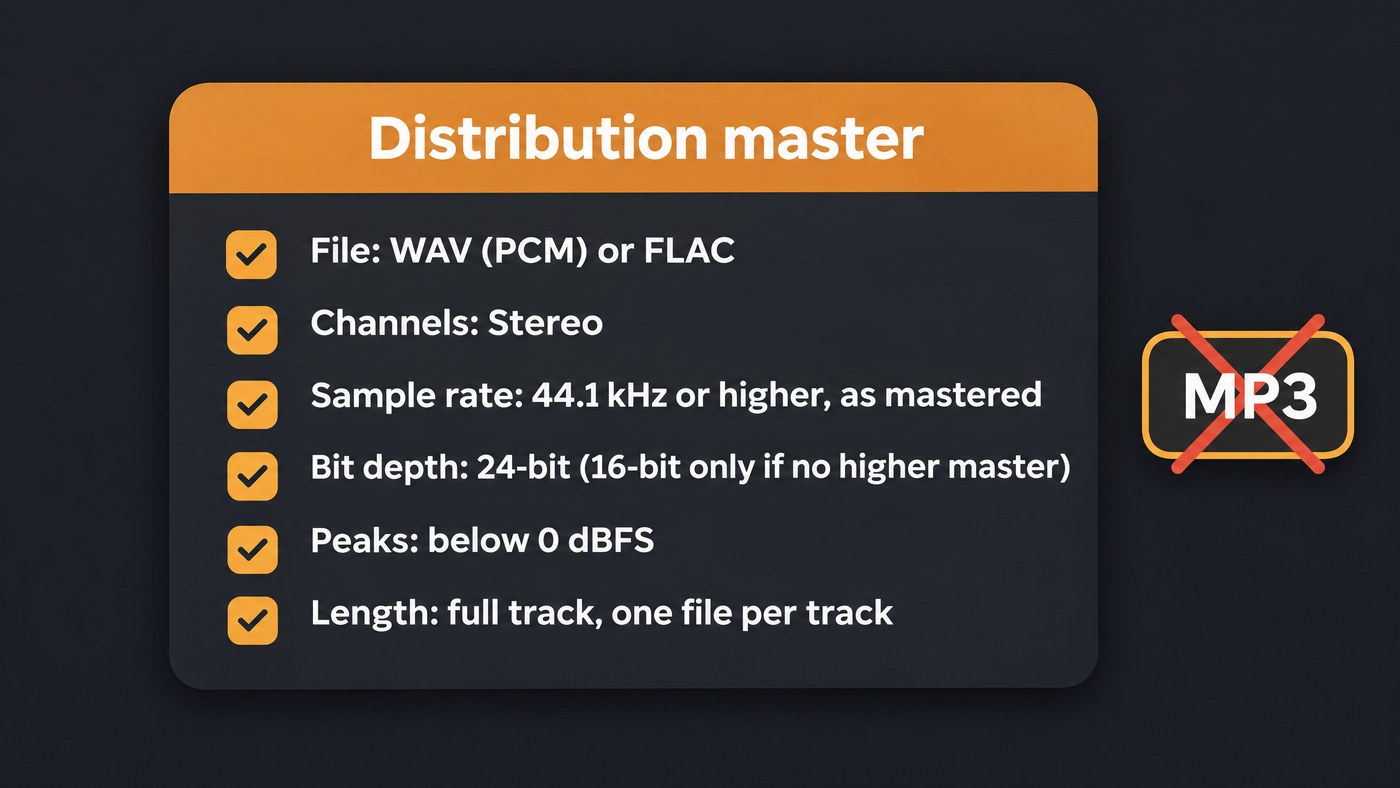
The standard music distribution file format is a lossless stereo WAV or FLAC, 44.1 kHz or higher, in 24-bit when the master is 24-bit or 16-bit when no higher master exists, one full-length file per track. Don't upload an MP3, even where a portal accepts one: it can't be delivered as a lossless master.
Everything below was read on 19 November 2026 on Spotify's, Apple's and the distributors' own pages. DistroKid's and CD Baby's help centres blocked automated reading that day, so where we couldn't read an upload spec we say so. This guide sticks to the files; for the rest of the upload form, see what to prepare before uploading music for distribution.
Music distribution file format: the settings to use
- File type: WAV (plain PCM) or FLAC. Both are lossless; FLAC files are smaller.
- Channels: stereo, two channels.
- Sample rate: 44.1 kHz or higher, at the rate you mastered. Don't convert up.
- Bit depth: 24-bit if the master is 24-bit; 16-bit only when no higher-resolution master exists.
- Length: the complete track, one file per track, without long silence at either end.
- Level: no clipping. Interspace rejects audio that peaks above 0 dBFS, and Spotify's loudness guidance recommends a true peak of -1 dB at most.
What Spotify asks for
Spotify's audio file formats page, updated February 17, 2026, is the most detailed spec a store publishes for the files distributors deliver. FLAC is its strong preference, with WAV accepted when it meets the same requirements: 44.1 kHz or higher, 24-bit if that's the native master, 16-bit only if no higher bit depth exists, stereo, one stereo master per track. Its instruction: "Don't downsample, reduce bit depth, or apply any processing that changes quality before delivery. We handle all format conversions."
Two details are easy to miss:
- Spotify reduces anything above 24-bit to 44.1 kHz / 24-bit FLAC itself. Anything under 16-bit or 44.1 kHz gets upconverted to 44.1 kHz / 16-bit and can't play as lossless.
- WAV files must use format code 0x0001 (WAVE_FORMAT_PCM), not 0xFFFE (WAVE_FORMAT_EXTENSIBLE), and hold full tracks only. Export plain PCM WAV or FLAC.
What Apple Music and Apple Digital Masters ask for
Apple's Apple Digital Masters page says its encoder works from high-resolution masters and that Apple Music streams lossless versions in ALAC. The technical brief linked there asks for 24-bit sources at the highest native sample rate, and tells engineers not to upsample or pad 16-bit files out to 24-bit. The deliverable is the original 24-bit PCM file, with no second master needed for lossless.
For the Hi-Res Lossless badge, RouteNote's hi-res article (updated March 11, 2026) sums up Apple's requirement as 24-bit audio at 88.2, 96, 176.4 or 192 kHz; 44.1 and 48 kHz don't qualify. Whether hi-res reaches Apple depends on your distributor: Amuse lists hi-res delivery on Artist Plus and Artist Pro, and RouteNote limits it to All Access users.
What each distributor's upload page says
- Amuse: WAV or FLAC, stereo, 16- or 24-bit, from 44.1 kHz up to 192 kHz, according to the FAQ on its pricing page.
- TuneCore: its TuneCore 101 guide recommends 44.1 kHz, 16-bit stereo WAV or FLAC as the safe spec.
- Ditto Music: at least 16-bit, 44.1 kHz or higher, stereo WAV or MP3, complete recordings only (help article, March 4, 2024). Another Ditto article (September 11, 2025) says it delivers to Spotify as lossless WAV.
- RouteNote: stereo FLAC, or MP3 at 320 kbps, at 16-bit and 44.1 kHz, and nothing else, so no WAV. Its list of refused formats names PCM, AIFF, ALAC and spatial audio such as Dolby Atmos (updated March 11, 2026), and its badge article says the Apple Music Lossless badge needs a FLAC upload.
- Interspace: WAV recommended, FLAC accepted, MP3 accepted at 320 kbps and converted to a 24-bit WAV on upload; 44.1 kHz, 16-bit minimum and 24-bit preferred (audio requirements, updated November 18, 2026).
- CD Baby: its Apple Music page is clear on one point: "Avoid uploading your audio files as MP3s, because that file type can't be adapted to fit the quality needs of every platform." Its help centre, where the upload articles sit, blocked automated reading.
- DistroKid: its help centre blocked automated reading on 19 November 2026, so open its upload spec in your browser before you export.
The pattern: every portal we could read takes 16-bit, 44.1 kHz stereo lossless audio, and most take 24-bit.
Why MP3 is the wrong file, even where it's accepted
MP3 encoding throws audio data away, and converting the file back to WAV doesn't bring it back: Interspace's automatic conversion changes the container, not the quality. CD Baby says it encodes files differently for each partner, which is why it asks for FLAC or WAV, and RouteNote ties Apple's Lossless badge to a lossless upload.
Artwork specs that travel with the audio
- Size: a square 3000 × 3000 pixels is the safe target. TuneCore asks for it, Ditto's minimum is 1400 × 1400 with 3000 recommended, and Amuse accepts square art from 1400 to 6000 pixels.
- File type and colour: JPG or PNG at most portals, though Ditto takes JPG only, up to 10 MB. Interspace asks for RGB, not CMYK.
- Content: Apple's Music Style Guide (October 2026 revision) rules out website addresses, logos, QR codes, release dates and pricing on art. It also bans references to the audio format, such as Dolby Atmos, lossless, 24-bit or 192 kHz. Ditto adds that the title on the art must match the metadata exactly.
Metadata basics that touch the audio file
- No format words in titles. Apple's guide bans terms like Atmos, lossless, spatial audio or 24-bit in titles, because Apple Music shows badges for those.
- One file per version. Explicit and clean versions are separate tracks, flagged in metadata, never with "(Explicit)" or "(Clean)" in the title.
Dolby Atmos is the exception to stereo
Apple's Video and Audio Asset Guide wants a BWF ADM file holding 24-bit LPCM at 48 or 96 kHz, integrated loudness no higher than -18 LKFS, and one file per album track, synced to the stereo version. Track boundaries more than half a second off the stereo deliverable get flagged for review, and no extra silence is allowed at the end. The mix must come from multitracks or stems printed from them, never upmixed or de-mixed from a stereo release.
Interspace delivers Atmos as a paid add-on from an ADM BWF or .atmos master; RouteNote doesn't accept spatial audio. For the stem side, see our guide to distribution software with stem management.
Common reasons a file gets rejected
- The wrong type for that portal, such as a WAV at RouteNote.
- Clipping: Interspace rejects audio that peaks above 0 dBFS.
- More than 10 seconds of silence at the start or end (Interspace), or extended silence inside the track (Ditto).
- Snippets or tracks that cut off abruptly (Ditto).
- A file that can't be decoded, or doesn't match the song named in the metadata (Interspace).
- An Atmos mix built from stereo or source-separated stereo (Apple).
How to export a distribution master from your DAW
- Export at the session's sample rate. A 48 kHz session gets a 48 kHz master; Spotify and Apple both ask you not to convert.
- Choose WAV (PCM) or FLAC. Pick FLAC if RouteNote is your distributor.
- Set 24-bit. If your DAW offers 32-bit float, use 24-bit for this file: Spotify caps at 24-bit, and most portals list 16 or 24 only.
- Dither only when you drop to 16-bit, once, at the final export. Apple's brief describes dither as trading a little noise for less distortion when bit depth is reduced.
- Leave export normalizing off unless it works on true peak with a ceiling below 0 dB.
- Set the range from the start of the song to the end of the last reverb tail, with only a short gap at either end.
- Bounce stereo, one file per track, named clearly, such as
Artist_Title_Master_24-48.wav. - Check the result. Listen end to end, read loudness and true peak on a meter, and confirm format, bit depth and sample rate in a tool like MediaInfo, which Interspace suggests.
If an automatic mastering chain set your final levels, our guide to pitfalls of automated mastering plugins lists what to listen for before you bounce.
Where Soundverse fits
Soundverse is an AI music platform that takes you from idea to audience. Your distributor delivers the release; Soundverse helps you export the file.
AI Studio exports WAV at 16-bit, 24-bit or 32-bit float and FLAC at 16 or 24-bit, at 44.1, 48 or 96 kHz, plus MP3, AAC or OGG, with an optional loudness target and true-peak normalizing to -1 dBTP. Free exports MP3; WAV and FLAC need the Creator plan. For distribution, pick 24-bit WAV or FLAC. Mastering One masters toward targets such as Streaming -14 or Apple Music -16 LUFS with a true peak ceiling you set, and offers TPDF dither for a 16-bit file. Analysis One shows gated LUFS and 4× oversampled true peak and counts overs above -1 dBTP before you send the master.
Licensing is set by plan: the Free plan is for personal use, and the Creator plan comes with a royalty-free license.
This video shows Mix One placing a project's stems by genre, then Mastering One mastering it toward a chosen target, with the versions compared.
FAQ
Should I upload WAV or FLAC? Either works at most distributors, since both are lossless. Spotify strongly prefers FLAC, FLAC files are smaller, and RouteNote takes FLAC but not WAV.
Is 24-bit, 48 kHz fine for distribution? At most portals, yes. Spotify takes 44.1 kHz or higher and asks you not to downsample, and Amuse accepts 24-bit up to 192 kHz. RouteNote's standard spec is 16-bit, 44.1 kHz, and TuneCore names 16-bit, 44.1 kHz as its safe spec, so check those first.
Do I need a separate master for Apple Music? Not for stereo. Apple's Digital Masters brief says one 24-bit master serves both the AAC and lossless versions. Dolby Atmos is the exception: a separate BWF ADM file made from your multitracks.
Sign up for Soundverse free and bounce your next master at the spec your distributor asks for. More mixing, mastering and release guides on the Soundverse blog.
