What Metadata Is Required for Successful Music Distribution?
Music distribution metadata, field by field: artist and featured names, titles, genre, language, explicit flags, dates, ℗/© lines and credits.
Music distribution metadata must include artist names in the correct roles, track and release titles in store style, primary genre, language, explicit flags, release date, label and ℗/© lines, songwriter and producer credits, and ISRC and UPC codes. Apple and Spotify publish style rules for each field and can edit, return or hide releases that break them.
We read the rules on November 19, 2026, in the Apple Music Style Guide (version 2.5, last revised October 2026), Spotify's Metadata Style Guide v2.3 and distributor help pages. The DistroKid, TuneCore and CD Baby help centers returned a 403 error to our automated reader, so for CD Baby we used its public DIY Musician guide; open the other two in your own browser. For the checklist version, see what to prepare before uploading music for distribution.
Spotify's metadata guidelines explain why it matters: "We display your music exactly as it’s delivered to us, so it’s important to get your metadata right." Later fixes go through your distributor, and some need a re-upload.
Artist names and featured artists
- One name per artist field. Spotify's Metadata Style Guide says two names in one field make a compound artist, and the content won't appear on the correct artist pages. Apple says the same.
- Same spelling every time, including punctuation and accents. Spotify's example: always "Beyoncé", never "Beyonce".
- Nothing but the name: no instrument, dates, former band or translation.
- No generic or search-bait names. Spotify doesn't allow names like Christmas Hits or Sleep Music; Apple won't accept Lo-Fi, Sped Up, Workout or Meditation.
- Labels and companies aren't artists.
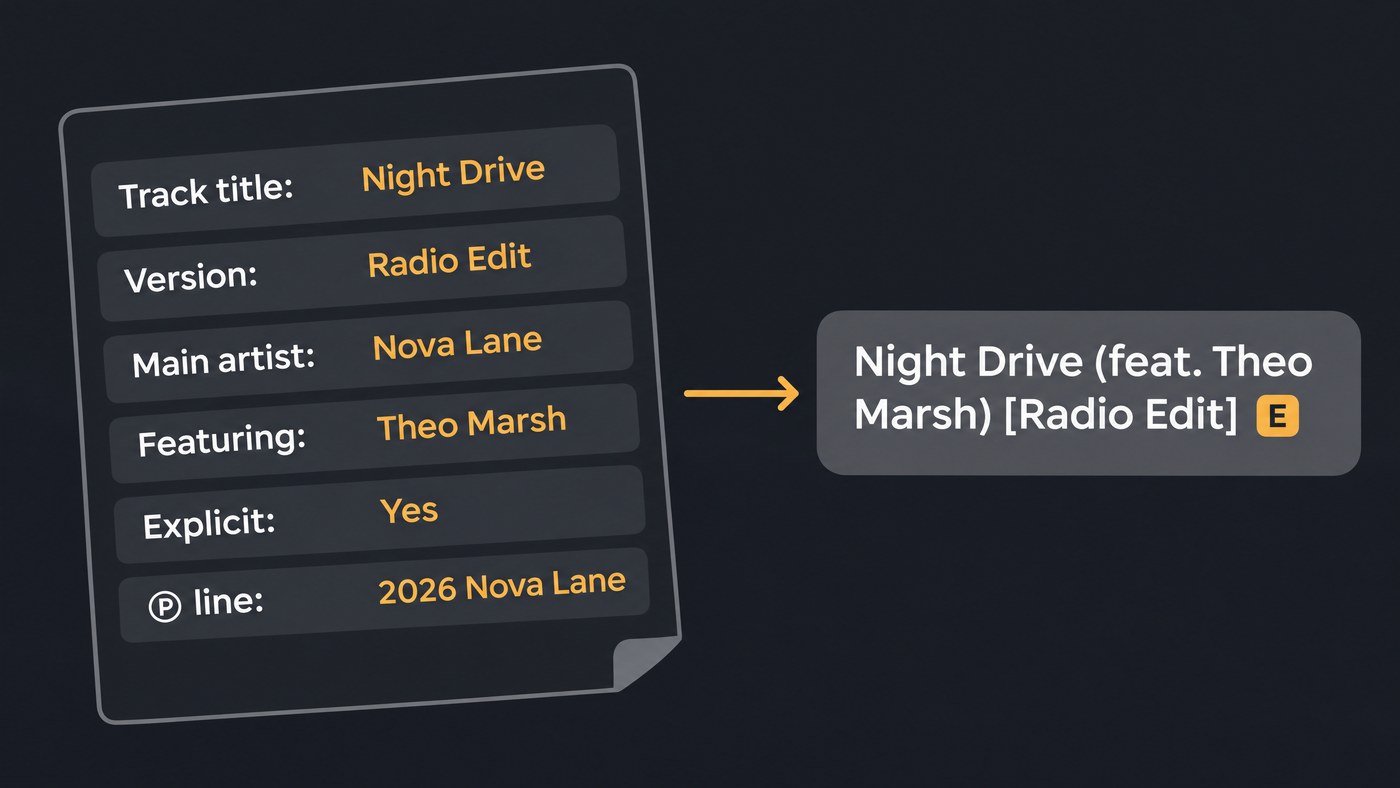
- Featured artists get a role, not a place in the title. Apple wants the Featuring or With role; Spotify wants each featured artist listed separately and never named in title or version fields. CD Baby's metadata guide (updated November 3, 2026) says to use the dedicated fields and let each store decide how to display them. Apple's guide formats featured credits in titles as lowercase "(feat. Name)".
- Remixes credit the original artist as primary and the remixer as remixer. Apple applies this to sped-up, slowed and lo-fi versions too.
- Collaborations. Spotify credits short-term pairings separately and allows at most 4 main artists per release; Apple switches to Various Artists at five. Band naming is in our post on registering a band's EP.
Track and release titles: capitalization and version tags
Casing. Apple and Spotify want English titles in title case. Lowercase a, an, and, as, but, for, from, nor, of, or, so, the, to and yet, plus prepositions of four letters or fewer, unless they start or end the title. All caps, all lowercase and random casing are out unless the artist styles it that way, Spotify adds. Other languages follow their own rules: Amuse's capitalization guide (September 9, 2026) asks for sentence case in Swedish, French and Italian and capitalized nouns in German, and warns it may not approve the release or may change the casing itself.
The original version gets the plain title. No "Original Mix", "Album Version" or "Exclusive". Apple's ban list also covers "Digital Single", "Official Music Video", "Dolby Atmos", "lossless" and "24-bit".
Version tags only for real versions, such as Live, Radio Edit or Extended Version, in the version field. Spotify wants that field without brackets ("2011 Remaster", not "(2011 Remaster)") and bans CD, digital, album, EP and single from release versions. Track titles on one release must be unique, except clean and explicit twins.
Single or EP. Apple counts one to three songs, each under 10 minutes, as a single and adds "- Single" itself. Spotify treats up to three tracks within 30 minutes as a single and four to six within 30 minutes as an EP. Don't type "Single" or "EP" into the title.
Also out: emoji, and asterisks in explicit words; Apple censors those itself.
Primary genre
Apple's first genre is the primary one and must best describe the music; a second is optional. Content charts only in its primary genre (Latin and K-Pop albums chart in both), so pick the most specific fit, such as Pop in Spanish rather than Latin.
Spotify says it doesn't currently use genre information from providers. If you send it, use one genre per field ("Dance/Electronic" in one field is out), in English.
Language: two separate fields
- Metadata language is the language your titles are written in. Apple and Spotify both say this code must match the metadata, not the audio.
- Audio language is what's sung or spoken. Apple sets it per track, with 'zxx' for nonlinguistic content; Spotify calls it Language of Performance, in ISO 639-3 codes.
No side-by-side translations: Amuse accepts "Je t'aime" or "I love you", never "Je t'aime (I love you)".
Explicit and clean flags
Flag explicit tracks Explicit, and flag a track Clean only when an explicit version of it exists. Never write "(Explicit)", "(Clean)" or "(Edited)" in a title; Spotify shows an E icon and Apple uses its parental advisory tag. The clean edit is a separate track with its own audio.
Release date and original release date
Leave room before the live date: Spotify notes distributor delivery can take a few days and recommends at least 7 days, so you can pitch an unreleased song to its editors. Our guide to distribution turnaround times has store-by-store timings.
The original release date is the first time the recording came out, in any format and on any label. Apple wants day, month and year for anything after 2000, and a remaster keeps the original's date. Spotify warns against changing the original date to make old releases look new.
Label, ℗ and © lines
Spotify's provider guide to filling out metadata defines the three fields:
- Label: the record label the release comes out on. Self-releasing, use your own name or one label name, consistently.
- ℗ line: the owner of the sound recording rights.
- © line: the copyright owner of everything beyond the sound recording itself.
Each line is usually a year and an owner, as in "℗ 2026 Nova Lane". If you licensed a beat or a verse, Apple asks you to credit its artist as Licensed Beat or Licensed Verse; for a free, bought or leased sample or stem, use Sampled Artist, never Primary or Featuring.
Contributors and roles
Spotify says roles belong at track and release level and should cover performers and non-performers: main and featured artists, remixers, composers, lyricists and producers. Apple adds:
- Composer for the music, Lyrics for the words, Songwriter when one person did both or the split isn't known.
- Producer and Recording Engineer for the people who did the work, not a production company or studio.
- No placeholders. Leave an unknown credit out rather than sending "TBD".
Amuse's Apple Music credits article (February 28, 2025) says Apple now requires at least one performer credit and one production and engineering credit on every new track. Amuse also requires a composer, a lyricist whenever there are vocals, and legal names on every role except producers, who can use an alias.
ISRC and UPC
Each recording needs an ISRC and each release a UPC or EAN. Spotify's provider guide says a release's primary ID, such as its UPC, is how it identifies the release, so keep it the same when you update. A previously released track keeps its original ISRC on every later release.
How DDEX standardizes delivery
Stores don't receive your upload form. Your distributor sends a structured feed, and DDEX's ERN standard is the industry format for it: the message a record company or distributor uses to tell a DSP about a release, its recordings and the terms for making it available. Spotify's style guide points to DDEX ERN for XML and requires DDEX's predefined Composer, Lyricist or ComposerLyricist roles for songwriters.
So each field lands in a defined slot, and a featured name typed into the title stays a title.
Music distribution metadata mistakes that get releases rejected
- Featured artists or version info in titles, and "(Explicit)" or "(Clean)" tags
- All caps, all lowercase or random casing
- Generic or search-term artist names and titles
- Two artists in one field, or a label as the artist
- Placeholder credits such as TBD
- URLs, social handles, competitor names or future release dates in metadata, and emoji
- Near-duplicate uploads with slightly changed titles or artists, and misleading content
- A manipulated original release date
Spotify says it will request updates or edit non-conforming metadata, and repeat instances can mean delivery delays or lost delivery rights. Apple's Quality Assurance team reviews content too. Your distributor won't catch everything: CD Baby says, "Distributors will only review your metadata to ensure it meets objective platform requirements." Spelling, track order and titles are on you. Audio and artwork specs are in our guide to the standard file format for distribution.
Where Soundverse fits
Soundverse is an AI music platform that takes you from idea to audience. It doesn't deliver music to stores: your distributor does, using the metadata you enter.
Music Business Agent works on real sites while you watch. Its store-by-store release check searches stores such as Spotify, Apple Music, JioSaavn and Amazon Music and lists where your release is live, missing or mislabeled, so you can spot one that landed wrong. Its workflows ask you for missing ISRCs, writers and splits and are instructed never to invent them.
Release Planner turns a finished track and your release date into a day-by-day rollout with pre-save, smart link and playlist pitch deadlines. It writes the plan and doesn't submit anything.
This walkthrough shows Release Planner turning a finished song into a day-by-day rollout plan.
FAQ
Should I put "feat." in my song title? No. Add the guest in the featured artist field. Spotify bans featured names in title and version fields, and CD Baby says each store decides how to display the role.
What goes in the ℗ and © lines if I self-release? Usually your own name or label name with the year, such as "℗ 2026 Nova Lane". The ℗ line names the sound recording owner; the © line covers everything beyond the recording.
Can I fix metadata after my release is live? Yes, through your distributor, which sends the store an update. Some fixes need a re-upload; keep the same ISRC, audio and titles so the play count carries over.
Sign up for Soundverse free and plan the rollout for your next release. More release guides on the Soundverse blog.
