Audio Editing Tools That Support AI Mastering Features
Audio editors with AI mastering built in: Logic Pro, Ozone in your DAW, FL Studio and Soundverse AI Studio, with what each controls and its catch.
The best-known audio editors with AI mastering built in are Logic Pro, with Mastering Assistant, FL Studio, with its FL Cloud Master option, and Soundverse AI Studio, with Mastering One. iZotope Ozone adds Master Assistant as a plugin on your DAW's master track. These are the audio editing tools that support AI mastering features inside your project.
Each one below gets the same three checks: what the assistant controls, where it sits in the editor, and its catch. We read each maker's own documentation on 19 November 2026. Steinberg WaveLab and Audacity are covered too, because plenty of producers expect an assistant there and won't find one.
What "AI mastering built in" means in an editor
An online mastering service takes your bounced mix and sends back a file. A built-in assistant works inside the session: it listens to your mix where it plays, sets up a chain of EQ, dynamics, width and limiting, and leaves every setting where you can change it. When you tweak the mix, you run it again, and the master renders with your normal export.
That's the main reason to prefer one. The master stays tied to the project, so a late vocal change costs a minute, not another upload. If you'd rather hand the whole job to a service, our guide to AI mastering services with unlimited exports covers that route.
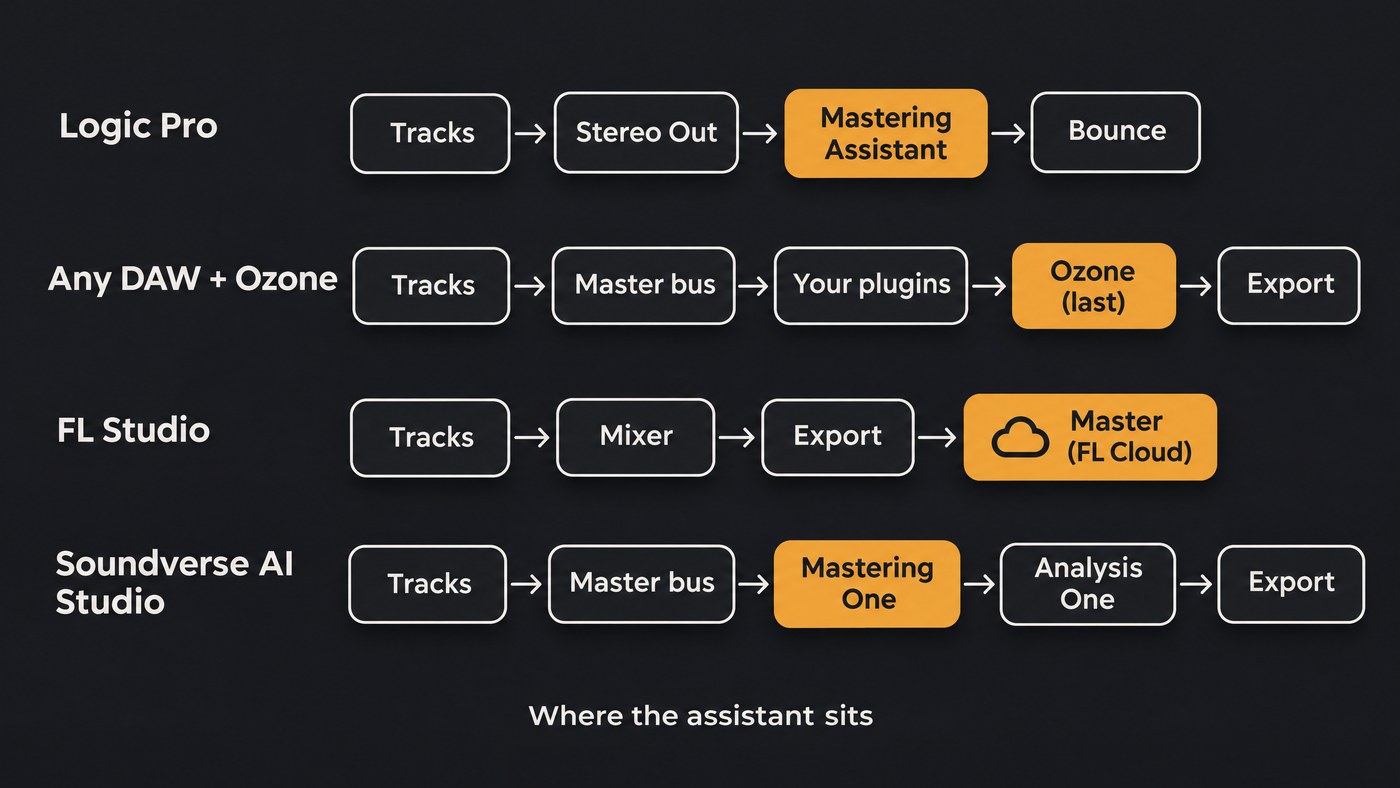
Audio editors with AI mastering, tool by tool
Logic Pro: Mastering Assistant
- Where it sits: its own slot on the stereo output channel strip, or under Mix > Mastering Assistant.
- What it controls: adding it starts an analysis. In the words of Apple's guide: "Mastering Assistant analyzes the whole project unless you set a cycle, in which case it will analyze only the part of the project within the cycle area." The parameters page lists four Characters (Clean, Valve, Punch and Transparent), an Auto EQ slider that scales its correction curve, a Custom EQ with three broad points of up to ±6 dB, an Excite button for upper-mid saturation, a Width knob with a correlation meter, and a Loudness knob. Output is limited to −1 dBFS true peak.
- The catch: Bypass and Loudness Compensation are listening aids, and Apple reminds you to switch both off before you bounce. After a mix change, press Reanalyze. Logic itself needs an Apple silicon Mac or an iPad.
iZotope Ozone 12: Master Assistant in any DAW or editor
- Where it sits: you add Ozone to your master track, after your other plugins, and click the circular Master Assistant button at the top of the plugin. Because it's a plugin, the same assistant can move with you between hosts that load it.
- What it controls: iZotope's Master Assistant tutorial (Nick Messitte, updated 4 May 2026) describes two flows. Auto-Master is the quick one. Custom lets you pick a genre target and a loudness target, bypass any module, and set an Analysis Time in seconds or bars; iZotope recommends analyzing your loudest section, usually the chorus. You can also upload a reference file as the target. Afterwards, macro sliders cover tonal balance, loudness, dynamic and width match, Clarity and Stabilizer, and Vocal Balance drives a Master Rebalance instance on the lead vocal.
- The catch: the tutorial notes that Ozone 12 Elements works as a macro processor only, so check the edition before you count on module-level editing. Gain Match must be off when you bounce, and Relearn starts the analysis over. iZotope is frank about the limits: Master Assistant won't de-click audio, check for errors, embed ISRC codes or assemble an album.
FL Studio: Master (FL Cloud)
- Where it sits: among the export options in FL Studio's File menu, not on a Mixer insert. It renders your finished mix into a master, then opens a comparison window.
- What it controls: Image-Line's manual says it "Uses an AI-powered system to master your mix compliant to the loudness (LUFS) specifications of all major digital streaming platforms." You set a LUFS target with a slider or a platform preset. FL Cloud subscribers can auto-detect or choose the genre, render two presets side by side, and fine-tune with Bass, Mid, Brightness and Warmth steps of −1, 0 or +1, plus on/off switches for a high- and low-frequency exciter, a multiband compressor and a widener.
- The catch: it needs an internet connection, and without a subscription you get the Default preset only. Image-Line's FL Cloud page puts AI-powered mastering in the paid Plus and Pro plans, with a 30-day free trial. The tuning moves are deliberately small, so fix big problems in the mix.
Soundverse AI Studio: Mastering One
- Where it sits: the master bus of every AI Studio project, in your browser. Open the Mixer from the Studio menu (☰) and click FX on the MASTER strip, or choose Master on a song in your Library.
- What it controls: with the song playing, ✦ Master listens for two seconds and sets five of its six macros: Tone, Dynamics, Width, Loudness and Intensity. Vocal Balance stays yours. You choose one of 7 genre targets and 8 loudness targets, the loudest being Club / DJ at −7 LUFS and the quietest Broadcast at −23, set the true-peak ceiling anywhere between −3 and 0 dBTP, and bypass any of the seven chain sections.
- The catch: it starts switched off, works only on the master bus inside AI Studio, and doesn't master stems separately. Its window meters are estimates, so the Mastering One page recommends placing Analysis One next on the master bus to read final loudness and peaks. We make this one.
Editors where you bring the AI yourself
Steinberg WaveLab Pro 13
WaveLab is a dedicated mastering editor, but Steinberg's WaveLab 13 feature list has no AI assistant. The headline additions are Dolby Atmos Master and Album montages, multicore rendering and MasterRig 2, a manual mastering suite with EQ, compression, limiting and stereo imaging modules. Steinberg says VST 3 plug-ins from any manufacturer can be added, so producers who want an assistant load one in the Master Section.
Audacity 4
Audacity's manual (updated 31 August 2026) describes a Master effects section that processes the mix of every track, with Compressor, Limiter and Reverb as the realtime effects. Its effects list includes Loudness Normalisation, Compressor and Limiter, but no mastering assistant. Audacity scans VST, LV2 and Audio Unit plugin folders, so the route is a third-party plugin. Check that its maker supports Audacity as a host before you buy.
BandLab
BandLab Mastering offers four free presets on audio or video files you select, with Membership for custom settings and unlimited masters. Its mastering page doesn't describe an assistant inside BandLab Studio's mixer, so we treat it as a service rather than an editor feature.
Getting a clean master out of a built-in assistant
- Finish the mix first, with headroom. Apple's recommended workflow starts there, and every assistant here masters the whole stereo mix.
- Keep the assistant last. Logic's slot already is. In another DAW, put Ozone after every other plugin on the master.
- Point the analysis at the chorus. Set a cycle in Logic, set Ozone's Analysis Time to the loudest section, or press ✦ Master while the chorus plays.
- Run it again after mix changes. Reanalyze, Relearn or press ✦ Master again; the old settings were made for the old mix.
- Compare at matched loudness. Use Loudness Compensation, Gain Match or FL's comparison window, and remember the mastered version is louder until you do.
- Meter the bounce, not the plugin. Read integrated LUFS and true peak on the exported file.
- Switch the listening aids off before you export.
Our list of the common pitfalls of automated mastering plugins goes deeper on loudness, true peak and presets. For why this all waits until the mix is locked, see why mastering is the final step.
Which editor with AI mastering should you pick?
- You already work in Logic: start with Mastering Assistant. It costs nothing extra.
- You switch between DAWs or master in WaveLab: a plugin assistant such as Ozone, because it goes with you.
- You make beats in FL Studio: try FL Cloud's Master during the free trial, with the mix finished.
- You want to write, mix and master in a browser: Soundverse AI Studio.
Where Soundverse fits
Soundverse is an AI music platform that takes you from idea to audience, built for independent artists who release music. AI Studio is a multitrack studio in the browser where you can record, generate parts, mix with Mix One's genre templates and finish with Mastering One, then check the result in Analysis One. All three are included on every plan and use no tokens.
Our own pages list the limits. There's no VST or AU plugin support, browser export stops at 15 minutes or 24 tracks, and Free exports MP3 only, with WAV, FLAC, AAC and OGG from Creator up. Licensing is set by plan: the Free plan is for personal use, and the Creator plan comes with a royalty-free license.
In this AI Studio walkthrough of a Christmas song, the mixing chapter with Mix One starts at 6:36 and Mastering One at 7:10.
FAQ
Which DAWs have AI mastering built in? Logic Pro has Mastering Assistant on its stereo output, and FL Studio offers Master through FL Cloud at export. Soundverse AI Studio has Mastering One on every project's master bus. In WaveLab and Audacity, you add a mastering plugin yourself.
Is FL Studio's AI mastering free? Partly. The manual says the included FL Cloud mastering gives you the Default preset, while genre detection, preset comparison and parameter tuning are for FL Cloud subscribers. It needs an internet connection either way.
Can I use Ozone's Master Assistant in WaveLab or Audacity? WaveLab takes VST 3 plug-ins from any manufacturer in its Master Section, and Audacity scans VST, LV2 and Audio Unit folders. Check iZotope's list of supported hosts before you rely on either.
Does a built-in assistant replace a mastering engineer? For singles and demos with a finished mix, it can get you close. iZotope's own tutorial lists what Master Assistant won't do, from de-clicking to assembling an album, and those jobs still need a person or a dedicated tool.
Sign up for Soundverse free and try Mastering One on your next mix. More mixing and mastering guides on the Soundverse blog.
