How to Generate AI Music With Claude Code
Generate AI music with Claude Code: add Soundverse as a claude.ai connector, then ask for songs, stems or MIDI. Setup, prompts and a real test run.
To generate AI music with Claude Code, add Soundverse as a custom connector on claude.ai, sign in to Claude Code with the same claude.ai account, and ask for a song in plain words. Claude Code can write the lyrics and call Soundverse's tools, and the finished track is saved to your Soundverse Library, ready to download.
We ran this in Claude Code on 18 November 2026 (version 2.1.323, in the VS Code extension; the same agent runs in the terminal). One request gave us a 3:02 lo-fi indie pop song with timed lyrics, renamed and filed in the Library. Below are the setup, the prompts and what happened in between.
What you need before you start
- Claude Code signed in with a claude.ai account. Anthropic's authentication docs list Claude Pro, Max and Ultra subscriptions, plus Team and Enterprise seats, as claude.ai logins. Connectors load only when that subscription login is your active sign-in, not an API key or a cloud provider.
- A Soundverse account. Every account starts with a one-time batch of free trial tokens.
- The right Soundverse plan for the tool you want. Soundverse v9, the newest song model, runs on Pro and Max. Audio to MIDI runs on the Free plan, and free accounts make instrumentals with Soundverse v6.
On a Team or Enterprise plan, only admins can add connectors on claude.ai, so ask yours first.
How to set up Soundverse to generate AI music with Claude Code
Soundverse signs in through claude.ai, so you add it there once and Claude Code picks it up. The values below come from the Soundverse for Claude setup page.
- On claude.ai, open Customize (or Settings) → Connectors, click Add, then Add custom connector.
- Name it Soundverse and paste the server URL
https://mcp.soundverse.ai/mcp, with no slash at the end. - Select "Sign in now" and "Use your own OAuth client" (or open Advanced settings). Paste the client ID
jt7cp9hv4m9idkuyv2gt0, leave the client secret empty, and click Add. - Sign in to Soundverse when asked.
- Start a new Claude Code session with the same claude.ai account and type
/mcp. Soundverse appears among the servers that come from claude.ai. - Its tools show up in Claude Code with the prefix
mcp__claude_ai_Soundverse__, for examplemcp__claude_ai_Soundverse__v9_generate_song.
Anthropic's Claude Code MCP documentation describes this exact route: "If you've logged into Claude Code with a claude.ai account, MCP servers you've added in claude.ai, known as connectors, are automatically available in Claude Code".
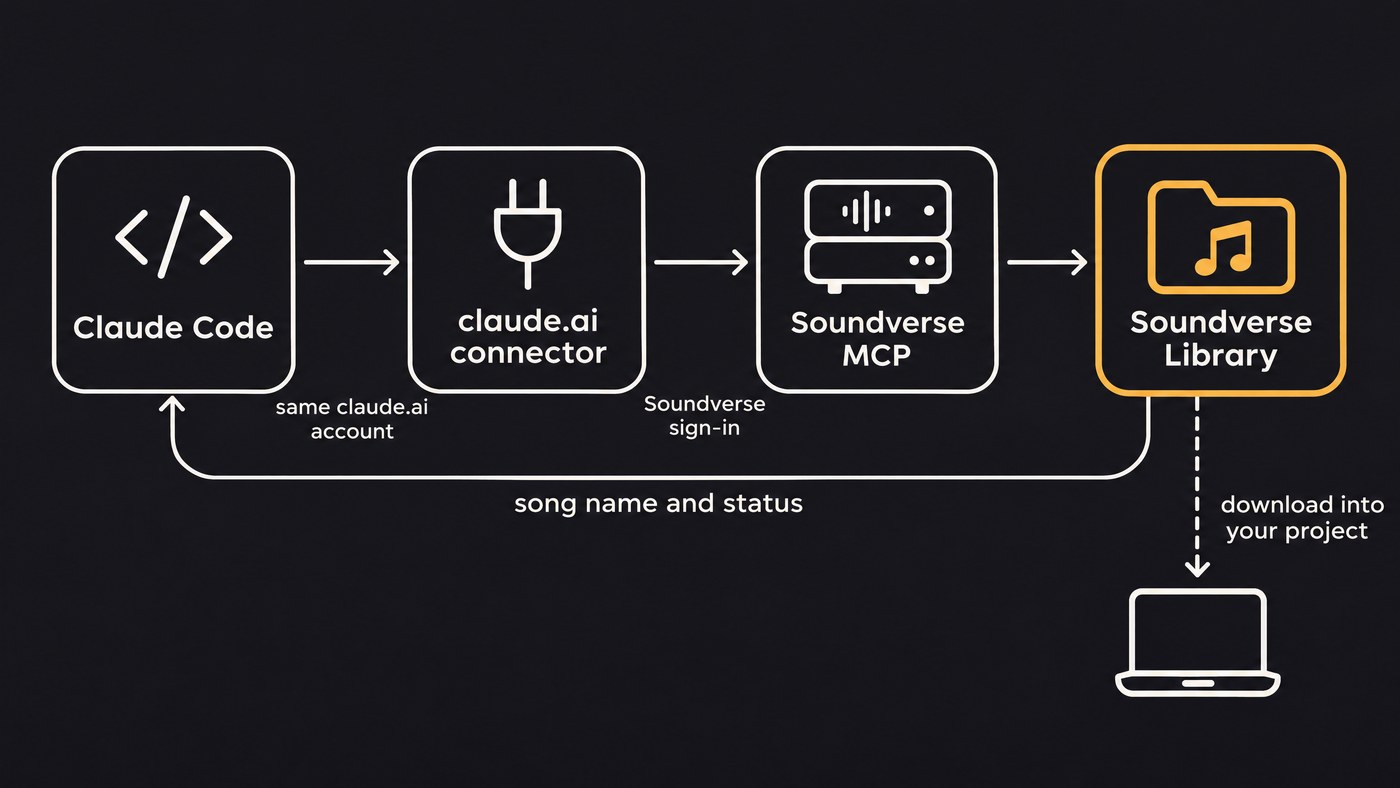
Skip claude mcp add for Soundverse. Its OAuth sign-in currently accepts only the claude.ai and ChatGPT callbacks, so a sign-in started from Claude Code on your own machine is rejected. If you already added it that way, remove it with claude mcp remove <name>. A server you add in Claude Code takes precedence over a claude.ai connector with the same URL, and hides it.
The Soundverse MCP page lists both values with copy buttons, and our step-by-step guide to the Soundverse MCP in Claude and ChatGPT covers the claude.ai side in more detail.
This Soundverse tutorial walks through the full connector setup in Claude, then makes a song from one message and pulls its stems.
First prompts to try
Three prompts to copy:
A full song, lyrics by Claude
Write lyrics about a developer shipping a release at 2 a.m.: two verses, a chorus and an outro, tagged [Verse 1], [Chorus] and so on. Then check my Soundverse balance and make one Soundverse v9 song. Style: lo-fi indie pop, 92 BPM, warm Rhodes, soft brushed drums, intimate male vocal, short intro, every word clear, no rap. Name it after the chorus hook.
An instrumental for a game prototype
Make one Soundverse v9 instrumental for the main menu of my pixel-art puzzle game: calm chiptune with soft pads and a light arpeggio, 100 BPM, no vocals, no big ending. Rename it "menu-theme" and tell me when it's in my Library.
Stems and MIDI from a finished song
Split "Press Enter on the Moon" into stems, then convert the bass stem to MIDI.
For the last one, Soundverse's Audio to MIDI page suggests that same order: run Stem Separator first, then convert only the bass stem for a single bass part.
What happens behind the scenes
Here is our run, call by call.
v1_check_token_balance. Claude Code read the balance first. This tool is free.v9_generate_song. Claude wrote the lyrics, which opened "[Verse 1] Blue light on the window, coffee going cold / One more line of code before the night gets old", with the chorus "Press enter on the moon / Let the midnight hum a tune". It sent them with a male vocal setting, the lyrics marked as AI-written, one version, and this style prompt:
Lo-fi indie pop, 92 BPM, warm Rhodes electric piano, soft brushed drums, round mellow bass, light vinyl crackle, intimate breathy male lead vocal, late-night city mood, short intro, every word clear, no rap
- The result. One song came back: a FLAC file, 3:02 long, with word-by-word timed lyrics for each section (verse, chorus, outro). Soundverse named it "Lo-fi Indie Pop".
file-manager_manage_file. Claude Code renamed it "Press Enter on the Moon" so it's easy to find later. Renaming is free.
The song went straight into the Soundverse Library. It doesn't play inside the conversation; the MCP page sends you to Library → Audios to listen, download or keep editing. The file URL Claude Code gets back is private, so a curl from your terminal won't fetch it.
Longer jobs can hand back a task id instead of a file. Claude Code then checks on it with get_generation_result, which is free, until the audio is ready.
Other tools the connector exposed in our session include v9_generate_music for instrumentals, v9_melody_to_song, v5_separate_stems (with 2-stem and 12-stem versions), audio-to-midi_convert, v5_generate_album_art and search-library_search_library for finding something you made last week.
Permission prompts
Claude Code decides when to ask you, using its own permission system. In Manual mode it prompts on the first use of each tool. Since v2.1.283, auto mode is the starting mode for terminal and VS Code sessions, and there a classifier reviews actions instead of you (see permission modes).
v9_generate_song makes one to three versions, and each one is billed, so it pays to approve every generation yourself. Add rules like these to .claude/settings.json in your project, or to ~/.claude/settings.json for every project:
{
  "permissions": {
    "allow": [
      "mcp__claude_ai_Soundverse__v1_check_token_balance",
      "mcp__claude_ai_Soundverse__get_generation_result"
    ],
    "ask": [
      "mcp__claude_ai_Soundverse__v9_*"
    ]
  }
}
Claude Code never auto-approves a tool matched by an explicit ask rule, in any mode. Anthropic's permissions guide is blunt about why the rule matters: "Permission rules are enforced by Claude Code, not by the model." Writing "ask me first" in a prompt helps, but only the rule makes Claude Code stop.
Writing better prompts for Claude Code music
v9_generate_song takes two inputs. The lyrics (required, up to 3,000 characters) hold every sung word, with section tags such as [Verse] and [Chorus]. The style prompt (up to 1,024 characters) holds the sound. Keep them apart.
- Order the style prompt: genre, BPM, core instruments, vocal type and delivery, mood, then what to leave out. Our prompt above follows that order.
- Give the tempo as a number, such as 92 BPM, not "slow".
- Say what you don't want: "no rap", "short intro". Add "every word clear" when the words matter.
- Describe the sound instead of naming real artists.
- Ask for one version while you're exploring. Each extra version costs tokens.
Most of these rules come from the Soundverse Prompting Playbook, which also comes as a PDF. Paste its short rules into your first message to Claude Code.
Using it inside a coding project
Say you're building a browser game and need a menu theme and a track for level one. A flow that works:
- Ask Claude Code for one track per scene. Soundverse's AI Music Generator page suggests exactly that, for example something epic for a boss fight and something calm for a menu screen.
- Have Claude Code rename each file to match your asset names, such as
menu-themeandlevel-1, withfile-manager_manage_file. - Download the files from your Soundverse Library yourself and put them in the repo, say under
assets/audio/. - Ask Claude Code to wire them in: the loader, volume, fades between scenes, and a smaller compressed copy for the web build if a FLAC file is too heavy.
- Keep a note of each track's Library name and prompt next to the files, for matching tracks later.
Before you ship, check what your plan covers. Licensing is set by plan: the Free plan is for personal use, and the Creator plan comes with a royalty-free license.
Troubleshooting
- Soundverse isn't in
/mcp. Check that Claude Code and claude.ai use the same account. Run/statusto see the active sign-in: connectors don't load whileANTHROPIC_API_KEY, anapiKeyHelperor a cloud provider is active. Run/login, pick your claude.ai account, then restart Claude Code. A connector you've never signed in to sits behind the "Show unused connectors" row. - "Authorization failed" on claude.ai. The client ID can't be edited after adding. Remove the connector and add it again with the client ID above and the secret blank.
session token rejectedin/mcp. Run/login, then reconnect the connector from/mcp.- A plan error on a v9 tool. The
v9_generate_songdescription says it needs the Pro plan or higher. Check your balance withv1_check_token_balance, then upgrade or ask for a model your plan includes. - A long job seems stuck. By default, Claude Code aborts a connector call after five minutes with no response or progress. If that happens, ask Claude to check
get_generation_resultwith the task id before it generates again, since a new call is a new billed job.
Where Soundverse fits
Soundverse is an AI music platform that takes you from idea to audience. In this setup Claude Code handles the writing, the planning and the code around your project, while Soundverse makes the audio and keeps the files. The same connector reaches Soundverse v9 for full songs with vocals, the AI Music Generator for instrumentals, and the Stem Separator and Audio to MIDI for taking a finished track apart.
If you'd rather stay in one app, Agent One plans the steps and runs Soundverse's tools inside Soundverse itself. Our roundup of the best AI music agents compares it with other options, and our lists of the top music MCPs and top audio MCPs cover other servers you can plug into Claude.
FAQ
Can I add Soundverse with claude mcp add?
Not at the moment. Soundverse's OAuth sign-in accepts only the claude.ai and ChatGPT callbacks, so a sign-in started from Claude Code on your machine is rejected. Add it as a custom connector on claude.ai, and Claude Code picks it up when you're signed in with that account.
Does the song play inside Claude Code?
No. Claude Code tells you when the job is done and what the song is called, but the audio lives in your Soundverse Library under Audios. Listen and download there.
Do I need a paid plan?
For claude.ai connectors to load, Claude Code has to be signed in with a Claude Pro, Max, Ultra, Team or Enterprise account. On Soundverse, v9 runs on Pro and Max, while Audio to MIDI runs on the Free plan and free accounts make instrumentals with Soundverse v6.
Will Claude Code spend my tokens without asking?
It can, depending on your permission mode. In auto mode a classifier approves actions instead of you. Add an ask rule for mcp__claude_ai_Soundverse__v9_* and Claude Code stops before every v9 generation.
Does this work in the terminal as well as VS Code?
Yes. We ran it in the VS Code extension, and the same agent runs in the terminal CLI. Anthropic's docs say ~/.claude/settings.json is shared between the extension and the CLI, so your permission rules apply in both.
Sign up for Soundverse free and connect it to Claude Code in a few minutes. More guides on the Soundverse blog.
