Best AI Music Agents in 2026
The best AI music agents in 2026, checked on each vendor's site: what Agent One, Flow Music, Suno Studio, Gopher and others plan, chain and stop at.
The best AI music agents in 2026 are Soundverse Agent One, Google Flow Music's Producer agent, Suno Studio's Chat, Mureka Co, FL Studio's Gopher, Logic Pro's assistant, and Claude or ChatGPT with music connectors. Each acts on your request with tools, but they stop in different places: a finished song, a tidier mix or a sample search.
We checked every tool on its maker's own website on 18 November 2026. We make Soundverse, so Agent One's limits are spelled out like everyone else's.
What is an AI music agent?
An AI music agent takes a goal, such as "a 90-second lo-fi track for my study vlog, with a cover", and works out the steps itself. It plans, calls tools like a song model, a stem splitter or a mixer, checks what came back, and keeps going until the goal is met or it needs you.
Anthropic, the company behind Claude, draws the line in its guide Building effective agents (19 December 2024): "Agents, on the other hand, are systems where LLMs dynamically direct their own processes and tool usage, maintaining control over how they accomplish tasks."
Two other kinds of tool often get called agents:
- A music generator returns one output per prompt. Every next step is yours.
- A chat helper inside a DAW answers questions about the software. Once it can change your project, as Gopher and Logic Pro's assistant now can, it becomes a narrow agent that acts only inside the open session.
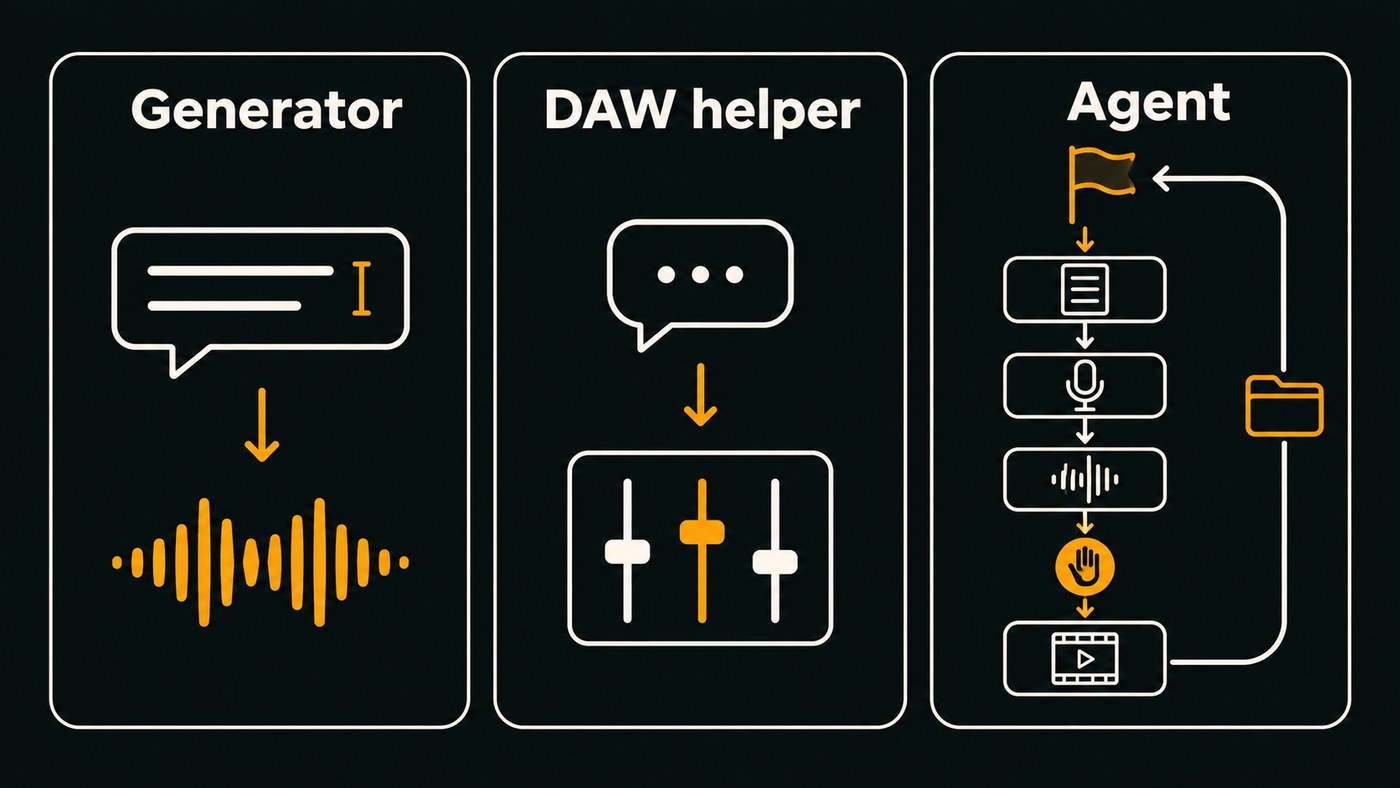
More on this in how a chatbot differs from a music agent.
A five-question test for any AI music agent
- Does it plan? You should see the steps before it starts spending.
- Does it use tools? Generation, stem separation, mix moves, web search: it picks among them so you don't click through each one.
- Does it chain steps? Lyrics feed vocals, vocals feed a mix, the mix feeds a video.
- Do you stay in control? Look for approval prompts before costly or public actions, a stop button, and changes you can undo.
- Do you keep the files? Results should land where you can download them, open them in a DAW or edit them again.
Soundverse Agent One
Agent One is the agent inside Soundverse, an AI music platform that takes you from idea to audience. Per its Agent One page, you describe an outcome in plain words, and it plans the steps, picks the tools and runs them.
- What it chains: one request can become lyrics, a sung song, a title and cover art. Attach a PDF brief and it plans a song for each track, keeping your titles and lyrics as written. A finished track can go on to stems, a remix, a music video, a day-by-day release plan, captions or pitches for playlist curators.
- Control: the plan appears as a row of steps, and a plan your balance can't finish is stopped before its first step. For a music video, it writes a script with a named cast and place, then waits for your go-ahead before filming.
- Beyond the app: with the free Soundverse for Chrome extension, it can upload a track to SoundCloud or a visualizer to YouTube as Private, so you check it before it goes public. You sign in yourself, and it never solves CAPTCHAs. See Agent One working in your browser.
- Who it's for: independent artists who want the song, the visuals and the release legwork in one chat.
- Where it stops: it can't fetch a song from a pasted link (import the file first), and a render is at most 10 minutes long. In AI Studio it writes MIDI parts and mixes but can't change the project tempo. Free runs in Lite mode, music videos need Creator or above, and Soundverse v9 comes with Pro and Max.
Here a song is made by chatting with Agent One, then edited in AI Studio.
Google Flow Music (the Producer agent, formerly ProducerAI)
ProducerAI joined Google Labs on 24 February 2026, running on Gemini, Lyria 3, Veo and Nano Banana models, per Google's announcement. Today riffusion.com and producer.ai redirect to Google Flow Music (checked 18 November 2026).
- What it does: you chat with an agent called Producer to make full-length songs with vocals on Lyria 3.5, remix your audio, split stems, add effects and make videos with Veo.
- What it chains: Google's 19 May 2026 update added section editing (rewrite or translate one part's lyrics without touching the rest) and music videos you direct by talking to the agent, for Google AI subscribers. Spaces lets you describe and build your own audio plugins or custom DAWs.
- Who it's for: artists and producers who want a chat-first studio on Google's models. It's free to start.
- Where it stops: its pages describe publishing songs inside Flow Music, not release planning or uploads elsewhere.
Suno Studio with Chat
Suno Studio is Suno's browser-based DAW, and Chat is its built-in assistant, described in Suno's post Meet Chat: Our In-house Studio Assistant (29 October 2026).
- What it does: Chat acts on the open project. Suno's examples include renaming tracks after their clips, lowering every track by 3 dB, adding a compressor and EQ to each track and setting an 82 Hz high-pass on every EQ. It can also create stems and plugins from an instrument or voice you describe, and give feedback.
- Who it's for: Suno users who want to finish songs in a DAW without leaving Suno.
- Plan: Studio comes with Premier and Platinum. As listed on Suno's site, November 2026, Premier is $24 a month billed yearly ($288 a year).
- Where it stops: Suno presents Chat as a studio assistant, so it's for production and cleanup inside a project.
Mureka Co for Ableton Live
Mureka Co is a free desktop app for Mac and Windows that Mureka calls an AI music copilot for Ableton.
- What it chains: describe a song and it generates it, then imports every stem into Ableton, beat-aligned. It can add an instrument or vocal that fits a track, remix, extend, inpaint, clone vocals, export stems and MIDI, and create, rename, delete or mute tracks on request.
- Control: Mureka's features guide (28 August 2026) says it shows a summary for confirmation before each action.
- Who it's for: Ableton producers who want generation without bouncing files between a browser and the DAW.
- Where it stops: Ableton Live only for now, and DAW control needs an active connection to Live.
FL Studio with Gopher
Gopher started as a chatbot for production questions. In FL Studio 2026, Image-Line says it can organize tracks, set levels, route audio and write Piano roll and VFX scripts.
- What it controls: the Gopher Control manual page lists project inspection, play, stop and tempo, channel and mixer levels, pan, mute, solo, colours and names, routing, adding and removing mixer plugins, exposed plugin parameters, and Piano roll quantize and scripting.
- Control: an Approve or Deny prompt appears when Gopher needs project access. In Image-Line's words, "Gopher will not proceed without your knowledge and permission."
- Who it's for: FL Studio users who would rather type "drop the sub by 6 dB" than hunt for the fader.
- Where it stops: its control list has no audio generation, and Image-Line calls these controls early and experimental.
Logic Pro's assistant (beta)
Apple added an intelligent assistant to Logic Pro for Mac in the 13.0 update (release notes published 6 November 2026).
- What it does: it understands requests in everyday language. Apple's 27 October 2026 announcement says it can start a new song, set up a vocal track from a single prompt or refine an active project. The release notes add example prompts for mixing, plug-ins, editing and Session Players. You can type or dictate.
- Who it's for: Logic users on Apple silicon Macs.
- Requirements and price: an Apple Creator Studio subscription, macOS 27 or later, English only, and usage limits may apply. As listed on Apple's site, November 2026, Creator Studio is $12.99 a month or $129 a year in the US. Apple says your projects and prompts aren't used to train models.
- Where it stops: it's in beta, and it works inside your Logic project only.
Claude or ChatGPT with music connectors
General assistants plan well; connectors hand them music tools. The Soundverse and ElevenLabs connectors run on the Model Context Protocol (MCP), the open standard Anthropic introduced in November 2024.
- Soundverse connector: add the Soundverse MCP connector to Claude or ChatGPT, then ask in chat to write a song, turn a hum into a song, swap vocals or pull stems. Results land in your Soundverse Library under Audios. In Claude, each tool can be set to Needs approval (the default), Always allow or Blocked.
- Splice connector: built by Splice, the Splice connector searches Splice's royalty-free samples in natural language and builds stacks of sounds that go together.
- Ableton connector: Anthropic's Claude for Creative Work post (28 April 2026) says it grounds Claude's answers in Live and Push documentation. It answers questions rather than driving Live.
- ElevenLabs: the official ElevenLabs MCP server works with Claude Desktop, Cursor and other MCP clients; its tools use ElevenLabs credits.
- Who it's for: people who already work in Claude or ChatGPT and want music steps in the same chat.
- Where it stops: there's no timeline in the chat, and each tool's costs and rights follow that tool's own plan.
How to choose an AI music agent
- Start from what you have. An idea or a brief points to a full-song agent (Agent One, Flow Music). An open session points to your DAW's agent (Gopher, Logic, Mureka Co, Suno Studio's Chat). A Claude or ChatGPT habit points to connectors.
- Check the approval model before anything that costs money or posts in public.
- Count the cost per step. Agents charge for planning and for each tool they call.
- Check where files land: stems, MIDI and WAV you can take elsewhere, or only a player in a chat.
- Read the rights by plan before you release.
For first jobs to hand an agent, browse 17 workflows Agent One can run for you.
How we picked
- We read each vendor's own pages on 18 November 2026 and used only what they say.
- A tool made the list only if its maker shows it acting: planning steps, calling tools or changing your project.
- We left out pure generators. ElevenLabs' music page, for example, describes making and editing songs but no agent, so ElevenLabs appears only under connectors.
- Prices appear only where we read them on the vendor's site.
Where Soundverse fits
Agent One suits you if your goal is a finished release package rather than one file: the song and its cover, a music video you approve before filming, a release plan and the browser chores around it. It shows its plan before it runs.
If you live in FL Studio, Logic or Ableton and only want help inside the session, the DAW agents above fit better, and you can still reach Soundverse from Claude or ChatGPT through the Soundverse MCP connector.
Start with Agent One, and add the Soundverse for Chrome extension for uploads in your own browser. Licensing is set by plan: the Free plan is for personal use, and the Creator plan comes with a royalty-free license.
FAQ
What is the difference between an AI music agent and an AI music generator? A generator turns one prompt into one output and waits. An agent takes a goal, plans several steps, calls tools in order and checks results, asking you only when it needs a decision. Many agents use generators as one of their tools.
Can an AI music agent release my song for me? Treat release as a step you approve. With the Soundverse for Chrome extension, Agent One can upload a track to SoundCloud or a visualizer to YouTube as Private, so you review it before it goes public. Streaming services still go through a distributor you choose.
Are AI music agents free to use? Several start free. Flow Music is free to start, Mureka Co is a free download, and Agent One runs in Lite mode on Soundverse's Free plan. Suno Studio needs Premier or above, and Logic's assistant needs an Apple Creator Studio subscription.
Sign up for Soundverse free and give Agent One your first goal. More guides on the Soundverse blog.
