Assuming I Need a Tool for Voice Synthesis That Allows for Pitch and Timbre Adjustment, What Do You Suggest?
For pitch and timbre adjustment, compare Synthesizer V, ACE Studio, VOCALOID7, Vocoflex, Kits.ai and Soundverse by the controls each really gives you.
For pitch and timbre adjustment in one tool, pick Synthesizer V Studio 2 Pro or ACE Studio: both let you redraw pitch curves and vibrato note by note, then shape timbre with parameters such as tension. Cubase users should look at VOCALOID7. For the timbre of a vocal you've already recorded, use a voice changer such as Vocoflex.
That's the short answer for choosing software. If you already have a tool and want the steps, our guide to adjusting the pitch and vibrato of synthesized vocals walks through them. Below, each tool is compared by the controls its maker documents, read on 19 November 2026. Dreamtonics blocks automated readers, so its details come from its product pages as captured on 15 November 2026 and its Synthesizer V Studio 2 user manual.
Pitch, timbre and the two kinds of voice tool
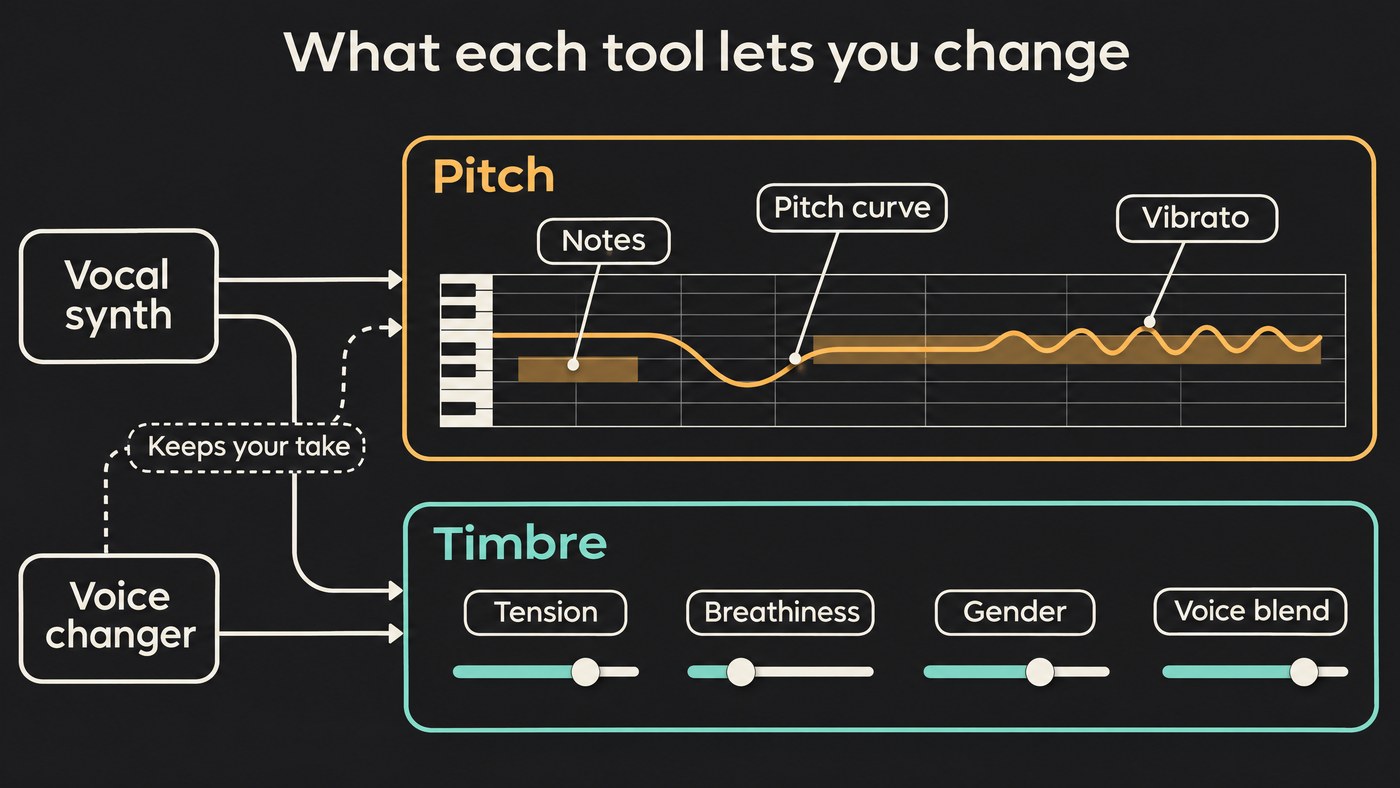
Pitch is which note is sung and how it moves: scoops into a note, drift, vibrato. Timbre is the colour of the voice: how tense, breathy, bright or chesty it sounds, and whose voice it seems to be. Tools split into two families, and the split decides what you can adjust.
- Vocal synths (Synthesizer V, ACE Studio, VOCALOID7) build the voice from notes and lyrics. Pitch and timbre are both curves and sliders you can change before rendering, note by note.
- Voice changers (Vocoflex, ACE's Voice Changer, Kits.ai, Soundverse Voice Swap) take a sung take and replace the timbre. The melody, phrasing and vibrato come from the take, and pitch control is usually a semitone shift.
Dreamtonics says it directly about its own changer: "While it transforms the timbre of your voice, Vocoflex does not change the pitch beyond simple pitch shifting." So if you need to rewrite the melody, you need a synth or a pitch editor, and if you need a different singer on a take you love, you need a changer.
Which voice synthesis tools give you pitch and timbre adjustment
Synthesizer V Studio 2 Pro (Dreamtonics)
Pitch. You draw pitch curves and vibrato depth in the piano roll, on top of the curves its AI generates. The manual's Notes panel adds an Expression Pad that steers how the AI sings a note: Vibrant for more exaggerated expression such as deeper vibrato, Refined for a stable, polished delivery, Raw for more human movement at the risk of off-pitch notes, and Rigid for a flat line. Vibrato Modulation scales a note's vibrato from 0.00 to 2.00. For a whole note group, Key Shift moves it up to 12 semitones either way and Pitch Shift fine-tunes it by up to 50 cents.
Timbre. The Synthesizer V product page lists gender, breathiness, mouth opening, consonant and vowel strength among its controls, and the manual adds Tension and Tone Shift, which makes a note sound like head or chest voice without changing its pitch. Each voice also has Vocal Modes that you can mix, with separate amounts for pitch, timbre and pronunciation, and AI Retakes regenerate a passage's pitch, timbre or timing.
Languages. Lyrics can be English, Japanese, Mandarin, Cantonese, Spanish or Korean, mixed in one track, sung in the voice you picked.
Best for: producers and songwriters who want the most detailed note-level control and offline rendering on their own machine.
ACE Studio
Pitch. ACE keeps two curves: AI pitch, generated from your notes, lyrics and voice, and user pitch, which overrides it. Its Vibrato tool sets amplitude, phase, frequency and attack and release envelopes per note.
Timbre. The Vocal Parameters docs describe a Dynamic envelope from soft to powerful, then four Advanced parameters: Air (raspier and brighter), Falsetto, Tension and Energy, which ACE notes is not simply volume. The docs advise small moves, and suggest lowering Tension when you add Falsetto. Voice Blending mixes several voice seeds of the same model version on faders, and you can save the blend as a preset.
Changing a recording. ACE's Voice Changer converts a selected region into another voice or an instrument, with a semitone shift and pitch correction by scale. In ACE's words: "The voice changer not only alters the timbre but also adjusts certain stylistic elements, while keeping the melody and lyrics unchanged."
Languages. Each note can carry its own language attribute, so one singer can switch languages mid-phrase.
Best for: producers who want synthesis, blending and voice changing in one app.
VOCALOID7 (Yamaha)
Pitch. The VOCALOID7 page lists freehand pitch drawing with the Pencil tool, and pitch curve preservation: you can lock a synthesized pitch curve and reproduce it with a different voicebank. That's a clean way to audition timbres over an identical performance.
Timbre. VOICE TYPE switches between vocal characteristics inside one voicebank, such as Normal, Power and Soft on the bundled asa. A new ATTACK parameter controls how defined the pronunciation sounds, and more than 100 style presets recall combinations of parameters and effects.
Languages. VOCALOID:AI voicebanks can sing lyrics that mix Japanese, English and Chinese.
Best for: Cubase users, since notes and lyrics can be entered in Cubase's Key Editor, and anyone with VOCALOID voicebanks from version 3 onward.
Vocoflex (Dreamtonics)
Timbre. The Vocoflex page treats timbre like a colour picker. Import a voice sample, where a 10-second excerpt works, or generate one with an X/Y pad for gender and a hue control for timbre. Voices you place "under the light" add together and voices "in the shadow" subtract, so a breathy voice lit against a clear one gets breathier still. Moving around a single voice makes it brighter, darker or softer while your pronunciation, pace and intonation stay.
Pitch. Simple pitch shifting only, as quoted above.
Practical details. It runs on your CPU in real time, from 35 ms round-trip latency in its lowest-latency mode, as a VST3, AU or AAX effect or standalone, with 40 voice presets to start from. It's $199 one-time with no trial, requires ID verification and embeds an inaudible watermark. It doesn't work with distorted input, choirs or background music.
Best for: singers and producers who want to reshape timbre live or on a clean take.
Kits.ai
Kits' Voice Blender takes two voice models and a blend ratio and creates a new voice in your library, which Kits suggests for adding range, timbre or raspiness to a model of your own voice. Its Voice Designer starts from a base voice type and adjusts tone, vibrato and breathiness. You then convert vocals into that voice in the browser. For more on building a voice from one singer, see the best AI tools to clone a specific vocal timbre.
Best for: designing a custom voice without a dataset.
Soundverse
Voice Swap re-sings a vocal or a full song in a Community, Public or your own trained voice, keeps the performance, and shifts pitch up to 24 semitones either way. AI Autotune corrects pitch to a key at a strength you choose, and AI Vocal Effects moves Brightness by up to 6 dB with a Saturation slider. There's no note-by-note editor for pitch curves or vocal timbre.
Best for: changing the voice on a take or demo without recording it again.
How to choose
- You write melodies in a piano roll and want every note's pitch and tone: Synthesizer V Studio 2 Pro or ACE Studio.
- You work in Cubase or own VOCALOID voicebanks: VOCALOID7.
- You love a take but need a different timbre: Vocoflex for live, local work; ACE's Voice Changer, Kits.ai or Soundverse Voice Swap for offline conversion.
- You want a new voice from two others: ACE Voice Blending, Kits Voice Blender or Vocoflex's light and shadow; Synthesizer V mixes Vocal Modes within one voice.
- You need one timbre across languages: Synthesizer V's cross-lingual singing, ACE's per-note languages or VOCALOID7's Japanese, English and Chinese.
Then test before you pay, using the same eight bars in each trial:
- Write a phrase with one long held note, a jump into falsetto and a soft, breathy line.
- Flatten the long note's vibrato and redraw it, to see how much pitch control you really have.
- Push tension and breathiness halfway, then blend or swap voices, and listen for artefacts.
- Bounce it and play it against your beat. Timbre choices that sound bold solo often disappear in a mix.
Style matters as much as timbre for a convincing part; our piece on whether AI voice synthesis can mimic vocal styles and genres covers that, and multi-part AI vocal harmonies covers stacking parts.
Where Soundverse fits
Soundverse is an AI music platform that takes you from idea to audience, built for independent artists who release music. For pitch and timbre, it works on audio. Train a model of your own voice with Train Voice Model, from at least 10 minutes of clean solo singing on Creator and up, then pick it in Voice Swap to re-sing a guide vocal in your timbre. Voice Swap runs on every plan, including Free. AI Autotune's Custom style sets correction strength from 0 to 100% and eases off on breathy sounds, and AI Vocal Effects adds the final tone.
What it won't do: draw a pitch curve or adjust tension per note. Pair it with a vocal synth when you need that.
This video trains a voice model on clean vocals, then uses it in Voice Swap to re-sing a track in that voice.
FAQ
What's the difference between pitch and timbre adjustment? Pitch adjustment changes the notes and how they move: scoops, slides and vibrato. Timbre adjustment changes the character of the voice singing them, such as breathiness, tension, brightness or the singer it sounds like. A good vocal synth gives you both, while a voice changer mostly gives you timbre.
Can I change a voice's timbre without changing its pitch? Yes. Synthesizer V's Tone Shift moves a note toward head or chest voice at the same pitch, VOCALOID7 can lock a pitch curve while you switch voicebanks, and voice changers such as Vocoflex or Voice Swap keep the melody of your take.
Which tools can blend two voices into a new one? ACE Studio's Voice Blending, Kits.ai's Voice Blender and Vocoflex's light and shadow mixing all do it. Synthesizer V's documented mixing is between the Vocal Modes of one voice.
Is there a free way to compare them? Synthesizer V has a 14-day trial and VOCALOID7 a 31-day trial; Vocoflex has none. Soundverse Voice Swap runs on the Free plan, so you can hear a take in another voice before you buy a synth.
Sign up for Soundverse free and try Voice Swap on one of your own takes. More vocal guides on the Soundverse blog.
