Is It Possible to Adjust the Pitch and Vibrato of Synthesized Vocals?
Yes, you can adjust the pitch and vibrato of synthesized vocals. How to do it in ACE Studio, VOCALOID, Melodyne and Logic, with settings that sound human.
Yes, you can adjust the pitch and vibrato of synthesized vocals, and how much control you get depends on where the vocal came from. Note-based synths such as ACE Studio and VOCALOID let you redraw every note's pitch curve and vibrato. A vocal from a full-song generator gets edited like a recording, in Melodyne or Logic Pro's Flex Pitch.
Voice conversion sits in between: you can transpose it freely, but the vibrato comes from the take you feed it. Below is how to work in each case, plus settings that sound natural. Tool details come from each maker's own documentation, checked on 7 November 2026.
What you can change depends on where the vocal came from
- A note-based vocal synth such as ACE Studio or VOCALOID stores the performance as editable curves. Change any note, scoop or vibrato, then render again.
- Generated audio, from an AI singing generator or a full-song generator, arrives as a finished file. Pitch and vibrato are baked in, so you either edit the audio with a pitch editor or generate again.
- Voice conversion (Soundverse Voice Swap, RVC and similar) lets you shift the key in semitones, but the melody, timing and vibrato follow the take you converted. To change the vibrato, change the source take first.
How to adjust pitch and vibrato in a vocal synth
ACE Studio
ACE Studio's Editing Pitch docs separate two curves: AI pitch, drawn dark, which the model generates from your notes, lyrics and voice, and user pitch, drawn white, which overrides it. A good order of work:
- Flatten the default vibrato first. With the Modulation tool, drag down on the note; drag all the way and the pitch becomes a straight line, per ACE's vibrato guide.
- Add your own. With the Vibrato tool, drag across the note from right to left, horizontally for length and vertically for amplitude. Handles then set amplitude, phase, frequency and the attack and release envelopes.
- Lock what already works. The Fixed brush turns a stretch of AI pitch into user pitch, so it isn't regenerated when you change a lyric.
Skip step 1 and you'll hear why it matters. The docs warn: "Usually, for a longer note, the AI pitch already has a vibrato. In this case, if you add an extra vibrato on it, the final pitch would be in chaos."
VOCALOID
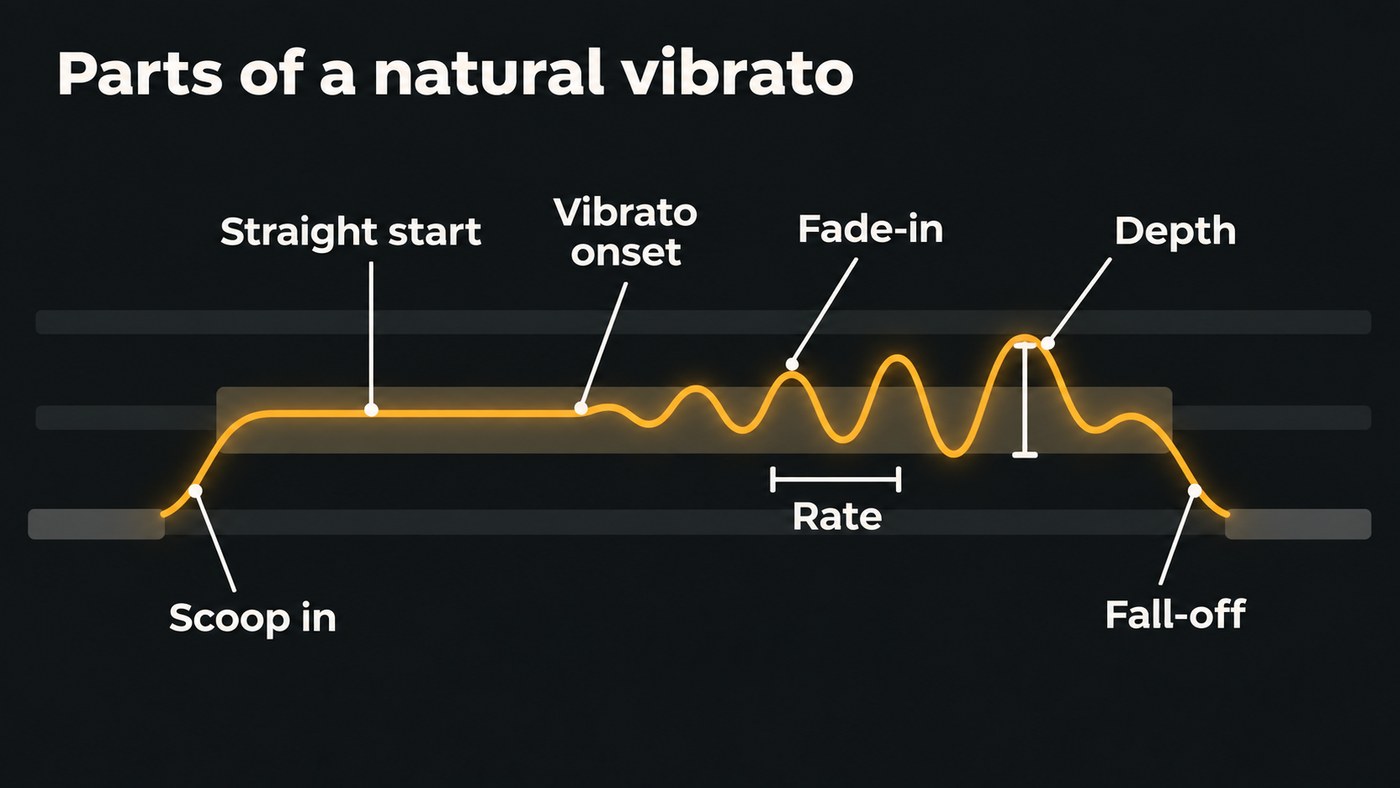
Yamaha's Try VOCALOID tutorial covers the same moves in the VOCALOID Editor. The Pitch Tool's Front Transition and Front Drift points create a slide up into a note, the scoop singers use. The Vibrato Tool sets Depth, Start Position and Rate. The tutorial sets Depth to about 60, moves the start to 45% of the note and lowers the Rate, noting that vibrato sounds unnatural when it's too fast.
How to edit pitch and vibrato on an AI-generated vocal
When the vocal comes from a generator, treat it like a recorded take:
- Get the vocal on its own. Soundverse's AI Singing Generator gives you an a cappella vocal with nothing behind it. For a full song, Stem Separator splits it into vocals and backing; our guide to free tools for isolating vocals covers other options.
- Open it in a pitch editor that can see notes and vibrato, such as Melodyne or Logic Pro's Flex Pitch. If your DAW already splits stems, see DAWs with AI stem separation.
- Fix wrong notes first, by dragging each note up or down, then shape vibrato and drift.
- Bounce the edited vocal and put it back over the instrumental, then listen in context. A wobble that sounds wide solo can disappear in the mix.
In Melodyne
Melodyne's Pitch Modulation and Pitch Drift tools sit under the Pitch Tool. Modulation covers fast movement such as vibrato; drift covers the slow wander within a note. Drag on a note to scale either one, or type a value: 100% is the original, 0% a straight line, and negative values invert the curve.
Because 100% means the vibrato already there, the tool is best at taming or widening a wobble, less so at inventing one on a dead-straight note. And don't zero everything. Celemony's manual is blunt: "If you eliminate altogether both the modulation and the drift, you will get an unnaturally flat monotone that can be suitable for effects."
Edition matters. Celemony's editions page describes Melodyne 5 essential as basic pitch and timing editing, while assistant and up offer the full toolkit for pitch, timing, vibrato, phrasing, formants and dynamics.
In Logic Pro
With Flex Pitch on, Apple's Logic Pro guide shows each detected note with hotspots. Select a note, then drag:
- the upper-mid hotspot vertically to change the vibrato
- the upper-left and upper-right hotspots for pitch drift at the start and end of the note
- the lower-mid hotspot for fine pitch
In the Audio Track Editor, the Vibrato tool does the same job: drag up on a note for more vibrato, down for less.
Changing the key or range of a synthesized vocal
Sometimes the problem is the register, not the wobble. Three ways to move it, from the Soundverse side:
- Voice Swap. Voice Swap shifts the pitch up to 24 semitones either way while re-singing the vocal in another voice model; 12 semitones takes a part up or down an octave. Its page suggests it for a demo that sits too high or too low for the voice.
- AI Studio. AI Studio shifts a clip's pitch up to 12 semitones either way. Its VocalTune One effect corrects pitch as you listen, but the correction isn't printed into exports, so use a pitch editor for a tuning pass you want to keep.
- Fix the notes before anything is sung. MIDI to Song Generator builds a sung song that follows the melody in your .mid file. Its page describes converting a rough recording with Audio to MIDI, correcting the notes in AI Studio's piano roll, then running the MIDI.
This walkthrough of Soundverse's Edit tools shows Voice Swap from 2:18, along with Stem Separator and Audio to MIDI.
What natural pitch and vibrato sound like
Researchers have measured this for decades. In a paper for the sixth International Conference on Music Perception and Cognition in 2000, Renee Timmers and Peter Desain summarise earlier studies: singers' vibrato runs at a rate between 5.5 and 8 Hz, with an extent between 0.6 and 2 semitones. They also note that sung notes generally start with a rising pitch and end in the direction of the next note.
Tools label these settings differently, so use the research as a reference and your ears as the judge. Settings that sound human:
- Start straight, then add vibrato. Let the note settle first. ACE's guide says vibrato suits longer notes with a fairly steady pitch.
- Fade it in with the attack envelope rather than switching it on at full depth.
- Vary the depth across the song. Little or none in the verse, widest on the last long note of the final chorus.
- Keep the rate steady within a note. Too fast sounds nervous.
- Leave short notes and fast runs alone. Vibrato needs time to read.
- Keep the scoops and fall-offs. Perfectly flat jumps between notes sound programmed.
For which singing tools give you this control, see the best AI singing generator platforms for independent artists, and for realism more broadly, the most realistic AI vocal synthesis for singer-songwriters.
Where Soundverse fits
Soundverse is an AI music platform that takes you from idea to audience, built for independent artists who release music. For pitch and vibrato, it works before and around the edit. MIDI to Song Generator sings your lyrics over the melody in your MIDI file, so the notes are right before a voice is added. Voice Swap, on every plan including Free, re-sings a take in another voice and shifts it up to 24 semitones either way. Stem Separator pulls the vocal out of a generated song for editing elsewhere, and Train Voice Clone lets you describe a voice, for example as a warm acoustic vocal with subtle vibrato.
Soundverse has no note-by-note vibrato editor. To draw vibrato, use a vocal synth such as ACE Studio; to reshape it on audio, use Melodyne or Logic Pro's Flex Pitch.
FAQ
Can I remove the vibrato from an AI vocal? Yes. In ACE Studio, drag down with the Modulation tool until the line goes straight. On audio, lower the Pitch Modulation value in Melodyne or drag down with Logic's Vibrato tool. Leave a little unless you want an obviously straight, effected tone.
Can I change the key of an AI-generated vocal? Yes. Voice Swap shifts a vocal up to 24 semitones either way, and AI Studio shifts a clip up to 12. Large shifts change a voice's character more than small ones, so audition a few settings.
Is pitch correction the same as editing vibrato? They overlap. Correction pulls each note toward the right pitch, while vibrato editing changes the wobble inside a note. Heavy correction can flatten vibrato as a side effect, which is part of why an over-tuned vocal sounds robotic.
Do I need to be able to sing to shape vibrato? No. A vocal synth lets you draw it, and Melodyne or Flex Pitch let you scale what a generator gave you. If you do sing, a take with the vibrato you want, run through voice conversion, keeps your phrasing.
Sign up for Soundverse free and try a pitch shift on your own demo in Voice Swap. More vocal guides on the Soundverse blog.
