Soundverse edit tools: AI Remix, stems, Extend, Inpainting and MIDI
Change a song you already have: AI Remix, Similar Song, AI Stem Generator, stem separation, Extend, Inpainting and Audio to MIDI, with the plan for each.
Quick answer: Soundverse's edit tools work on a song you already have. AI Remix restyles it and keeps the melody, Similar Song Generator writes a new song in its style, Stem Separator and AI Stem Generator split it or add a part, Extend and Inpainting change its length or one section, and Audio to MIDI and VocalMIDI One turn sound into notes. They're for artists, producers and creators who want new versions without starting over. Extend, 2- and 6-stem separation and Audio to MIDI run on Free; AI Remix, Similar Song, AI Stem Generator, Inpainting and the 14+ stem split need Creator ($12.49/mo) or above.
One reference, four versions: "Radiant Motherland"
Soundverse's own demo starts with Vande Mataram, Bankim Chandra Chattopadhyay's 1875 hymn to the motherland and a public-domain song. The team gave Similar Song Generator one reference song and the original verses, on Soundverse v9. About 90 seconds later it returned a new song, "Radiant Motherland", with its own title and cover art.
Then AI Remix kept the melody and changed everything around it, producing a cinematic orchestral anthem and an Indian classical fusion. The video closes on four versions from one reference.
Vande Mataram becomes "Radiant Motherland", then two AI Remix versions.
"AI Remix keeps the melody and changes everything around it." (from the video's description)
How to run the same workflow
- Pick a reference you have the rights to. Open Similar Song Generator and add the track from your Library or your device. A song you own, or a public-domain one like the demo's, is the simplest place to start.
- Choose the 30 seconds to match. Drag the Reference region to the part with the sound you want, such as the chorus. Left alone, it uses the first 30 seconds.
- Add the lyrics. Paste up to 3,000 characters; they're sung exactly as written. Help me write can draft them if you don't have any.
- Pick a model and generate. The demo used Soundverse v9, which is on Pro. Click Generate in Chat, and the song arrives with a title and cover art.
- Remix it. Open AI Remix on the result, describe the new style in Prompt, for example a cinematic orchestral anthem, keep or edit the lyrics and generate. Run it once per version you want.
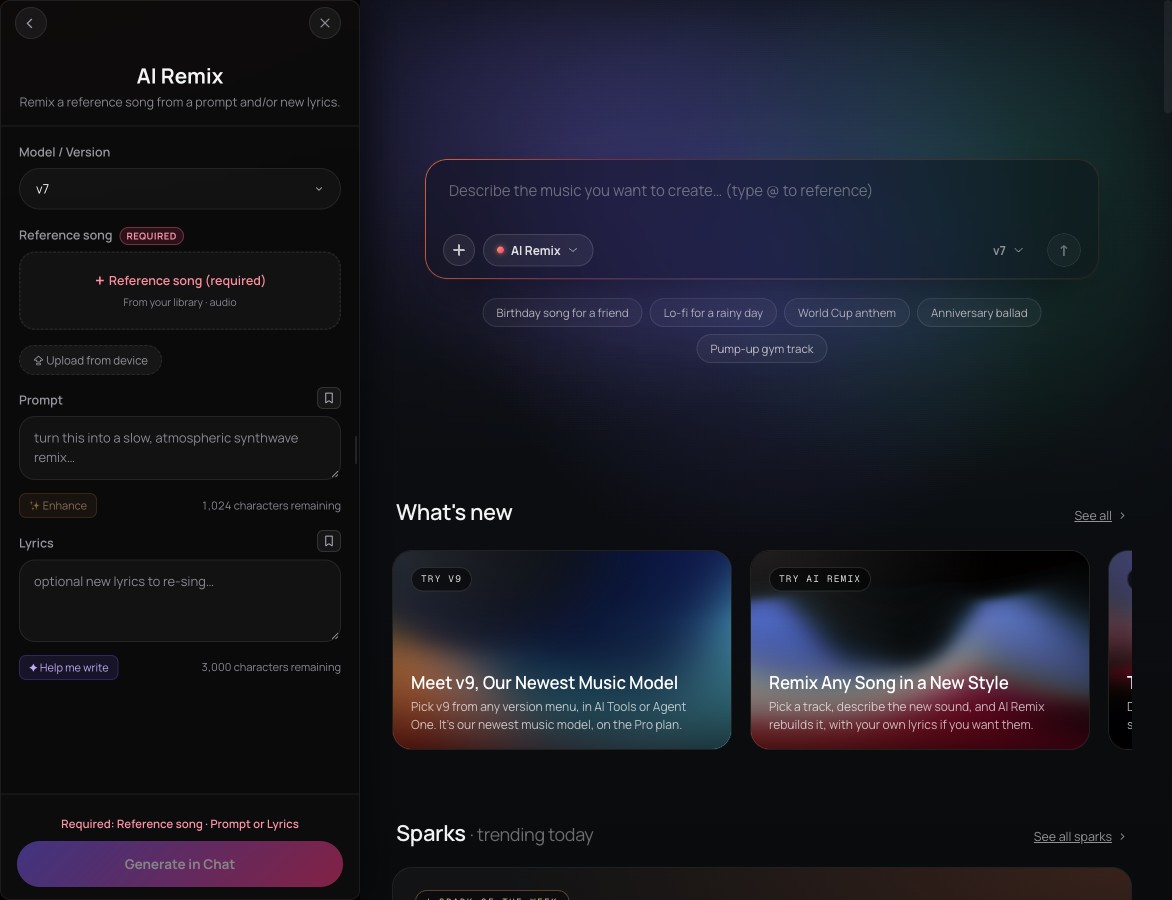 AI Remix: a reference song, a prompt, and lyrics you keep or rewrite.
AI Remix or Similar Song?
The two sound alike but do different jobs.
- AI Remix reworks your actual song. The melody carries over into the genre, tempo or mood you describe, and it re-sings the original lyrics unless you write new ones. A remix is always sung, so for an instrumental, split it with Stem Separator and keep the backing. The reference can run from 10 seconds to 5 minutes 50 seconds.
- Similar Song Generator writes a new song. It matches the style of 30 seconds of a reference and sings your lyrics over it. There's no text prompt: the reference section and your lyrics are the only inputs.
The AI Remix tutorial moves songs from pop to lo-fi, a ballad to EDM and an acoustic track to hip-hop. In its words: "Your melody and vibe stay, and the genre changes."
AI Remix: one song, a new genre, from a prompt.
Stems: split what's there, generate what's missing
Stem Separator splits a finished mix. Choose 2 stems (vocals and backing), 6 stems (vocals, drums, bass, guitar, piano and other) or 14+ stems, the maximum split, which puts every part on its own with a MIDI file for each. Songs can be up to 50 MB. The 2- and 6-stem splits come as WAV, FLAC or MP3; the maximum split comes as WAV plus MIDI.
AI Stem Generator does the opposite: it creates one new part that fits a track you already have. Pick from 12 stem types (Instrumental, Vocals, Drums, Bass, Guitar, Keyboard, Percussion, Strings, Synth, FX, Brass or Woodwinds) and describe the sound you want. The headline use is a backing track for an a cappella: upload your vocal, leave Stem on Instrumental and name a style. Clean, dry vocals with little background noise give the best results.
Stem Gen: an instrumental built around your vocals, in the style you pick.
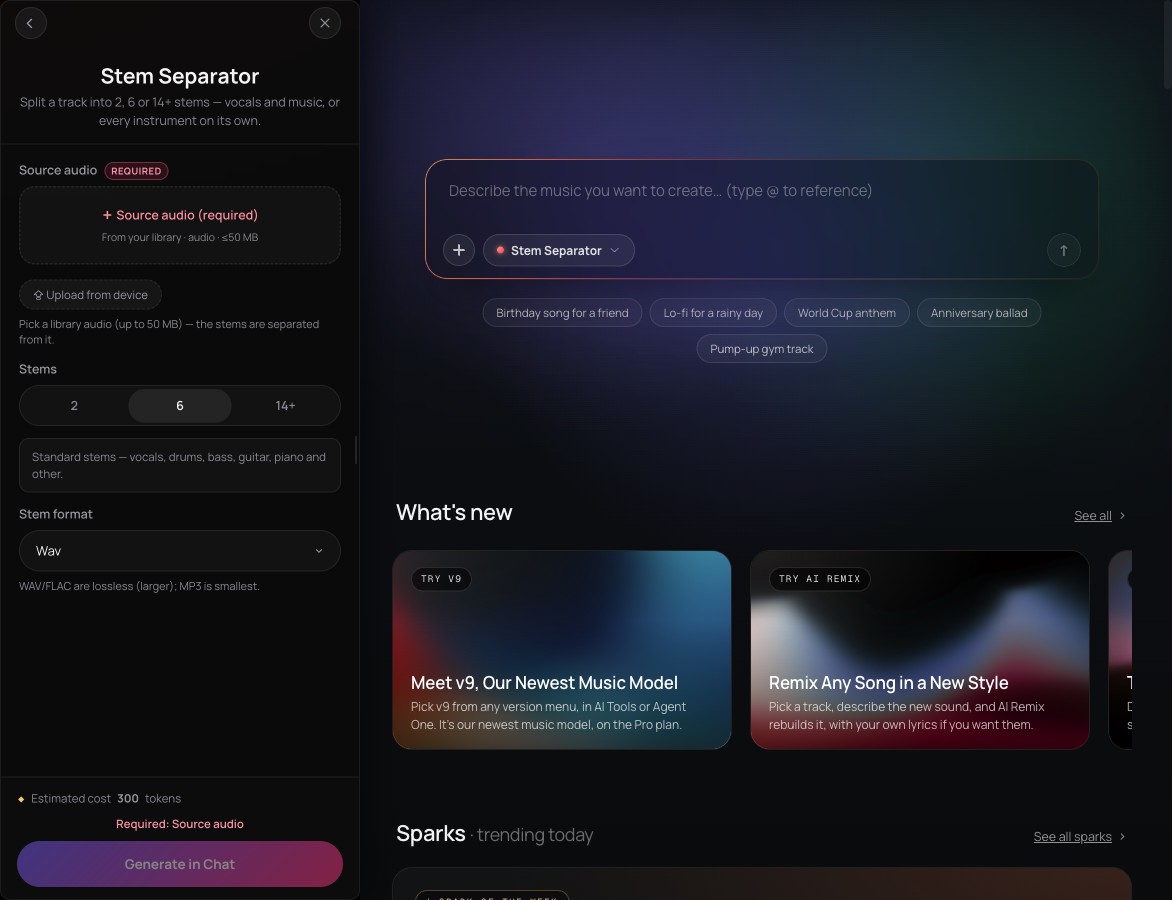 Stem Separator: pick the size of the split and the file format.
Extend and Inpainting: more song, or a different section
Extend Music makes a track longer. In Extend Music mode, each run adds up to 85 seconds of instrumental music after the end or before the start, and an empty prompt continues in the track's own style. Extend Song continues a vocal song from lyrics you write for the next part. Either way you get the whole track back, not a clip to stitch on.
Inpainting changes what's already there. Drag the handles on the waveform to select a section, then type new lyrics, which are sung word for word on the default model, or switch on Instrumental and pick up to 5 style tags. Everything outside the selection stays as it was. On the default model it rewrites up to about a minute at a time, so take a longer change in shorter sections.
Audio to MIDI and VocalMIDI One
Audio to MIDI transcribes the notes in a recording into MIDI, with one .mid file per instrument it detects, such as piano, bass, strings and guitar. Recordings can be up to 30 minutes long, and Tempo (BPM) fills itself in so the notes land on the right bars. Choose By instrument to split a full mix, or One track for a solo part. It's billed by the length of your audio, and the files save to your Library, ready for AI Studio or any DAW that reads Standard MIDI Files.
Audio to MIDI: one song in, a MIDI track per instrument out.
VocalMIDI One works live instead. It's an AI Studio instrument that turns singing, humming or beatboxing into MIDI as you perform, in Melody, Drums or Chords mode, snapped to the key you set. In Drums mode it sorts beatboxed hits into kick, snare and hat on the General MIDI drum notes 36, 38 and 42. It uses no tokens, and the voice analysis runs locally in your browser.
 From a recording, or your voice, to notes you can edit.
Which tool, which plan
| Tool | What it does | Plan (as of November 2026) |
|---|---|---|
| AI Remix | Restyles your song, keeps the melody, re-sings the lyrics | Creator and up |
| Similar Song Generator | A new song in a reference's style, sung to your lyrics | Creator and up |
| Stem Separator | Splits a mix into 2, 6 or every stem | 2 and 6 stems on every plan; 14+ stems on Creator and up |
| AI Stem Generator | Generates one new part that fits your track | Creator and up |
| Extend Music | Adds music to the start or end, or continues a song | Every plan, including Free |
| Inpainting | Rewrites one section, keeps the rest | Creator and up |
| Audio to MIDI | A recording to one .mid file per instrument | Every plan, including Free |
| VocalMIDI One | Voice to MIDI, live, in AI Studio | Part of AI Studio on every plan; no tokens |
Every AI tool here uses tokens at its own price, and Free starts with 1,000 one-time tokens. Current plans are on the pricing page.
Edit inside AI Studio, or ask Agent One
Each tool also runs on the timeline. In AI Studio, right-click a clip, open AI Tools and choose Remix Track, Generate Stem, Separate Stems or Convert to MIDI. The result lands on a new track under the original, so you can compare versions in one project. For Inpainting, right-click a selected range and choose Inpaint with Song or Inpaint with Instrumental. Our AI Studio guide walks through a full session.
Or describe the change to Agent One. In Soundverse's Edit walkthrough, "take the vocals out, add a bansuri line and make the chorus longer" becomes a stem split, a new layer and an extend, with Agent One picking the tool for each step.
Rights: what you can remix
Only edit songs, vocals and voices you own or have permission to use; that's why the demo used a public-domain song. On Free, what you make is for personal, non-commercial use. Creator carries the "Royalty Free license — monetize your content". Pro's "Sample license — flip & release derivatives" is the one that fits releasing a remix, and streaming revenue needs Max's "Distribution license — collect streaming revenue". Soundverse's own distribution is coming to Max. Read the Terms of Service before you release.
On authorship, the US Copyright Office's 2025 report on copyrightability says prompts alone don't make you the author. Human-authored parts, such as lyrics you write and your own arrangement and edits, can be protected. This isn't legal advice.
Want to check a track's tempo, key and sections before you edit? See our guide to the analyze tools. Comparing options? Read the best AI remix apps.
FAQ
Is AI Remix free?
No. AI Remix is on Creator and up, and each remix uses tokens. The Free plan includes Extend, 2- and 6-stem separation and Audio to MIDI.
Can AI Remix make an instrumental?
No, a remix is always sung, even if the prompt asks for no vocals. Run Stem Separator on the remix and keep the backing stem, or use Similar Music Generator for a new instrumental in a song's style.
Can I remix a song I didn't make?
Only one you have permission to use, or one that isn't under copyright, like the public-domain Vande Mataram in the demo. The same goes for any file you upload as a reference. This isn't legal advice.
What's the difference between Stem Separator and AI Stem Generator?
Stem Separator splits out the parts already in your mix. AI Stem Generator creates a part that isn't there yet, such as a bassline under a piano idea or an instrumental for an a cappella.
Can I take the MIDI into another DAW?
Yes. Audio to MIDI saves a .mid file per instrument to your Library, and in AI Studio, Export as MIDI File downloads a clip's notes.
Try it: remix a song, or open your track in AI Studio and right-click a clip for the edit tools.
