Software for Editing Audio and Generating Music Videos, Graded on Both Halves
Music video software graded on both halves, audio editing and video generation: Soundverse, CapCut, Premiere, Resolve, Descript, Kapwing and more.
If you need software for editing audio and generating music videos in one place, the music video software shortlist is Soundverse AI Studio, CapCut, Adobe Premiere with Firefly, Descript and Kapwing. DaVinci Resolve has the strongest audio editor here but no prompt-to-video tool, and Neural Frames or Kaiber make the video but need an audio editor beside them.
Each tool below is graded on both halves from its own pages, read on 21 November 2026, followed by a 30-minute walkthrough from a rough mix to a finished video.
One app or two
- One app. Audio and video share a timeline, so a trim on the music moves the picture with it and nothing is exported twice. Best for a single, a teaser or a lyric clip that one person finishes.
- Two apps. A generator such as Neural Frames or Kaiber makes the visuals from a finished mix, and a DAW handles the sound. You get each tool's strengths and pay for them with exports and a sync check by ear.
- A hybrid. Generate in one app, finish in the editor you know. Every tool here exports a plain MP4.
If you're producing the music itself or scoring a locked cut, our guide to AI tools for music production and video syncing grades that side. If the audio has to travel to a colleague's video app and back, see audio editing software that integrates with video production apps.
What to check before you choose music video software
- Audio editing depth. Vocal cleanup (noise, hum, harsh S sounds), waveform cuts and fades, several tracks, stem separation and a loudness target.
- Video generation types. "Generate" covers four jobs: a full music video built from your song, single shots from a prompt or image, audio-reactive visualizers, and lyric or caption videos.
- Timeline sync. The video should sit on the same timeline as the audio, with cuts that can land on beats and section changes.
- Export formats. YouTube's recommended upload settings list an MP4 container, H.264 video and AAC-LC audio at 48 kHz, with 8 Mbps suggested for 1080p at standard frame rates. It adds: "Content should be encoded and uploaded in the same frame rate it was recorded."
- Plan limits. Resolution caps, export length, watermarks, generation credits and commercial use change by plan, so read the pricing page.
For codecs and containers in depth, see the most common file formats for exported AI video.
Music video software graded on both halves
Soundverse AI Studio and AI Music Video Generator
- Audio editing: AI Studio is a multitrack studio in the browser with audio, MIDI, video and image tracks. You split, trim, fade and pitch-shift clips, automate volume, pan and effects, and use built-in EQ, compression, de-essing and limiting. Mastering One masters toward a target such as Streaming −14 LUFS, and Analysis One meters loudness and true peak. AI Vocal Cleaner removes noise, hum and clicks from a vocal and levels it.
- Video generation: AI Music Video Generator (Creator and above) takes your song or a prompt. Agent One writes a script and quotes the cost for approval, then films the scenes and cuts them to the music, with optional lip sync, in 16:9 or 9:16 at up to 1080p. AI Video Generator makes single 3 to 30 second clips, and the Visualizer renders an audio-reactive MP4 in 16:9, 9:16, 1:1 or 4:5.
- Sync and export: video sits on lanes above your tracks (one lane on Free). Video exports as MP4, WebM or MOV at 24, 30 or 60 fps: 720p on Free, 1080p on Creator, up to 4K on Pro. WAV needs Creator; Free exports MP3.
- Watch for: no VST or AU plugins, browser export is blocked over 15 minutes or 24 tracks, and video export needs current desktop Chrome or Edge.
CapCut
- Audio editing: the AI music video page says CapCut enhances audio and removes background noise automatically, and its tools menu adds a voice enhancer. That's cleanup rather than mixing or mastering.
- Video generation: you upload music, pick a style, and the AI analyzes beats to build visual sequences with transitions. Auto lyrics, under Captions, writes lyric subtitles timed to the song.
- Export: you set quality, frame rate and codec, then save or post to TikTok or YouTube.
- Best for: vertical edits and lyric clips posted the same day.
Adobe Premiere with Firefly
- Audio editing: the Premiere features page lists dialogue cleanup, one-click AI mix enhancement, AI separation of overlapping voices and of a track's parts, automatic tagging of clips as music, dialogue, effects or ambience, and sound effects generated from a description.
- Video generation: Generative Extend adds frames and missing ambient sound to a clip, and Firefly generates video, images and music inside Premiere. Text to Video is listed among Creative Cloud Pro's premium features.
- Plan limits: as served to us, the Premiere plan came with 25 monthly generative credits and Creative Cloud Pro with 4,000.
- Best for: editors already in Creative Cloud.
DaVinci Resolve
- Audio editing: Blackmagic's DaVinci Resolve page says of the Fairlight page: "It’s like having a professional digital audio workstation (DAW) built into your editing and color system!" It lists up to 2,000 tracks, realtime effects, EQ and dynamics, sample-accurate editing, ADR and Foley tools, and third-party audio plugins.
- Video generation: none from a prompt. The new AI tools the page lists are content search, focal point adjustment and facial refinement.
- Cost: a free version up to Ultra HD at 60 fps; DaVinci Resolve Studio is listed at $236.
- Best for: finishing generated clips: cut, grade and mix here.
Descript
- Audio editing: you edit by editing the transcript, with multitrack audio and Studio Sound for one-click noise removal and voice enhancement.
- Video generation: Generate video (from text) and Generate image run through Underlord, its AI co-editor.
- Plan limits: Descript's pricing page gives Free 60 media minutes a month and 100 one-time AI credits; Hobbyist exports 1080p without a watermark; Creator exports 4K and adds video generation with the latest models.
- Best for: speech-led videos such as interviews and lyric breakdowns.
Kapwing
- Audio editing: its AI video generator page points to a built-in Audio Editor for cleaning audio, removing background noise, adding music and effects, and splitting or merging audio.
- Video generation: Kai, its assistant, can strengthen a prompt, build a storyboard and pick a model; you generate scenes or multi-scene videos from a prompt, image, script or PDF, in 9:16, 16:9, 1:1 and more, then edit on the timeline.
- Plan limits: per its pricing page, Free exports are watermarked, 720p and up to 4 minutes; Pro removes the watermark and exports 4K, up to 2 hours.
Neural Frames or Kaiber, paired with an audio editor
- Video generation: Neural Frames analyzes your song's rhythm, energy and structure, and extracts stems so visuals can react to drums, bass or vocals. Paid plans upscale to 1080p and its top two tiers to 4K. Kaiber's Music Video Sequence maps clips to your song for videos of 30 seconds to 4 minutes, at up to 1080p.
- Audio editing: not their job. Master the mix in a DAW or browser editor first, then upload a WAV.
A 30-minute walkthrough: rough mix to finished music video
This uses Soundverse, with equivalents in brackets. It's about 30 minutes of hands-on time; render time depends on the song's length and the video model.
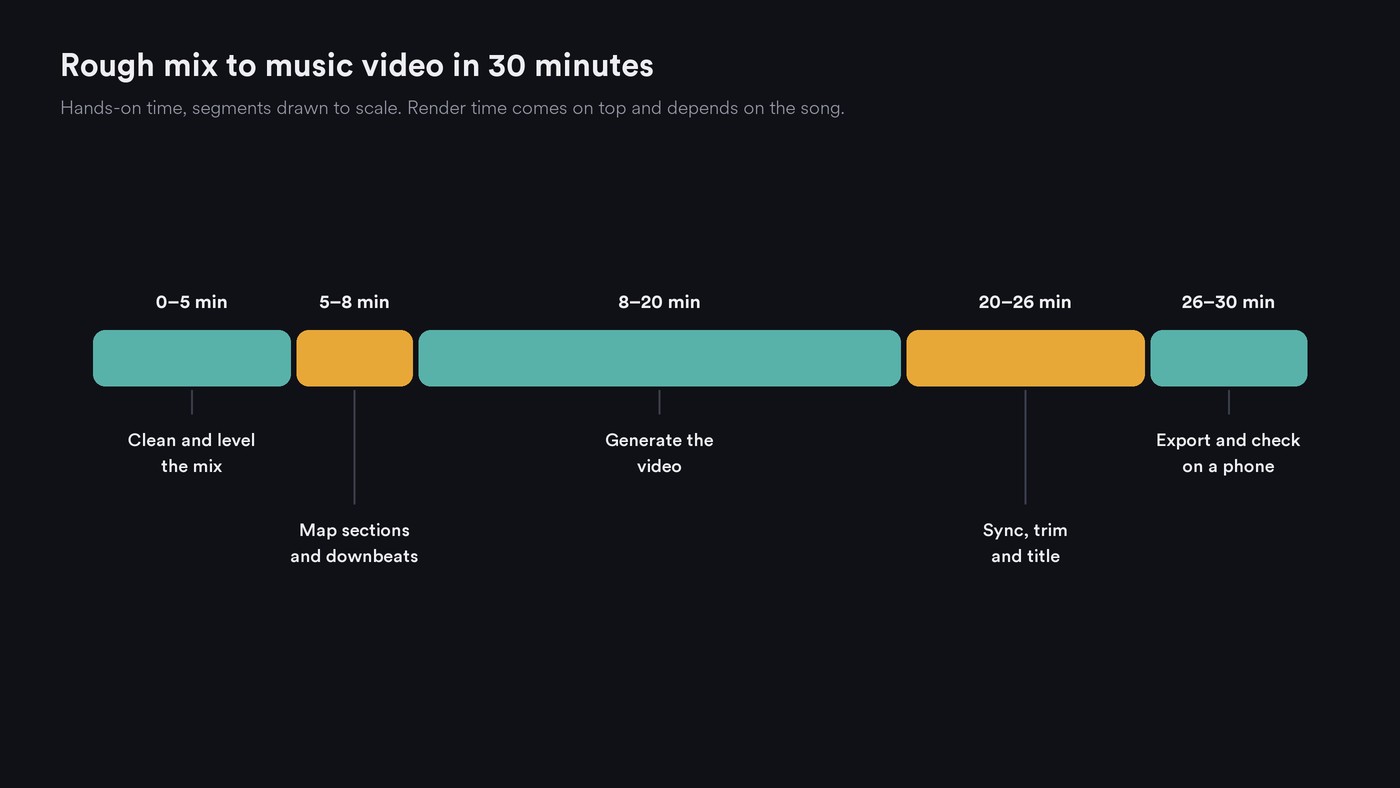
- Clean and level (0 to 5 minutes). Import the rough mix into AI Studio, running AI Vocal Cleaner first on a separate vocal file. Put Mastering One on the master at Streaming −14 LUFS, press Master during the loudest chorus, and check true peak in Analysis One.
- Map the song (5 to 8 minutes). Run Section Analysis for section start times, tempo and downbeats. Note where the first chorus starts and pick a 15 to 30 second hook.
- Generate the video (8 to 20 minutes). In AI Music Video Generator, choose Custom, then Use Existing Song, and upload the mastered WAV. Describe the look, add image references, pick 16:9 and approve the script. Meanwhile, render a 9:16 Visualizer in AI Studio. (With Neural Frames, upload the same WAV and start Autopilot.)
- Sync, trim and title (20 to 26 minutes). Open the result in AI Studio, nudge any cut that misses a downbeat and start the picture on the first beat.
- Export and check (26 to 30 minutes). Export MP4 at the frame rate you generated in, at 1080p on Creator, plus a WAV if an editor will finish it. Watch once on a phone with sound, then on headphones.
This short tutorial builds a song, an AI video and sound effects side by side in AI Studio, lines them up on one timeline and exports the finished piece. For treatment, shot lists, grading and delivery around this step, see the full workflow for creating a music video with AI.
Where Soundverse fits
Soundverse is an AI music platform that takes you from idea to audience, built for independent artists who release music. Here it covers both halves in one place: AI Studio edits, mixes and masters the audio on the same timeline as your video lanes, and AI Music Video Generator turns a finished song, or a one-line idea, into a scripted video cut to the music that you can reopen in AI Studio. Lip Sync, AI Video Generator and the Visualizer add performance shots, single clips and audio-reactive versions.
A desktop editor suits you better if you need third-party plugins, a 4K generated music video, or projects longer than 15 minutes. Licensing is set by plan: the Free plan is for personal use, and the Creator plan comes with a royalty-free license.
FAQ
Is there one app that edits audio and generates a music video? Yes. Soundverse, CapCut, Premiere with Firefly, Descript and Kapwing do both, with different depth.
Can I generate a music video from a song I've already mixed? Yes. Soundverse's AI Music Video Generator takes an MP3, WAV, M4A or FLAC of up to 50 MB, Kaiber's Music Video Sequence makes 30-second to 4-minute videos from your audio, and Neural Frames builds visuals that react to your track.
Do I still need a DAW? For recording a band, third-party plugins or a detailed mix, yes. For cleanup, level and loudness under a music video, the audio tools in these apps are usually enough.
Sign up for Soundverse free and edit your track and make its video on one timeline. More guides on the Soundverse blog.

