Looking for Intuitive Audio Editing Software That Integrates Well With Video Production Apps
Audio editing software for video, graded on round-trips: Fairlight, Audition, Logic Pro, Pro Tools, Descript, REAPER, Audacity, plus a handoff checklist.
The best audio editing software for video is the one that moves your edit to the video timeline and back without anyone re-syncing by hand. If you're looking for intuitive audio editing software that integrates well with video production apps, start with your video editor's partner: Fairlight in DaVinci Resolve, Audition for Premiere, or Logic Pro for Final Cut Pro.
Everything else connects through files: AAF, XML, EDL or plain stems. Each tool below was checked on its own pages on 21 November 2026, and we say where a vendor blocked our reader.
What "integrates well" means between audio and video apps
- Round-tripping. A clip or sequence goes to the audio editor and comes back to the same place on the video timeline, with no manual export and re-import.
- A shared timeline. Better still, no trip at all: the audio tools live inside the video app.
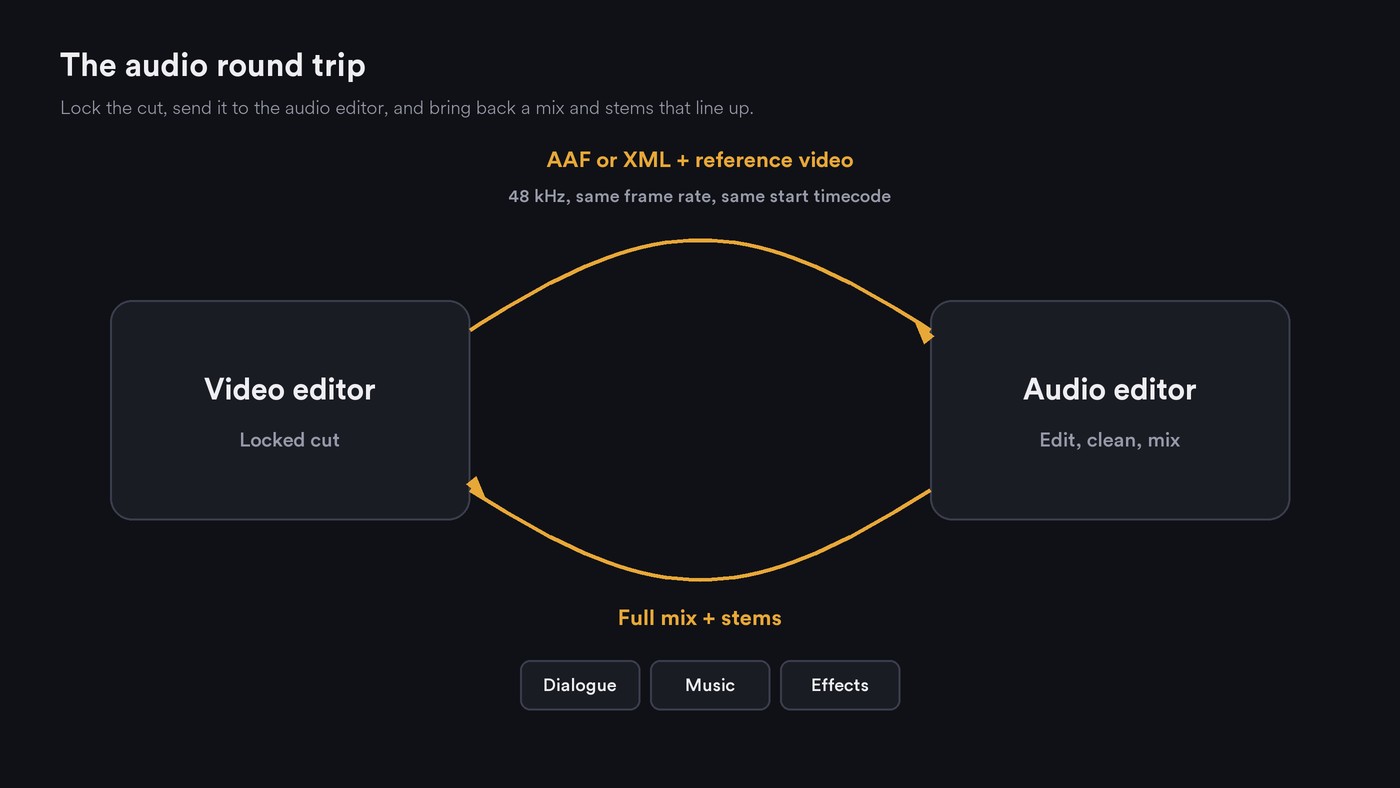
- Interchange files. When the apps differ, a file describes the edit. Apple describes AAF as carrying multiple audio tracks with references to tracks, time positions and volume automation. Final Cut Pro XML moves audio data between Final Cut Pro and Logic Pro. EDL is a bare cut list; OMF is AAF's older predecessor.
- Timecode and frame rate. Both apps must agree on the start timecode and frames per second. YouTube's recommended upload settings say to upload at the frame rate you recorded, and list 24, 25, 30, 48, 50 and 60 fps as common.
- 48 kHz sample rate. The same YouTube page recommends 48 kHz audio. Convert a 44.1 kHz song once, at the start, not on every trip.
- Stems and dialogue/music/effects splits. Separate dialogue, music and effects files let an editor rebalance one without asking for a new mix.
- Plugin formats. Check for VST3 on Windows and AU on macOS, so effects open on both machines.
- Cloud project links. Shared online projects replace file transfers when everyone uses the same app.
Audio editing software for video, graded by how it connects
Intuitive, for this job, means a round trip you can repeat from memory with nothing to re-sync.
DaVinci Resolve Fairlight
- How it connects: it doesn't need to. Blackmagic's Fairlight page says you move between sound editing and picture editing with a single click, and describes multi-user projects where sound and picture work in parallel: "you’ll never have to conform again because you’re working in the same project."
- Intuitive for editors: the arrow and selection tools match Resolve's edit page.
- Extras: third-party VST and Mac AU plugins, ADR, and an external audio process command that sends a clip to an app such as iZotope RX and puts the result on a new layer above the original.
- Cost: a free version; DaVinci Resolve Studio is listed at $236.
- Best for: editors who want to finish sound without leaving the project.
Adobe Audition with Premiere
- How it connects: Adobe's Audition page presents Audition as an audio workstation built to speed up video production, with multitrack, waveform and spectral views, and points to its workflow with Adobe Premiere.
- Blocked: Adobe's help center returned "Access Denied" (403) to our reader on 21 November 2026, so we couldn't confirm the current round-trip commands. Check Premiere's Edit menu for the Audition options in your version.
- Cost: US$22.99 a month on the annual plan, billed monthly.
- Best for: Premiere editors already paying for Creative Cloud.
Logic Pro with Final Cut Pro
- From the video app: in Logic Pro 13, File > Import > Final Cut Pro XML brings in a Final Cut sequence with volume and pan automation, and offers to convert files at a different sample rate (Apple's guide).
- Back to it: File > Export > Project to Final Cut Pro XML returns the mix, optionally with the video or as a compound clip. Software instrument tracks are bounced to audio; MIDI tracks are ignored.
- To a mixer: Logic's Project as AAF File exports at 44.1, 48, 88.2 or 96 kHz, 16 or 24-bit, as WAVE or AIFF.
- Stems from the edit: Final Cut Pro's share roles exports dialogue, music and effects roles as separate files, or as one multitrack QuickTime or MXF file.
- Best for: Mac editors who score or mix their own cuts.
Pro Tools
- Blocked: Avid's product and comparison pages returned 403 to our reader on 21 November 2026, so we couldn't check which tier imports what.
- What we could confirm: Avid's Pro Tools 2026.11 release notes (updated 18 November 2026) list fixes for the Avid Video Engine, video tracks, MXF import and synchronization. Apple's Logic guide names Pro Tools as an app that uses AAF, and Descript's help warns that some Pro Tools editions don't support AAF imports.
- Best for: handing a locked cut to a post mixer, once you've confirmed your edition imports AAF.
Descript
- How it connects: "Timeline export creates a structured project file you can keep editing in another app, with your media, edits, and source timecode intact," says Descript's timeline export help. Formats include Premiere (XML), DaVinci Resolve (XML), Final Cut Pro (FCPXML), Reaper (EDL), Audition (SESX) and Pro Tools/Logic (AAF).
- Catches: timeline export needs the Creator, Business or Enterprise plan. AAF exports split stereo files into two mono tracks, and mixed sample rates are upsampled to the highest in the project.
- Best for: speech-led videos edited by transcript, then finished elsewhere.
REAPER
- How it connects: REAPER's about page says you can mix audio, MIDI, video and still images on any track. It reads MOV, MP4 and EDL, writes MOV and MP4, and loads VST, VST3, CLAP, LV2 and, on macOS, AU plugins. Its Region Render Matrix suits stem exports.
- Gaps: the readable-format list we saw has no AAF, OMF or XML, so bring edits in as an EDL, which Descript can export.
- Cost: a 60-day evaluation, then $60 for a discounted licence or $225 commercial.
- Best for: technical editors on a budget.
Audacity (the baseline)
- How it connects: by hand. Audacity 4 is free and open source, and its support site says FFmpeg must be installed separately, for patent reasons, to import and export formats such as M4A. The pages we read describe an audio editor and recorder, with no video track or timeline interchange.
- Best for: cleaning a single voiceover file before it goes back to the edit.
Soundverse AI Studio
- How it connects: AI Studio puts video on lanes above the audio tracks in the browser. It imports MP4, MOV, WebM, MKV and AVI; exports audio at 44.1, 48 or 96 kHz as 16-bit, 24-bit or 32-bit float WAV (Creator and above; Free exports MP3); exports stems as one file per track in a ZIP (Creator and above); and exports video as MP4, WebM or MOV at 24, 30 or 60 fps.
- Handoff: WAV stems and a video file are the bridge to your video app. It doesn't host VST or AU plugins, and browser export is limited to 15 minutes or 24 tracks.
- Best for: artists who build the music and the picture on one timeline.
For tools that also make the music, see AI tools for music production and video syncing; if ease of learning matters most, see the most intuitive audio editors for beginners.
A clean handoff checklist: audio to video and back
Before the audio leaves the video editor:
- Lock the picture and put the version in every file name, such as "Promo_Cut07".
- Set the sequence to 48 kHz and write down its frame rate and start timecode. Many teams start programs at 01:00:00:00.
- Arrange tracks by job (dialogue, music, effects) and name them, or assign roles in Final Cut Pro.
- Export the interchange file the audio app reads: AAF for Pro Tools or Logic, FCPXML for Logic, EDL for REAPER. Add handles to every clip so fades have room.
- Export a reference video at the same frame rate, with burnt-in timecode and a sync pop two seconds before the first frame of action.
Coming back from the audio editor:
- Render a full mix and dialogue, music and effects stems, each the full length of the sequence and starting at the same timecode.
- Deliver 48 kHz, 24-bit WAV unless your spec says otherwise, and name stems clearly, such as "Promo_Cut07_DIA.wav".
- Run a null test: put the stems and the full mix on the timeline and flip the mix's polarity. Near silence means the stems add up; anything left means a stem is missing or a master-bus effect isn't in them.
- Watch the whole program once with picture, checking sync at the start, middle and end.
For conforms on bigger productions, see AI video in production pipelines.
Where Soundverse fits
Soundverse is an AI music platform that takes you from idea to audience, built for independent artists who release music. If you make the song and its video yourself, AI Studio keeps the edit and the score on one timeline until you hand off.
Describe and Generate Audio (Creator and above) describes a video, then adds SFX, Music and Dialogue tracks with each clip at its moment, locked to the picture even if you change the project tempo. Those tracks become a dialogue, music and effects stem export for whoever finishes the edit. Treat it as a first pass: a moment the description misses gets no audio, and music cues stop at five minutes.
Video export uses your browser's built-in encoders, which current desktop Chrome and Edge include. Licensing is set by plan: the Free plan is for personal use, and the Creator plan comes with a royalty-free license.
This walkthrough shows AI Studio reading a video frame by frame and placing background music, sound effects and dialogue on the timeline where each scene needs them.
FAQ
Do I need a separate audio editor if I edit in DaVinci Resolve?
Usually not. Fairlight is built into Resolve, works on the same project and loads VST and AU plugins. For a specialist repair app, the external audio process command sends a clip out and back.
What's the difference between AAF, OMF and XML?
All three describe an edit so another app can rebuild it. AAF carries multiple audio tracks with positions and volume automation, and OMF is its older predecessor. XML is the family Final Cut Pro, Premiere and Resolve use to move timelines.
Should audio for video be 44.1 kHz or 48 kHz?
48 kHz. YouTube's upload guidance recommends it. Convert a 44.1 kHz music project once before the first handoff, so every later file matches.
Sign up for Soundverse free and score your next video on the same timeline as the song. More guides on the Soundverse blog.

