Are There Any AI Tools That Handle Both Music Production and Video Syncing?
AI tools for music production and video syncing, graded on both halves, plus three step-by-step workflows: song first, video first and a social clip.
Yes, a few AI tools handle both music production and video syncing: Soundverse AI Studio and CapCut generate music and line it up with picture on one timeline, and Adobe Premiere with Firefly can generate music and score an uploaded video. Neural Frames and Kaiber sync visuals to a finished song but don't make the music.
Most tools are strong on one half: Logic Pro scores to picture but can't edit video, and DaVinci Resolve mixes sound but, on the pages we read, doesn't compose. Each tool was checked on its own pages on 21 November 2026.
What "video syncing" means when you also make the music
Six different jobs hide behind the phrase:
- Scoring to picture. Music is written or generated against a locked cut, so cues change when scenes change.
- Hitting cuts and beats. The edit cuts on the beat, or the music accents an edit.
- Video-to-music and video-to-audio. A model watches the clip and generates a score, sound effects or dialogue timed to it.
- Cutting video to the beat. The tool detects beats and trims clips to land on them.
- Audio-reactive visuals. Motion, zoom or colour follow the music's level or frequency bands. For per-instrument control, see our guide to AI video tools that sync visuals to audio stems.
- Lip sync. A face mouths the vocal.
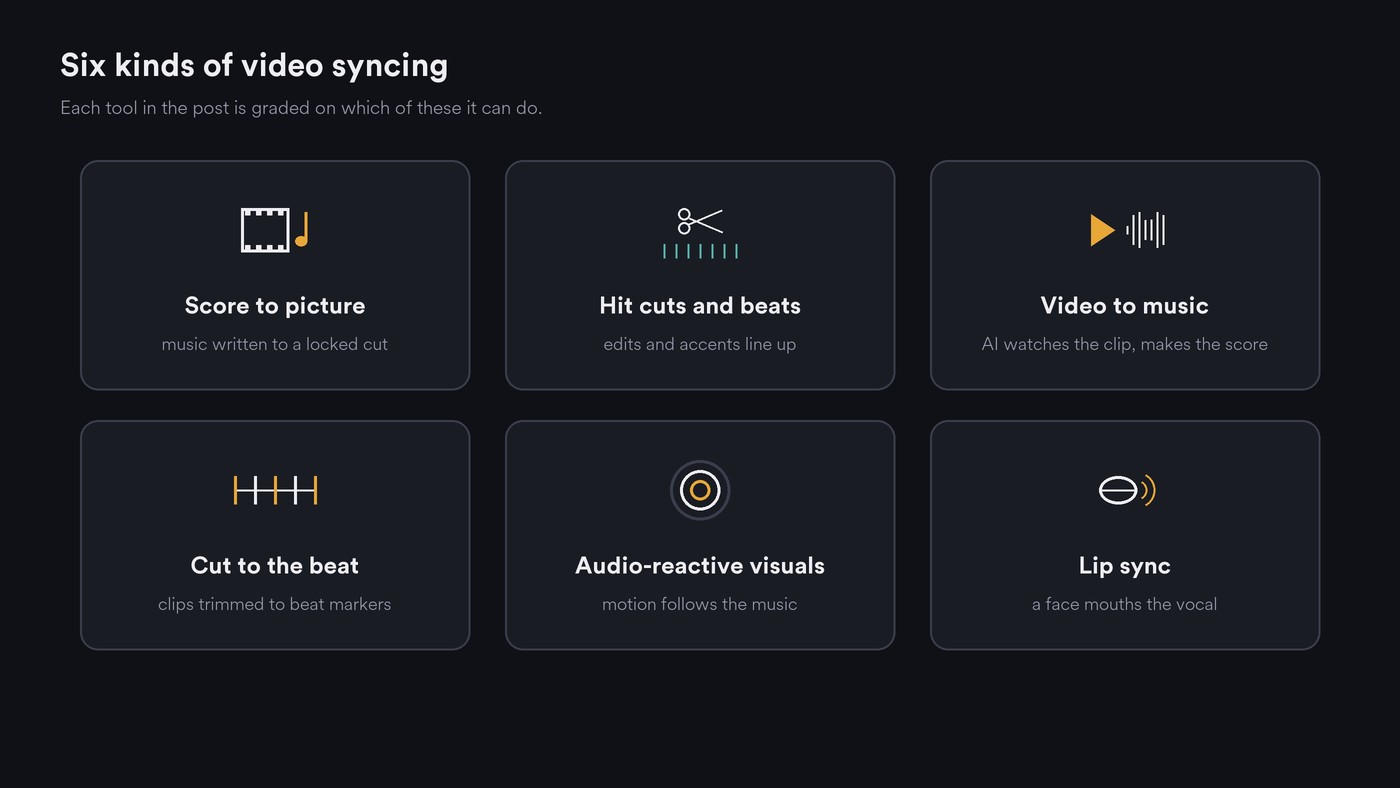
For how each works under the hood, read how AI-generated visuals synchronize with audio. Below, each tool is graded on both halves.
AI tools for music production and video syncing, graded
CapCut
- Music production: CapCut's AI music generator page describes prompting a track under Audio, then AI music, in the desktop app and adding it to the timeline, with fades, speed and noise reduction. That's prompt-made tracks and basic edits, not arranging or mixing parts.
- Video syncing: the same page describes Auto mark beats, which places beat points for cuts. The Auto Cut help page says Auto Cut analyzes video and audio to make rhythm-synced cuts, with a Beat Sync option, on mobile and desktop but not on CapCut Web.
- Best for: short social edits where every cut should land on the beat.
Soundverse
- Music production: AI Studio is a multitrack DAW in the browser, with audio, MIDI, video and image tracks on one timeline. You record, play built-in instruments, generate music, vocals and sound effects onto tracks, then mix and master.
- Video syncing: video sits on lanes above your tracks (one lane on Free, no lane limit on paid plans). Describe and Generate Audio (Creator and above) describes a clip, then adds SFX, Music and Dialogue tracks with each clip at its moment, locked to the picture even if you change the project tempo. AI Music Video Generator (Creator and above) scripts, films and cuts a video to your song, with optional lip sync, in 16:9 or 9:16 at up to 1080p. The Visualizer renders an audio-reactive MP4, and Section Analysis returns tempo, beats and downbeats so edits can fall on the bar.
- Limits: music cues from Describe and Generate Audio stop at five minutes, a moment its description misses gets no audio, and video export relies on encoders in current desktop Chrome and Edge.
- Best for: artists who want the song, the score and the video on one timeline.
Adobe Premiere and Firefly
Adobe's features page now calls its editor Adobe Premiere rather than Premiere Pro.
- Music production: the Premiere features page says you can generate music on your timeline, describe sound effects and shape their timing with your voice, and pick Adobe Stock music in the app.
- Video syncing: Firefly's Generate Music page lets you upload a video to score it. Firefly analyzes the footage to match its tone and vibe, you set energy, tempo and duration (five seconds to five minutes), and you download a WAV on its own or combined with the video.
- Blocked: Adobe's help center returned "403 Forbidden" to our reader on 21 November 2026, so we couldn't confirm Premiere's Remix or beat-detection details.
- Best for: editors already in Creative Cloud who want a fitted cue fast.
DaVinci Resolve 21
- Music production: Blackmagic describes the Fairlight page as a professional DAW built into the editor, with ADR and Foley tools, but its product pages don't describe generating music.
- Video syncing: the Resolve 21 what's new page adds a Fairlight Animator modifier that drives Fusion animation, such as eyes and lips, from audio levels, plus an AI Speech Generator for voiceover. The pages we read don't describe automatic beat detection, so check the current reference manual for beat tools before you buy.
- Best for: editors who mix and finish sound in the same app as the cut.
Logic Pro
- Music production: Apple's Logic Pro page lists AI-powered Session Players for drum, bass, keyboard and synth parts that follow your chords, plus Stem Splitter and Chord ID.
- Video syncing: a QuickTime movie plays in sync with your project, though Logic can't edit video. Create Movie Scene Markers searches the movie for scene cuts and marks each one. Apple's guide explains why that helps a composer: "Scene markers are SMPTE-locked markers: they remain at the same absolute time position, regardless of tempo changes."
- Best for: composers scoring a locked cut on a Mac.
Neural Frames and Kaiber
- Music production: neither page we read offers it, so bring a finished song.
- Video syncing: Neural Frames makes audio-reactive music videos: its audio engine analyzes your song's rhythm, energy and structure for frame-perfect sync, with lip sync and a beat-sync intensity setting. Kaiber's Music Video Sequence article, updated 11 days before we read it, maps clips to your song for videos of 30 seconds to 4 minutes. Kaiber's homepage returned no readable text to our reader, so we used its help center.
- Best for: a music video or visualizer for a track that's already mixed.
Video-to-music research
Google DeepMind's V2A research post (17 June 2024) states the idea clearly: "V2A combines video pixels with natural language text prompts to generate rich soundscapes for the on-screen action." Google said V2A would undergo safety testing before any wider release. Among tools you can use today, Soundverse's Describe and Generate Audio and Firefly's Generate Music start from your video.
Three workflows, step by step
Song first, then the video
- Finish the song in AI Studio or your own DAW and export a WAV master.
- Map it. Section Analysis gives section start times, tempo and downbeats; note where the first chorus lands.
- Open AI Music Video Generator, choose Custom, then Use Existing Song, and upload the track (MP3, WAV, M4A or FLAC up to 50 MB).
- Describe the video, add image references for the cast, turn on Lip Sync if the lead should sing to camera, and pick 16:9 or 9:16.
- Approve the script and let it film and cut to the music.
- Open the video in AI Studio, nudge any clip that misses a downbeat, then export MP4 at 24, 30 or 60 fps.
With Neural Frames or Kaiber, steps 3 to 5 happen there and step 6 moves to your editor.
Video first, then the score
- Lock the cut and export a reference file at a constant frame rate.
- Put it on a video lane in AI Studio, or open it in Logic Pro.
- Mark the hits: Create Movie Scene Markers in Logic, or note the time of every cut.
- Get a first pass: Describe and Generate Audio adds Music, SFX and Dialogue tracks timed to the scenes, or Firefly returns a cue fitted to the video's length.
- Produce over it: regenerate any clip that misses, or write your own cue on the tracks below.
- Pull the music under any dialogue in the mixer, then export.
A short social clip
- Pick the hook: 15 to 30 seconds, starting one beat before the first word.
- Make the visual. In CapCut, drop in your clips; in Soundverse, Lip Sync turns a character image and up to 15 seconds of vocal into a singing shot in 9:16 (Creator and above).
- Mark the beats with CapCut's Auto mark beats, or use Section Analysis downbeats as your guide.
- Cut on them with Auto Cut and Beat Sync, then check the biggest change lands on the chorus downbeat.
- Export vertical 9:16 and watch it once on a phone with the sound on.
Our guide to making a vertical AI music video for Shorts and Reels covers framing and length.
This tutorial makes a track, records vocals and splits stems in AI Studio, then generates AI visuals on the timeline (from 4:44) and exports the music video.
Where Soundverse fits
Soundverse is an AI music platform that takes you from idea to audience, built for independent artists who release music. Here, both halves share one timeline: AI Studio holds the song's tracks and the video lanes together, so you can produce, score and cut without exporting between apps. Describe and Generate Audio gives a silent cut a first soundtrack, AI Music Video Generator turns a finished song into a directed video, and Lip Sync and the Visualizer cover performance shots and audio-reactive versions.
Where it stops: AI Studio doesn't load VST or AU plugins, the music video tool films at up to 1080p, and browser export is blocked for projects over 15 minutes or 24 tracks. Licensing is set by plan: the Free plan is for personal use, and the Creator plan comes with a royalty-free license.
FAQ
Can one AI tool make a song and its music video? Yes. Soundverse's AI Music Video Generator has a Prompt to Music Video mode that makes the song first, then films a video for it, and you can open the result in AI Studio to keep editing. Neural Frames and Kaiber need a finished song.
Is CapCut enough for music production? For a backing track under a short edit, often yes. For arranging parts, recording vocals or mixing stems, use a DAW or a browser studio.
What is video-to-music AI? A model that watches a video and generates music, and sometimes effects or dialogue, timed to what happens on screen. Firefly's Generate Music and Soundverse's Describe and Generate Audio work this way.
Do I need a DAW to score to picture? Not always. You need a timeline that plays video and music together. Logic Pro adds scene markers at each cut; AI Studio puts the video on a lane above your tracks.
Sign up for Soundverse free and build your next track and its video on one timeline. More guides on the Soundverse blog.

