How Can AI Video Tools Be Integrated Into Professional Production Pipelines?
An AI video production pipeline for music videos: where AI shots fit, frame rates, ProRes and DNxHR, ACES, EDL/XML/AAF conforms, C2PA and disclosure.
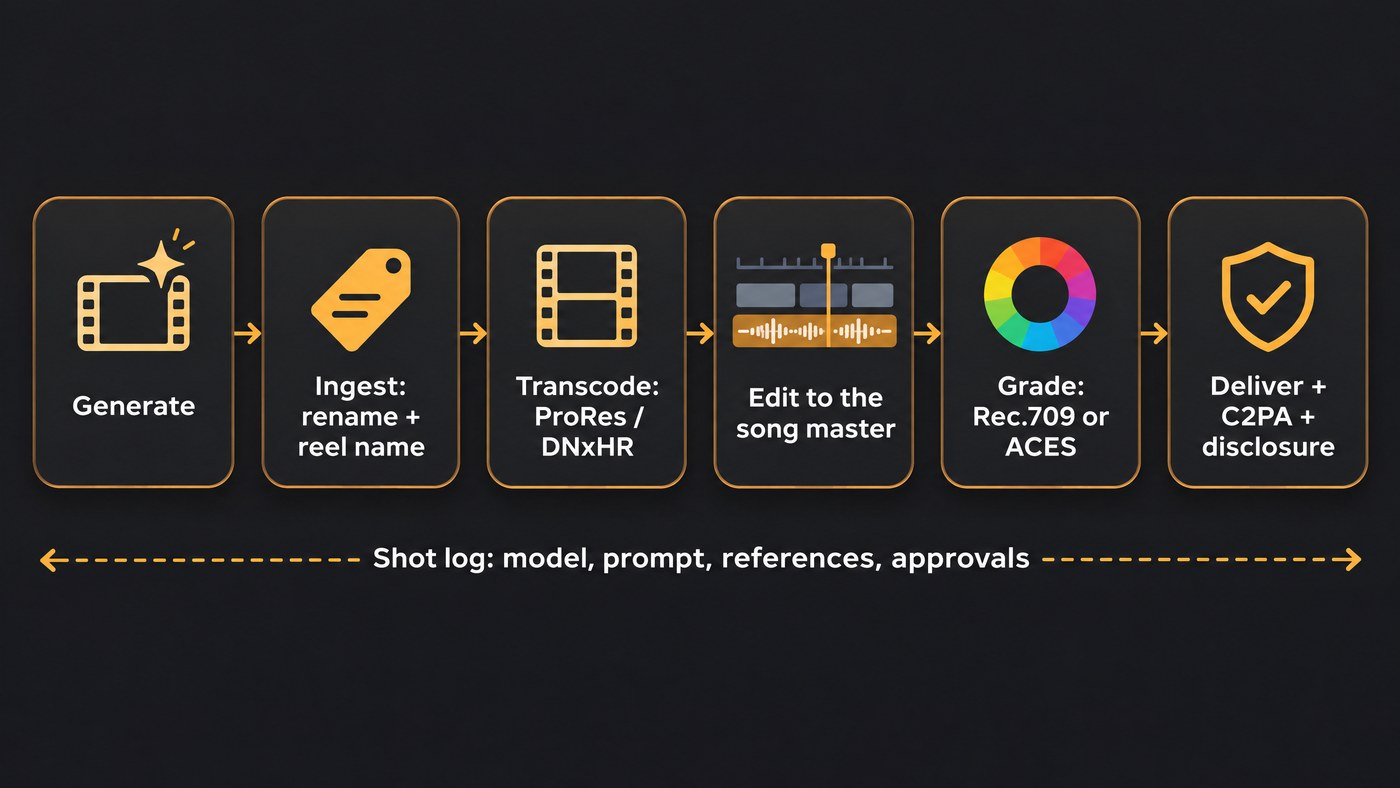
An AI video production pipeline treats generated clips like footage from one more camera. You decide where they belong (previs, B-roll, inserts or VFX plates), match them to the project's resolution, frame rate and colour space, transcode them to ProRes or DNxHR, name and version them like any shot, and carry provenance and AI disclosure through to delivery.
This is the post-production view, for editors, post supervisors and labels. Vendor details come from each company's own documentation, checked on 19 November 2026. For codec basics, see our guide to AI video file formats.
Where AI shots fit in a professional video production pipeline
Generated footage is safest where nobody needs to believe a real person did a real thing on a real day. In rough order of risk:
- Previs and animatics. Turn storyboard panels into rough moving shots and cut them against the song to lock pacing before anyone pays for final renders.
- B-roll and inserts. A neon sign, rain on a windscreen, a speaker cone. Short, no lip-sync, easy to replace.
- VFX plates and backgrounds. Skies, set extensions, screens inside the shot and textures composited in After Effects or Resolve's Fusion page. Bit depth matters most here.
- Pickups. Adobe's Premiere Pro 25.2 added Firefly-powered Generative Extend, which adds frames, at up to 4K, to a clip that ends too soon.
- Hero performance. Lip-synced singing and full-body dance are where generators still slip most, so shoot the artist or keep these shots stylised.
Our roundup of AI video software for professional music clips compares which generators suit which of these jobs.
Match frame rate and resolution before ingest
Decide the project format first, then bend every generated clip to it.
Frame rate. Google's Veo 3.1 model page (last updated 18 November 2026) lists 24 FPS as its only frame rate, for 4, 6 or 8 second clips in 16:9 or 9:16. In a 23.976 timeline the editor either slows a 24 fps clip by 0.1% or drops frames. That's 8 milliseconds on an 8-second insert, but about 0.21 seconds over a 3-minute 30-second performance clip, enough to break lip-sync. At 25 fps, a 24 fps clip either repeats frames or, if conformed, plays about 4% fast. For mostly generated footage, use a 24 fps project.
Resolution. Veo 3.1 lists 720p, 1080p and 4K outputs. Luma's Ray3.2 page lists 1080p outputs across every mode, and Soundverse's AI Video Generator renders at 480p, 720p or 1080p, never 4K. On a UHD timeline, upscale 1080p clips once and label the results so nobody mistakes them for native 4K.
Transcode to ProRes or DNxHR for the edit
Generated clips usually arrive as compressed MP4 files; Veo 3.1, for one, lists video/mp4 as its only output type. They get heavy under effects and grades, so transcode once, at ingest, to a mezzanine codec:
- Apple ProRes (MOV) in Mac shops and for After Effects round-trips: ProRes 422 HQ for picture, ProRes 4444 when a comp needs an alpha channel.
- Avid DNxHR, now simply called Avid DNx, for Media Composer. Avid's knowledge base (updated 21 April 2026) says a 2025 revision of SMPTE ST 2019-1 brought its five levels, LB, SQ, HQ, HQX and 444, to feature parity, each handling 8 to 16 bits and an alpha channel. At 1080p and 23.976 fps, HQX runs about 20.8 MiB per second at full bitrate, so budget storage for it.
Transcode at the clip's native frame rate and resolution, keep the original download, and do upscales and rate changes as separate, named steps.
Colour management: Rec.709, ACES and LUTs
Unless the vendor documents otherwise, treat a generated MP4 as finished, display-referred Rec.709 SDR video, not camera log. Don't put a camera LUT on it, and don't expect it to survive a heavy grade.
- Rec.709 timelines. Most music videos for YouTube and streaming finish in Rec.709. Adobe's Premiere Pro 25.2 announcement (2 April 2025) made Direct Rec.709 the default colour management preset.
- ACES timelines. Resolve's colour page supports DaVinci's own colour management and ACES, set in Project Settings, and Premiere's new wide-gamut presets use ACEScct as the working space. Give generated clips a Rec.709 input transform so they sit correctly beside camera footage.
- EXR plates. Luma lists 16-bit EXR frames in ACES2065-1 (AP0) for grading, compositing and VFX. That's the closest a generator gets to a camera plate.
- LUTs. Use a show LUT for viewing and the final look at timeline or group level. Never bake one into generated clips at ingest.
Our guide to coherence across AI video sequences covers grading clips from different models into one look.
Conform and round-trips: EDL, XML and AAF
Generated clips break conforms predictably: random file names, no reel name and timecode starting at zero. Fix it at ingest:
- Rename each file to its shot code before it enters any project.
- Set the reel or tape name to the shot code, so an EDL can find the media again.
- Give each clip a unique start timecode if your conform relies on it.
The Academy Software Foundation's OpenTimelineIO, an open interchange format for editorial cuts, reads and writes Final Cut Pro XML, AAF and CMX 3600 EDL. An EDL carries cuts, reel names and timecodes; XML and AAF also carry more tracks and audio. Effects, speed ramps and titles rarely survive any of them, so rebuild those at the destination.
A common route: cut in Premiere Pro or Media Composer, send XML or AAF to Resolve for the grade, round-trip VFX shots through After Effects or Fusion as ProRes 4444 with alpha, and render the master from Resolve. Adobe's help pages refused our requests on 19 November 2026, so check your own Premiere Pro export menu for the formats it writes.
Shot naming, versioning and review
Name for the edit, not the generator. ARTIST_SONG_sc03_sh020_v004 sorts correctly, survives round-trips and shows scene, shot and version. Log one row per approved version:
- tool, model and model version
- date, and the plan or tier it was generated on
- prompt, seed (where the tool exposes one) and reference images
- approver and gate
Approve at fixed gates: animatic, style frames, picture lock, final grade, then a legal and disclosure check. Use a review tool that pins comments to timecode and stacks versions, so a note on v003 never lands on v004.
Keep the master audio in charge
The song master is the clock; picture moves to it.
- Import the final WAV master at 48 kHz at the start, and treat any remaster as a new version.
- Mute the audio video models generate. Veo 3.1 lists sound generation as a feature; in a music video that track is scratch.
- Build lip-sync shots from the vocal stem of the same master and align them on a hard consonant or breath. Our guide to syncing AI visuals to audio stems covers stem prep.
- Never stretch the music to fit a shot. Trim or retime the picture.
- Before delivery, check sync at the head and on a hard cut near the end, where drift shows first.
Content credentials (C2PA) and AI disclosure
C2PA is an open technical standard for recording the origin and edits of digital content, known as Content Credentials. More of the toolchain writes them: Google lists Content Credentials (C2PA) as supported on Veo 3.1, and Adobe wrote of Premiere's Generative Extend: "Generative Extend works in the background while you continue to edit and clips are marked with Content Credentials so viewers know where AI was used."
YouTube's GenAI disclosure page says it may automatically label content that contains C2PA metadata, and that those labels can't be changed by the uploader. Whether credentials survive your edit depends on export settings, so check a test export with a Content Credentials verify tool.
Labels have a second channel. YouTube's music disclosure guidance says: "Music partners should disclose the use of generative AI (Gen AI) in their content to help YouTube accurately treat and label media that contains Gen AI." Partners declare Fully, Partly or No Gen AI via DDEX ERN 4.3.2 or later, a contains_ai column in YouTube's CSV templates, or YouTube Studio's Attributes section. Its examples put human-performed songs with AI-generated video visuals under Partly Gen AI.
Rights in the inputs
Before anything goes into a generator, check:
- The song: the rights to upload it to each tool.
- Faces and voices: written consent from everyone whose likeness is used, filed with the shot log.
- Reference images and plates: licences for stock, photos and artwork used as first frames or style references.
- Plan terms: commercial use often depends on the tier you generated on, so log it per clip.
Our comparison of AI music video makers for small labels covers likeness consent and copyright in AI output.
Where Soundverse fits
Soundverse is an AI music platform that takes you from idea to audience, and in a post pipeline it's most useful around the song. Section Analysis, on the Free plan, returns each section's start and end time plus the tempo, beats and downbeats, so the cut list can follow the music. Multi-Scene Video Builder, on Creator and above, films up to 10 scenes of 4 to 15 seconds with optional first and last frames, and its Multiple videos option returns each scene as its own file to rename and ingest. AI Studio, on every plan, lays video on a lane under your song and exports MP4, WebM or MOV at 24, 30 or 60 fps: up to 720p on Free, 1080p on Creator and 4K on Pro. Licensing is set by plan: the Free plan is for personal use, and the Creator plan comes with a royalty-free license.
FAQ
Can AI-generated clips go straight into a Premiere Pro or Resolve timeline? Yes for previs and quick cuts, since they import as ordinary MP4 files. For a finished edit, rename them, set reel names and transcode to ProRes or DNxHR first, or conforms will fail later.
Do AI video clips carry Content Credentials? Some do: Google lists C2PA support for Veo 3.1, and Adobe marks Generative Extend clips. Whether credentials reach your master depends on your export settings, and YouTube may auto-label uploads that carry them.
How should a label disclose AI visuals on YouTube? Through DDEX ERN 4.3.2 or later, the contains_ai column in YouTube's CSV templates, or the Attributes section in YouTube Studio. YouTube's own example puts a human-performed song with an AI-generated video under Partly Gen AI.
Sign up for Soundverse free and map your next song before the first shot is generated. More guides on the Soundverse blog.
