Compare Professional AI Music Video Makers for Small Labels
Compare professional AI music video makers for small labels: team seats, brand kits, approvals, rights terms and volume options, checked Nov 2026.
When you compare professional AI music video makers for small labels, judge the roster workflow rather than one great clip: shared seats and roles, a way to keep each artist's look, written commercial terms, and volume pricing or an API. Runway, LTX Studio, Kaiber and Rotor Videos publish team or label tiers; Soundverse adds song-first videos with script approval.
A label repeats the same jobs for every artist: a widescreen video, vertical hook cuts and a loop, each in that artist's own look. We checked every tool below on its own site on 19 November 2026, and held Soundverse, our own product, to the same format.
What a small label needs from AI music video makers
- One look per artist. Saved references, characters or brand kits the whole team can reuse.
- Seats, roles and approvals. Who generates, who approves, who only comments.
- Rights you can document. Who owns the output, what each plan allows commercially, and proof you hold the rights in every song, photo and face you upload.
- Volume that doesn't punish you. A shared credit pool, rollover, credits usable across artists, or an API.
- Output for every channel. 1080p as a floor, 4K for a premiere, native 9:16 for Shorts and Reels.
- Turnaround. Song-first tools cut a whole video in one run; clip generators hand you shots someone still has to edit.
For a ranking of the models themselves, see our guide to top-rated AI video software for professional music clips. This one is about running a roster through them.
AI music video makers for small labels, compared
Soundverse
- Roster fit: AI Music Video Generator lists labels and managers as a use: videos for several artists' songs, each script and its cost approved before filming. Upload an MP3, WAV, M4A or FLAC of up to 50 MB, plus up to nine image references.
- Team: in Collaborative AI Studio, the owner and Admins invite people as Editor, Viewer or Admin, and comments pin to a track at the exact bar.
- Volume: the pricing page lists custom seats, high-volume API access and SLA support under Enterprise.
- Output: 16:9 or 9:16, filmed at up to 1080p, never 4K.
- Catch: the video tool needs Creator or above, the Viewer role doesn't lock the timeline, and the Enterprise API documents music and audio tools, not music video generation.
Runway
- Roster fit: a suite for generating and editing shots, with no song-first mode.
- Team: the Team plan on Runway's pricing page puts 2 to 9 members in one workspace with a shared credit pool, up to 100 shared projects and frame-accurate comments. User roles and permissions, SSO and asset lineage are Enterprise only.
- Identity: up to 100 Brand Kits on Team, against 1 on Pro and 3 on Max.
- Rights and API: Runway's help center says you keep ownership of your generations. Team includes API access billed in credits.
- Output: 4K upscaling, plus ProRes and HDR on Team.
- Catch: nothing cuts to your song, so budget editing time per release.
Google Flow and Veo
- Team: Google's Flow help says qualifying Workspace plans, from Business Starter to Enterprise Plus, include Flow with 50 daily credits at no extra charge.
- Marking: every output carries an invisible SynthID watermark, and a visible one is added automatically for users in India, South Korea and Vietnam unless they're on the AI Ultra 20x plan. That matters if any of your team works from India.
- Rights and API: Google's Terms of Service say it won't claim ownership of content you generate. For volume, the Gemini API docs point to Gemini Omni Flash, with character consistency across up to 6 reference images.
- Catch: users must be 18 or older, and you still cut clips to the song yourself.
LTX Studio
- Roster fit: a production workspace with its own models plus Veo 3.1, Kling and Seedance, and a Music Video Maker use case.
- Team: LTX's pricing page allows 3 collaborators per project on Pro. Enterprise adds unlimited collaborators, SSO, centralized brand management and org-wide credit allocation.
- Identity and rights: consistent Elements from Standard, which also carries the commercial use license. Free is for personal projects only, with no business, marketing or paid work.
- Catch: the strongest team controls are Enterprise, priced by quote.
Kaiber
- Roster fit: Music Video Reference takes up to 9 images, such as the singer, her car and a motel, and plans each clip to its part of the track. Sequence 2.0 builds a reference sheet of face, clothing and style first.
- Label tier: Kaiber's plans guide sends labels and agencies to Visionary, with unlimited credits and white-glove support, by quote.
- Volume and rights: Pro runs Beat Sync batches of up to 10 videos, credits roll over, and commercial use rights start on Creator.
- Output: Sequence renders 30 seconds to 4 minutes at up to 1080p, in 16:9 or 9:16.
- Catch: no team seats or roles are described below Visionary.
Neural Frames
- Roster fit: Autopilot turns a song into a full, character-consistent video, and stems can drive audio-reactive motion.
- Volume: its pricing page gives Neural Nirvana 24,000 credits a month with priority upscaling. Credits roll over while you subscribe, up to 300% of the monthly allocation, and failed generations cost nothing.
- Rights: its FAQ says you own your videos and may use them for client work, while staying responsible for rights in your uploads.
- Output: 1080p on every paid plan, 4K on Neural Ninja and Neural Nirvana.
- Catch: no seats or roles, so a label shares one login or pays for several.
Freebeat
- Roster fit: Freebeat reads BPM, beats and sections, pitches a "Small Teams & Indie Studios" use, and says it keeps character and brand details aligned across edits.
- Rights: its FAQ grants a commercial-use license for generated visuals, subject to its Terms of Use, which list the Free plan as non-commercial.
- Output: 720p or 1080p, in 16:9, 9:16 or 1:1, from 15 seconds to about 6 minutes.
- Catch: it accepts YouTube or TikTok links, which give you no rights to the audio, free videos are public, and we found no published seat or role details.
Rotor Videos
- Roster fit: the only FAQ here that answers the roster question. Credits work across artists, but as the Rotor pricing page puts it, "Subscriptions, on the other hand, are tied to a single artist." Enterprise Accounts and a white-label Plug In cover full rosters.
- Formats: music and lyric videos, Spotify Canvas, Apple Music Album Motion and album artwork videos, as watermark-free MP4s.
- Rights and volume: Rotor says every video is yours to own and use commercially. Its 50-credit pack ($299.99, 19 November 2026) is pitched at an album campaign for several artists.
- Catch: it edits stock clips and templates, so your artist appears only in footage you upload.
Rights in uploaded images, faces and the output
The inputs. Every vendor above puts the rights in songs, photos and footage on you. Get each artist's written consent to use their likeness in AI video and file it with their contract. On Soundverse, Lip Sync blocks realistic human faces, so illustrated or anime-style versions of an artist work best there.
The plan. Commercial use depends on your tier when you generate. The Free tiers of LTX Studio, Freebeat and Soundverse are personal or non-commercial, so never make a release asset on a free seat.
The output. Vendor terms settle ownership between you and them, but copyright protection is a separate question. The U.S. Copyright Office concluded in January 2025 that "the outputs of generative AI can be protected by copyright only where a human author has determined sufficient expressive elements." Your direction, edit and arrangement are that human authorship, so document them.
How to brief AI video tools for several releases a month
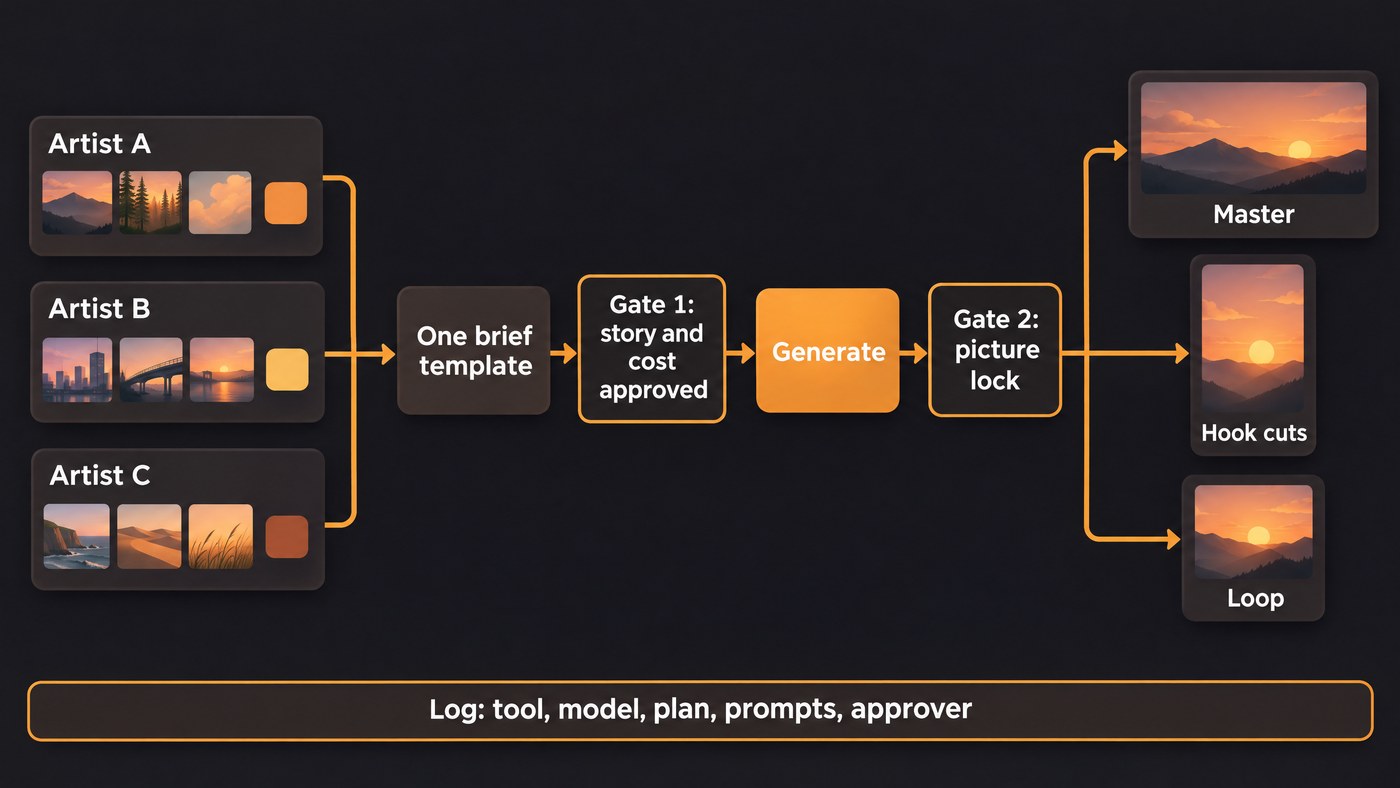
- Write an artist bible. One page per artist: approved reference images, a palette with hex codes, recurring places, camera language and a short "never" list. Our guide to keeping faces, clothes and locations the same covers building those references.
- Use one brief template. Song, BPM, sections with timestamps, where the hook lands, what each section's lyrics say, formats, deadline and approver. If the story should come from the words, see how lyrics can drive the scenes.
- Batch by artist, not by tool, so the same references carry through every asset.
- Approve at two gates. Lock story and cost before credits are spent, then lock the picture before export. Soundverse quotes script and cost before filming; Runway's Team comments suit the second gate.
- Export a deliverables pack: a 16:9 master, two or three 9:16 hook cuts and a loop, named artist_title_ratio_resolution_v1.
- Keep a run log: tool, model, plan, date, prompts, references and approver.
Where Soundverse fits
Soundverse is an AI music platform that takes you from idea to audience, and for a label it works best when the song comes first. Music Video Storyteller reads each song's sections and lyrics and writes a story for every part, on the Free plan, so A&R can compare treatments before anything is filmed. AI Music Video Generator then films and cuts the video on Creator or above. Projects open in AI Studio, where the team shares one timeline with roles; our post on AI Studio for teams shows how. Enterprise adds custom seats and high-volume API access. Licensing is set by plan: the Free plan is for personal use, and the Creator plan comes with a royalty-free license.
This walkthrough shows people invited into one AI Studio session building a track together, with every edit and generated stem appearing on everyone's screen.
FAQ
Which AI music video makers have team seats? Runway's Team plan covers 2 to 9 members in one workspace, and LTX Studio allows 3 collaborators per project on Pro and unlimited on Enterprise. Soundverse invites collaborators into AI Studio projects with roles, and Kaiber handles labels through its Visionary tier.
Can one account make videos for several artists? Usually, but read the terms. Rotor Videos ties each subscription to one artist while its credits can be spread across a roster.
Who owns an AI music video a label makes? Runway, Neural Frames and Rotor say the output is yours, and Google says it won't claim ownership. Copyright protection still depends on human authorship, so keep records of your direction and edits.
Is there an API for making music videos in bulk? Runway's Team plan includes API access billed in credits, and Google points developers to Gemini Omni Flash. Soundverse's Enterprise API covers music and audio, so its music videos are made in the app.
Sign up for Soundverse free and plan your roster's next videos with Music Video Storyteller. More guides on the Soundverse blog.
