Top-Rated AI Video Software for Producing Professional Music Clips
Top-rated AI video software for professional music clips in 2026: Seedance 2.5, Kling, Veo 3.1, Runway, Neural Frames and Soundverse, and how to pick.
The top-rated AI video software for professional music clips in November 2026 includes Seedance 2.5 in Dreamina, Kling, Google Veo 3.1 and Runway for directed shots, plus Neural Frames and Soundverse for videos built around your song. Seedance 2.5 placed fifth on Artificial Analysis's blind-tested text-to-video leaderboard.
A leaderboard is a starting point. A music clip also needs things no general ranking measures: the singer's mouth matching your vocal, the same face from the first shot to the last, cuts that land on the beat, and enough resolution to hold up on a TV. This guide covers both.
What "top-rated" means for AI video software
A useful public rating for video models comes from blind voting. Artificial Analysis explains its method on its leaderboard: "Models are ranked using an Elo rating system derived from blind comparisons judged by our validated private evaluators." Voters see two videos made from the same text prompt without knowing which model made which.
On its text-to-video leaderboard with audio, checked on November 7, 2026, the top five were Wan 3.0 (Alibaba), Utopai X, MiniMax H3, FLUX 3 Max and Dreamina Seedance 2.5. Kling 3.0 variants sat between about 17th and 20th, and Veo 3.1 around 22nd.
Read that ranking with two caveats. First, it judges short clips from one prompt, so it says nothing about lip sync to your own vocal, editing footage you already shot, or keeping a character consistent across a three-minute song. Second, it changes often as new models arrive. That is why the shortlist below mixes high-ranked models with tools that win on the jobs music clips actually need.
The shortlist: AI video software for professional music clips
Every tool here was checked on its own site in November 2026.
- Seedance 2.5 in Dreamina. ByteDance's model, used through Dreamina. Its page says Seedance 2.5 can generate 30-second videos from up to 50 references, and one of Dreamina's own example prompts is a reference-based music video with beat-synced editing and lip sync to an audio track. Dreamina gives free daily credits. Good for reference-heavy shots where the artist, outfit and location must match your mood board.
- Kling. Kling's Video 3.0 page describes multi-shot sequences with native audio and character-level lip-sync, up to 15 seconds per generation, with consistent characters across frames. Kling 4.0 is now the headline model on its site. Good for short multi-shot scenes where the same character has to hold up from shot to shot.
- Google Veo 3.1. Google DeepMind's Veo page says it generates in 1080p and 4K, with sound effects, ambient noise and dialogue made natively. You can guide it with reference images of a scene, character or object, and set a first and last frame for transitions. It's available in Flow, the Gemini app and the Gemini API, and videos made with Veo are marked with SynthID. Good for cinematic B-roll at high resolution.
- Runway. Gen-4.5, announced December 1, 2025, is available on all paid Runway plans for new shots. For music clips, Runway's standout is editing: Aleph 2.0 in Edit Studio, announced May 21, 2026, edits existing clips of up to 30 seconds at 1080p. You give it a frame showing the change you want, and it can relight a scene, swap the background or restyle the whole video, applying the edit across related shots. Good for artists who filmed real performance footage and want it to look like a bigger production.
- Neural Frames. Built for musicians, it makes audio-reactive videos: it splits your track into stems such as drums, bass and vocals, and lets each one drive the motion. It offers models including Kling, Seedance and Runway, an Autopilot mode for full-length videos, and lyric captions. 1080p comes with every paid plan and 4K with its Neural Ninja and Neural Nirvana plans, and its FAQ says you keep full commercial rights to your videos. Good for electronic, ambient and visualizer-style releases.
- Soundverse AI Music Video Generator. You bring a finished song or a one-line idea, and Agent One writes the script, quotes the token cost, then films many scenes and cuts them to the music. It's covered in more detail below. Good for artists who want the whole video built around the song and left editable afterwards.
MiniMax H3, third on the leaderboard and available in the Hailuo AI app, is also worth a test. Run the same shot through it and two of the tools above before you commit to a plan.
Which tool fits which music clip
Match the tool to the clip you need, not to the leaderboard.
- A performance video of you. Film yourself on a phone, then restyle or relight the footage with Runway's Aleph 2.0. Aleph changes only what you ask it to, so your real performance and its lip sync stay intact.
- An animated or illustrated singer. Soundverse Lip Sync fed with a clean vocal stem, or Seedance 2.5 with your vocal as an audio reference.
- A cinematic story video. Veo 3.1 or Seedance 2.5 with a fixed set of reference images, cut together in an editor.
- A visualizer for an electronic or ambient track. Neural Frames, or the audio-reactive visualizer in Soundverse AI Studio.
- Vertical teasers for Shorts and Reels. Any tool that renders 9:16 directly. Our guide to making a vertical AI music video covers framing and length.
How to make AI music clips look professional
The software matters less than the process. These steps work with any of the tools above.
- Build a visual reference set first. Pick three to five images: the artist or character, the main location, and a colour reference. Use the same set for every shot. Consistent faces and places are what separate a music video from a reel of random clips.
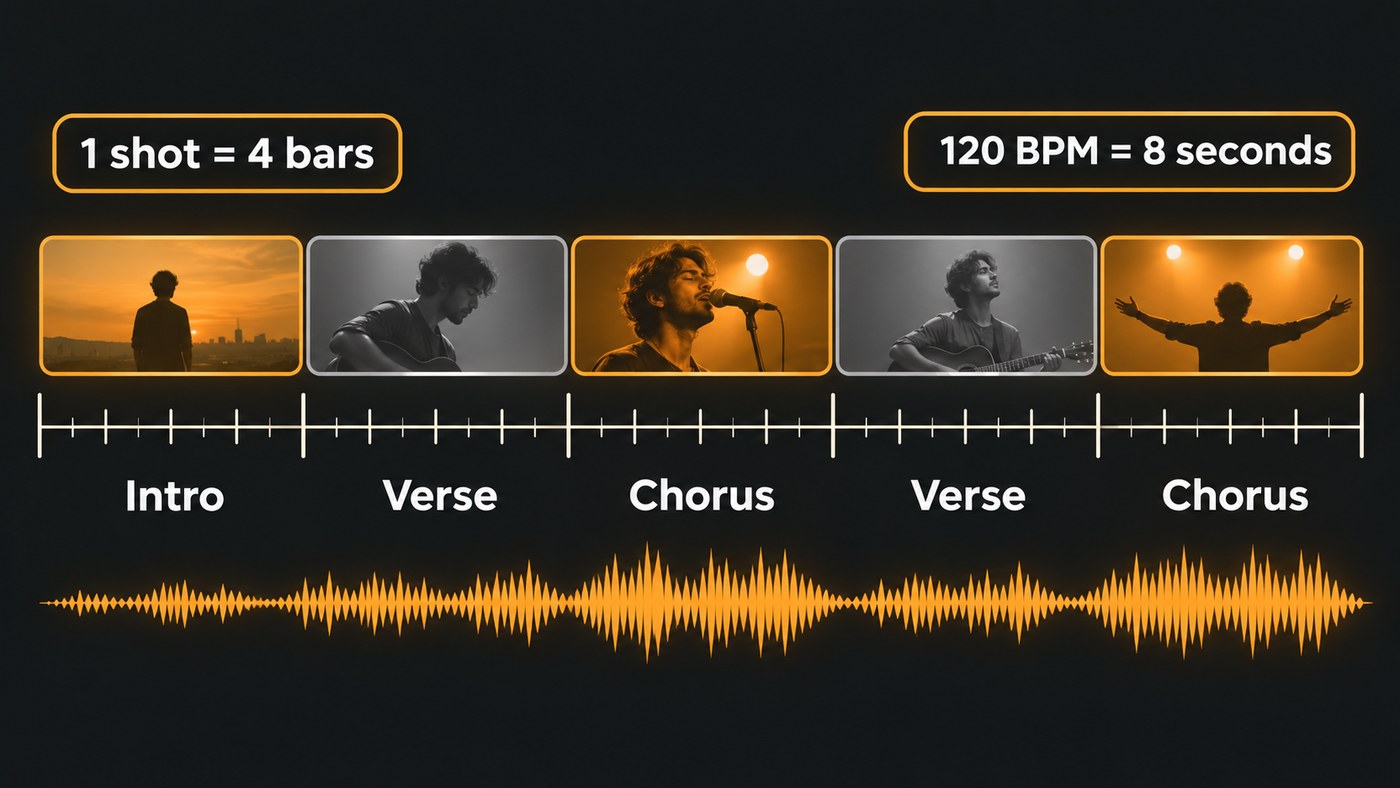
- Set shot length from the tempo. One bar of 4/4 lasts 240 ÷ BPM seconds. At 120 BPM, a four-bar shot is 8 seconds; at 90 BPM it's about 10.7 seconds; at 140 BPM about 6.9. Generate shots slightly longer than the phrase so you have room to trim. Our guide to matching AI music videos to song structure goes section by section.
- Feed lip sync a clean vocal. Export the lead vocal stem and use that, not the full mix. Background instruments confuse mouth timing.
- Generate at 1080p and keep one aspect ratio per edit. Make a 16:9 master for YouTube and a separate 9:16 cut for Shorts and Reels instead of cropping one into the other.
- Grade everything together. Clips from different models rarely match. One colour grade and a light grain over the whole timeline make them feel like one shoot.
- Cut on the downbeat and save the best shot for the final chorus. Viewers feel an edit that lands on the one, even if they can't name why.
Can AI video software make a full-length music video?
Yes, but almost always by assembling shorter clips. Kling makes up to 15 seconds per generation, and Seedance 2.5 and Runway's Aleph 2.0 work with up to 30 seconds. A three-minute song cut into 8-second shots needs about 23 of them, so plan the shot list before you spend credits.
Two tools on this list do the assembly for you. Neural Frames has an Autopilot mode for full-length videos, and Soundverse's AI Music Video Generator films many scenes and cuts them to your song. With either, review every scene before you export.
Disclosure and rights for AI music clips
YouTube asks for disclosure when AI output looks real. Its help page states: "We require creators to disclose AI-generated or altered content that seems realistic." The same page says non-realistic content made with AI, such as an obviously fantastical world, doesn't need the label. A photoreal singer performing on a stage that never existed most likely does.
Rights work tool by tool. Read the terms of the plan you use for commercial release before the video goes up, and keep the prompts and reference images you used in case a question comes up later.
Where Soundverse fits
Soundverse is an AI music platform that takes you from idea to audience, so the video can start from the same song you made with it. The AI Music Video Generator takes an MP3, WAV, M4A or FLAC of up to 50 MB, or a one-line idea, plus up to nine image references. Agent One quotes the token cost before any scene is filmed. It makes 16:9 or 9:16 videos at up to 1080p depending on the model, and needs Creator or above. Turn on Lip Sync and the lead sings to camera in time with the vocals.
Afterwards, open the video in AI Studio, which puts video and images on their own lanes above your tracks. Exports reach 1080p on Creator and 1440p or 4K on Pro. For a single singing shot, Lip Sync works best with illustrated, painterly or anime-style characters, because its video model blocks realistic human faces.
This tutorial walks through AI Studio, from generating and editing a song to making its music video.
For lyric videos specifically, see the best AI video generator for lyric videos.
FAQ
What is the best AI video software for music videos? It depends on the clip. Among the tools here, Seedance 2.5 currently ranks highest in Artificial Analysis's blind tests. For restyling your own footage, Runway's Aleph 2.0 fits best, and for videos built around your song, Neural Frames and Soundverse do the cutting for you.
Can AI make a music video from my song? Yes. Neural Frames and Soundverse's AI Music Video Generator both start from your audio. General video models such as Veo 3.1 and Kling make individual shots, which you then cut to the song in an editor.
What resolution should a professional music clip be? Aim for at least 1080p. Veo 3.1 generates in 4K, Neural Frames reaches 4K on its Neural Ninja and Neural Nirvana plans, and Soundverse AI Studio exports at 1440p or 4K on Pro. Keep the same resolution across every shot in one edit.
Do I need to label an AI music video on YouTube? If it looks realistic, yes: YouTube requires disclosure for realistic AI-generated or altered content. Clearly non-realistic content, like an animated fantasy world, doesn't need the label.
Can AI lip sync to my own vocals? Yes. Soundverse Lip Sync takes up to 15 seconds of your vocal per clip, and Dreamina's example prompts for Seedance 2.5 include lip sync to a supplied audio track. Use a clean vocal stem rather than the full mix for the best timing.
Sign up for Soundverse free and turn your next song into its video in one place. More guides on the Soundverse blog.
