How Can AI Help With Syncing Background Music to Video Timing?
How AI helps you sync background music to video: retime a track to length, snap cuts to detected beats, duck music under dialogue and score to picture.
AI helps you sync background music to video timing in four ways: it retimes a track to your edit's exact length, detects beats so cuts snap to them, ducks music under dialogue, and generates new music fitted to the video's length and scenes. You still pick the hit points and judge the ending by ear.
This guide is for a locked cut, with each tool checked on its maker's own pages on 23 November 2026. If you're choosing one app to both produce the music and cut the video, read our guide to AI tools for music production and video syncing instead.
The five timing problems under a finished edit
Dropping a song under a locked cut usually breaks in five places:
- Length. The track runs 2:40 and the video runs 0:45, or the track ends ten seconds early.
- Hit points. A cut, a logo reveal or a door slam should land on a downbeat and lands between beats instead.
- Tempo against cutting rhythm. Shots that change every second feel wrong over a slow ballad, and long takes drag under a fast beat.
- The ending. The music fades mid-phrase, or a final chord rings on over black.
- Dialogue. The music competes with voices and nobody hears the line.
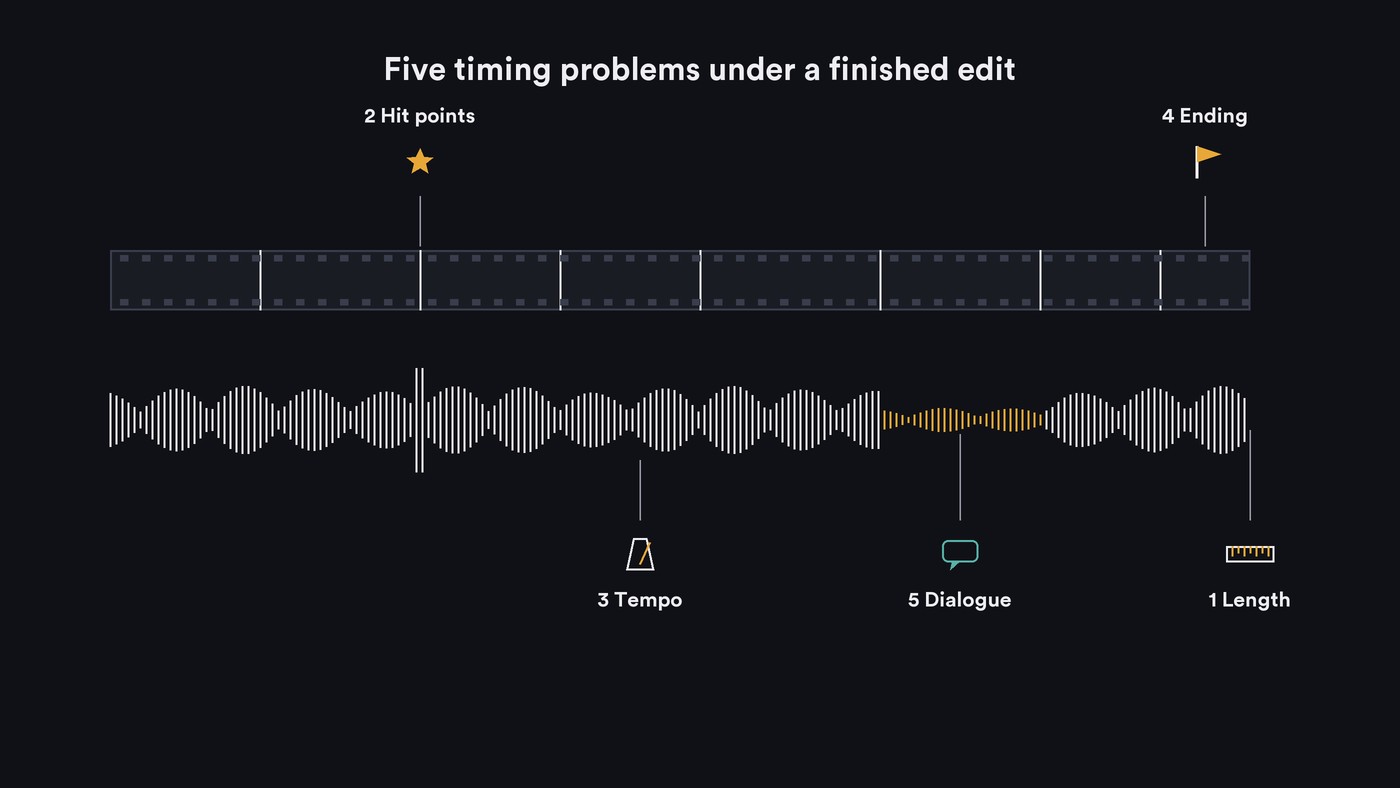
Each has an AI fix, and none replaces your ear. Our explainer on what beat-accurate editing actually means covers why a small offset is easy to see.
How to make a music track fit the length of your video
Retiming tools shorten or lengthen a track by cutting and repeating musical sections, so the tempo and pitch stay put.
- DaVinci Resolve Studio. Blackmagic's DaVinci Resolve 20 New Features Guide (April 2025) describes an AI Music Editor in the Audio Inspector: type a Target Length and it offers four versions of the edit. The guide is precise about the method: "Music Editor does not use time compression/expansion or alter the pitch of the music, but instead uses editing techniques like a music editor might to fit the material to desired length to picture." It works best on beat-driven music and may land slightly off target; for the last fraction, the guide suggests the Elastic Wave tool.
- Final Cut Pro. Apple's Beat Detection guide for Final Cut Pro 13 draws a grid of song parts, bars and beats over a music clip. Its worked example cuts a 2-minute song to a 30-second edit by deleting a range between song part markers, keeping the final sting. Apple recommends a 4/4 clip for the most accurate grid.
- Adobe Premiere. Adobe's help center returned 403 Forbidden to our reader on 23 November 2026, so we couldn't confirm the current steps for its Remix tool.
- Soundverse. When a track is too short, Extend Music continues it, adding an intro, an outro or a new section in the same style, tempo and key. In AI Studio you can also split, trim and fade clips, or Stretch a clip from 0.25× to 4× its length.
Stretching changes the tempo, so keep it for small adjustments.
Snapping cuts and hit points to detected beats
Beat detection turns the music into a grid your edits can snap to.
- Resolve Studio: right-click a music clip and choose Detect Music Beats. Other timeline items snap to the beat markers it adds. It works only with beat-driven music in 4/4 or 3/4 for now.
- Final Cut Pro: choose Clip > Enable Beat Detection (Option-B), turn on snapping, and edit points, the playhead and the skimmer snap to song parts, bars and beats.
- CapCut: its Auto Cut help page (3 February 2026) says Auto Cut analyzes video and audio to make rhythm-synced cuts, with a Beat Sync option on desktop and mobile. It isn't available on CapCut Web.
- Soundverse: Section Analysis returns each intro, verse, chorus and outro with start and end times, plus tempo, beats and downbeats.
On a finished cut, find your most important hit, such as the title card. Slide the music until its strongest downbeat sits on that frame, then check the other cuts. If most fall near a beat line, nudge them onto it. If they don't, the tempo is wrong for the edit.
Matching tempo to how fast you cut
In 4/4, one bar lasts 240 ÷ BPM seconds. At 120 BPM that's 2 seconds; at 80 BPM it's 3. If your shots average about 3 seconds, an 80 BPM track gives you a cut per bar; at 2 seconds, try 120. Our explainer on how AI identifies key and tempo covers why a detector can read a track at double or half its real speed.
Endings that land on the last frame
Work backwards. Place the track's final hit on the video's last frame, then make length edits in the middle of the song, never at the end. Resolve's Music Editor tries to keep the original ending when it times well, and the guide says to add a fade by hand if the result stops abruptly.
If the song has no real ending, Extend Music can add an outro; trim it in AI Studio so the last note decays just before black.
Ducking music under dialogue automatically
Ducking lowers the music while someone speaks and brings it back in the pauses.
- Premiere: Adobe's audio page says "Auto Ducking uses AI to automatically drop the level of the music track whenever voices are detected to ensure the dialogue is heard."
- Resolve: the Fairlight page describes a ducker plug-in on the music track that listens to one or more dialogue tracks, with controls for the duck level and how fast the music recovers. In Resolve 20 Studio, AI Audio Assistant also applies ducking to music tracks as part of an automatic mix toward a delivery standard you pick.
- Soundverse: Describe and Generate Audio puts music and dialogue on separate tracks, and in AI Studio you pull the music down in the Mixer or draw volume automation under each line.
Check ducking on a phone speaker; if you hear the music before the words, duck deeper or pick a sparser track.
Generating music to the video's length and picture
The newest option skips fitting: the tool watches the video and writes music for it.
- Adobe Firefly. Its Generate Music page lets you upload a video to score: Firefly matches the footage's tone and vibe, you set energy, tempo and a duration from five seconds to five minutes, and you download a WAV or the music combined with your video.
- Soundverse Describe and Generate Audio (Creator and above). Right-click a video in AI Studio and Describe and Generate Audio describes it, then adds SFX, Music and Dialogue tracks with each clip placed at its moment. Clips stay locked to the picture even if you change the project tempo. Watch it through once and add a cue anywhere the scene needs one.
- Soundverse AI Music Generator. Inside AI Studio, Generate Music for Video spans an instrumental across the clip. On Creator and above, AI Music Generator also offers a Length setting from 15 seconds to five minutes and a Score a video option that writes music to a clip's pace and length, for videos up to 10 minutes.
This short demo drops a video into AI Studio and shows background music, sound effects and dialogue landing on the timeline where each scene needs them.
For how Video to SFX and AI Video Describer work alongside it, see AI scores your video.
A step-by-step workflow to sync background music to video
- Lock the picture. Export a reference at a constant frame rate and note its running time.
- Mark the hits. Add markers on key cuts, on-screen moments and the last frame.
- Choose the music. Pick a tempo that suits your shot length, or generate a cue to the video's length.
- Fit the length. Retime, cut between song parts, or extend a short track.
- Align the biggest hit. Put the strongest downbeat on your key marker, then snap other cuts to the grid.
- Land the ending. Back-time from the last frame.
- Duck under dialogue. Use Auto Ducking, Fairlight's ducker or volume automation.
- Check it twice. Watch on headphones, then on a phone speaker.
Sync checklist before you export
- The music ends on the last frame, or the final note decays just before black.
- The key hit lands on a downbeat, not between beats.
- No edit inside the song cuts a word or a held vocal note.
- Every line of dialogue is clear on a phone speaker.
- Retimed sections don't repeat a lyric line in a way listeners will notice.
- You hold the rights to use the track in this video.
Where Soundverse fits
Soundverse is an AI music platform that takes you from idea to audience, built for independent artists who release music. For syncing, AI Studio puts your video on a lane above the music tracks, so you trim, extend, stretch and automate against the picture. Section Analysis gives you section times and downbeats to cut to, and Extend Music adds the bars a short track is missing.
When you'd rather start from the picture, Describe and Generate Audio (Creator and above) builds a first soundtrack of music, effects and dialogue timed to each scene, ready to refine in the Mixer.
Licensing is set by plan: the Free plan is for personal use, and the Creator plan comes with a royalty-free license.
FAQ
Can AI make a song exactly as long as my video? Close to it. Resolve's AI Music Editor and Final Cut Pro's beat grid edit musical sections to a length, and generators such as Firefly take a set duration. Finish with a small trim, fade or stretch.
Should I cut the video to the music or the music to the video? For a locked edit, fit the music to the picture and align the one hit that matters most. For a montage you haven't cut yet, lay the music first and cut to its beat grid.
Why does beat detection put markers in the wrong place? Detectors work best on steady, beat-driven music. Resolve limits its Beat Detector to 4/4 and 3/4, Apple recommends 4/4, and rubato or a drumless intro can shift the grid. Mark those parts by hand.
How loud should music be under dialogue? Low enough that every word is clear on a phone speaker, rising again in pauses. Auto ducking gets you close; fix any line where the music still competes.
Sign up for Soundverse free and score your next edit on the same timeline as the picture. More guides on the Soundverse blog.