How Does AI Identify the Key and Tempo of Uploaded Audio Files?
AI key and tempo detection explained: onsets, autocorrelation, half or double BPM errors, chroma key profiles, neural classifiers and ear checks.
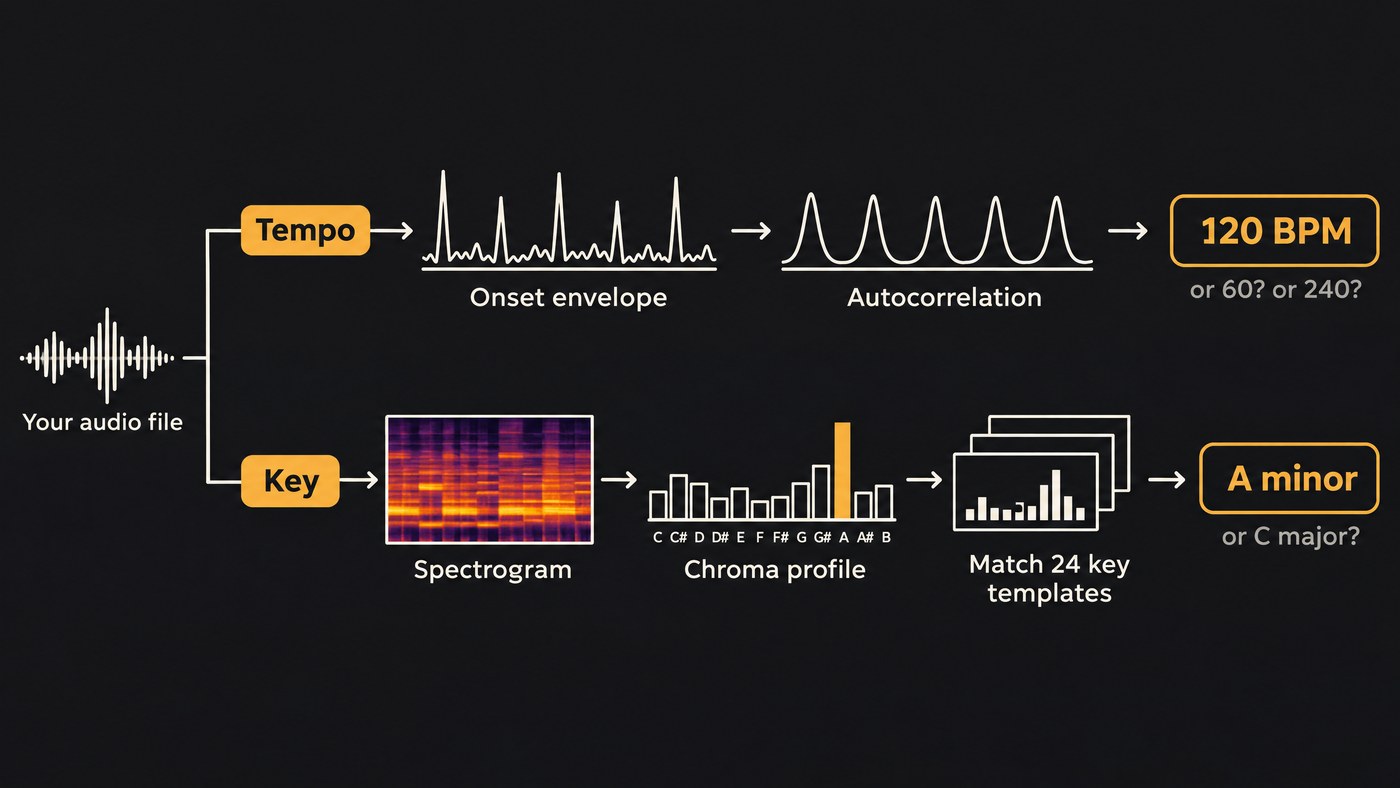
AI key and tempo detection reads your file in two passes. For tempo, the software marks where notes start, measures how regularly those onsets repeat and picks the most likely beats per minute. For key, it sums the energy in the 12 pitch classes and matches that profile, or a neural network's reading, against all 24 major and minor keys.
Both do well on steady, tonal music and fail in predictable ways: half or double the tempo, a key a fifth away, or the relative major or minor. Docs and papers cited here were read on 19 November 2026.
How AI key and tempo detection works, step by step
Most analyzers run the same pipeline:
- Decode and resample the file to a mono waveform. Essentia's TempoCNN, for example, takes audio at 11,025 Hz.
- Make a spectrogram, energy by frequency over time.
- Tempo: find the onsets, measure how they repeat, pick a BPM and the beat positions.
- Key: fold the spectrum into 12 pitch classes and match that profile to a key, or let a neural network classify it.
- Report one value per file, often with a confidence score.
What DJ software then does with beat grids, downbeats and sync is covered in how AI-assisted beat matching works.
Onset detection: finding where notes start
An onset is the start of a note or hit: a kick, a strum, a chord. A standard detector is spectral flux. librosa's onset_strength function compares each frame of a log-power mel spectrogram with the one before, keeps only the increases and averages them across frequency. A kick lights up the low bands at once, so the curve spikes. A held pad barely moves it.
The result is an onset envelope, one curve with a peak wherever something new happens. librosa also filters across frequency, a 2013 method by Sebastian Böck and Gerhard Widmer, so vibrato doesn't register as new notes. Video tools time cuts from the same onsets, as our piece on how AI video engines read rhythm and tempo explains.
Tempo estimation: autocorrelation, tempograms and priors
Tempo is the period hiding in that envelope. Autocorrelation finds it: slide the envelope against a copy of itself and note the delays where the peaks line up. If they line up every 0.5 seconds, the pulse is 120 BPM, since 60 divided by 0.5 is 120. Run that in short windows across the song and you get a tempogram, a map of tempo over time. librosa's tempo function uses an 8-second autocorrelation window by default and looks below 320 BPM.
Autocorrelation can't choose between a period and its multiples, because a 120 BPM groove also lines up at 60 and 240. So estimators add a prior, a preference for typical tempos. librosa's starts from 120 BPM with a pseudo-log-normal prior, which can pull a 174 BPM drum and bass track down to 87.
Neural networks now handle this step too. Hendrik Schreiber and Meinard Müller's single-step tempo estimator (ISMIR 2018) reads a mel spectrogram, treats tempo as classification and needs only 11.9 seconds of audio. They report: "Especially the exact estimation of tempo without tempo octave confusion is significantly improved." Essentia ships the approach as TempoCNN, which gives a local tempo about every 6 seconds with probabilities you can read as confidence.
Beat tracking sits on top. librosa's beat tracker, based on Dan Ellis's 2007 dynamic programming method, estimates the tempo, then picks the onset peaks that fit it.
Why tempo detectors give you half or double the BPM
Octave errors, readings off by a factor of two, are the classic tempo mistake. Half-time trap at 140 BPM reads as 70, and a 70 BPM soul groove with busy 16th-note hats reads as 140.
Listeners disagree too, and the standard benchmark allows for it. MIREX tempo evaluation, as implemented in mir_eval, gives each test track two reference tempos with a weight for how strongly each is felt, and counts an estimate as a hit within 8% of one. So treat a half or double reading as a labeling choice: pick the one where people nod their heads, and check that the snare falls on 2 and 4.
Key detection: chroma and Krumhansl-Schmuckler profiles
The classic key detector works on a chromagram. Every frequency is folded into one of 12 pitch classes, so a C in any octave lands in the C bin. Averaged over the song, that gives a 12-number profile: how much C, how much C sharp, and so on. librosa uses a constant-Q chroma; Essentia uses a harmonic pitch class profile (HPCP).
The Krumhansl-Schmuckler method rotates a major and a minor template through all 12 roots, correlates each of the 24 with the song's profile and picks the best match. The templates matter. Essentia's Key algorithm offers 14 sets, and its documentation describes the Krumhansl profiles as "reference key profiles after cognitive experiments with users. They should work generally fine for pop music." Temperley's come from classical scores; edma and bgate come from electronic dance music, and bgate is the default. Essentia also returns the gap between the best and second-best key, a useful confidence signal.
Neural key classifiers
Newer detectors skip hand-made templates: a convolutional network reads a spectrogram and outputs a probability for each of the 24 keys. S-KEY, by Yuexuan Kong and colleagues (ICASSP 2025), learns major and minor keys self-supervised; the authors report it matches the supervised state of the art on the FMAKv2 and GTZAN datasets, and they scaled its training to a million songs. They built it because the earlier self-supervised model, STONE, couldn't tell relative keys such as C major and A minor apart.
The scoring shows where models miss. mir_eval's key metric, consistent with MIREX since 2017, gives 1.0 for the right key, 0.5 for a key a perfect fifth away, 0.3 for the relative major or minor and 0.2 for the parallel key, such as C major for C minor. Those near misses are the errors to listen for. For harmony analysis beyond the key, see our guide to detecting a song's key with AI.
Why tempo changes, modal music and heavy percussion confuse detectors
Tempo and key changes. Most tools report one number per file. A band that pushes into the chorus or a DJ edit with a tempo ramp gets averaged into a value that fits no section. Essentia's TempoCNN docs recommend majority voting across windows when you assume a constant tempo; for music that moves, read the local values. A last chorus lifted a semitone blends two keys into one profile in the same way.
Modal music. Detectors and benchmarks think in major and minor; mir_eval's key scoring knows those two modes plus an "other" label. D Dorian uses the same notes as C major, so a template may say C major or D minor, and a G Mixolydian riff can come back as C major. Essentia suggests a plain diatonic profile for ambient music that isn't strictly functional, and warns that its edmm profile reports major modes as minor. For drone or raga-based music, trust the root and question the mode.
Heavy percussion. Kicks, snares and hats are noisy, broadband sounds that spread energy across every chroma bin and flatten the profile. A gliding 808 adds notes of its own, and distorted guitars add strong fifths, which feed fifth errors. For tempo, busy drums usually help, though dense hats can tip the reading to double time.
How to sanity-check a tempo and key reading by ear
- Tap the tempo for eight bars in your DAW. If you land on half or double the reading, choose the one that matches the feel.
- Run a click from bar 1 at the detected BPM and listen in the middle and at the end. If it drifts, the BPM is off by a fraction or the track itself moves.
- Find the home note. Play the reported tonic as a long bass note under the end of a chorus. It should sound like rest, not tension.
- Test the near misses. If it doesn't, try the relative key, the parallel key and the keys a fifth above and below. If one scale note keeps clashing, usually the third or seventh, suspect the parallel key or a mode.
- Check a stem. Rerun the detector on a drumless stem for key and on the drums for tempo. A reading that holds on both is one you can build on.
To count tempo without software, see our guide to finding the tempo of a song.
Where Soundverse fits
Soundverse is an AI music platform that takes you from idea to audience, built for independent artists who release music. Tempo & Key Detector reads a track's BPM and key in one check and gives the key as a note and a scale, such as A minor. It accepts MP3, WAV, AAC, OGG, M4A, MP4 audio and FLAC, works on a full mix, a stem or a sample, saves both readings to the file in your Library and runs on the Free plan. It reports one BPM and one key per file and measures how confident each reading is, so confirm songs that change tempo or key by ear.
Section Analysis maps sections with start and end times, plus tempo, beats and downbeats. AI Vocal Producer reads key and tempo from the beat you add, which its page calls more reliable than reading them from the vocal alone.
Soundverse's Analyze walkthrough shows Tempo & Key Detector from 0:11 and Section Analysis from 1:49.
FAQ
How accurate is AI key and tempo detection? It depends on the music. Steady, tonal tracks with a clear beat are the easy case; tempo changes, modes and dense percussion are the hard ones. Treat a reading as a strong first guess and check it by ear.
Why does my software say 140 BPM when the track feels like 70? The detector found a real periodicity at twice the pulse you feel, often from busy hi-hats. Both readings fit the drums, which is why the MIREX benchmark keeps two reference tempos. Halve the number and check the snare lands on 2 and 4.
Can AI detect a key change in the middle of a song? A global detector can't, because it averages the whole file into one profile. Tools that analyze in short windows can show the change; otherwise, cut the song at the modulation and check each part.
Sign up for Soundverse free and check your next track's tempo and key. More guides for producers on the Soundverse blog.
