What "Beat-Accurate Editing" Actually Means: A Non-Technical Guide
Beat-accurate editing sounds technical. It isn't. It's the difference between a cut that feels right and one that feels slightly off — and it's one of the most important things the Soundverse AI Studio does automatically. Here's what it means in plain language.
There's a moment every music listener knows without being able to name it. A song transitions to the next section and something feels slightly wrong. Not wrong enough to stop listening. Just wrong enough to notice. A small jolt. A tiny disconnect. The feeling that the edit happened a fraction of a second too early or too late.
You don't need to know anything about music production to feel it. You just feel it. And there's an opposite moment too, when a cut is so clean it feels inevitable. When the chorus drops exactly when it should. When a TikTok edit hits the beat so precisely that the visual and the audio feel like one thing, not two things that happen to be playing at the same time.
That second feeling that's what beat-accurate editing produces. And it's one of the things the Soundverse AI Studio handles automatically, without you having to think about it once. Here's what it actually means.
What a Beat Is: The Absolute Basics Before beat-accurate editing makes sense, beats need to make sense. Every piece of music has a pulse. A steady, underlying rhythm that everything else is organised around. That pulse is made up of beats, the moments you tap your foot to, the moments a drummer hits the snare, the moments a crowd claps along.
Beats group into bars. In most popular music, four beats make a bar. One bar is one cycle of that four-beat pattern. A typical pop song might have 100 bars or more each one four beats long, all of them happening at a consistent speed measured in BPM, beats per minute.
Every section of a song: the intro, the verse, the chorus, the bridge — starts and ends on a beat. Usually on the first beat of a bar, which is called the downbeat. That alignment is what makes music feel organised and intentional rather than random. Beat-accurate editing means making cuts, transitions, and changes that land exactly on those moments not approximately on them, not close to them, but precisely on them.
Why Precision Matters More Than You Think Here's what happens when an edit doesn't land on the beat. Say you're making a TikTok cut of a song. You want it to start with the chorus. You drag the clip, eyeball the waveform, and trim it roughly where you think the chorus begins. You play it back. It feels slightly off. The chorus is there, but the energy doesn't hit the way it does in the full song. Something is missing. What's missing is the downbeat. You trimmed the clip a fraction of a second after the first beat of the chorus, so the most impactful moment the moment the whole section is built around, got cut off. The listener gets the chorus, but not the hit. The energy is present but the precision is gone. Now multiply that across an entire production. A transition between sections that lands slightly late. A vocal that comes in a beat after it should. A video cut that happens in the middle of a bar rather than at the start of one. Each individual misalignment is small. Collectively they create a track that feels slightly unfinished that sounds like it was put together rather than composed. Beat-accurate editing prevents all of that. Every cut, every transition, every structural change happens at the right musical moment not approximately, but exactly.
How the AI Studio Handles This Automatically In traditional production tools, beat-accurate editing is a manual skill. You learn to read waveforms. You learn to use snap-to-grid. You develop an ear for where the downbeat is and train yourself to make cuts there. It takes time and even experienced editors make mistakes.
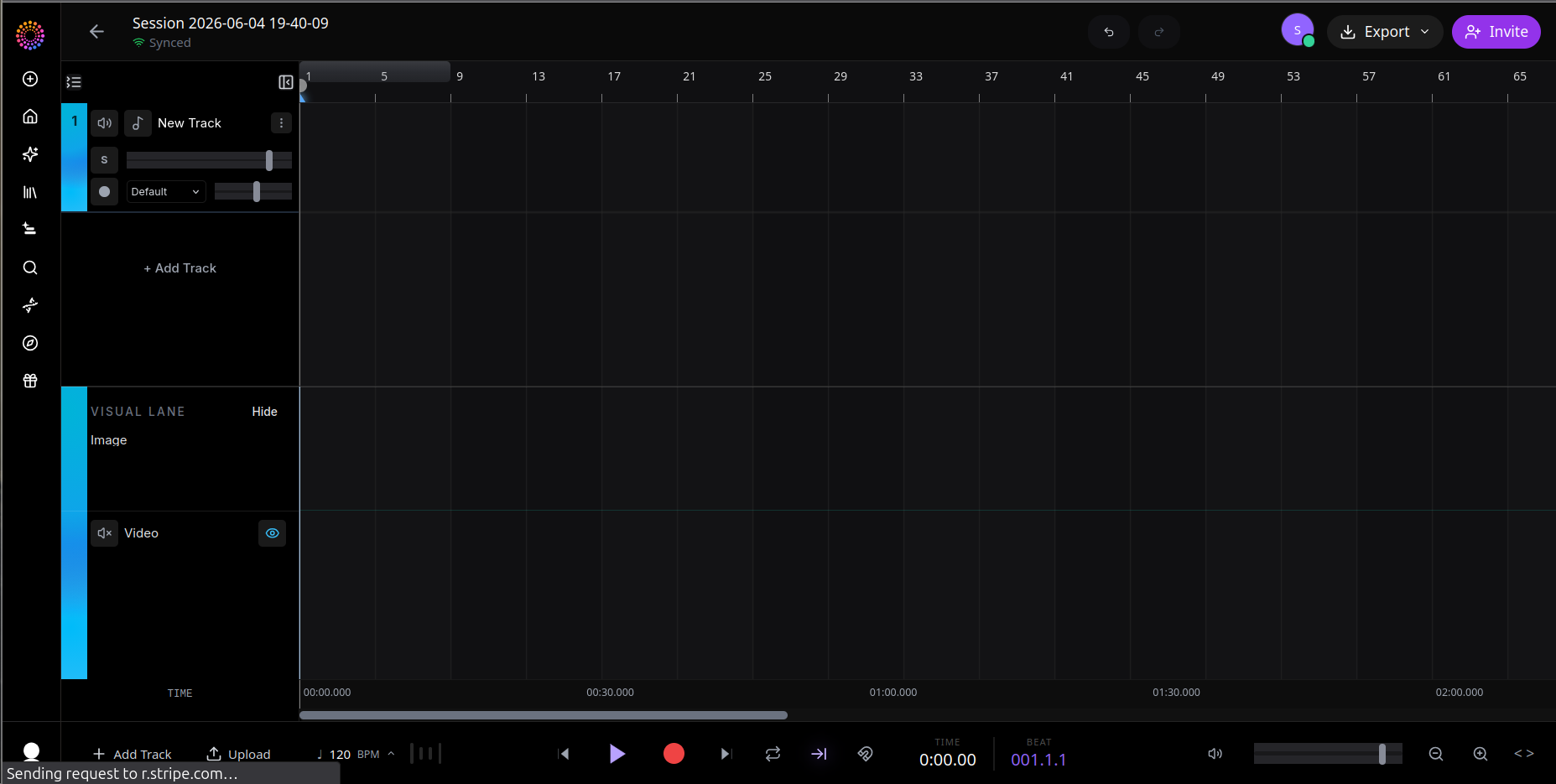
In the Soundverse AI Studio, beat accuracy is the default. The timeline is built around the beat grid from the moment you open a session. Here's how it works in practice. Every session has a BPM beats per minute and a time signature set in the session header. The default is 120 BPM in 4/4 time, but you can change it to anything. If you upload an existing song, Tempo Detection runs automatically and sets the session BPM to match the track.
The timeline is divided into bars and beats. The ruler at the top shows bar numbers. The playhead position is displayed in two formats simultaneously bar and beat position, and absolute clock time in seconds. So you always know both where you are musically and where you are in real time. When you drag a clip onto the timeline, it snaps to the nearest beat. When you trim the edge of a region, it snaps to the beat grid. When you move something, it lands on a beat. The grid is always there, always active, always keeping everything aligned to the musical structure. You don't have to think about any of this. The Studio handles it. Every edit you make is beat-accurate by default.
What It Means for Specific Workflows Beat accuracy shows up differently depending on what you're making. Here's what it means in three specific contexts. Making a short-form cut for TikTok or Reels. You want a 30-second clip that starts with the hook. In the Studio, Section Analysis identifies the hook with frame-accurate timestamps. The trim happens at the exact first beat of that section. The export starts precisely where the musical energy begins — not a fraction early, not a fraction late. The result is a clip that hits immediately, because the first thing the listener hears is the strongest beat in the section. Transitioning between sections in a remix or arrangement. You're reordering a song putting the chorus before the verse, or removing the bridge, or combining sections from two different ideas. Every transition snaps to the bar line. The section that follows picks up exactly where the previous one ended musically. No awkward gap. No overlapping beat. The listener moves from one section to the next and feels the transition as intentional because it landed on the right beat. Generating a music video.
When Agent One generates a video from a finished song, every scene cut snaps to the beat grid. The visual edit and the musical edit happen at the same moment. When the chorus drops, something changes on screen at exactly that beat. When a new section begins, a new scene begins. The synchronisation between audio and video isn't approximate, it's exact. The result is a video that feels composed rather than assembled.
The Manual Override — When You Need Precision Below the Beat Beat-accurate editing is the default. But there are moments when you need to work at a finer resolution aligning audio to a specific video frame, for example, or nudging a clip by a fraction of a beat to match an unusual timing choice in the source material. The Studio supports frame-accurate trim alongside the beat grid. You can edit at 24, 30, or 60 frames per second depending on your session settings. The snap grid and the frame-accurate trim are independent — you can have snap on and still nudge by single frames using arrow keys when you need that level of precision. Most of the time you won't need it. The beat grid handles the vast majority of editing decisions correctly. But when you do need it, the resolution is there.
Why This Matters for Creators Who Aren't Producers The reason beat-accurate editing matters for non-technical creators isn't that they'll ever think about beats and bars while they're working. It's that they'll never have to. The feeling of a well-edited track — that sense of inevitability, of every cut landing exactly right — used to require either years of training or a skilled editor. In the AI Studio it's the default state. You make the creative decisions. The Studio makes sure every cut lands where it should. That's what beat-accurate editing actually means for creators. Not a technical feature to configure. The thing that makes everything feel right without you having to know why.
Experience it in the AI Studio at soundverse.ai/aistudio
Social Links: Instagram: https://www.instagram.com/soundverse.ai TikTok: https://www.tiktok.com/@soundverse.ai Twitter: https://twitter.com/soundverse_ai LinkedIn: https://www.linkedin.com/company/soundverseai Youtube: https://www.youtube.com/@SoundverseAI Facebook: https://www.facebook.com/profile.php?id=100095674445607
Join Soundverse for Free and make Viral AI Music
https://www.soundverse.ai/signup
