Easy-to-Use AI Tools for Making Music Videos, Sorted by the Video You Want
Easy AI music video tools sorted by the video you want: visualizers, lyric videos, lip-sync performances, story videos and Spotify Canvas loops.
The easy-to-use AI tools for making music videos are the AI music video tools built for the one kind of video you want. Name it first: Renderforest or Soundverse AI Studio for a visualizer, VEED or the Soundverse phone apps for a lyric video, HeyGen or Soundverse Lip Sync for a singing performance, and Luma for a Spotify Canvas loop.
A long ranked list hides the question a first-timer actually has: what am I making, and how much work will it take? So this guide sorts the picks by kind of video and by effort. Every detail comes from each company's own pages, checked on 19 November 2026, Soundverse (our own product) included. If you mostly post vertical clips, our guide to easy AI apps for social media music videos covers a different set of apps, and the full ranking of AI music video generators covers the heavier clip generators.
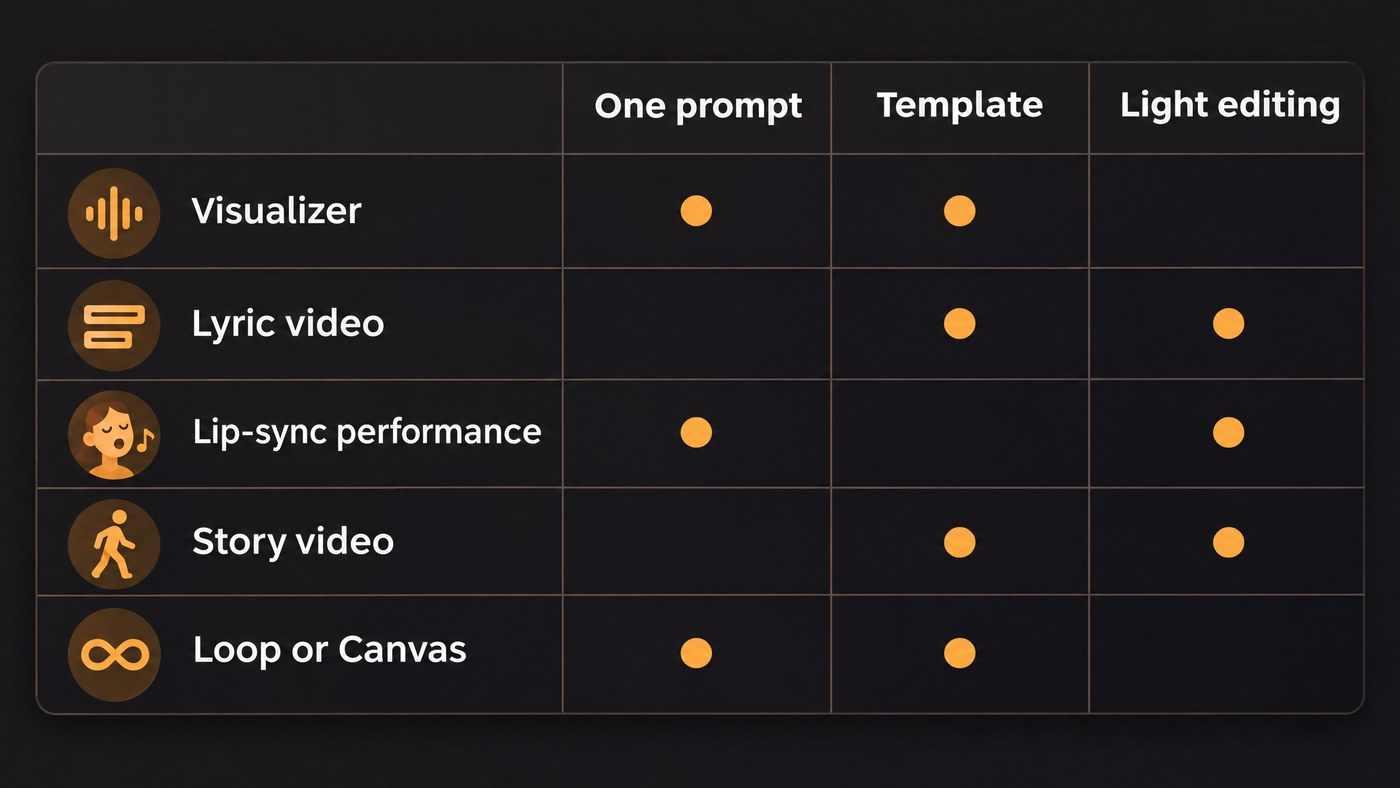
Five kinds of music video, and what each one needs from you
- Audio-reactive visualizer. Shapes or scenes that pulse with the audio. You need the track and your cover art.
- Lyric video. The words on screen, timed to the vocal. You need the song and correct lyrics.
- Performance with lip-sync. A face or character singing your line. You need a vocal and an image you may use.
- Story or narrative video. A cast, a place and something that happens. You need an idea, or a tool that writes one.
- Loop or Spotify Canvas. A short vertical clip that repeats. You need one strong image or moment.
How much skill each tool asks for
We tag every pick with one of three effort levels:
- One prompt. You upload or describe, press generate, and review what comes back.
- Template. You pick a ready-made look and swap in your track, artwork or words.
- Light editing. You fix captions, trim a clip or place a few shots on a timeline. No editing background needed, but budget an evening.
Audio-reactive visualizers: the easiest first music video
Renderforest music visualizer templates (Template). Renderforest's music video maker works the way a beginner expects: pick a visualizer, lyric or promo template, add your track and artwork, and export for YouTube, Spotify and TikTok. Templates include Album Promo, Bass Drops and Turntable visualizers. It is free to start, and Renderforest says paid plans export without a watermark, so check the free export before you post it.
Soundverse AI Studio Visualizer (Template). Inside AI Studio, the Visualizer renders an audio-reactive visual for your song to MP4, from 10 scenes, in 16:9, 9:16, 1:1 or 4:5. AI Studio is on every plan, Free included, and video export follows your plan: up to 720p on Free, 1080p on Creator and up to 4K on Pro. Export runs in your browser and uses its built-in video encoders, which current desktop Chrome and Edge include, so render on a computer rather than a phone.
A visualizer suits album tracks and instrumentals, where the song carries the video.
Lyric videos: words on screen without typing every line
VEED (Light editing). VEED's lyric video maker has you upload your music and footage or photos, then add lyrics with its auto-subtitle generator, which transcribes the vocal, or paste them in by hand. You can animate the text and use a preset canvas size for YouTube. The editor is free to use; VEED says a paid plan removes its watermark. Check every line, since sung words trip up transcription more than speech.
Soundverse for iPhone and Android (One prompt). If the song doesn't exist yet, the phone apps do both jobs. In Soundverse for iPhone you describe a song or paste lyrics, Agent One makes it, and you export a vertical lyric video with the cover art and scrolling lyrics, ready for Stories and Reels. Soundverse for Android shares a lyric video as an MP4. The iPhone app is in English and needs iOS 17.6 or later.
For animated, word-by-word styles and more options, our comparison of AI video generators for lyric videos goes deeper.
Performance videos with lip-sync
HeyGen Make Photo Sing (One prompt). HeyGen's Make Photo Sing takes a clear, front-facing photo of a person, pet or cartoon character plus an MP3 or WAV at full track length. You pick a mood and a shape (9:16, 1:1 or 16:9) and download an MP4. Its FAQ says the free plan covers short clips with a watermark, a paid plan adds longer renders and HD, and it animates one face at a time.
Soundverse Lip Sync (Light editing). Lip Sync turns a character image and up to 15 seconds of vocal into a 4 to 15 second singing shot at 480p, 720p or 1080p, vertical by default. It needs the Creator plan or above. Illustrated, painterly and anime-style characters work best, because realistic faces often can't be animated, and a clean vocal stem syncs far better than a full mix. Make one shot per line and lay them on a video lane in AI Studio, or use the Lip Sync toggle in AI Music Video Generator for the whole song. Our overview of Soundverse's video and lip sync tools shows how the pieces connect.
Either way, only animate a face you have permission to use.
Story and narrative videos
Soundverse Music Video Storyteller, then AI Music Video Generator (One prompt). Beginners stall on story videos because the hard part is the idea. Music Video Storyteller runs on the Free plan and writes a story from your song's own sections and lyrics: the kind of video (performance, story, dance, concept, journey, mood piece or abstract), the cast, the place and what happens in each section. Pick Live action, Anime, Painterly or Mascot, a vertical or wide shape, and add your own characters or a photo of you. It films nothing. To shoot it, AI Music Video Generator (Creator plan and above) takes one prompt for a new song and its video, or your own MP3, WAV, M4A or FLAC of up to 50 MB. Agent One writes a script and quotes its cost for your approval before filming, then cuts the scenes to the music in 16:9 or 9:16 at up to 1080p.
Sideways Eyes is a song and music video that a musician on Soundverse made with AI Music Video Generator.
Renderforest AI Music Video Generator (One prompt). From the same company as the templates above, Renderforest's AI Music Video Generator takes an MP3 or WAV, a description of the look and a choice of model, then returns a video cut to the track that you edit scene by scene. Its page says it reads tempo, energy, transitions and lyrics before building the edit, and its models are free to try with test credits.
Our guide to making a story-driven AI music video covers planning the beats first.
Loops and Spotify Canvas
Spotify's Canvas guidelines, checked on 19 November 2026, ask for 3 to 8 seconds, vertical 9:16, between 720 and 1080 pixels tall, as an MP4 or JPG. Since a loop won't line up with the words, Spotify advises: "Choose footage without talking, singing, or rapping." It also offers the simplest loop trick there is: "Rebound plays your clip forwards, then reverses it (an easy way to get a smooth loop)."
Luma Dream Machine (One prompt). Luma's guide to generating with Ray2, published in January 2025 and still on its learning hub, says you can add "loop" to the prompt or turn on looping in the interface: the infinity symbol on the web, or Loop in the iOS prompt tray. Clips run 5 or 10 seconds at 540p, 720p or 1080p, and the guide puts processing at 10 to 60 seconds. Newer Luma models may differ, so check the toggle.
Cut it from a video you already have (Light editing). Soundverse Media Converter works on the Free plan: trim a video on a timeline, crop it to 9:16 and convert it to MP4, and the original stays untouched. Renderforest also suggests reusing your music video's scenes for a 9:16 Canvas.
Matching the tool to the time you have
- A finished song and little time: a visualizer template, or the Soundverse phone app's lyric video if you're still making the song.
- An afternoon: a lyric video in VEED with corrected captions, or a HeyGen singing photo.
- A weekend: a story video from Music Video Storyteller and AI Music Video Generator, with a few Lip Sync shots and a Canvas cut from the best scene.
Where Soundverse fits
Soundverse is an AI music platform that takes you from idea to audience, built for artists who want the song and its video in one account. On the Free plan you can make a song, plan a story with Music Video Storyteller and trim a Canvas with Media Converter, and AI Studio, where the Visualizer lives, is on every plan, with Free video exports up to 720p. The Creator plan adds AI Music Video Generator, which scripts, films and cuts a full video to your track at up to 1080p, and Lip Sync for singing shots, plus 1080p export from AI Studio. Pro raises AI Studio export to 4K. Lip Sync often can't animate realistic faces and AI Music Video Generator doesn't film in 4K, so for photoreal singers or 4K footage, look at the tools above or a dedicated clip generator. Licensing is set by plan: the Free plan is for personal use, and the Creator plan comes with a royalty-free license.
FAQ
What is the easiest kind of AI music video to make? An audio-reactive visualizer. You only need the track and your artwork, and template tools like Renderforest or the Visualizer in Soundverse AI Studio do the rest.
Can I make an AI music video for free? Yes, with limits. VEED's editor is free but adds a watermark, HeyGen's free plan makes short watermarked clips, and Renderforest is free to start. On Soundverse, Music Video Storyteller and Media Converter work on the Free plan, and AI Studio, home of the Visualizer, is on every plan, with Free video export up to 720p.
Which AI tool can make a photo sing my song? HeyGen Make Photo Sing animates a front-facing photo to a full-length MP3 or WAV. Soundverse Lip Sync makes 4 to 15 second singing shots from a character image and works best with illustrated or anime-style characters. Use only faces you have permission to use.
Sign up for Soundverse free and make your first visualizer tonight. More guides on the Soundverse blog.
