Best AI Music Video Generators in 2026
The best AI music video generators in 2026 for independent artists: song-first tools and clip models compared, with what each does well and where it stops.
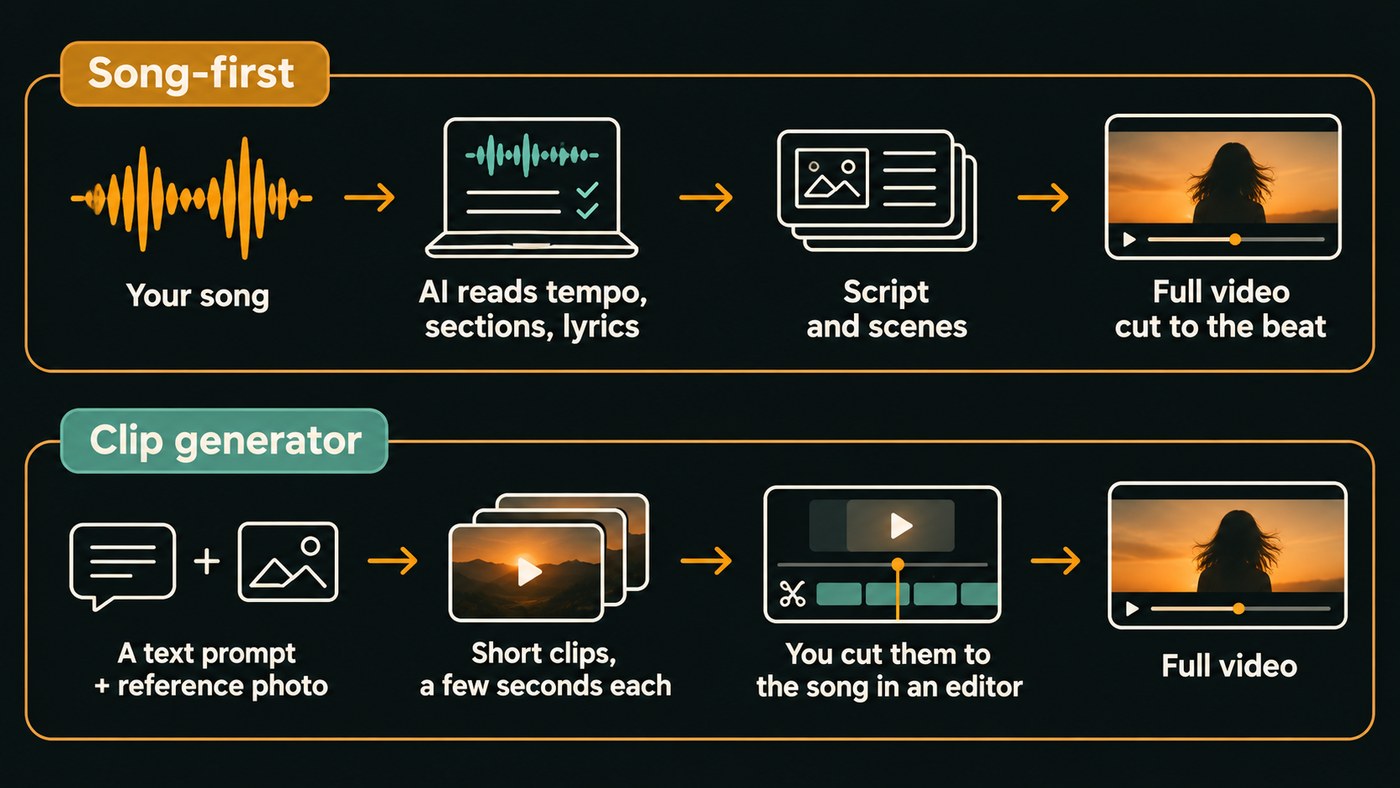
The best AI music video generators in 2026 come in two kinds. Song-first tools (Soundverse, Neural Frames, Freebeat, Kaiber, Revid, Rotor Videos) start from your track and cut the video to it. Clip generators (Google Flow, Runway, Kling, LTX Studio) make striking shots that you edit to the song yourself. Choose by how much directing you want to do.
This shortlist is for independent artists who need a video for a single, a lyric video or vertical clips. We checked every tool on its own website in November 2026, and held Soundverse, our own product, to the same format as the rest.
Song-first tools vs clip generators: two kinds of AI music video generator
Song-first tools take your audio, read the tempo, sections and often the lyrics, then plan scenes and cut them to the beat. You get a full-length video in one pass, and the tool makes many shot decisions for you.
Clip generators are video models. You write a prompt or give a start image, get a clip a few seconds long, and repeat. Then you cut the shots to the song in CapCut, Premiere Pro or DaVinci Resolve. It's more work, and it's how you get the exact image you pictured.
Plenty of artists use both: a song-first tool for the full video, a clip model for the chorus hero shots. More on that split in the most advanced AI tools for music videos.
Soundverse AI Music Video Generator
AI Music Video Generator is the song-to-video tool in Soundverse, an AI music platform that takes you from idea to audience. Bring a finished track (MP3, WAV, M4A or FLAC up to 50 MB) or describe a new song. Agent One writes a script, quotes the cost for your approval, then films every scene and cuts it to the music.
Who it's for: artists with a single and no video, or who want the song and the video from one place.
What stands out:
- Prompt to Music Video makes the song first from one prompt, then films it. In Custom, pasted lyrics are sung word for word.
- Lip Sync puts the lead singing to camera, with up to nine image references for cast and setting.
- The video opens in AI Studio, Soundverse's browser studio, for further editing.
Where it stops: it needs the Creator plan or above, every second of the song is filmed (so on Creator a video needs a token top-up), and output is 16:9 or 9:16 at up to 1080p, with no 4K.
Neural Frames
Neural Frames is a Berlin-based music video platform with three modes: Autopilot (song to video in two clicks), a frame-by-frame editor and a text-to-video timeline.
Who it's for: artists who want visuals that react to specific parts of the track, like the kick or the vocal.
What stands out:
- It splits your song into 8 stems and lets you tie effects to each one.
- You can pick Kling, Seedance or Runway models, or train a custom model on 10 to 20 images for a consistent character.
- 1080p upscaling on every paid plan, 4K on the higher tiers.
Where it stops: the entry plan, Neural Knight, is $39 a month or $26 a month billed yearly (as listed on the Neural Frames pricing page, November 2026), and that page flags it as not recommended for Autopilot.
Freebeat
Freebeat reads a song's BPM, beats and structure and builds the video around them. Upload an MP3 or paste a link from Spotify, SoundCloud, YouTube, Suno, Udio or TikTok.
Who it's for: artists who want a full video or lyric video quickly, with little setup.
What stands out:
- A lyric video mode with automatic timing and karaoke-style highlighting.
- Lip sync and consistent characters, with videos from about 15 seconds to roughly 6 minutes.
- Exports in 16:9, 9:16 or 1:1, and a free plan for testing.
Where it stops: its FAQ lists exports at 720p or 1080p, and results depend on which of its many third-party models you choose.
Kaiber
Kaiber has three music video workflows. Music Video Montage holds one subject, setting and style for the whole song. Music Video Sequence moves the subject through several settings mapped to the song's builds and releases. Lyric Video builds your transcribed lyrics into the scene.
Who it's for: artists who want a structured video without prompting each shot, or many short clips around a release.
What stands out:
- Beat Sync cuts your own images or clips to a track with no prompting, up to 10 videos per batch on Pro (2 on Creator).
- You can run a short, low-resolution test before spending credits on the full song.
Where it stops: Kaiber's help center caps videos at 4 minutes for Montage and Sequence and 3 minutes for Lyric Video, and Beat Sync isn't on the entry Starter plan.
Revid.ai
Revid's AI Music Video Generator turns an MP3, WAV or music link into a beat-synced video with lyric captions, timed to the beat or to the lyrics.
Who it's for: artists who plan for TikTok, Reels and Shorts first.
What stands out:
- Its Growth plan includes publishing to TikTok, Instagram, YouTube and X.
- The generator shows the exact cost before you press generate.
Where it stops: it's a general short-form platform with many non-music tools, and AI video is billed by the second, so a full song costs far more than a 30-second teaser.
Rotor Videos
Rotor Videos, part of LyricFind, makes music videos, lyric videos, Spotify Canvas loops and Apple Music Album Motion from your track. It suggests clips from a stock library of 17M+ clips matched to tempo, genre and mood, then sequences the edit. Its FAQ is plain: "AI's role on Rotor Videos is editing, not generating."
Who it's for: artists who prefer real footage, and want every release format in one account.
What stands out:
- Over 300 styles, Transcribe & Sync for lyric videos, and Reframe for 9:16 and 1:1.
- Artist Unlimited plans start at $9.99 a month billed annually ($119.88 a year), or single credits at $9.99, as listed on the Rotor Videos pricing page, November 2026.
Where it stops: stock footage won't feature your face or character unless you upload your own clips.
Google Flow
Google Flow is Google's AI filmmaking tool. You generate clips from text, start and end frames, or "ingredients", reference images you reuse across clips.
Who it's for: artists comfortable editing who want cinematic shots with a consistent lead.
What stands out:
- Ingredients keep the same character and props from clip to clip.
- Without a subscription you still get basic generation and editing plus 50 credits a day.
Where it stops: you get clips, not a cut video. Google's help center lists Omni Flash 1.2 and Veo 3.1 Lite as current models, with Veo 3.1 Fast, Veo 3.1 Quality and Omni Flash 1.1 retiring on December 5, 2026. You must be 18 or older and in a supported region.
Runway
Runway is a suite for generating and editing video, images and audio. Its own model, Gen-4.5, launched on December 1, 2025, and paid plans also include models such as Kling 4.0.
Who it's for: artists and directors who want several top models and an editor under one subscription.
What stands out:
- Gen-4.5 is built for realistic motion and close prompt adherence, good for hero shots.
- Free plan with 125 one-time credits; Standard is $15 a month, or $12 a month billed annually, for 625 credits, which Runway equates to 52 seconds of Gen-4.5 (as listed on the Runway pricing page, November 2026).
Where it stops: there's no song-first mode, and 52 seconds a month won't cover a three-minute song shot fresh.
Kling AI
Kling AI is a video and image generator whose flagship, Kling 4.0, is pitched on audio-visual performance. It adds Motion Control, AI avatars and a Canvas where an agent helps write scripts and storyboards.
Who it's for: artists who want realistic people, movement and performance shots.
What stands out:
- Kling lists music videos among its industry uses, including a virtual idol's MV made with Warner Music China.
- Its site announces native 4K video.
Where it stops: like every clip model, it hands you shots rather than a video cut to your song.
LTX Studio
LTX Studio sits between the two kinds: a production workspace on its own LTX model, plus partner models such as Veo 3.1, Kling and Seedance. Its music video workflow starts from your track: set style and lighting, cast characters, then adjust camera and motion per shot.
Who it's for: artists working with a director or small team on a planned, story-led video.
What stands out:
- Characters, objects and locations stay consistent across scenes.
- Export as MP4, or as XML to keep editing in your usual software.
Where it stops: audio upload is MP3 or OGG only, and it's built for teams, so expect more setup.
Also worth a look: Luma (Ray 3.2), Hailuo (MiniMax H3) and Pika, which makes multi-shot clips of up to 30 seconds. All three are clip generators.
How to choose the best AI music video generator for your release
- Start from what you have. A finished song and no visual idea suits a song-first tool. Shots already in your head suit a clip generator.
- Performance or story. For a lead singing to camera, check lip sync first: Soundverse, Freebeat and Neural Frames list it.
- Check the length cap. A 4-minute limit rules out a 4:30 song.
- Price the whole song. Most tools bill by the second, so multiply by your track's length.
- Pick the shape early. Make it 9:16 for Shorts and Reels instead of cropping later; our vertical AI music video guide covers framing.
- Label it on YouTube. YouTube's policy says: "We require creators to disclose AI-generated or altered content that seems realistic." Its list also covers AI music that is the main focus of the video.
How we picked
We read each tool's site, help center and pricing page in November 2026. A tool had to be live and either start from your audio or be widely used for music video shots. Prices appear only where the vendor's pricing page lists them. We left out general video editors and anything we couldn't verify on the vendor's own pages. Order within each group isn't a ranking.
Where Soundverse fits
Soundverse makes sense when the song and the video should come from the same place. Start from one prompt and get both, or bring a finished single and let AI Music Video Generator script, film and cut it, with lip sync for a performance.
If you're not sure what the video should be, Music Video Storyteller reads your song's sections and lyrics and writes a story for each part. It's on the Free plan and films nothing. That plan works just as well if you shoot with Flow, Runway or a real camera.
Licensing is set by plan: the Free plan is for personal use, and the Creator plan comes with a royalty-free license.
This walkthrough shows one prompt becoming a full song and music video, editable in AI Studio afterward.
FAQ
What is the best free AI music video generator? Freebeat has a free plan, Runway's Free plan gives 125 one-time credits, and Google Flow offers 50 credits a day without a subscription. Use free tiers to test a style before paying for a full video.
Can AI make a music video from my own song? Yes. Soundverse, Neural Frames, Freebeat, Kaiber, Revid, Rotor Videos and LTX Studio all build a video around an uploaded track. Only upload songs you hold the rights to.
Which AI music video generators make lyric videos? Freebeat, Kaiber, Revid, Rotor Videos and Neural Frames all offer lyric options with automatic timing. Our guide to AI lyric video generators goes into more detail.
How long can an AI music video be? It depends on the tool: Kaiber caps workflows at 3 to 4 minutes, and Freebeat goes to roughly 6 minutes. With clip generators, length depends on how many clips you're willing to make and edit.
Sign up for Soundverse free and plan your next video with Music Video Storyteller. More guides on the Soundverse blog.
