How to Make a Story-Driven AI Music Video in 2026
Learn how to make an AI music video with narrative storytelling using Soundverse tools.
How to Make a Story-Driven AI Music Video
The fusion of artificial intelligence and music video production has grown exponentially by 2026. With intuitive tools like Soundverse’s AI Song Generator, creators can now transform stories, emotions, and lyrics into stunning, narrative-driven AI music videos. Whether you’re a musician trying to visualize your next single, a filmmaker exploring AI-generated visuals, or a digital creator focused on immersive storytelling, the process is becoming more accessible than ever.
In this detailed guide, we’ll explore how to make a story-driven AI music video—from concept to final edit—using modern AI tools. We’ll analyze narrative design principles, discuss how AI-generated music and visuals work together, and show exactly how to use the Soundverse AI Song Generator as your creative foundation.
Why Are Story-Driven AI Music Videos Trending in 2026?

The year 2026 marks a critical moment in creative AI. Story-based content dominates platforms like YouTube Shorts, TikTok, and emerging metaverse spaces. Audiences crave emotion and relatability, not just abstract visuals. This shift makes the narrative music video more relevant than ever.
By combining AI music generation with AI video storytelling, creators can design cohesive, cinematic music experiences. The AI interprets lyrics, generates complementary visual elements, and helps craft transitions that mirror emotional tension, character arcs, and rhythm.
How to Make a Story-Driven AI Music Video with Soundverse AI Song Generator


Before we jump into steps, let’s understand the foundation — your song.
Soundverse’s AI Song Generator is a core tool for transforming your narrative ideas into complete, emotionally engaging songs. It creates music through a multi-stage pipeline that handles lyrics, melody, arrangement, and mixing—making it ideal for launching narrative music projects.
Key Capabilities That Power Storytelling
- Describe Your Song Mode: Use natural language prompts to describe the story, genre, or emotion behind your song. For example, “A haunting ballad about time travel and lost love.”
- Custom Mode: Upload your own lyrics and fine-tune vocal styles, tempo, or key. This is perfect for creators who already have story beats mapped out.
- Reference Audio: Upload a demo, vocal stem, or music reference to guide tonal and rhythmic choices.
- Quick Style Selection: Easily pick from genres like pop, EDM, or rock to match the intended mood of your story.
Primary Use Cases
- Songwriting Demos: Quickly visualize story concepts in audio form.
- Content Creation: Ideal for social media music storytelling.
- Custom Gifts and Greetings: Personalize meaningful narratives through AI-composed songs.
- Multilingual Music: Produce story-driven videos across languages for global reach, powered by tools like the AI Song Generator for Global and Multilingual Audiences.
Now, let’s walk through exactly how to use Soundverse to create your AI music video base.
Step 1: Feature Overview — Access AI Song Generator

Log into Soundverse and access the AI Song Generator from the main dashboard. This is your central hub for creating songs that serve as the soundtrack to your narrative music video.
Step 2: Lyrics Input — Enter or Paste Song Lyrics
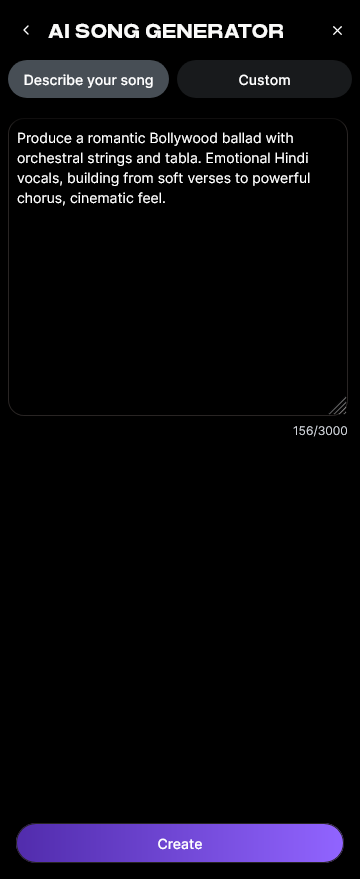
If you already have a script or lyrical poem, paste that text into the lyrics field. If not, use the AI Lyrics Writer from Soundverse to generate compelling lyrics based on tone, genre, or theme.
Step 3: Style Selection — Choose Music Style and Genre

Decide which genre complements your story. A romantic narrative may pair best with pop or R&B, while a sci-fi concept benefits from electronic or cinematic orchestration. This choice sets the visual pacing of your future video.
Step 4: Configuration — Set Generation Parameters

Adjust the settings such as tempo, key, vocal tone, and intensity. Tailor each to amplify the narrative moment—fast beats for action, soft harmonies for emotional depth.
Step 5: Generation — Generate Song with Vocals and Instruments

Click Generate and let the system synthesize your story into music. The AI processes your data, integrating lyrics, melody, and production layers into a full composition.
Step 6: Generation Complete — Review and Refine

Once the song is ready, review it. Pay attention to vocal tone and phrasing; does it align with your narrative intention? You can tweak parameters and regenerate until the emotion feels right.
Step 7: Export Results — Download and Prepare for Video Integration

Export your final mix in WAV or MP3 format. You can now use this in any video editor or AI visual engine to animate your story. For extra inspiration, watch our tutorial on music creation fundamentals from the Soundverse YouTube channel.
How to Develop a Strong Narrative for Your AI Music Video
Once your audio is complete, shift focus to the visual story. Even the best AI-generated song deserves imagery that conveys emotional arcs.
- Define Character or Emotion: Build the entire video around a feeling or journey. For example, heartbreak could be portrayed through motifs of fading light or dissolving cityscapes.
- Plan Scene Progression: Break the video into acts—introduction, conflict, resolution—similar to a short film.
- Sync Music and Scenes: Match visual pacing to the song’s rhythm. A soft verse might feature slow camera motion or broader landscape shots.
- Leverage AI Visual Tools: Use platforms like Runway, Kaiber, or Pika to transform your song into animated visuals. Pair these with Soundverse-created audio for unified storytelling.
For inspiration on how AI-generated music supports storytelling, explore How AI-Generated Music Is Transforming the Music Industry or look at The Role of AI Music in Film and Television.
Pro Tips for Creative Video Editing
Fine-tuning your narrative music video requires strong visual rhythm and storytelling focus. Here are advanced techniques to help:
- Blend Real and Synthetic Footage: Combine stock video elements with AI-generated scenes for unique texture.
- Use Motion Cuts Wisely: Transition on beats or melodic phrases to reinforce musical storytelling.
- Color Grading for Emotion: Warm tones for romance, blue hues for melancholy.
- AI-Assisted Editing Tools: Tools like Runway Gen-3 and Adobe Firefly 2 allow adaptive scene morphing that aligns perfectly with musical sections.
For creators working on large-scale productions, consider blending Soundverse output with post tools such as Soundverse AI Magic Tools, which streamline content prep and file management.
Extending and Improving Your Audio for the Story
If you need longer or alternate versions of your song to fit dynamic video sequencing, use Extend Music, another Soundverse feature. It can stretch or loop your track without breaking style or continuity.
Similarly, if you require background scores without vocals for intros or credits, use AI Music Generator, which creates rich instrumentals based on simple text prompts. You can read more about crafting atmosphere in our article Generate AI Music with Soundverse Text-to-Music.
Why Storytelling Matters for AI-Driven Creations
As algorithmic content rapidly floods online platforms, emotional storytelling is what keeps audiences engaged. AI can automate technical tasks, but human direction gives meaning to those outputs. The most successful narrative music videos of 2026 don’t just rely on visuals—they build empathy and communicate a theme.
For additional creative approaches, look at How to Create EDM with Soundverse AI or How to Make AI-Generated Music to explore varied genres and workflows.
Create Your Own AI Music Video Today
Bring your story to life with Soundverse — generate stunning music and dynamic visuals powered by AI. Start experimenting with custom soundtracks and creative tools built for storytellers, musicians, and creators.
Related Articles
- The Role of AI Music in Film and Television: Explore how AI-generated compositions are revolutionizing the soundtrack industry for filmmakers and content creators.
- Enhancing YouTube Content with Royalty-Free and Copyright-Free Music Using Soundverse AI: Learn how to use Soundverse AI to elevate your YouTube videos with custom, royalty-free background tracks.
- Soundverse Revolutionizing Music Creation for New-Age Content Creators: See how Soundverse is empowering creators to compose, edit, and share professional-level music powered by AI.
- How an AI Music Generator Inspires Creative Fusion: Discover how AI tools like Soundverse spark innovation, helping musicians and visual storytellers create more cohesive art.
Here's how to make AI Music with Soundverse
Video Guide

Here’s another long walkthrough of how to use Soundverse AI.
Text Guide
- To know more about AI Magic Tools, check here.
- To know more about Soundverse Assistant, check here.
- To know more about Arrangement Studio, check here.
Soundverse is an AI Assistant that allows content creators and music makers to create original content in a flash using Generative AI. With the help of Soundverse Assistant and AI Magic Tools, our users get an unfair advantage over other creators to create audio and music content quickly, easily and cheaply. Soundverse Assistant is your ultimate music companion. You simply speak to the assistant to get your stuff done. The more you speak to it, the more it starts understanding you and your goals. AI Magic Tools help convert your creative dreams into tangible music and audio. Use AI Magic Tools such as text to music, stem separation, or lyrics generation to realise your content dreams faster. Soundverse is here to take music production to the next level. We're not just a digital audio workstation (DAW) competing with Ableton or Logic, we're building a completely new paradigm of easy and conversational content creation.
TikTok: https://www.tiktok.com/@soundverse.ai
Twitter: https://twitter.com/soundverse_ai
Instagram: https://www.instagram.com/soundverse.ai
LinkedIn: https://www.linkedin.com/company/soundverseai
Youtube: https://www.youtube.com/@SoundverseAI
Facebook: https://www.facebook.com/profile.php?id=100095674445607
Join Soundverse for Free and make Viral AI Music

We are constantly building more product experiences. Keep checking our Blog to stay updated about them!