Easy-to-Use AI Apps That Produce Music Videos for Social Media
Easy AI music video apps for social media compared: steps from song to a 9:16 post, auto captions, beat sync, direct sharing and free-tier watermarks.
If you want easy-to-use AI apps that produce music videos for social media, these AI music video apps reach a 9:16 post fastest: CapCut for auto lyrics on your phone, Soundverse for a song plus a vertical lyric video, Freebeat and Revid for beat-synced clips, Neural Frames for short-form cuts, and Kaiber for Beat Sync.
Easy, for a musician posting several times a week, means a short path: few steps to a vertical export, cuts on the beat, captions you don't type, and a way onto TikTok, Reels or Shorts. Every detail below comes from each company's own pages, checked on 19 November 2026, with Soundverse, our own product, held to the same standard.
What makes an AI music video app easy for social posts
- Steps from song to post. Count them on the tool's own how-to. The best read: upload, pick a look, generate, post.
- Vertical from the start. A native 9:16 export beats cropping a 16:9 video, which chops faces and text.
- Beat-synced cuts. The app should cut on tempo and sections; our explainer on how AI video engines read rhythm and tempo shows what's under the hood.
- Auto captions or lyrics, with an editor to fix a misheard line.
- Templates that lock timing and transitions, so you only swap media.
- Direct sharing to TikTok, Instagram or YouTube, which saves a download-and-upload loop.
- Free-tier limits. Watermarks and length caps decide whether a free export is postable.
Easy-to-use AI music video apps, compared
CapCut: a phone-friendly editor with auto lyrics
What makes it easy: CapCut's AI music video generator page lays out three steps: bring in your media, apply auto lyrics from Captions, then export to your device or straight to TikTok and YouTube. Its FAQ says the AI analyzes beats to build matching visual sequences, and that videos export without watermarks. You can also start from a template or a caption template.
The catch: CapCut is an editor first, so the look comes from your clips, its library or its generators, not from what the song is about. The page notes some features are only available in certain regions, and Auto Lyrics isn't in every version of the app; our lyric video generator guide explains where it works.
Soundverse: the song and a vertical lyric video in one app
What makes it easy: In the Soundverse iPhone app you describe a song or paste lyrics, and Agent One returns the music, vocals, a title and cover art. You then export a 9:16 lyric video that scrolls your words over the cover art, ready for Stories and Reels, or share to Instagram, Facebook or Snapchat. The Android app sends a lyric video as an MP4. On the web, AI Music Video Generator films a full video for your track in 9:16 for Shorts and Reels.
The catch: the filmed music video and Lip Sync need the Creator plan or above, AI Studio (where you keep editing) is web-only, and the iPhone app is in English. Lip Sync suits illustrated or anime-style characters, because realistic faces often can't be animated.
Freebeat: four steps from a link to a posted video
What makes it easy: Freebeat lists four steps: upload an MP3 or paste a Suno, Udio, TikTok or YouTube link, pick Story Video or Stage Performance, generate and refine the storyboard, then switch on synced lyrics and share to TikTok, Instagram or YouTube. It exports 16:9, 9:16 or 1:1 at 720p or 1080p, in the browser or in its App Store, Google Play and Mac apps.
The catch: the free plan is for testing, and the FAQ doesn't say whether free exports carry a watermark. Render a short test first.
Revid: built around TikTok, Reels and Shorts
What makes it easy: Revid's AI music video generator takes an MP3, WAV, M4A or a Suno link in three steps: upload, choose stock footage, AI clips or moving AI images, then generate and refine. Output is native 9:16, you choose Beats or Lyrics timing, and you publish to TikTok, YouTube and Instagram from inside Revid. There's an iPhone app too.
The catch: credits grow with the track's length, so trim to the hook first; the generator shows the cost before you press the button. Music is one of many video types it covers.
Neural Frames: a short-form studio beside full videos
What makes it easy: Autopilot turns a song into a full music video or lyric video, and the pricing page lists Short-Form Studio, made for TikTok, Reels and Shorts clips, plus horizontal-to-vertical conversion on every paid plan. Make the full video once, then cut vertical clips from it.
The catch: its lyric video FAQ gives free accounts 20 seconds of generated video, watermarked; full-length, unwatermarked downloads need a paid plan. The entry plan is flagged as not recommended for Autopilot.
Kaiber: Beat Sync in your phone's browser
What makes it easy: Kaiber's help center says there's no app to download: open kaiber.ai in your mobile browser for more than 20 workflows, including Music Video Montage, a multi-clip video from your sound with no editing, and Beat Sync, which times your photos or clips to the beat.
The catch: on mobile, Beat Sync is limited to Instant Cut, and adding lyrics is desktop-only. Kaiber's plans article lists a paid five-day trial that turns into a monthly plan, and no free plan.
Top-Rated AI Music Video Generators for Social Media Content
Star ratings shift with every update, so pick by the job in front of you:
- A finished song and a hook clip today: Revid or Freebeat.
- Lyrics on screen from your phone: CapCut's auto lyrics, or a Soundverse lyric video from the phone apps.
- No song yet: Soundverse, for the track and then a lyric video or a filmed video in the same account.
- One full video, many vertical cuts: Neural Frames.
- Your own photos and clips, cut to the beat: Kaiber Beat Sync.
For a wider ranking that includes clip generators such as Runway and Google Flow, see our full ranking of AI music video generators.
Format rules for TikTok, Instagram Reels and YouTube Shorts
These come from each platform's own help pages, checked on 19 November 2026.
Instagram Reels. Instagram's Help Center accepts an aspect ratio between 1.91:1 and 9:16, at 30 FPS or more and at least 720 pixels. Its Reels page allows recording and editing up to 20 minutes, then warns: "Reels over 3 minutes won’t be recommended to new audiences." Reels templates only work for reels with music and at least 3 clips.
YouTube Shorts. Square or vertical videos up to three minutes long are treated as Shorts if uploaded from 15 October 2024, or from 8 December 2025 on Official Artist Channels. One rule hits musicians hardest. YouTube Help states: "Any Short that is over one minute in duration with an active copyright claim of any type, including manual claims, will be blocked globally on YouTube." If your distributor registers your song with Content ID, keep Shorts that use it under a minute, or get the claim released for your channel first. To keep a full video out of Shorts, YouTube suggests a wider ratio such as 16:9.
TikTok. Confirm the current length and file limits in the TikTok app's upload screen before exporting a long cut. Revid, Freebeat, Neural Frames and CapCut all name TikTok as a target for their exports, so a 9:16 master is the right starting shape.
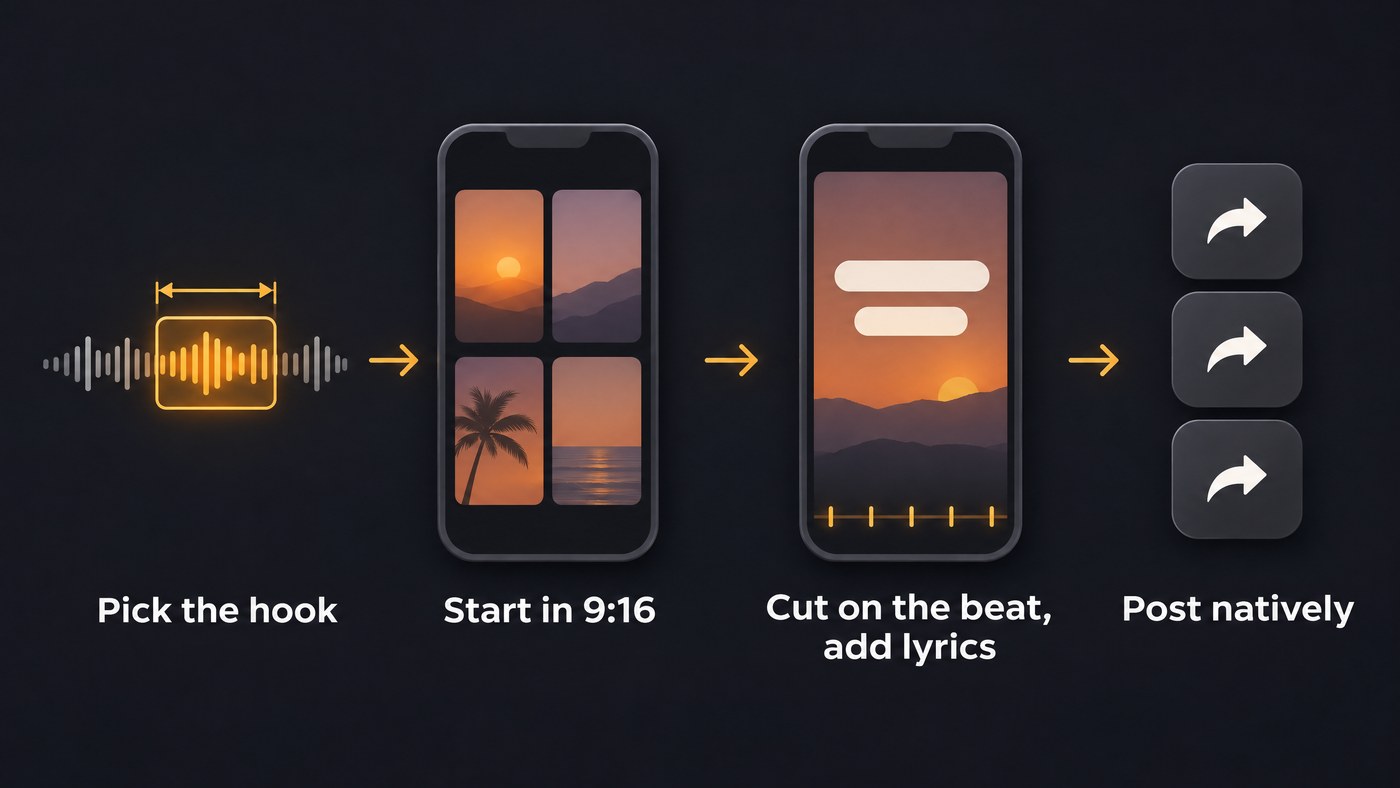
From song to a 9:16 post in six steps
- Pick the hook. Take 15 to 30 seconds, usually the chorus or the drop, starting on a line people remember.
- Set 9:16 before you generate. Reframing later costs you the edges of the picture.
- Let the app cut on the beat, then fix the opening by hand. The first two seconds decide whether people stay.
- Add the words. Use lyric captions or one hook line. Soundverse's Caption & Copy Writer writes three on-screen hook lines for Reels, TikTok or Shorts, each under 12 words, on the Free plan.
- Watch it muted on a phone. Text should sit clear of the edges and app buttons.
- Post natively. Upload the same master to each platform with its own caption. Our guide to an AI music video for Instagram Reels and Shorts covers framing.
Where Soundverse fits
Soundverse is an AI music platform that takes you from idea to audience, so it suits artists who are still making the song. The iPhone and Android apps turn an idea or your lyrics into a finished song and export a vertical lyric video. On the web, AI Music Video Generator (Creator plan and above) has Agent One draft a script and wait for you to approve its cost; only then does it shoot the scenes and edit them to the track, in 9:16 or 16:9 at up to 1080p, with Lip Sync if the lead should sing to camera. For a moving background instead, the Visualizer in AI Studio makes an MP4 that reacts to the audio, in 9:16, 1:1 or 4:5. Licensing is set by plan: the Free plan is for personal use, and the Creator plan comes with a royalty-free license.
This walkthrough of Soundverse's Create tools reaches AI Music Video Generator at 3:10, where a prompt or your own song becomes a music video.
FAQ
Which AI music video app is easiest for a beginner? The one that matches what you have. With a finished song, Revid and Freebeat go from upload to post in three or four steps. With only lyrics or an idea, the Soundverse phone apps make the song and a vertical lyric video in one place.
Can I make a social media music video for free? Partly. Neural Frames gives free accounts 20 watermarked seconds, Freebeat's free plan is for testing, and CapCut says its AI music videos export without watermarks. On Soundverse, Caption & Copy Writer runs on the Free plan, while filming a music video needs Creator.
Can one video go to TikTok, Reels and Shorts? Yes, one 9:16 master covers all three. Keep in mind that Instagram won't recommend reels over 3 minutes to new audiences, and YouTube blocks Shorts over one minute that carry an active copyright claim.
Do I need the rights to my song? Yes. Freebeat and Neural Frames make you responsible for the rights to what you upload, and Soundverse's AI Music Video Generator page asks for the rights to the song and any image references.
Sign up for Soundverse free and make your next hook a vertical video. More guides on the Soundverse blog.
