Which AI Video Platforms Allow for Custom Branding in Music Visuals?
Custom branding in AI music visuals: platforms that support your logo, fonts, colours, intro cards and consistent characters, and plans without watermarks.
For custom branding in AI music visuals, the platforms that document it on their own pages are Headliner, Kapwing and VEED (your fonts, logos and brand kits), Runway (Brand Kits), Neural Frames (styled lyric captions and consistent characters), Rotor (watermark-free exports) and Soundverse (one look across release images and reference-led videos). Most remove the platform watermark only on paid plans.
We read each platform's own pages on 20 November 2026. Canva's pages returned an access block to our requests, so it isn't graded here. Prices change; check them on the day you subscribe.
What custom branding means in AI music visuals
Branded music visuals usually mean six things:
- Your logo on the video. A small corner logo (a "bug") or an end-card logo, saved once and reused. Some tools call this a custom watermark.
- No platform watermark. Free tiers often stamp the vendor's mark on exports; removing it is usually a paid feature.
- Brand colours and fonts. Saved colour codes and uploaded typefaces, so every title and caption matches the release.
- Intro and outro cards. A two- or three-second ident at the start and an end card with the release name, date or handle.
- Consistent characters and style. The same artist character, outfit and palette in every clip, steered by reference images.
- Lyric-video type. The font, colour, size and position of on-screen lyrics.
Few tools do all six, so most teams generate in one place and finish the branding in an editor with a saved brand kit.
AI video platforms with custom branding, platform by platform
Soundverse
For artists who want the music and visuals to share one look. Soundverse is an AI music platform that takes you from idea to audience.
- One style across the release: Asset Studio makes cover art, story backgrounds, a YouTube thumbnail, a tour poster and a merch mockup from your track, and with Consistent Identity on they share one palette and style. It runs on the Free plan. The images carry no text, "so you add the title, dates and links in your own fonts and layout."
- Consistent characters: AI Music Video Generator takes up to nine image references for the cast and setting, and Lip Sync has the lead sing to camera, in 16:9 or 9:16 at up to 1080p on Creator and above. AI Video Generator can start a clip on your cover art as its first frame.
- Your cards and footage on the timeline: AI Studio puts video and image lanes above the song's tracks (one video lane on Free, no lane limit on paid plans), renders an audio-reactive Visualizer from 10 scenes in 16:9, 9:16, 1:1 or 4:5, and exports MP4, WebM or MOV at 24, 30 or 60 fps: up to 720p on Free, 1080p on Creator, 1440p or 4K on Pro.
- Rights: Licensing is set by plan: the Free plan is for personal use, and the Creator plan comes with a royalty-free license.
Headliner
For audiogram-style visuals in the artist's own type. Its pricing page lists "Use your own fonts", "Create branded templates" and "Custom intro & outro videos" on Basic and Pro, and "Custom watermarks" on Pro, so you can put your own mark where Headliner's would sit.
Kapwing
For an editor where the whole team shares one brand kit. The pricing page puts "Brand Kit and custom fonts" on Pro, and describes the Brand Kit as a place to "Save your brand logos, fonts, and colors". Pro also exports in 4K.
VEED
For reusable brand assets across many projects. The pricing page FAQ says: "Brand Kit allows you to add custom brand fonts, colors, images, videos, audio files, and watermarks and reuse them across all projects effortlessly." The plan table didn't load as text for us, so check which tier includes Brand Kit before you buy.
Runway
For generated shots with a saved brand kit. The pricing page lists 1 Brand Kit on Pro ($35 a month, or $28 billed annually) and up to 3 Brand Kits on Max ($95, or $76), which suits an agency running more than one artist.
Neural Frames
For lyric videos with styled captions and a recurring character. Its lyric video page says the caption editor lets you "pick from 10 fonts and 10 colours, and set size, position and background", line by line, without word-by-word karaoke. You can upload an album cover or reference images and "lock in consistent characters". The page lists 10 fonts and doesn't mention uploading your own, so an artist's licensed typeface goes on in an editor afterwards.
Rotor Videos
For template-led lyric videos and Spotify Canvas at volume. Its homepage says lyric videos take clips from its library or your own and can be personalized in the editor. The pricing FAQ says: "Any video you create on Rotor is 100% yours to own, distribute, and use commercially. Exported videos are completely watermark-free." For labels and distributors it offers Plug In, a white-label integration.
Kaiber
Kaiber's plans guide lists commercial use rights from Creator ($29 a month, or $23 billed annually), and its help centre has guides to creating a logo in Kaiber Canvas and putting your logo on a product. Our guide to AI video for podcast intros covers animated logo intros in more detail.
Which plans remove the platform watermark
From each pricing page on 20 November 2026:
- Headliner: Free gives one unwatermarked audiogram a month, Basic ($9.99 a month, or $7.99 billed annually) gives 10, and Pro ($25.99, or $19.99) gives "Unlimited, unwatermarked videos".
- Kapwing: Free exports carry a watermark at 720p; Pro, from $16 a month, removes it.
- VEED: the watermark shows "in the corner of videos that are created on the free plan", and any paid plan removes it.
- Runway: "No watermarks" from Standard ($15 a month, or $12 billed annually).
- Neural Frames: the free plan's 20 seconds of video carry a watermark; watermark-free downloads need a paid plan.
- Rotor Videos: every export is watermark-free; you pay per download or on an Artist Unlimited plan, from $9.99 a month.
- Soundverse: neither the pricing page nor the AI Studio page mentions a watermark, so export a short test on your plan and check.
For trial terms before you commit a client, see our list of free trials for AI music video software.
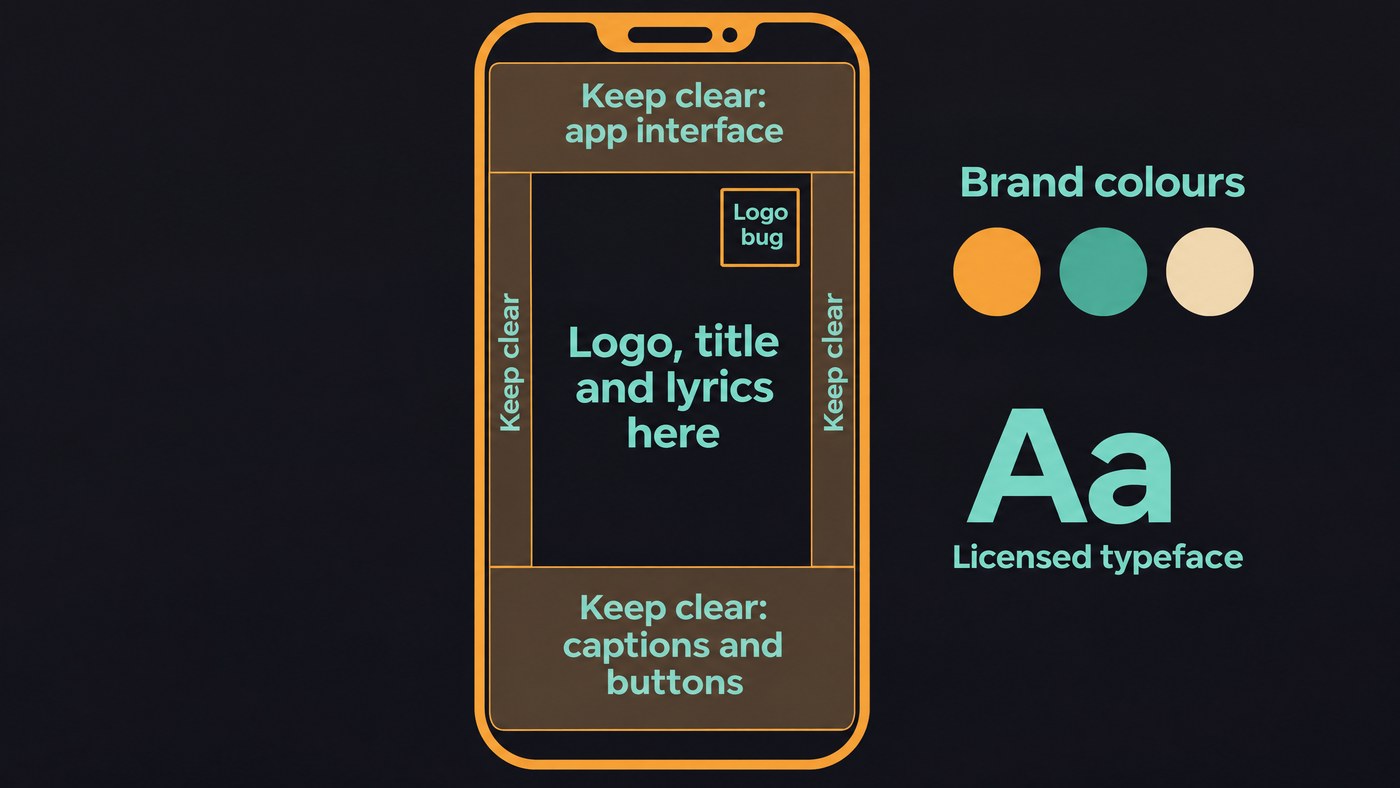
Brand-kit checklist for an artist
Build this once per artist and load it into every tool:
- Logo variants. A full lockup, a square icon or monogram, and white and black one-colour versions, as SVG and transparent PNG. Add a small corner version for a logo bug.
- Safe zones for 9:16. Meta's Ads Guide for Reels says: "Consider leaving at least 14% of the top, 35% of the bottom, and 6% on each side of your asset" free of text and logos. On a 1080 × 1920 frame, that's about 269 px at the top, 672 px at the bottom and 65 px each side. Make a template layer with those guides.
- Colour codes. Two main colours and one accent, written as HEX and RGB. Test lyric text over moving footage and add a shadow or band where it disappears.
- Typeface licensing. Check each font's licence covers video and uploading to a web app. The SIL OFL-FAQ lists "logos, posters, business cards, stationery, video titling, signage" among the uses OFL fonts allow with no additional permission. For a commercial font, read its licence for video and app use before you upload it.
- Intro and outro cards. A short ident and an end card with the release name, date and handle, in 16:9 and 9:16.
- Character references. A front, side and full-body image of the artist or character, plus one style sentence you reuse in every prompt. Our guide to AI video consistency covers faces, clothes and locations.
- A lyric style sheet. Font, size, case, colour, words per line and position. Our guide to AI lyric video generators compares the tools.
- Export presets. 16:9 at 1920 × 1080, 9:16 at 1080 × 1920, plus 1:1 and 4:5.
How to brand an AI music video, step by step
- Lock the kit above with the artist before any generation.
- Make the style references. Generate a matching image set, or start from the cover art.
- Generate the motion with the same reference images and style sentence in every run.
- Assemble in an editor with a brand kit. Add the logo bug, captions in the brand font and the intro and outro cards.
- Rebuild each shape. Re-lay the 9:16 cut inside the safe zones; our guide to vertical AI music videos covers reframing.
- Check on a phone, then save the project as a template for the next release.
Where Soundverse fits
Soundverse suits artists, and the teams behind them, who want the release visuals to start from the song. Asset Studio gives a matching cover, thumbnail, poster and story set in one identity, with no text, so your fonts and logo go on top. AI Music Video Generator builds a video around up to nine reference images of the artist and the setting. AI Studio keeps the footage, image cards and the song on one timeline and exports each aspect, and Media Converter crops a finished video to 16:9, 9:16, 1:1 or 4:3. For saved fonts, logo bugs and templates, finish in an editor that has them.
This video shows Asset Studio turning an uploaded track into matching cover art, story templates, a thumbnail, a tour poster and a merch mockup.
FAQ
Which AI video platform lets me upload my own fonts? On the pages we read, Headliner's Basic and Pro plans and Kapwing's Pro plan list custom fonts, and VEED's Brand Kit stores custom brand fonts. Neural Frames' caption editor lists 10 fonts.
Can I remove the watermark from AI music visuals for free? Mostly not. Rotor's exports are watermark-free but downloads cost money, and Headliner's Free plan gives one unwatermarked audiogram a month. Kapwing, VEED, Runway and Neural Frames remove theirs on paid plans.
How do I keep the same character across every music video? Use the same reference images in every run. Soundverse's AI Music Video Generator takes up to nine for the cast and setting, and Neural Frames lets you lock in consistent characters.
Can I add my own watermark to an AI music video? Yes. Headliner Pro lists custom watermarks and VEED's Brand Kit stores them, or add your logo as a top layer in any editor, inside the safe zones.
Sign up for Soundverse free and build your next release's visuals around the song. More guides on the Soundverse blog.

