How to Make a Vertical AI Music Video for Shorts and Reels
Learn how to make a vertical AI music video for Shorts & Reels using Soundverse's AI Music Generator in 2026.
How to Make a Vertical AI Music Video for Shorts and Reels
Creating a vertical AI music video for platforms like YouTube Shorts and Instagram Reels has become one of the most powerful ways for creators to deliver engaging content in 2026. With the rise of short-form vertical video, combining artificial intelligence-driven music generation and dynamic visuals can help content stand out instantly in crowded social feeds. Whether you are a musician looking to showcase a beat or a marketer aiming to create fast, attention-grabbing media, this guide walks you through every step—from concept to final export.
Why vertical videos dominate short-form content in 2026
Vertical video, historically popularized by TikTok, has now become the standard format across social platforms. By 2026, YouTube Shorts, Instagram Reels, and other mobile-first apps prioritize full-screen vertical content to match user scrolling behavior. This orientation leverages screen space more effectively, ensuring that creators get maximum attention per frame. Vertical clips are particularly effective when paired with custom AI music since they communicate emotion and atmosphere quickly.
For creators, vertical video also means minimizing production time—no need for complex multi-camera setups or horizontal reframing. It syncs perfectly with AI tools that automate music and visuals, letting creators produce cinematic mini-stories optimized for fast consumption.
How to make a vertical AI music video with Soundverse AI Music Generator
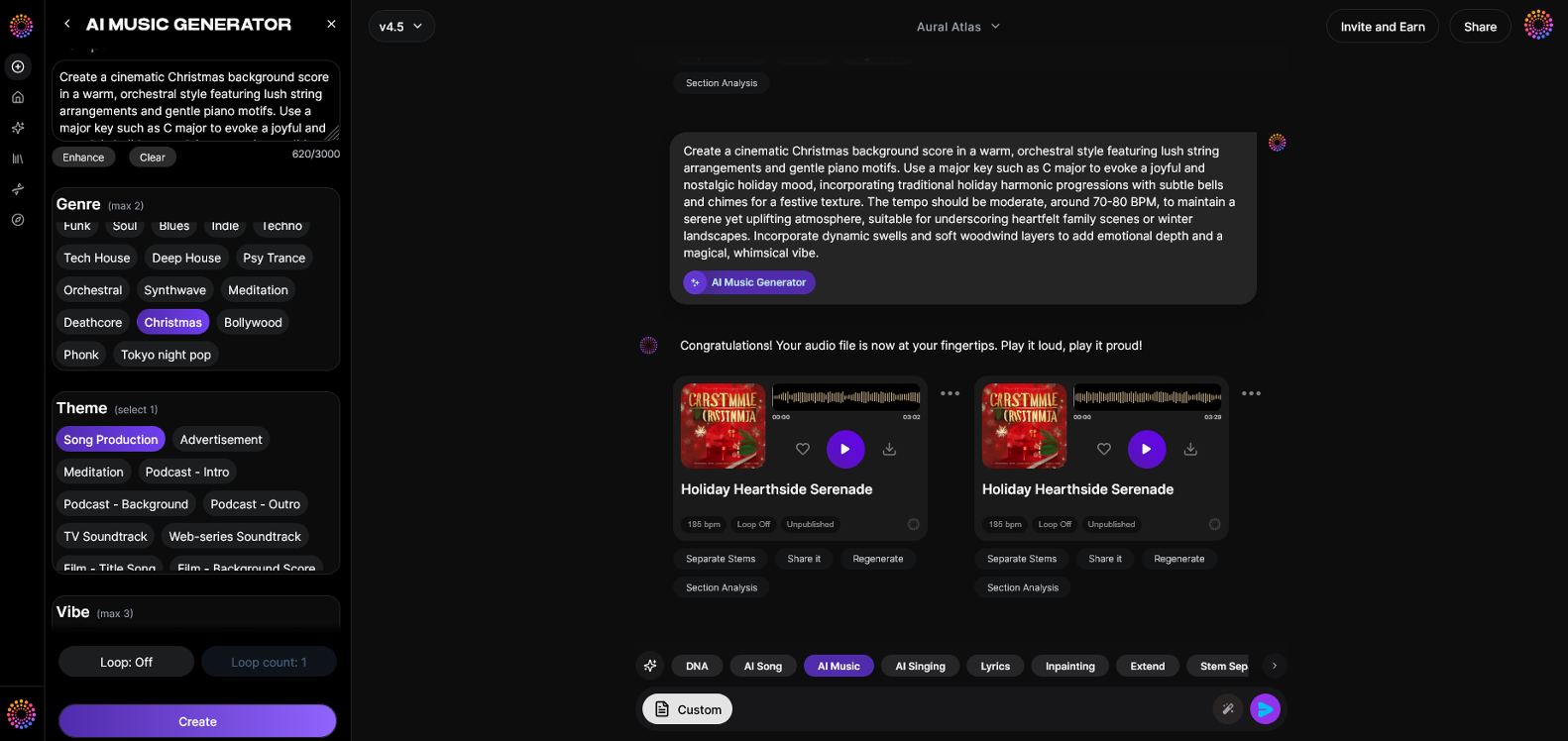
At the heart of this process is the Soundverse AI Music Generator — a system built to transform written descriptions into complete instrumental soundscapes. You can use it to create background soundtracks, rhythmic beats, or looping music beds for short-form vertical videos.
Soundverse Feature Overview
The Soundverse AI Music Generator allows creators to produce original instrumental music directly from text prompts. It specializes in background tracks and beats without vocals, ideal for Reels and Shorts that require mood-driven instrumentals. Key capabilities include:
- Text-to-music generation
- Loop Mode for seamless repetition
- Genre, mood, and instrument customization
- Model selection between V4 and V5 for creative variation
Its main use cases include producing soundtrack beds for video content, gaming loops, meditation or wellness tracks, and commercial scoring—all crucial for the digital-first creator economy in 2026.

Step 1: Feature Overview
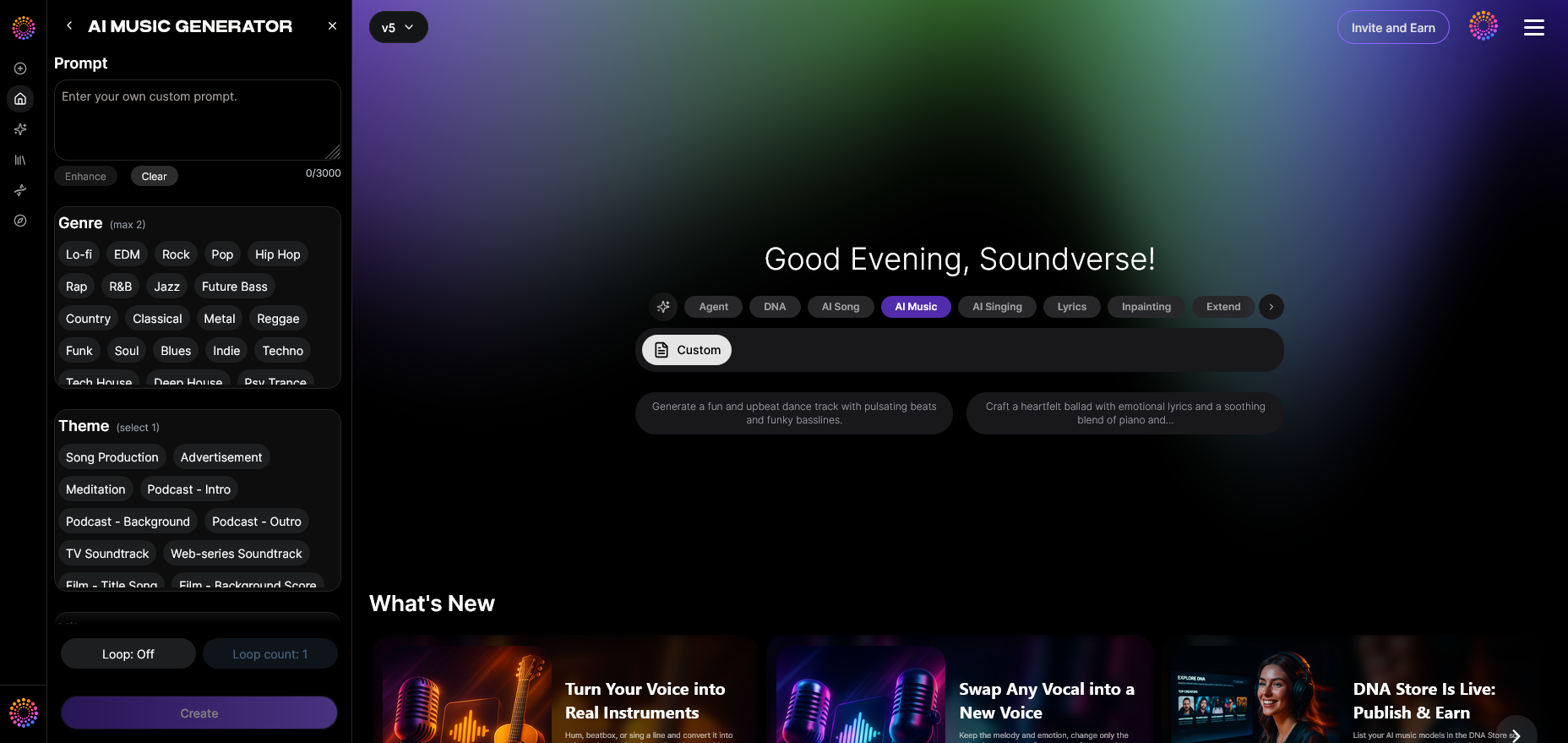
Access the AI Music Generator from the Soundverse main menu. Once inside, you’ll see options for creating instrumental tracks or exploring genre presets designed for short-form video backgrounds.
Step 2: Description Input
In the description box, write a text-based prompt that reflects the mood and style of the music you want. For example, “energetic electronic beat for travel reel” or “ambient chill background for sunset fashion short.” The clearer your text description, the more accurately Soundverse can interpret your intent.
Step 3: Style & Duration
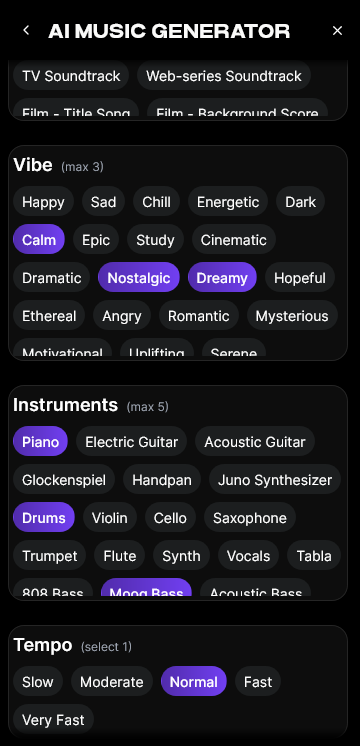
Select the music style, genre, and track duration. For vertical video, 15–30 seconds usually performs best. You can also enable Loop Mode to make the music repeat seamlessly, perfect for looping Reels or Shorts.
Step 4: Generation
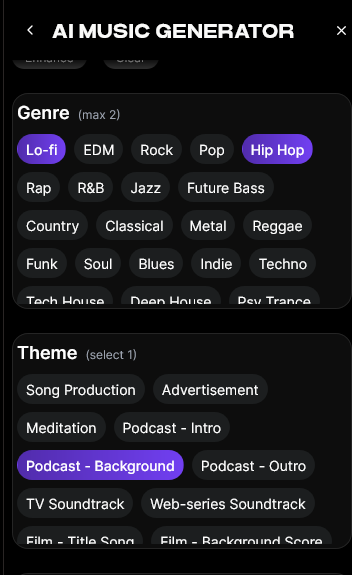
Click Generate, and Soundverse processes the input using the chosen model (V4 for detailed soundscapes or V5 for dynamic energy). The AI will produce an instrumental track optimized for social media use.
Step 5: Export Options
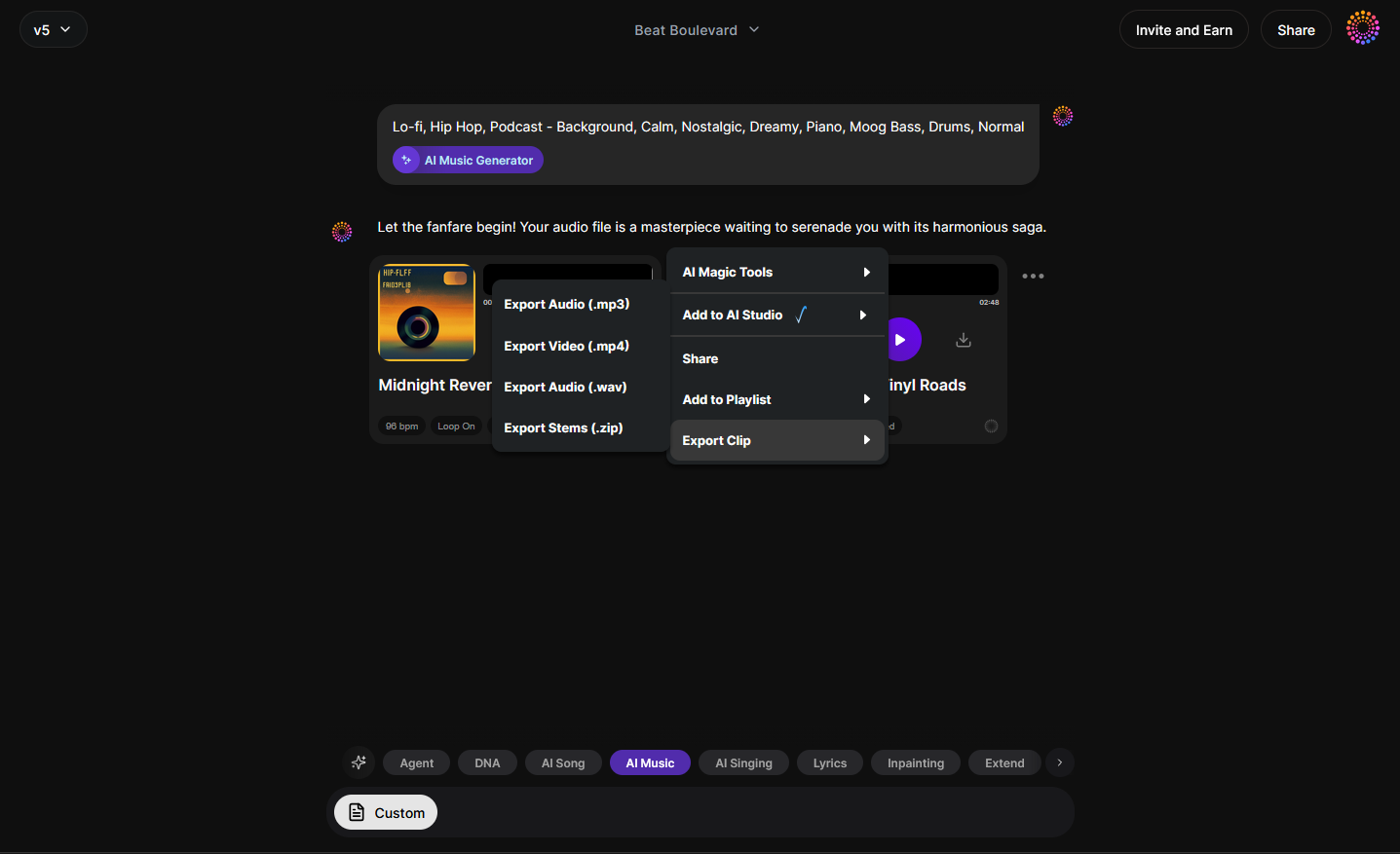
After generation, download your new instrumental track. Soundverse supports various export lengths and looping formats, allowing flexible integration with your video editing workflow. For additional guidance, watch our tutorial on how to make music with Soundverse.
How to integrate your AI music with vertical video visuals
Once you have your Soundverse-produced track, the next step is pairing it with visuals. Here’s how:
- Choose a vertical canvas (9:16 aspect ratio) – Set your editing timeline for vertical video to ensure it fills the mobile screen.
- Sync music beats to visual cuts – AI-generated music often has clear rhythmic structures. Align transitions or text overlays with beat changes to improve viewer retention.
- Add motion overlays and AI visuals – Tools like Runway or Pika Labs can generate cinematic visuals matched to your music’s energy. Even using royalty-free clips, you can stylize them with filters to match tone.
- Use captions or lyric-like animations – Even though Soundverse AI Music Generator produces instrumentals only, adding kinetic text synced to beats enhances engagement.
- Final export optimization – Platforms like YouTube Shorts and Instagram Reels favor high-resolution vertical uploads (1080x1920). Keep your file size under 50MB for quick loading.
Pro tips for making your vertical AI music videos viral in 2026
- Trend-conscious production – Pair your Soundverse-generated tracks with trending video ideas. Check emerging styles in music industry trends to predict what may resonate this year.
- Genre experiments – Try different moods using guides like How to Create EDM with Soundverse AI and How to Create Jazz Music with Soundverse AI. This helps tailor the vibe to different audience segments.
- Loop Mode mastery – Use Loop Mode to make instrumentals that endlessly replay without noticeable breaks. Perfect for tutorials, storytelling Shorts, or ambient background Reels.
- Match visuals to emotional tone – The AI engine responds to descriptive prompts like "uplifting cinematic string ensemble" or "dark synthwave bass pulse." Ensure your video colors and editing style mirror these moods.
- Combine AI tools smartly – Pair Soundverse with other creative AI features showcased at Soundverse AI Magic Tools to automate video tasks, such as stem separation or adaptive mixing.
For a hands-on look, you can also check our Soundverse Tutorial - Explore Tab walkthrough.
Why AI-generated music drives short-form success
Short-form video depends heavily on quick emotional impact. Viewers decide within seconds whether to keep scrolling or engage. AI-generated music plays a vital role in this, setting a mood even before the visuals fully load. Soundverse’s text-to-music capability ensures every creator can build unique audio without worrying about copyright or licensing issues—a major advantage over traditional production workflows.
For creators producing multiple videos weekly, AI music drastically reduces turnaround time. It allows scale without artistic compromise. Combining AI-composed music with accessible mobile editing tools democratizes creativity at a new level.
Future trends: What creators can expect in 2026 and beyond
In 2026, the integration of AI video and audio generation continues to accelerate. Cross-platform output (Reels, Shorts, TikTok) now demands faster, loopable, atmospherically rich tracks—exactly what Soundverse provides through intuitive text input. Expect growth in “faceless creator” channels using music-driven storytelling, a trend already covered in creating faceless video content. As generative models mature, we will see deeper automation that syncs beats, tone, and even camera movement.
Create Your Own AI Music Video Today
Generate custom tracks, visualize your beats, and craft vertical videos perfect for Shorts and Reels. Soundverse gives you all the AI tools you need to transform your music ideas into scroll-stopping content.
Start Creating for Free
Related Articles
- Generate AI Music with Soundverse Text-to-Music: Discover how to turn simple text prompts into full-fledged music compositions using Soundverse’s AI generator.
- Enhancing YouTube Content with Royalty-Free and Copyright-Free Music Using Soundverse AI: Learn how to make your content stand out with music that’s both unique and safe to use across all platforms.
- Soundverse AI Revolutionizing Music Creation for New-Age Content Creators: Explore how Soundverse is empowering a new generation of creators to produce professional music effortlessly with AI.
- Soundverse Introduces Stem Separation AI Magic Tool: Uncover how Soundverse’s AI-driven stem separation tool lets you isolate vocals and instruments for precise music editing.
Here's how to make AI Music with Soundverse
Video Guide

Here’s another long walkthrough of how to use Soundverse AI.
Text Guide
- To know more about AI Magic Tools, check here.
- To know more about Soundverse Assistant, check here.
- To know more about Arrangement Studio, check here.
Soundverse is an AI Assistant that allows content creators and music makers to create original content in a flash using Generative AI.
With the help of Soundverse Assistant and AI Magic Tools, our users get an unfair advantage over other creators to create audio and music content quickly, easily and cheaply.
Soundverse Assistant is your ultimate music companion. You simply speak to the assistant to get your stuff done. The more you speak to it, the more it starts understanding you and your goals.
AI Magic Tools help convert your creative dreams into tangible music and audio. Use AI Magic Tools such as text to music, stem separation, or lyrics generation to realise your content dreams faster.
Soundverse is here to take music production to the next level. We're not just a digital audio workstation (DAW) competing with Ableton or Logic, we're building a completely new paradigm of easy and conversational content creation.
TikTok: https://www.tiktok.com/@soundverse.ai
Twitter: https://twitter.com/soundverse_ai
Instagram: https://www.instagram.com/soundverse.ai
LinkedIn: https://www.linkedin.com/company/soundverseai
Youtube: https://www.youtube.com/@SoundverseAI
Facebook: https://www.facebook.com/profile.php?id=100095674445607
Join Soundverse for Free and make Viral AI Music

We are constantly building more product experiences. Keep checking our Blog to stay updated about them!