Music Distribution Software That Allows for Seamless Stem Management
Distribution software with stem management: what distributors really accept, where stems matter (Atmos, sync, DJs) and a stem workflow to run beside them.
If you're looking for music distribution software with stem management, start with what distributors actually take: one stereo master per track. DistroKid, TuneCore and Amuse deliver stereo files to stores, and DistroKid and TuneCore add an optional Dolby Atmos mix for Apple Music. Your stems stay in your own folders until someone asks for them.
So the honest setup is two tools: a distributor for the master, and your own workflow for the stems. Everything below comes from each company's own documentation, checked on November 19, 2026.
What music distribution software actually delivers to stores
Spotify's help page on audio file formats sets the rule for every distributor that delivers to it: "Deliver your highest-quality native stereo master." It asks for stereo, two-channel audio at 44.1 kHz or higher, 24-bit if that's how the track was mastered, and one stereo master per track. FLAC is preferred and WAV is accepted.
Distributors' own requirements match. Amuse's pricing page asks for WAV or FLAC, stereo, at 16 or 24 bit and 44.1 kHz up to 192 kHz. Ditto's Beatport label service says releases ship to Beatport as DJ-ready WAVs.
None of the upload requirements we read asks for stems, and none offers to store them. The master is the deliverable; for the full list of what goes with it, see what to prepare before uploading music for distribution.
The one store deliverable that depends on stems: Dolby Atmos
Apple Music's spatial audio is where stems and distribution meet.
- DistroKid announced on July 1, 2021 that members can upload songs mixed in Dolby Atmos to Apple Music and Tidal by ticking "Dolby Atmos" in the upload form. Platforms without Atmos play the regular two-channel version.
- TuneCore's Atmos guide says you can add Dolby Atmos to new releases during upload, as a per-track paid extra.
- Other distributors: if the upload form shows no Atmos option, ask before you pay for a mix.
Apple's spec explains why your stems matter here. Its Video and Audio Asset Guide says: "A Dolby Atmos track must be created from multitracks or stems created from multitracks." The same page rules out upmixing a stereo release and extracting stems from one, and asks for a BWF ADM file of 24-bit audio at 48 or 96 kHz, synced to the stereo version, at no more than -18 LKFS integrated and -1 dB true peak. Apple's Music Style Guide also rejects a stereo release that has been audibly source separated and used as the input for a spatial mix.
In short, an Atmos version needs your real multitrack session or the stems printed from it. If you deleted the session after mastering, that door closes.
Where stems matter beyond the stores
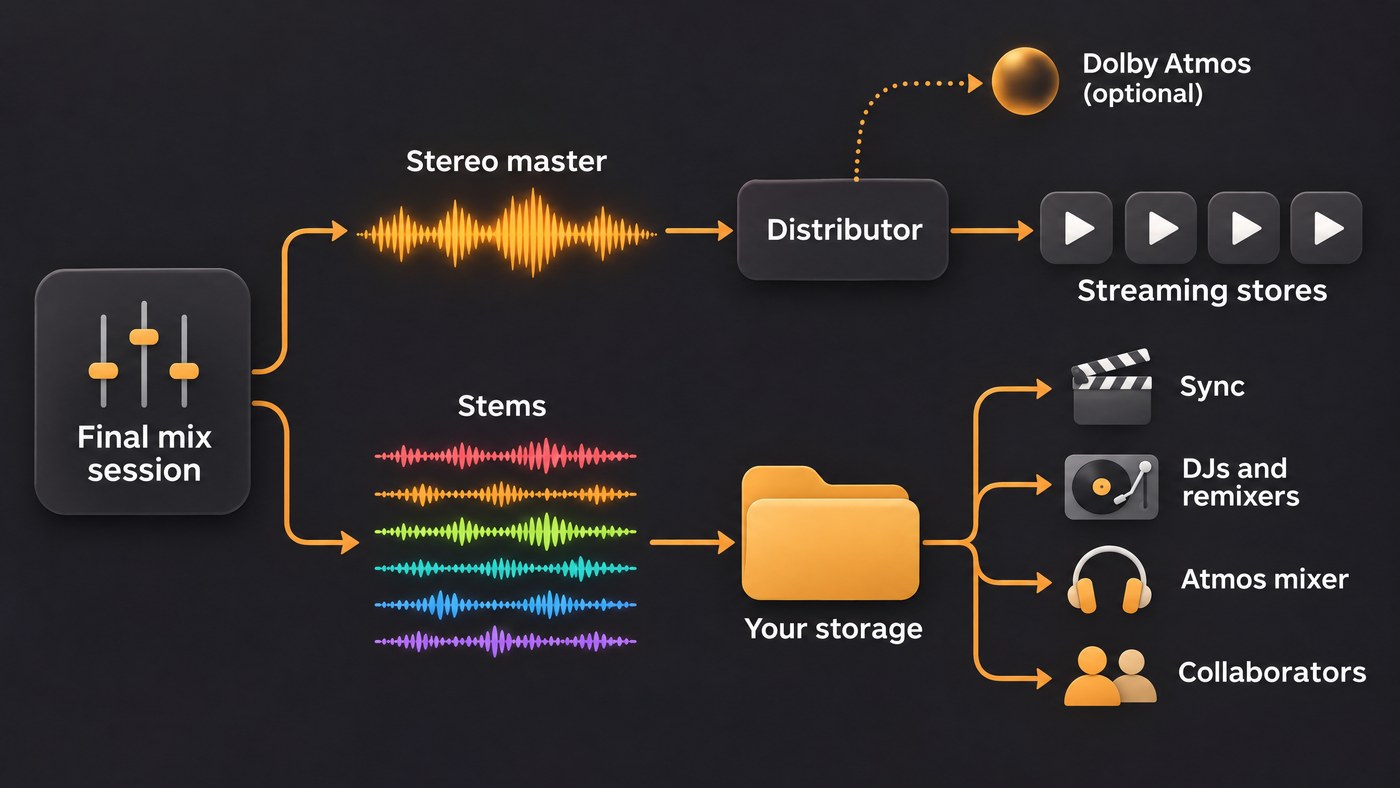
- Sync libraries and music supervisors. Audiosocket's help center asks for final 44.1 kHz WAV or AIFF files whose names match the track details you enter, plus instrumentals and alternate versions. It asks you to keep stems available, because it may request them separately. An editor cutting a trailer often needs the drums without the vocal.
- Remixers and remix contests. A remixer needs full-length stems that start at bar 1, the acapella, the tempo and the key, and a clear note in writing on what they may release.
- DJ platforms like Beatport. Ditto's page says Beatport requires an official label profile, and releases go out as stereo WAVs. What DJs get from your stems is extra tracks on the release: an extended mix, an instrumental or a dub. Native Instruments' Stems format is an open multi-channel file that holds a track as four parts, such as bass, drums, vocals and melody, for DJs to mix in Traktor.
- Collaborators. Mix engineers want stems or multitracks, mastering engineers sometimes ask for a few stem groups, and video editors want the instrumental.
- Your future releases. A remaster, a live backing track, an Atmos mix two years from now or an acapella edit for short-form video all start from the stems.
A stem management workflow that runs beside your distributor
- Print stems from the final mix session, the day you bounce the master. Same session, same plugins, same version number. Drop the stems into a blank session at unity gain and play them against the mix; with bus compression or a limiter on the master, expect close rather than identical.
- Export at the session's own sample rate, 24-bit WAV. Don't normalize. Every stem starts at bar 1 and runs past the longest reverb tail, so all files are the same length. Work at 48 kHz if an Atmos mix is possible, since Apple takes Atmos at 48 or 96 kHz. Our guide to exporting stems in Pro Tools walks through one DAW's export.
- Group stems the way people use them. Drums, percussion, bass, keys, guitars, synths, lead vocal, backing vocals and FX is a set most engineers recognize. Print wet and dry versions of the vocal if a remixer or sync editor may need either.
- Name every file the same way. Artist, song, BPM, key, stem, version and format, joined by underscores:
NovaLane_Afterglow_124bpm_Fmin_LeadVox_v03_48k24.wav. No spaces, and two-digit numbers so files sort in order. - Keep one folder tree per release. For each song:
01 Session,02 Mixes(main, instrumental, acapella, clean),03 Masters(stereo master, plus the Atmos file if there is one),04 Stems(one ZIP per version) and05 Docs(lyrics, credits, splits, ISRC, BPM and key). Artwork sits at the top level of the release. - Version without overwriting. Any change to the mix bumps v03 to v04 for the master and the stems together. Keep a short CHANGES.txt noting what changed and which version went to the distributor under which ISRC, so the stems you hand out always match the song on Spotify.
- Keep three copies. The working drive, a second local drive and a cloud copy. A 24-bit, 48 kHz stereo WAV takes about 17 MB a minute, so ten stems of a four-minute song come to roughly 690 MB per version.
- Share read-only links with a readme. List tempo, key, start bar, sample rate, which files are wet or dry, and what the recipient may do with them.
If the stems need cleanup before they go out, our guide to techniques for editing audio stems covers alignment, bleed and fades.
Where Soundverse fits
Soundverse is an AI music platform that takes you from idea to audience. It doesn't deliver music to stores; your stereo master still goes through your distributor. It helps with the stem side.
In AI Studio, Export then Stems gives one file per track in a ZIP, as WAV, FLAC or MP3, with each track's effects baked in or not, on the Creator plan and above. Audio exports at 44.1, 48 or 96 kHz, as 16-bit, 24-bit or 32-bit float WAV. People you invite by email or link edit the same timeline live, so fewer stem packs travel by email.
Stem Separator splits a finished mix into 2 or 6 stems, or every part with MIDI, when the session is gone. That suits a remix, practice or a rebalance; Apple doesn't accept de-mixed stems as the source of an Atmos mix. Release Planner then writes the day-by-day rollout.
Licensing is set by plan: the Free plan is for personal use, and the Creator plan comes with a royalty-free license.
This video shows a shared AI Studio session where every edit and generated stem appears on each collaborator's screen.
FAQ
Does any music distributor store or manage my stems? Not among the ones we checked. Spotify asks for one stereo master per track, and DistroKid and TuneCore add only an optional Dolby Atmos file. Keep stems in your own storage, with backups.
Can I use AI-separated stems for a Dolby Atmos mix on Apple Music? No. Apple's asset guide says an Atmos track must come from multitracks or stems made from multitracks, and it doesn't allow extracting stems from a stereo release. Keep the original session.
What format should I export stems in? 24-bit WAV at the session's sample rate, all starting at bar 1 and the same length. Choose 48 kHz if an Atmos mix is likely, since Apple takes Atmos at 48 or 96 kHz.
Do sync libraries need stems? Many ask for instrumentals and alternate versions first. Audiosocket, for example, wants those in the submission and asks you to keep stems ready in case it requests them.
Sign up for Soundverse free and export your next stem set from AI Studio. More production and release guides on the Soundverse blog.
