What Are the Common Pitfalls When Using Automated Mastering Plugins?
The common pitfalls of automated mastering plugins: loudness chasing, true peak, mix-bus limiters, mono, unfair A/B tests, dither and presets, with fixes.
The common pitfalls when using automated mastering plugins are chasing loudness, mastering an unfinished mix, picking the wrong genre profile or reference, ignoring true peak, leaving a limiter on the mix bus, skipping mono checks, judging whichever version is louder, careless export settings and trusting presets on quiet, vocal-led songs. Each one has a simple fix.
An automated mastering plugin, such as iZotope's Ozone Master Assistant or Soundverse's Mastering One, listens to a slice of your mix and sets EQ, compression, width and a limiter toward a target. It does exactly what you point it at, including the wrong thing. We checked every document cited below on 19 November 2026.
1. Over-limiting to chase loudness
The loudness control is the most tempting knob in any automated mastering plugin, and streaming has made pushing it mostly pointless. Spotify's loudness normalization page says it adjusts tracks to −14 dB LUFS according to the ITU 1770 standard, turning louder masters down during playback. A song you crushed to −8 LUFS plays at roughly the same level as everyone else's, minus the punch you squeezed out of it.
Apple's Apple Digital Masters technology brief (April 2021) puts it bluntly: "The effect of Sound Check, as well as other volume-controlling technologies, is that songs that have been mastered loud will be played back at a lower volume which can make tracks actually sound weaker."
YouTube's Help Center describes a viewer setting, stable volume, that evens out quiet and loud passages, and says it's turned off for YouTube Music and official music videos. That article gives no loudness target for music, so don't master to a YouTube number you read on a forum.
How to avoid it: start near −14 LUFS integrated for streaming and go louder only when the genre calls for it, such as club edits. If the limiter clamps hard on every kick, ease the loudness back.
2. Asking automated mastering plugins to fix an unfinished mix
An automated mastering plugin hears one stereo file. It can't lift a buried vocal without lifting everything else in that range, and it can't fix a bass note that clashes with the chord. iZotope's Master Assistant tutorial for Ozone 12 (Nick Messitte, 9 September 2025) treats it as a warning sign when the EQ has to work hard to reach the genre target, and says vocal-balance problems usually get fixed back in the mix session.
How to avoid it: before you master, check the lead vocal level, tame sibilance, filter rumble and put short fades on every clip. LANDR's mix preparation guide (4 March 2024) suggests 5 to 10 ms fades. If two different plugins both make the song harsh or boomy, the problem is in the mix. Our guide to balancing levels in a multi-track project walks through a clean static mix.
3. Stacking a limiter on the mix bus
Plenty of producers mix into a limiter, then forget it's there when they bounce. The mastering plugin then pushes a mix that's already flattened.
LANDR's guide says a lack of headroom is one of the most common mix mistakes it sees in uploaded tracks. It suggests keeping peaks not much above −10 dBFS with the body of the waveform around −18 dBFS, and avoiding master-bus plugins that affect overall gain and headroom, such as limiters or aggressive compression.
How to avoid it: bypass the mix-bus limiter and any clipper before you bounce. Gentle EQ or glue compression that's part of your sound can stay. If the mix clips without the limiter, lower the track levels rather than putting the limiter back.
4. Using the wrong genre profile or reference
Most automated mastering plugins steer toward a target. Ozone 12's Master Assistant matches tone, width and dynamics to genre targets, or to the tonal balance, width, dynamics and loudness of a reference file you upload. That's useful until the target doesn't fit. Match a sparse folk song to a dense EDM single and you'll get a master that's brighter, wider and louder than the song wants.
How to avoid it: pick a reference with a similar arrangement, tempo and instrumentation. Level-match it before you compare. Try two neighbouring genre profiles and choose by ear.
5. Ignoring true peak and inter-sample peaks
A sample-peak meter shows the highest stored sample, but the waveform a converter rebuilds can rise higher between samples. ITU-R BS.1770 (currently BS.1770-5, November 2023) defines how both loudness and true-peak level are measured. EBU R 128 (version 5, November 2023) defines the maximum true peak as the waveform's maximum in the continuous time domain and caps it at −1 dBTP in broadcast production.
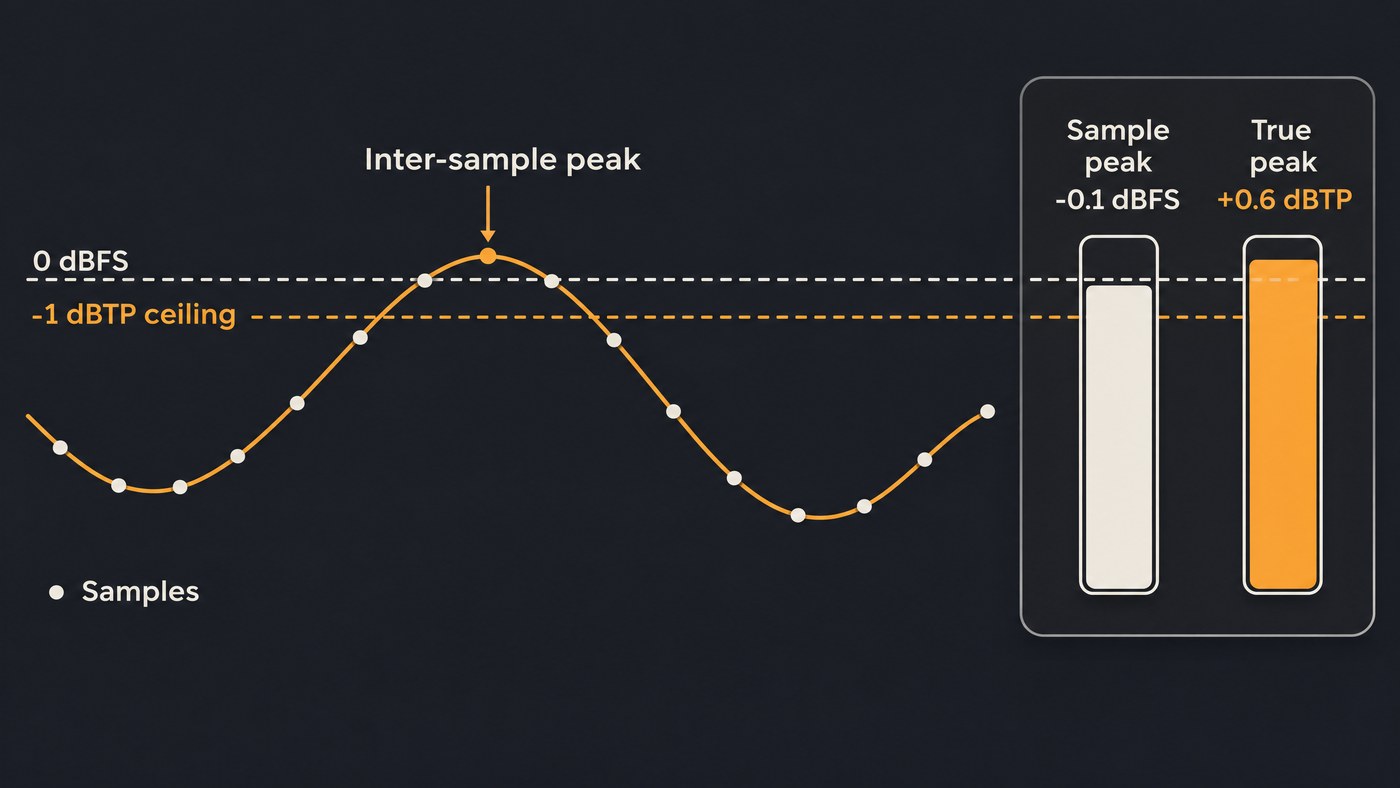
Apple's brief explains the playback side: converters commonly oversample at four times the sample rate, a master sitting at 0 dBFS can clip in that process, and Apple recommends leaving at least 1 dB of headroom. It adds that levels showing no overs on PCM can still clip once encoded.
How to avoid it: set the limiter to true-peak mode with a −1 dBTP ceiling, and −2 dBTP for masters louder than −14 LUFS, as Spotify recommends. Confirm it on a true-peak meter, not a sample-peak one.
6. Skipping the mono check
Spread a mix too far with a width control and parts can cancel when it's summed to mono on a phone speaker or a club system. iZotope's tutorial says that nine times out of ten you'll want to deal with width earlier, in the mix, rather than at mastering.
How to avoid it: sum the master to mono and listen for a vocal that drops back. Watch a correlation meter during the widest chorus; readings near −1 warn of cancellation. Keep the low end narrow.
7. Comparing without bypass and level matching
This mistake drives the others. The master is louder than the mix, and louder wins the first few seconds. iZotope's tutorial says it plainly: "When something is louder than it used to be, our ears are fooled into thinking it sounds better." Ozone's Gain Match button exists to defeat that, and iZotope reminds you to switch it off before you bounce or export.
How to avoid it: compare mastered and unmastered at the same loudness, with a gain-match option or by turning the master down until both read the same LUFS. Flip between them on the chorus and the quietest verse, then check on a phone.
8. Getting dither and export settings wrong
Small export choices can undo a good master:
- Exporting MP3 for release. Apple says the deliverable for Apple Digital Masters is the original 24-bit PCM file, and Spotify asks for one high-quality stereo master per track.
- Dithering twice, or too early. Apple describes dither as a tradeoff: less distortion from bit-depth reduction, at the cost of added noise. Apply it once, last, and only when you reduce bit depth, such as 24-bit to 16-bit.
- Leaving gain match on when you render, or changing gain after the final limiter, which can push peaks over the ceiling.
How to avoid it: export a 24-bit WAV at the session rate with the true-peak ceiling set, then meter the exported file itself.
9. Trusting presets on vocal-forward or acoustic songs
Default presets are usually tuned for dense, modern productions. A voice with guitar or piano has wider dynamics, and the vocal carries the meaning. A pop or EDM preset can flatten the lift from verse to chorus and push the exciter until every "s" hisses.
Going too quiet costs you as well. Spotify lifts soft masters only as far as their peaks allow, leaving 1 dB of headroom for lossy encoding: its example track at −20 LUFS with a −5 dBFS true peak is raised only to −16 LUFS.
How to avoid it: choose an acoustic or transparent profile, lower the intensity, and compare the quietest verse with the biggest chorus. Our shortlist of budget AI mastering services for singer-songwriters covers gentle options for this kind of song.
Where Soundverse fits
Soundverse is an AI music platform that takes you from idea to audience. Its automated mastering plugin, Mastering One, sits on the master bus of every AI Studio project and covers several checks above. It starts switched off, so opening a project never changes the sound, and Bypass compares mastered and unmastered; the page itself warns that the master is louder, and suggests easing Loudness or Dynamics back if it sounds flattened. You pick one of seven genre targets and a loudness target from Club / DJ −7 to Broadcast EBU R128 −23 LUFS, with a True Peak Ceiling from −3 to 0 dBTP. ✦ Master listens to two seconds of playback, so play the chorus. Its Imager keeps the side signal out of the lows below 120 Hz, and TPDF dither is there for 16-bit files.
Put Analysis One after it for gated LUFS, 4× oversampled true peak, an overs counter and a correlation meter. Both run on every plan with no tokens; Free exports MP3, and Creator adds WAV, as the pricing page shows. Licensing is set by plan: the Free plan is for personal use, and the Creator plan comes with a royalty-free license.
This video shows Mix One placing a project's stems by genre, then Mastering One on the master chain with a chosen target, with the versions compared.
FAQ
What loudness should I set an automated mastering plugin to for streaming? Spotify's guidance is to target −14 dB integrated LUFS with true peak below −1 dBTP, or below −2 dBTP if you master louder. Louder genres can go higher, but normalization will turn them down.
Should I remove the limiter from my mix bus before mastering? In most cases, yes. LANDR advises against limiters or aggressive compression on the master bus before mastering, because they use up the headroom the mastering processors need. Gentle EQ or glue compression can stay.
Can an automated mastering plugin fix a bad mix? No. It works on the whole stereo file, so it can't rebalance one instrument without moving others. If the plugin makes big EQ moves to reach its target, fix the mix first. Our comparison of automated vs professional AI mixing shows what automation handles well.
Do I need to dither a 24-bit master for streaming? Dither when you reduce bit depth, for example to 16-bit for CD, and only once at the end of the chain. Apple says its encoders use the full resolution of a 24-bit source, which removes the need to add dither.
Sign up for Soundverse free and try Mastering One on your next mix. More mixing and mastering guides on the Soundverse blog.
