The Process of Releasing a Podcast Episode Compared to a Song
Releasing a podcast episode vs a song, side by side: RSS feed vs distributor, GUID vs ISRC and UPC, lead times, artwork, rights, earnings and edits.
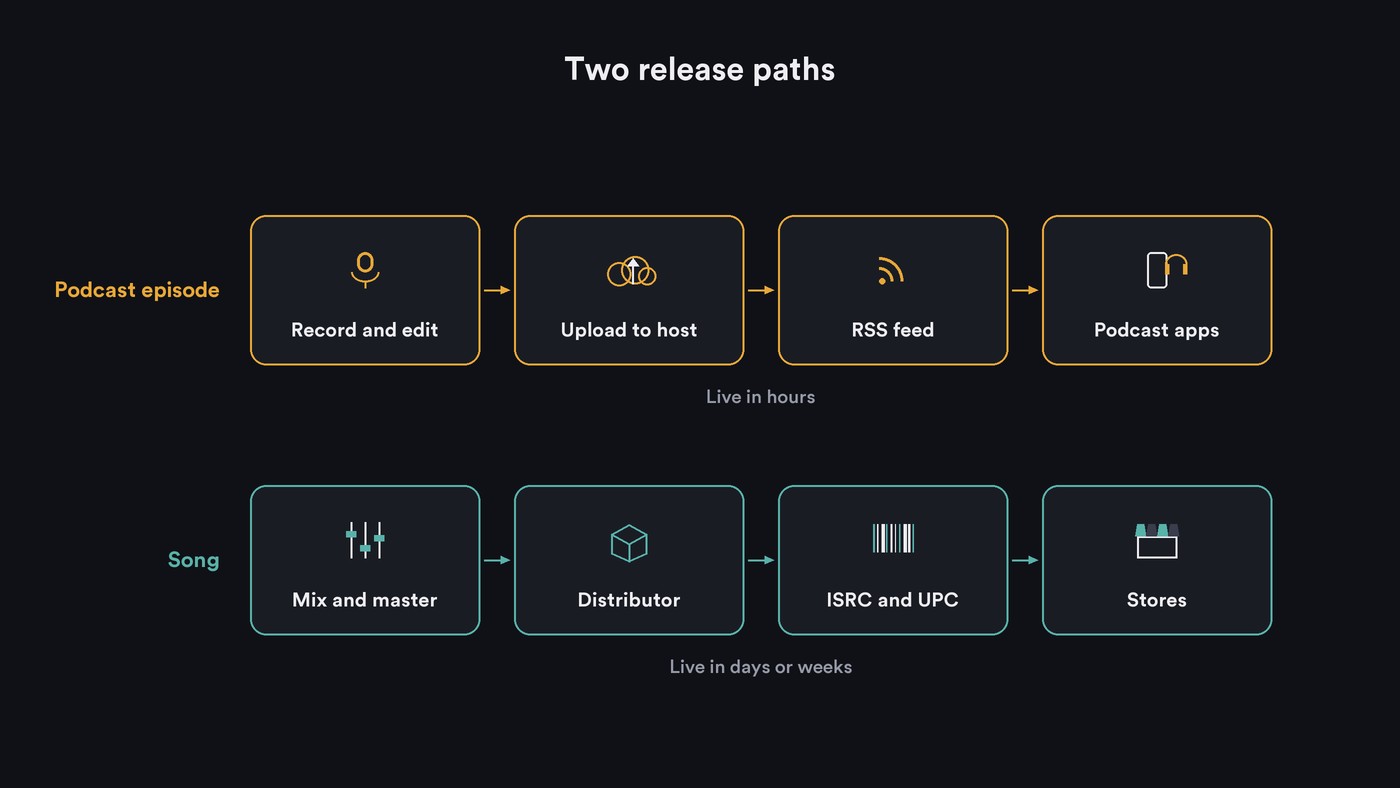
The process of releasing a podcast episode compared to a song comes down to two different pipes. An episode goes from your podcast host's RSS feed to podcast apps, usually within hours. A song goes from a distributor to stores such as Spotify and Apple Music, after store processing and days or weeks of lead time.
Below, the two paths side by side, from Apple, Spotify, YouTube, IFPI and Amuse help pages checked on 23 November 2026. For the full podcast pipeline, read how podcasters distribute across multiple platforms; for the music side, see how digital music distribution works.
Releasing a podcast episode and a song, step by step
Podcast episode
- Record and edit the episode, then export the audio.
- Upload it to your host with a title, show notes and episode art.
- The host adds the episode to your RSS feed with its audio URL and a permanent ID.
- Apple Podcasts, Spotify and every other app you've submitted the show to read the feed and list the episode.
Song
- Mix and master, then export a WAV or FLAC file.
- Upload it to a distributor with cover art, credits, metadata and a release date.
- The distributor assigns or records the codes, reviews the release and delivers it to each store.
- Each store processes it, and the song goes live on the date you set.
Once your show is listed, each new episode flows through the feed with no separate submission. A song goes through a review at the distributor and processing at every store.
Identifiers: episode GUID versus ISRC and UPC
Podcast. Each episode carries a GUID in your feed, and your host writes it for you. Apple's RSS feed requirements put it plainly: "All episodes must contain a globally unique identifier (GUID), which never changes." Each episode also needs its own audio file URL; Apple ignores duplicates. Keep the GUID as it is when you edit an episode.
Song. A recording gets an ISRC, and the release (single, EP or album) gets a UPC or EAN. IFPI's ISRC FAQs say only the recording rights owner, or an ISRC manager they appoint, may assign one, that each product needs its own UPC/EAN, and that codes are permanent: "Once assigned, an ISRC must not be re-used under any circumstances." The codes travel beyond audio stores too: YouTube's Art Track page says it identifies each track delivered by a label or distributor by its ISRC and release identifier, then builds a version from the recording and its album art.
Our guide to why ISRC codes matter for tracking streams explains how plays get matched to your recording.
Lead times: hours versus days or weeks
Podcast. Spotify for Creators' help page on episodes not appearing says most platforms post new episodes shortly after you publish, and it can take up to 24 hours to reach all of them.
Song. Amuse's page on release times and scheduling sets minimum notice for a chosen release date by plan: 14 days on Artist, 10 on Artist Plus and 7 on Artist Pro. It estimates store processing at 2 to 4 days for Spotify and 1 to 2 days for Apple Music, where a manual review can occasionally add 1 to 2 weeks. It also recommends picking a date so you have time for playlist pitching, pre-saves and promotion, which need your music delivered well before release day. Once submitted, the timing can't be changed.
So an episode can follow the news, while a song needs a plan made weeks ahead.
Metadata and artwork
Podcast metadata lives in your feed: episode title, description, season and episode number, explicit flag, episode art, chapters and transcripts. You can change it after release, and Spotify says edits to titles, descriptions, artwork and audio files post the same way new episodes do.
Song metadata is the artist name, title, featured artists, songwriter and producer credits, genre, language, explicit flag, release date and territories. It's checked before delivery and much harder to change later, as the editing section below shows.
Artwork follows different rules:
- Podcast: Apple's Show Cover guide prefers 3000 × 3000 px, accepts 1400 to 3000 px through RSS, allows no transparency, and asks you to make your podcast title clear and prominent.
- Song: Amuse asks for a perfect square between 1400 × 1400 and 6000 × 6000 px in PNG or JPEG, and its artwork guide says the text on the cover should match the release and bans social media handles. An episode number or a guest list belongs on podcast art, not on a single.
Rights: music inside a podcast versus a song you own
Inside an episode, every piece of music needs rights that cover that use, whether you made it or licensed it: your theme, any bed and any clip you play. Spotify's policy on music in podcasts says podcasts shouldn't be used to distribute music tracks, DJ mixes or similar content, and that Spotify can remove episodes that break the rule whatever the music's licensing. Play an excerpt of your new single in an episode; release the full track through a distributor.
A song you release has two sets of rights. You (or your label) own the recording, and IFPI says only the recording rights owner may assign its ISRC. The composition, meaning words and melody, earns separately through publishers, PROs and mechanical agencies. Our step-by-step guide to registering with performance rights organizations covers that part.
A licence to use a track in your show rarely covers releasing it as your own song.
How each one earns
A podcast episode earns from attention:
- Ads. Through the Spotify Partner Program, you earn a 50% share of the revenue from Spotify-monetized ads that play in your episodes, on and off Spotify, once you insert ad breaks. To apply, your show needs a legal address in an eligible market, at least 2,000 consumption hours and an audience count of at least 1,000 on Spotify in the last 30 days.
- Sponsorships. You sell host-read spots directly to brands.
- Listener subscriptions. With Apple Podcasts Subscriptions, you receive 70% of the subscription price each billing cycle, rising to 85% once a subscriber has a year of paid service, minus taxes. Apple says your ad revenue stays yours.
A song earns royalties per stream share:
- Recording royalties go to the rights holder through your distributor. Spotify's royalties guide says it pays on streamshare, your share of total streams in a month, with no fixed per-stream rate, and since April 2024 a track needs at least 1,000 streams in the previous 12 months to count toward recording royalties.
- Publishing royalties cover performance and mechanical rights and are paid to publishers, PROs and mechanical agencies.
Our explainer on how streaming platforms calculate payouts walks through the maths.
Analytics
Podcast: your host counts downloads, while Apple Podcasts Connect and Spotify for Creators report listening on their own apps. For its Partner Program, Spotify counts a stream when someone plays an episode or video for 60 seconds or more.
Song: Spotify for Artists and similar dashboards show streams and listeners per song, and your distributor's statements show the money by store and country. Compare songs with songs and episodes with episodes; the numbers measure different things.
Editing or removing after release
Podcast: fix a typo, swap the art or replace the audio at your host, and the feed carries the change. If a new image or audio file won't update, Spotify suggests saving it under a slightly different URL. To pull an episode, unpublish it at your host.
Song: most changes mean a new upload. Amuse's guide to re-uploading a live release says releases with outdated metadata can't be edited and must be re-uploaded. Reusing the same metadata, including the ISRC, lets the new upload keep most of its data, such as stream counts; take the old release down once the new one is live. A new mix with a different length may need a new code: IFPI lists playing-time changes over 10 seconds among the edits that need a new ISRC.
One week, one song, one episode
- Weeks ahead: upload the song to your distributor with a fixed release date.
- A week ahead: record the episode about the song, with a short excerpt to play.
- Release day: publish the episode once the song is live and link it in your show notes.
- After: read each set of numbers in its own dashboard.
Where Soundverse fits
Soundverse is an AI music platform that takes you from idea to audience, built for independent artists who release music. Your episodes go out through your podcast host and your songs through a distributor; Soundverse helps you make what goes into them:
- AI Music Generator makes instrumentals with no vocals. Its Podcast - Intro, Podcast - Background and Podcast - Outro themes give you a matching set when you keep the genre and vibe tags the same.
- AI Song Generator turns a description or your own lyrics into a full song with vocals.
- Asset Studio designs square cover art and a 16:9 YouTube thumbnail from your track, with no text in the images, so you add the title yourself.
- Audio Transcription turns up to 60 minutes of an episode into text with word timestamps, for show notes and quotes.
Licensing is set by plan: the Free plan is for personal use, and the Creator plan comes with a royalty-free license.
FAQ
Can I publish my song as a podcast episode to get it on Spotify? No. Spotify's policy says podcasts shouldn't be used to distribute music tracks, and it can remove episodes that do. Release the song through a distributor and talk about it in an episode.
Does a podcast episode need an ISRC? Not for podcast apps. Apple requires a GUID for every episode in your feed. ISRCs identify sound recordings and music videos, and stores use them to match plays and royalties to your songs.
How far ahead should I upload a song compared with an episode? An episode can go out the day it's finished. For a song, Amuse's minimum notice for a set date is 7 to 14 days depending on plan, and more time leaves room for pitching and pre-saves.
Can I fix a mistake after release? For an episode, yes: edit it at your host and the feed updates. For a song, metadata and audio changes usually mean a new upload and a takedown of the old one.
Sign up for Soundverse free and make your show's theme, your next single and their artwork in one place. More guides for podcasters and musicians on the Soundverse blog.