How Can Podcasters Distribute Their Audio Content Across Multiple Platforms Effectively?
Podcast distribution explained: one host and one RSS feed, submitted once to Apple Podcasts, Spotify, YouTube and more, plus video, metadata and stats.
Effective podcast distribution means publishing each episode once to a podcast host, which writes one RSS feed, then submitting that feed once to each directory: Apple Podcasts, Spotify, YouTube, Amazon Music and the apps that read Apple's catalog. After approval, new episodes reach every platform automatically. Video, clips and metadata need a little extra work.
We checked each platform's own pages on 23 November 2026, and say where one wouldn't load.
How podcast distribution actually works
Your host stores the audio and writes the RSS feed, a public file listing every episode. Directories read that feed; you never upload to them.
Apple's feed requirements show what matters: RSS 2.0, publicly reachable, a unique enclosure per episode, and a GUID per episode that never changes. Spotify's help centre says new or updated episodes usually appear within a few hours (allow up to 24), and if replaced artwork or audio won't update, save the new file under a slightly different URL.
One field matters more than it looks: the owner email in your feed. Spotify, YouTube and Amazon all check ownership through that address.
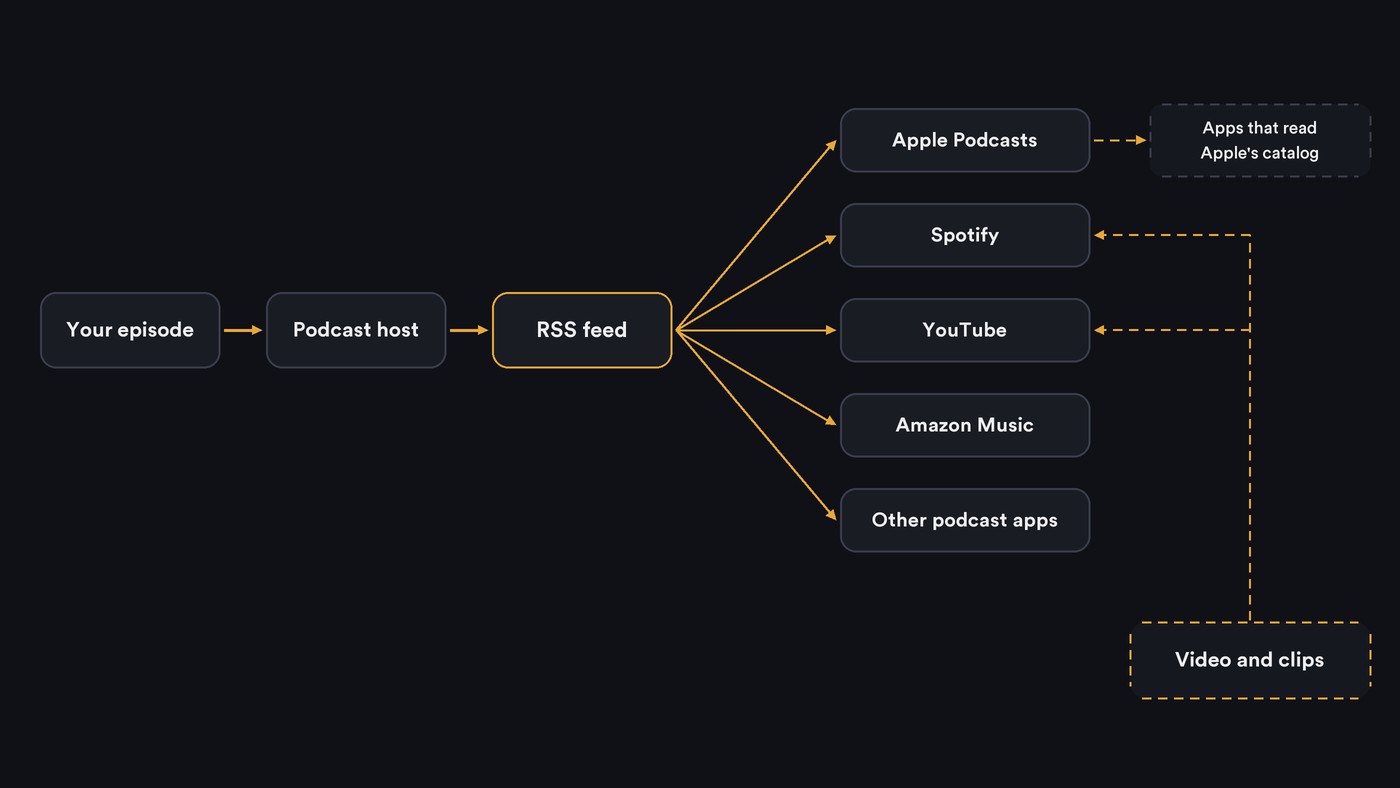
Where to submit your feed
Apple Podcasts. In Apple Podcasts Connect you add a show with an RSS feed, confirm Content Rights for any third-party material, then set Availability. Every show passes validation and a review before it appears. Apple's catalog also feeds other apps, including Overcast and Pocket Casts; opt out of catalog distribution and those apps lose your show unless you submit to them directly.
Spotify. If you host anywhere other than Spotify, you claim your show on Spotify for Creators by entering the RSS feed, and Spotify emails an 8-digit code to the address in it. A show can be claimed only once, so whoever claimed it first has to invite you.
YouTube. In YouTube Studio, choose Create, then New podcast, then Submit RSS feed. YouTube's RSS delivery page says it turns your show art into a static-image video for each episode, uploads new episodes automatically, and is available only in select countries and regions. Audio can't be swapped once published; you re-ingest instead. The same page says uploaded podcast content can't contain advertisements, and host-read promotions or sponsorships must be declared as branded content.
Amazon Music. Spotify's help page says to open Amazon Music for Podcasters, choose Add or Claim Your Podcast, and make sure your email is in the feed. Amazon's own portal loaded as an empty page for our checker, so confirm its current steps there, including how Audible listings work.
iHeartRadio. iHeart's podcaster site sent our checker into a redirect loop. Spotify's help page says to head to iHeartRadio and use Submit Your Podcast.
Pocket Casts. Its support page accepts a feed URL or an Apple Podcasts link. Select Public when you submit: a show added by pasting a feed into the app stays private unless Pocket Casts matches it to Apple Podcasts.
Podcast Index. Its add-a-feed page didn't load for our checker. Podcast Index maintains the podcast namespace specification on GitHub, which defines tags such as transcript, chapters, soundbite and person.
Choosing a host that submits for you
Most hosts handle the submissions. What each says on its own site:
- Buzzsprout: Get Listed Everywhere submits to 16 audio directories in one click, everything except YouTube, and it sends video to Apple Podcasts, Spotify and YouTube.
- Libsyn: delivery to Apple Podcasts, Spotify, YouTube and Amazon Music "with a single click", plus IAB-verified download trends.
- Podbean: "All Destination" distribution to Apple Podcasts, Spotify, Amazon Music and other apps, plus AI transcripts.
- RSS.com: automatic and guided distribution to Spotify, Apple Podcasts, Amazon Music and YouTube Podcasts.
- Captivate: single-click submissions to Apple Podcasts, Spotify, YouTube and Amazon, plus apps such as Pocket Casts, Goodpods, Overcast and Castro.
- Transistor: upload a video once and it goes to YouTube, Apple Podcasts, Spotify and your feed.
Video podcasts: when you need a separate upload
Audio travels everywhere by RSS. Video doesn't, so plan it per platform:
- Apple Podcasts. Apple calls HLS video "the preferred method". Your host must be on Apple's list of HLS providers, and you generate an API key in Apple Podcasts Connect for it. The older route, RSS video in MOV, MP4 or M4V, needs a separate, dedicated feed.
- Spotify. Spotify's list of hosts that deliver video (updated 9 October 2026) names Audioboom, Audiomeans, Buzzsprout, Flightcast, Libsyn, Podigee and Podspace. Otherwise you can replace an audio episode with video in Spotify for Creators, but those replacements can't use Spotify's monetization options.
- YouTube. YouTube's help is plain about the model: "On YouTube, a podcast is a playlist, and podcast episodes are videos within that playlist." Upload real video yourself or through a host that publishes to YouTube. If you mix in RSS, YouTube recommends ingesting only episodes newer than those already on your channel, to avoid duplicates.
Clips for Shorts, Reels and TikTok
Clips are promotion: each should send people back to the full episode, with the show name on screen and the link in the caption. One YouTube detail: Shorts made to support your podcast don't appear in YouTube Music. Our guide to turning podcast moments into social snippets covers formats, captions and each platform's limits.
Metadata that travels with your feed
Whatever is in the feed shows up everywhere, so fix it at the host.
- Titles and show notes. Apple asks you to include host and guest names in show and episode descriptions so transcripts spell them correctly.
- Artwork. Apple's Show Cover spec prefers 3000 × 3000 px and accepts 1400 to 3000 px through RSS, as PNG or JPG with no transparency. YouTube builds its RSS videos from the same art.
- Chapters. Apple reads chapters from timestamps in the description (start at 00:00:00, at least three), from the podcast:chapters tag, or from MP3, AAC or MP4 metadata. It suggests no more than six per hour, none shorter than two minutes, and titles under 45 characters. If you supply none, it generates chapters for English episodes of 10 minutes or more.
- Transcripts. Apple generates transcripts automatically, or ingests yours through the RSS transcript tag. A VTT file lets you name each speaker, and music lyrics aren't displayed.
Analytics and IAB certification
Apple Podcasts Connect, Spotify for Creators and YouTube Studio each report their own audience; YouTube's include impressions, click-through rate, views, traffic sources and watch time. Your host counts downloads, and IAB Tech Lab explains why that number differs: "Podcast episodes are downloaded for consumption and measurement is based on server logs."
Its guidelines, now at version 2.3, define how to measure downloads, audience and ad delivery, and its compliant companies list shows who is certified. On 23 November 2026, Buzzsprout, Captivate, Libsyn, Podbean and RSS.com were on it. Compare downloads with downloads, never with YouTube views.
Music in your podcast: only what you have rights to
Every platform puts the rights question on you. Apple has you confirm rights to third-party content when you submit. YouTube recommends checking each uploaded episode for copyright issues before you go public. Spotify's help centre says that on Spotify-hosted shows, episodes containing songs from its catalog play only on Spotify, and that podcasts shouldn't be used to distribute music tracks or DJ mixes.
So build your theme, intros and beds from music you made, music licensed for podcasts, or an AI tool whose plan licence covers your use. Our guide to AI platforms for podcast theme music compares the options, and if you want to release that theme as a song, see the easiest distribution service for podcasters' original music.
Podcast distribution launch checklist
- Pick a host and fill in title, description, category, language, explicit flag and owner email.
- Make the cover at 3000 × 3000 px, PNG or JPG, no transparency.
- Publish a trailer or the first episodes. Apple requires at least one episode.
- Submit to Apple and wait for validation and review.
- Claim Spotify, add YouTube, then Amazon Music, iHeartRadio and Pocket Casts (Public).
- Choose your transcript and chapter settings in Apple Podcasts Connect.
- Choose a video route for each platform, or stay audio-only.
- Collect every show URL on one links page for your notes and socials.
A weekly cross-platform routine
- Two days out: finish the mix, write title and notes, add chapters and a VTT with speaker names.
- Release day: upload once to your host, then check Apple, Spotify and YouTube a few hours later.
- Day after: post three to five clips, each linking to the full episode.
- End of week: compare each platform with last week, and adjust titles, artwork or clip formats.
Where Soundverse fits
Soundverse is an AI music platform that takes you from idea to audience. Your episodes go out through your podcast host, and Soundverse helps with the music and text around them:
- AI Music Generator makes instrumentals with no vocals, with three themes for shows: Podcast - Intro, Podcast - Background and Podcast - Outro. Keep the genre and vibe tags the same and the three share one style.
- Audio Transcription turns an episode of up to 60 minutes into text with word timestamps for quotes and show notes. Add speaker names yourself before you build a VTT.
Licensing is set by plan: the Free plan is for personal use, and the Creator plan comes with a royalty-free license.
From 0:17, this walkthrough shows AI Music Generator turning a prompt into an instrumental track.
FAQ
Do I have to upload each episode to every platform? No. You upload once to your host and submit the feed to each platform once; after that, each directory reads the updated feed.
Should I send my podcast to YouTube by RSS or upload video? RSS gives you static-image videos made from your cover art, which suits an audio show. If you film, upload the video yourself or through a host that publishes to YouTube.
How long until a new episode shows up everywhere? Spotify says most platforms post new episodes within a few hours, and to allow up to 24. Pocket Casts says a newly submitted show can take a little while to appear in search.
Can I play popular songs in my podcast? Only with the rights to do so. Apple asks you to confirm rights to third-party content, YouTube tells you to check uploads for copyright issues, and Spotify-hosted episodes with songs from its catalog play only on Spotify.
Sign up for Soundverse free and make an intro, bed and outro that share one style. More guides for podcasters on the Soundverse blog.