How Do Creators Ensure Their AI-Generated Voices Sound Distinct and Unique?
Make an AI voice sound distinct: start from your own voice or a blend, shape timbre, build performance habits and a vocal chain, then test it.
To make an AI voice sound distinct, start from a voice nobody else can use: your own, trained with consent, or a blend you design, never a copy of a famous singer. Then shape its timbre, give it performance habits of its own, wrap it in a signature vocal chain and keep every setting the same across releases.
Most AI vocals blur together because everyone starts from the same defaults: a built-in vocal style, a public voice model or a stock preset chain is open to every other user of that tool. Identity comes from the layers you add on top. Tool details below come from each company's own pages, checked on 20 November 2026.
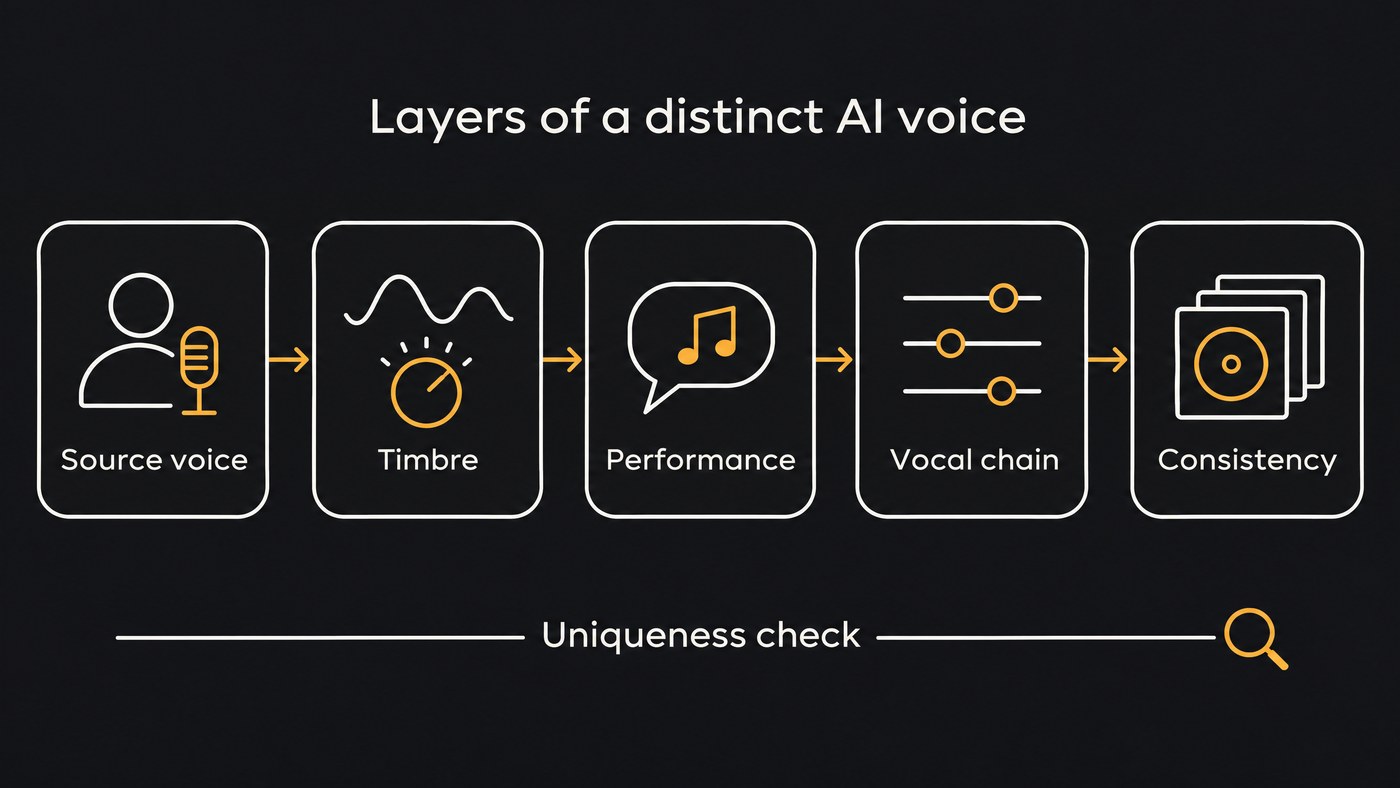
Start from a voice nobody else has
The source voice sets the ceiling. You have three honest options.
Your own voice. No library holds it, so it's the most distinct voice you can put on a record. In Soundverse, Train Voice Clone builds a reusable voice from one take with at least 15 seconds of singing, and Train Voice Model learns from 10 minutes or more of clean, dry solo recordings for use in Voice Swap. Neither starts training until you confirm the voice is yours or that the singer has given explicit consent.
Record the training audio the way you want to sound. A clone learns the take you give it, and the Train Voice Clone page suggests training one clone from a breathy take and another from a belted one, then picking the one a song needs.
This video records a short sample, creates an AI voice from it, then has the AI Song Generator sing a new song in that voice.
A collaborator who agreed. A bandmate or session singer can become a project's voice with their explicit consent, in writing, and a model kept Private so nobody else can pick it.
A blend you design. Some vocal tools mix voices into a new one. ACE Studio's documentation sums up its feature in one line: "Blend multiple AI voice seeds to create unique hybrid voices in ACE Studio." You set each seed's share with a fader and save the blend to your Voice Library. Kits.ai's Voice Blender mixes any two of its voices, or one of them with your own trained voice, using a Blend Ratio slider. Blend only voices you're allowed to use.
Skip any model built to sound like a famous singer. Beyond the legal problem covered below, it caps your identity at "AI version of someone else".
Shape the timbre: formant, gender and tone controls
Small timbre moves then make the source voice yours:
- Formant. It moves the resonances that tell the ear how big the singer is, without changing the note. A small shift down adds weight; a small shift up sounds younger and brighter. Our guide to formant shifting in voice synthesis explains the controls in Melodyne, Synthesizer V, ACE Studio and VOCALOID.
- Gender, tone or character parameters. Use them lightly: a voice pushed to an extreme sounds processed long before it sounds unique.
- Register. Where the melody sits changes the color as much as any knob. In Voice Swap, Pitch shifts a part up to 24 semitones either way, so you can hear one performance higher and lower and keep the range where the voice has an edge.
Settle on one value per control and write it down. A timbre you can't reproduce won't become your sound.
Give the voice performance habits of its own
Listeners recognize singers by how they sing as much as by their tone. Voice conversion replaces the timbre and keeps the performance: Soundverse's Voice Swap keeps the phrasing and timing of the take you feed it. So your guide vocal is where the signature starts.
Pick four or five habits and repeat them on purpose:
- Phrasing. Sit slightly behind the beat in verses and on it in choruses, or the reverse, and keep it.
- Ad-libs. Choose two or three (a word, a hum, a vowel run) and place them in the same spots, such as the turnaround into the bridge.
- Vibrato. Decide where it lives, for example straight notes with vibrato only on the last long word of a phrase.
- Breath. Keep audible inhales before big lines in the guide take, and don't gate them out later.
- Diction. Your accent and the vowels you open or close are identity you get for free.
For vocals driven by text or MIDI, draw these habits in: scoops into key words, vibrato on long notes, a few onsets off the grid. If it still sounds too regular, our guide to what makes an AI voice sound robotic goes through the fixes.
Build a production signature into the vocal chain
Many artists are recognizable from their vocal sound as much as from the voice itself. Build one chain and use it on every release:
- Saturation. One color, tape-style warmth or a gritty edge, at the same amount.
- Doubles. A tight double panned against the lead, or a whispered double an octave down.
- Harmonies. Use the same stack every time, for example a third above in choruses only. Our piece on AI multi-part vocal harmonies shows how to build them.
- Space. One distinctive reverb or delay beats three generic ones: a short slapback, a delay throw on the last word of each chorus line, or a dark plate.
In Soundverse, AI Vocal Effects runs a full preset chain (Transparent, Modern Pop, Intimate, Wide Lead or Lo-fi), and Customize adjusts compression, brightness, reverb, delay and saturation with five sliders. Everybody else has the same presets, so move the sliders until the sound is yours and write down the values.
Keep the voice consistent across releases
A distinct voice only builds recognition if it's the same next month.
- One model per persona. Release under two names, train two voices, and never swap them.
- Save the recipe. One page per voice: model name, timbre and pitch settings, performance habits and chain values.
- Reuse the same voice on every track. The Train Voice Clone page makes the same point: pick one clone for every song and an EP keeps one lead voice from the first track to the last.
- Re-check after tool updates. Render an older song again and compare before you switch.
- Be upfront if the persona is virtual. Spotify is rolling out AI Persona badges for artists whose public identity is an AI-generated, photorealistic person, and its help page says their music isn't included in editorial or personalized recommendations unless a listener intentionally engages with the artist. The badge doesn't apply when you only use AI tools to make the music and your profile represents a real person or a stage name.
How to check that AI-generated voices sound distinct and unique
- Pick three reference artists in your lane.
- Match loudness and cut about 20 seconds of chorus from each, plus the same section of your track.
- A/B it yourself. Note any moment your vocal could pass for one of theirs.
- Run a blind listener test. Play the clips shuffled to five or more people and ask one question: "Who does this singer remind you of?"
- Read the answers. A spread of different names, or "nobody in particular", is a good sign. If most people name the same real singer, change something: the formant, the phrasing or the chain.
- Repeat after each change and save the winning settings.
Where the line is: sound-alikes and platform rules
A voice that sounds like a specific real singer, without their permission, turns uniqueness into a liability. Spotify's support page on music that impersonates another artist's voice, read on 20 November 2026, says Spotify will remove such music whether it was made with AI voice cloning or any other method. Leaving the name off doesn't help: the policy covers "Releases that do not include the impersonated artist’s name in the metadata or credits, but the vocals are clearly recognizable as the exact voice of another artist, without that artist’s permission."
YouTube's privacy guidelines let people ask for removal of AI-generated or altered content that looks or sounds like them. Reviewers weigh whether the content is realistic, whether it's disclosed as altered or synthetic, whether the person can be uniquely identified, and whether it has parody, satire or other public interest value.
Voice and likeness laws also differ by country and by US state. This is general information, not legal advice, so ask a music lawyer about a specific release.
Where Soundverse fits
Soundverse is an AI music platform that takes you from idea to audience, built for independent artists who release music. For a voice of your own, Train Voice Clone turns one take into a voice the AI Song Generator can sing new songs in, and Train Voice Model builds a more detailed model for Voice Swap, which re-sings your guide vocal so your phrasing carries through. Both need the Creator plan or above, both ask you to confirm the voice is yours or that the singer consented, and new voice models start Private. AI Vocal Effects then gives the vocal a chain you can adjust and repeat on every release.
Licensing is set by plan: the Free plan is for personal use, and the Creator plan comes with a royalty-free license.
FAQ
Can two artists end up with the same AI voice? Yes, if they both pick the same built-in style or public model and leave it untouched. Training your own voice, blending voices you're allowed to use, and adding your own performance habits and vocal chain all reduce the overlap.
Is it legal to make an AI voice that sounds like a famous singer? Releasing one without their permission breaks platform rules such as Spotify's impersonation policy, and can break voice and likeness laws where you live. Build from your own voice or a singer who has agreed instead.
How do I keep my AI voice the same on every release? Use one model per persona, reuse it on every track, and keep a recipe sheet with the timbre settings, performance habits and chain values. Re-test whenever your tool updates its models.
Sign up for Soundverse free and train a voice from your own singing. More vocal production guides on the Soundverse blog.

