How Does Voice Conversion Technology Alter the Timbre of a Recorded Track?
Voice conversion keeps your phrasing, timing and melody but swaps formants, breath and identity. How pitch shifts, reverb and full mixes change the result.
Voice conversion alters the timbre of a recorded track by splitting the vocal into what is sung, the pitch line and the voice's color, then rebuilding it with another voice's color. Your phrasing, timing, melody and vibrato carry through; the formants, spectral envelope, breathiness and the singer's identity are replaced by the target voice.
That split explains most of what you hear in a converted vocal, good and bad. Tool details below come from each project's own documentation, read on 19 November 2026.
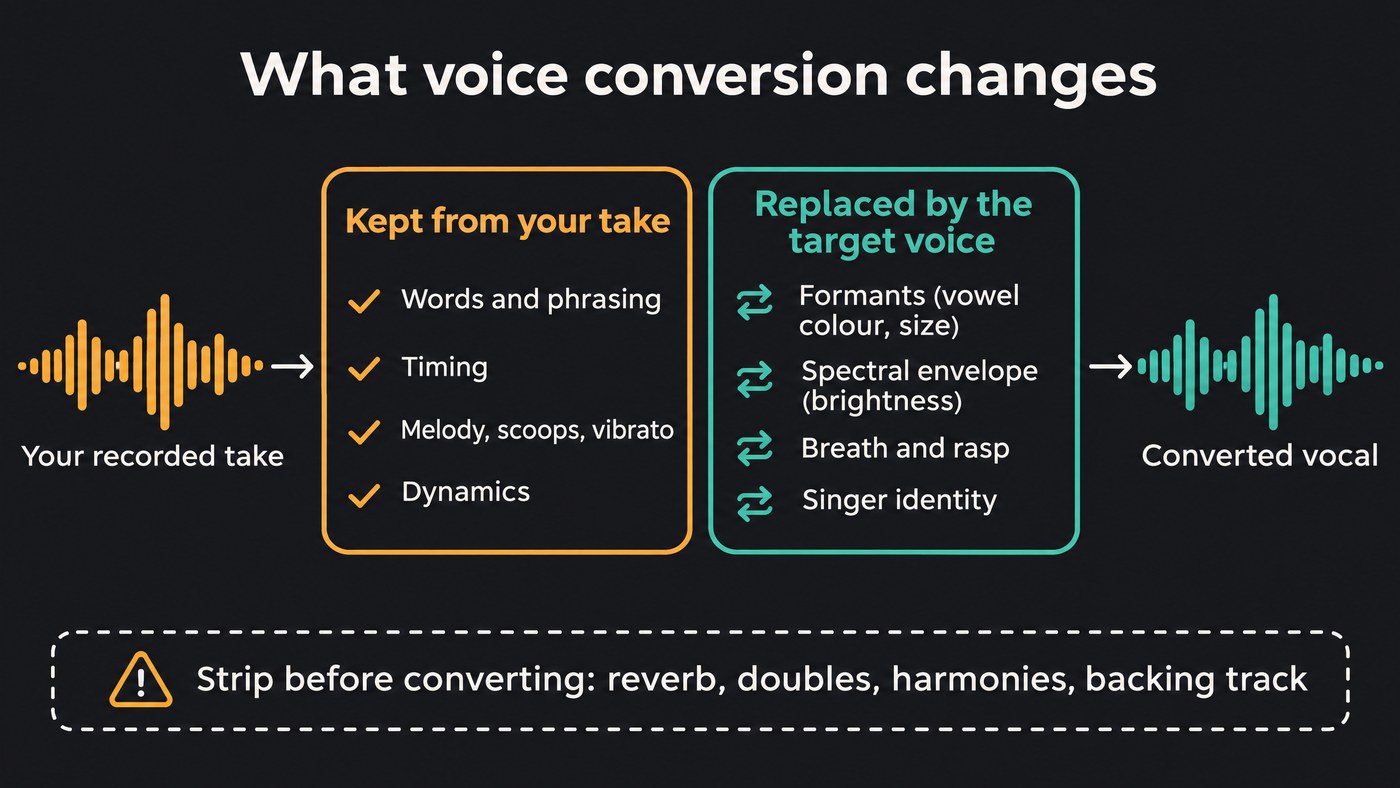
What voice conversion does to a recorded vocal
The research definition is simple. In a review of the field posted to arXiv in August 2020 and accepted by IEEE/ACM Transactions on Audio, Speech and Language Processing, Berrak Sisman, Junichi Yamagishi, Simon King and Haizhou Li put it this way: "In voice conversion, we change the speaker identity from one to another, while keeping the linguistic content unchanged."
For singing, a converter reads three things from your take:
- Content. A speech encoder turns the audio into features that describe which sounds are sung. The so-vits-svc README explains that these features go straight into the model without being turned into text first, which is why the pitch and intonation of the original survive.
- Pitch. A pitch tracker extracts the melody frame by frame and passes it on, moved only by any transpose you set.
- Timbre. This part is discarded and supplied by the target: a model trained on one voice, or a short reference clip in zero-shot systems.
A decoder then renders new audio from your content and pitch in the target's timbre. The authors of ContentVec, a content encoder used by several singing converters, note that stripping out speaker information can easily strip out content too, and that losing content does more damage than the speaker removal is worth. Most trade-offs below come from that tension. For which model families handle it best, see which machine learning models excel at cloning vocal timbres.
What voice conversion keeps from your take
- Words and phrasing. Where you breathe, which syllables you lean on, how you bend a vowel.
- Timing. The output follows your take frame for frame, so it lines up with the original.
- Melody and ornaments. Scoops, slides, runs and vibrato come from your pitch track. so-vits-svc even warns that its automatic pitch prediction can cause serious pitch problems on sung vocals.
- Dynamics, if you ask. RVC's interface has a volume envelope control: near 0 it follows the loudness of your original vocal, near 1 it gives a consistently loud result.
- Much of the delivery. Dreamtonics' Vocoflex page says your pronunciation, pace and intonation stay intact. The Seed-VC README offers an optional mode that converts accent and emotion too; with it off, only timbre changes.
What it replaces: formants, spectral envelope, breath and identity
Timbre is several things at once:
- Formants. Resonant peaks set by the shape of the throat and mouth. They color each vowel and tell you how big the singer sounds.
- Spectral envelope. The overall shape across frequency: dark or bright, chesty or nasal.
- Breath and rasp. The noisy, unpitched part: air on soft notes, grit on loud ones.
- Identity. The sum of those, which listeners recognize as a person.
All four now come from the target voice, so your old EQ and de-esser settings no longer fit: the new voice puts its body and sibilance in different places.
Breaths and unvoiced consonants such as "s", "t" and "k" are the weak spot, since they carry no pitch for the converter to follow. RVC's interface has a dedicated setting that protects voiceless consonants and breath sounds from tearing artifacts; more protection keeps them cleaner but loosens the timbre match. Our guide on whether AI can replicate breathiness and subtle vocal artifacts goes deeper.
How pitch shifting interacts with formants in voice conversion
With an ordinary pitch shifter, the formants move with the notes unless you correct them, which is where the chipmunk sound comes from. Our piece on the limits of manipulating a synthetic voice after generation covers formant correction in detail.
A converter works differently. Its transpose control moves the pitch line the decoder follows, while the formants come from the target model, so they don't ride up with the melody. RVC labels its transpose in semitones: 12 raises the part an octave, -12 lowers it.
Two limits remain:
- The target's range. Push the melody outside the notes the model learned and it thins out, strains or cracks. That is why voice training pages ask for singing at varied pitches.
- The key. Any shift other than ±12 moves the vocal out of the song's key. Over a backing track, stick to 0 or ±12, or re-pitch the backing too. A baritone guide going into a soprano model usually wants +12, not +5.
Why the input recording matters: reverb, doubles and harmonies
A converter treats everything in the file as voice, so whatever surrounds your vocal gets converted too.
- Reverb and delay. The tail becomes part of the "voice", so the target ends up singing the room: smeared vowels and ghostly repeats. ACE Studio's Voice Changer docs offer a Remove reverb and harmonies option before conversion, and RVC's WebUI ships a vocal separation and dereverberation tool.
- Doubles and harmonies. Pitch tracking expects one note at a time. Two voices make it jump between lines, which you hear as warble or octave flips. Dreamtonics' Vocoflex FAQ, as archived on 15 November 2026, is blunt about its own tool: "Vocoflex does not work with distorted input audio, choirs or background music."
- Hard tuning and noise. Because the pitch line is copied, hard-tuned steps carry straight into the new voice. Noise confuses the pitch tracker.
- Style, when the target is an instrument. ACE Studio's docs warn that ordinary singing may not produce ideal instrument sounds and suggest singing in a way that imitates the instrument. Hum like a flute and you get a better flute.
The RVC FAQ adds a subtler point: when your source sounds better than the model's training data, the result borrows that quality but drifts back toward the source singer's timbre. The docs call this tone leakage.
Full mix vs dry stem: what changes
On a dry, solo lead, the converter hears only your voice and you control everything after.
On a finished song, the tool first has to separate the lead from the music. Anything the separator leaves behind, such as hi-hat spill or a backing vocal, gets converted with the lead. Backing vocals are often dropped rather than converted, because they would still be in the original singer's voice, so the arrangement can sound thinner.
If you have the multitrack, convert the dry lead stem. If you only have the mix, separate it first and check the vocal by ear; our roundup of free tools for isolating vocals from mixed music compares options.
Artifacts to listen for in a converted vocal
- Leakage: the original singer shows through on held notes. Raise the retrieval setting (RVC's index rate, so-vits-svc's cluster ratio) or use a better-trained model.
- Slurred words: the other side of that trade. so-vits-svc frames its ratio as a balance between sounding like the target and clear enunciation; RVC warns that a feature-search ratio set too high causes artifacts.
- Torn breaths and sibilants: raise consonant and breath protection.
- Warble or octave jumps: a harmony, reverb or noise in the source.
- Metallic buzz: so-vits-svc says its optional shallow diffusion step can fix some electrical sound problems.
- Thin top notes: you've transposed past the model's range.
A before/after workflow for converting a vocal
- Confirm rights. Your own voice, or one you have explicit consent to use, on a vocal you have the rights to.
- Prepare one dry lead. Comp the take, mute reverb, delay and doubles, leave hard tuning off, export a WAV.
- Set the transpose: 0 if the target sits in your range, ±12 if it sits an octave away.
- Test the hardest bars first: the highest line, the breathiest line, a long held note.
- Compare at equal loudness, on headphones and on a phone speaker.
- Adjust or switch: retrieval, protection, volume envelope, or another voice model.
- Convert doubles and harmonies as separate passes, then rebuild your vocal chain for the new voice.
This video trains a voice model on clean vocals, then uses it in Voice Swap to re-sing a track while keeping the original performance.
Where Soundverse fits
Soundverse is an AI music platform that takes you from idea to audience, built for independent artists who release music. Voice Swap changes the voice and keeps the performance, so your phrasing and timing carry through. It shifts pitch up to 24 semitones either way. On a full song it separates the lead, converts only that and remixes it over the original backing, which you can set from 12 dB quieter to 6 dB louder; backing vocals are left out.
Train Voice Model learns your voice from at least 10 minutes of clean, dry, solo singing at varied pitches, on the Creator plan and above, once you confirm the voice is yours or the singer has consented. Voice to Instrument turns a sung, hummed or beatboxed line into sitar, bansuri, flute, tabla or dholak, setting the pitch per instrument: an octave up for bansuri, a fifth up for flute.
FAQ
Does voice conversion change the melody? No. Singing converters copy your pitch line and move it only by the transpose you set. A flat note stays flat in the new voice, so tune first.
Can voice conversion turn a male vocal into a female one? Yes, with the right model and transpose. Shift by +12 so the melody sits in the target's range; the formants come from the target model, so it won't sound like a sped-up male voice.
Should I remove reverb before converting a vocal? Yes. Reverb and delay tails get converted as if they were voice, which smears vowels. Convert the dry vocal, then add space afterwards.
Can I convert the vocal on a finished song? Yes, but the lead has to be separated first, so bleed from the mix can be converted with it and backing vocals may drop out. A dry stem gives a cleaner result. Licensing is set by plan: the Free plan is for personal use, and the Creator plan comes with a royalty-free license.
Sign up for Soundverse free and hear your take in a new voice. More vocal production guides on the Soundverse blog.
