How Do Modern Cloud-Based Audio Editors Compare to Desktop Software?
Cloud-based audio editors vs desktop DAWs: latency and drivers, plugins, offline use, collaboration, storage, export limits, cost and who owns your audio.
Cloud-based audio editors such as Soundverse AI Studio, BandLab, Soundtrap, Audiotool and Amped Studio win on access, live collaboration and nothing to install. Desktop software like Pro Tools, Logic Pro and Cubase wins on latency control, plugin choice, offline work and big sessions. Many producers now use one of each.
Everything below comes from each maker's own pages and the web standards, read on 19 November 2026. We make Soundverse, so its entries stick to our own pages, limits included.
What a cloud-based audio editor is in 2026
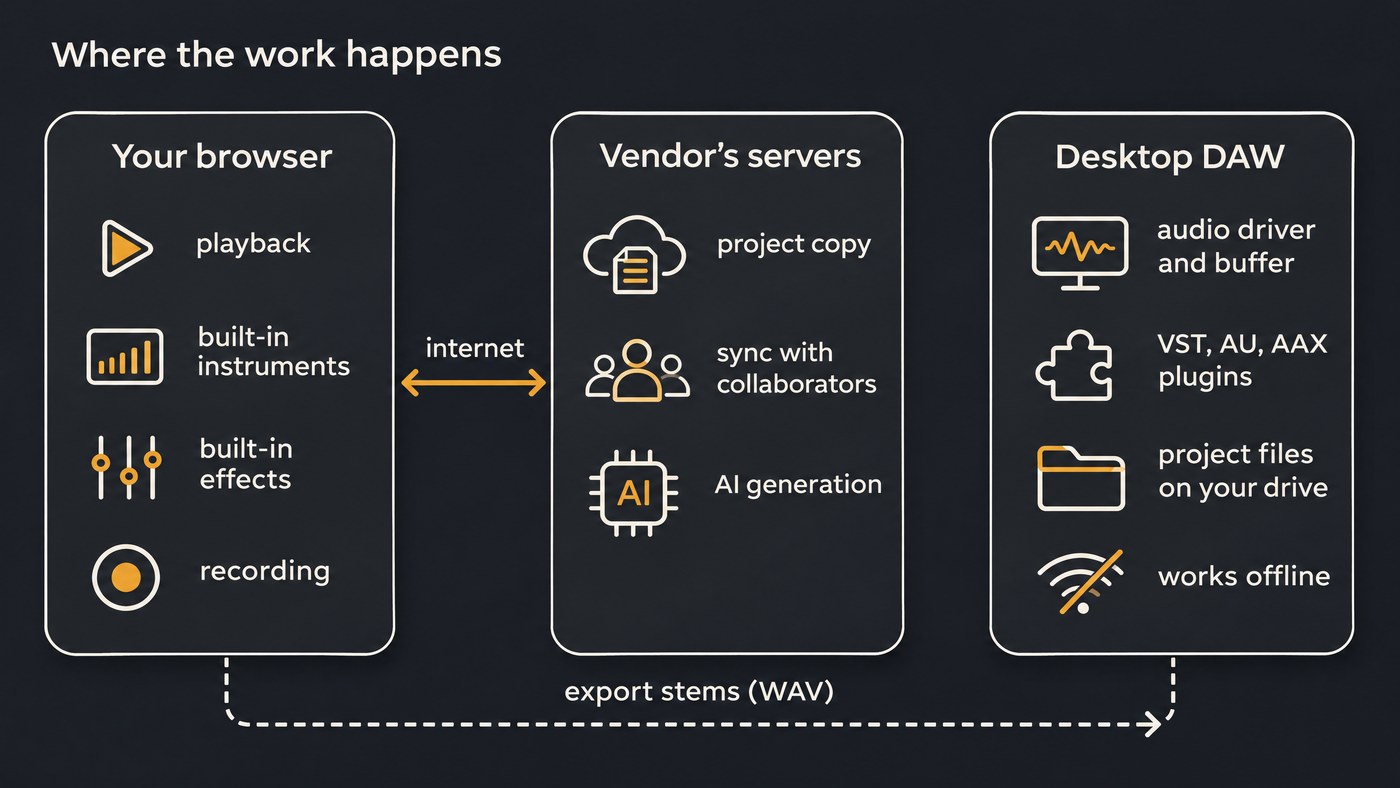
A cloud-based audio editor is a DAW that runs in a browser tab and keeps your projects on the vendor's servers. "Cloud" describes where the project lives, not where the sound is made: playback, instruments and effects usually run on your own computer, inside the browser.
Soundverse spells out the split on its what is an AI studio page. AI Studio's instruments, effects, Mix One and Mastering One run in your browser, while the AI tools on the timeline are models that run on servers. Projects save as you work, so you can open them from any computer.
The line between the two camps is blurring:
- Amped Studio's VST Remote is a small bridge app for Windows and Mac that brings your installed VST and VST3 plugins into its browser DAW.
- Audiotool is free with no ads and lets you bring in VST3 plugins alongside its own devices.
- BandLab's Pro and Max plans include Cakewalk Next, a desktop app for Mac and Windows, and Sonar, a Windows DAW.
Latency and audio drivers
On the desktop, your DAW talks to the audio interface through a low-latency driver, ASIO on Windows and Core Audio on Mac, and you set the buffer size yourself: small for tracking, large for mixing. Avid's HDX page quotes 0.7 ms at 96 kHz with a 64-sample buffer.
A browser app can only ask. Under the W3C Web Audio API (Working Draft, 22 September 2026), the app sends a latency hint and reads back the latency it got. The spec notes that the output figure "depends on the platform and the connected audio output device hardware."
In practice:
- Track vocals and guitar in a browser editor through your interface's direct monitoring.
- Before a long session, record one clap against the click and check where it lands.
- If played parts feel loose, record them in a desktop DAW at a small buffer.
Our explainer on low-latency AI audio goes deeper on buffers and AudioWorklet.
Plugin support: VST, AU and AAX vs built-in
Desktop DAWs host third-party plugins: VST 3 and AU in most, AAX in Pro Tools. If your sound depends on one compressor, amp sim or synth, this decides it.
Cloud-based audio editors mostly ship their own instruments and effects:
- Soundverse AI Studio: built-in instruments and effects, and no third-party VST or AU plugins.
- Amped Studio: VST 3 through VST Remote on its paid Premium and Pro plans; its pricing page lists no VST support on the free Starter plan.
- Audiotool: VST3 plugins plus native devices you patch into chains.
- BandLab and Soundtrap: built-in instruments, effects and loops (Soundtrap lists up to 24,000+ loops). Neither page we read mentions third-party plugins, and no browser editor we checked mentions AAX.
CPU, offline use and reliability
A browser editor still uses your computer: built-in instruments and effects run on your CPU, so a heavy session strains a laptop either way.
The internet matters for three things: syncing, collaborating and AI. In Soundverse's Collaborative AI Studio, the top bar shows Synced while you're connected and Local only when you're not. AI generation runs on servers, though a result that finishes after you close the tab still saves to your Library.
Desktop software works on a plane once it's authorized. Pro Tools 2026.11 accepts an iLok 2, an iLok 3 or iLok Cloud, so pick a physical key if you work offline.
Browser quirks count too. Soundverse's video export needs the built-in encoders in current desktop Chrome and Edge. And MDN notes that data a site stores in your browser is "best-effort" by default and usually deleted when a private window closes. The vendor's server copy is the one that counts.
Collaboration and versioning
This is where cloud-based audio editors pull ahead. In Soundverse AI Studio, the owner or an Admin invites people by email or link as Editor, Viewer or Admin. Everyone sees named cursors and edits as they happen, pins comments to a track at a bar, and can call up to three others who are online. Collaborators need only a free account. Two limits: undo applies only to your own edits, and the Viewer role doesn't lock the timeline.
Soundtrap describes real-time collaboration with video and chat in the studio, comments and auto-save. Audiotool calls itself a multiplayer music platform.
On the desktop, collaboration usually means passing files: stems, bounces and session copies on shared drives. Steinberg's DAWproject format helps by moving projects between Nuendo, Cubase, Cubasis and other supporting DAWs.
Either way, save a named copy before a big edit, since live editing sends one person's change to everyone.
Storage and export limits
Cloud editors meter what desktop software leaves to your hard drive:
- Soundverse AI Studio: Free keeps 3 projects of 3 tracks and exports MP3 and 720p video. Creator holds 8 projects of 8 tracks, adds WAV, FLAC, AAC and OGG at up to 96 kHz and exports stems as a ZIP; Pro and Max go higher. Browser export is blocked past 15 minutes or 24 tracks.
- BandLab: 16 tracks in Studio on Free and 32 on Pro or Max, with 10 or 20 effects per chain.
- Amped Studio: the free plan has 16 tracks, MP3 export only and no storage for your own audio files. Premium adds unlimited tracks, WAV and 10 GB, and Pro raises storage to 50 GB.
Desktop limits come from the edition and your machine. Ableton Live Intro, for example, stops at 16 tracks, while Standard and Suite don't.
Cost
Desktop DAWs lean toward one-time licenses. Apple's page lists Logic Pro at $199.99 outright, or $12.99 a month or $129 a year in Apple Creator Studio.
Cloud editors lean toward free tiers plus subscriptions. As listed on 19 November 2026:
- Audiotool: free, with no ads.
- BandLab: Free, Pro at $99 for the first year ($149 after), and Max at $199 ($299 after).
- Amped Studio: Premium at $5.99 a month billed yearly ($69.99), Pro at $9.99 a month billed yearly ($119.99).
- Soundverse: AI Studio is on every plan, Free included. Recording, editing, instruments, effects, mixing, mastering and export use no tokens; AI generation does.
Data ownership and privacy
With a cloud editor, your audio lives on someone else's servers, which is what makes sync work. Read the terms before you upload a client's vocals.
Ownership terms vary. BandLab's Terms of Use, current as of 9 September 2026, say: "As between you and us, you retain ownership of all Content that you Submit through use of the Services." The same section grants BandLab a broad license to use that content in connection with its services, which ends after you delete it, except for content you've shared that others haven't removed.
Desktop tools keep more on your machine, AI included. Describing its new Stem Separator, Avid's Pro Tools 2026.11 release notes say: "All AI analysis and processing occurs locally on your computer with no cloud upload required."
Some browser tools stay local too: Soundverse says VocalMIDI One's microphone sound never leaves the browser, while AI generation goes to servers.
Which to use when
Use a cloud-based audio editor when:
- You co-write with someone in another city and want one live timeline instead of emailed stems.
- You work across computers, including ones you can't install software on.
- You teach, or need a student or client to open the project with a free account.
- You want AI parts generated straight onto the timeline, as in Soundverse AI Studio.
Use desktop software when:
- You track drums or a band and need tight buffer control or HDX-class latency.
- Your mix depends on third-party VST, AU or AAX plugins.
- You deliver long sessions, Dolby Atmos masters or post-production files.
- You need to work offline.
Many producers split the job: sketch and co-write in the browser, export WAV stems, and finish on the desktop. See the best AI DAWs in 2026 for both kinds, and the main features of an AI-integrated music studio to judge AI tools.
Where Soundverse fits
Soundverse is an AI music platform that takes you from idea to audience, built for independent artists who release music. AI Studio is our cloud-based editor: a multitrack studio in the browser for audio, MIDI, video and image tracks, with built-in instruments and effects, Mix One and Mastering One running locally, and AI tools that land results on your tracks as new clips. Synth One, Bass One, Drum Kit One and Sampler One take a Web MIDI controller, and audio tracks record with live monitoring.
Recording has no count-in, punch-in or take comping yet. Our tour of the AI Studio plugin rack and the post on real-time collaboration in AI Studio cover the rest. Licensing is set by plan: the Free plan is for personal use, and the Creator plan comes with a royalty-free license.
This short video shows people invited into one AI Studio project editing it together, with every change appearing on everyone's screen as it happens.
FAQ
Are cloud-based audio editors good enough for professional work? For writing, arranging, remote sessions and demos, yes. For plugin-heavy mixes, long sessions and formal deliverables, finish in a desktop DAW from exported WAV stems.
Can I use VST plugins in a browser DAW? In some. Amped Studio loads your installed VST and VST3 plugins through its VST Remote bridge on paid plans, and Audiotool supports VST3. Soundverse AI Studio doesn't load VST or AU plugins.
Do cloud audio editors work offline? Mostly not: they need a connection to sync, collaborate and run AI tools. Soundverse AI Studio shows Local only when the connection drops. Desktop DAWs work offline once authorized.
Who owns the music I make in a browser DAW? It depends on each service's terms. BandLab's say you keep ownership of what you submit while granting BandLab a license to use it in its services. Soundverse's pages say you need the rights to everything anyone uploads or records into a project.
Sign up for Soundverse free and open AI Studio in your browser, with nothing to install. More production guides on the Soundverse blog.
