How Do AI-Driven Audio Platforms Achieve Low-Latency Processing for Real-Time Creation?
Low-latency AI audio explained for producers: buffer sizes, the latency musicians tolerate, causal streaming models, compression, AudioWorklet and WebRTC.
Low-latency AI audio for real-time creation comes from four engineering choices: small audio buffers, causal models that generate in short frames, models compressed enough to run on the musician's own device, and buffered network streams when the model lives in the cloud. Together they decide whether an AI tool feels like an instrument you play or a band you steer.
Sources were read on 19 November 2026; named products are described only as their makers document them.
How much latency can musicians tolerate?
The most cited target comes from David Wessel and Matthew Wright, who suggested in 2002 that digital instruments should respond in under 10 ms. Andrew McPherson, Robert Jack and Giulio Moro collect the evidence around it in their NIME 2016 paper on action-sound latency:
- People tapping a steady beat vary by around 4 ms, and listeners can detect a 6 ms asynchrony in a steady pulse.
- Theremin players only detected delays of 20 to 30 ms, since continuous gestures are more forgiving than hits.
- Musicians stayed in sync with up to 55 ms of latency by playing ahead of the beat.
Jitter, the variation in latency, matters as much as the average. As Franco Caspe and colleagues (2025) summarise it, a study by Robert Jack and co-authors found a steady 10 ms acceptable for percussive instruments, while 20 ms, or 10 ms wobbling by ±3 ms, significantly degraded the experience.
The target is hard to hit: in McPherson's tests, the fastest Arduino-to-Max/MSP chain over USB serial averaged 8.2 ms but passed 10 ms 12% of the time.
The latency budget: buffer sizes and round-trip latency
Audio moves through a computer in blocks. A 128-sample buffer at 48 kHz holds 2.67 ms, and with double buffering, output alone costs two blocks: one computed while another plays. The Web Audio API specification (W3C Working Draft, 22 September 2026) works the same example: two 128-frame blocks at 44.1 kHz come to about 5.8 ms.
Round-trip latency, from playing a note to hearing it, stacks up in four stages:
- The converter digitizes your input. Converters filter too; on Bela, the audio DAC's own filter dominated its roughly 600 µs.
- The input buffer fills.
- The model processes the block, plus any lookahead it needs.
- The output buffer plays it out through the driver and converter.
At 48 kHz, one 128-sample input block and one output block use about 5.3 ms of a 10 ms budget, before converters, extra buffering or any AI. The model gets what's left.
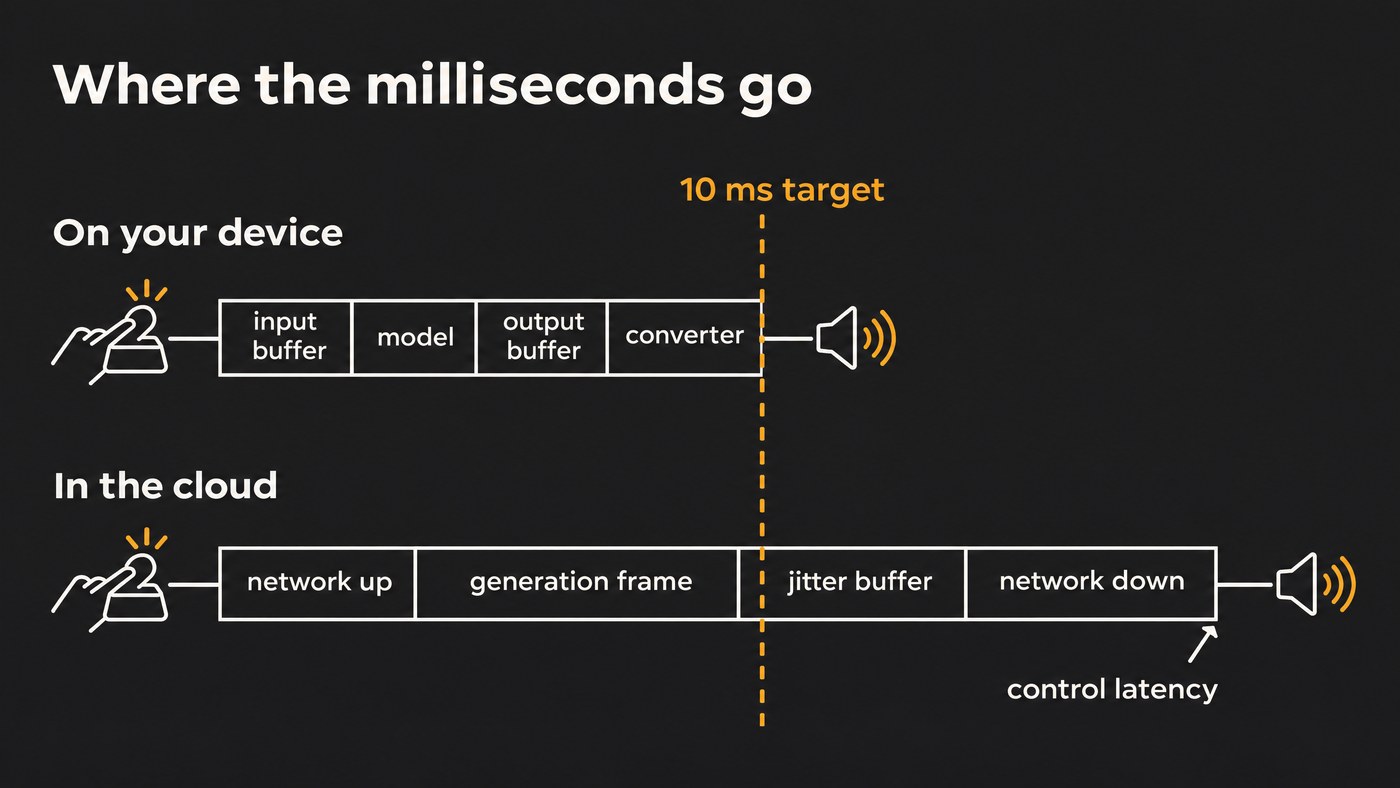
On-device, cloud or hybrid: where low-latency AI audio runs
Google's Lyria team set out the trade-off in their Live Music Models paper (2025): on-device inference gives lower latency because there are no network requests, plus reliability, privacy and room for artists to customise, while cloud APIs reach bigger models on specialised hardware. They released one of each: open-weights Magenta RealTime and the Lyria RealTime API.
- On-device is the route to instrument-grade response. Apple's 7 May 2024 press release says Logic Pro's Stem Splitter separates recordings on the device and needs M-series Apple silicon. Neutone's open-source SDK runs PyTorch models in its Neutone FX plugin, handling buffer sizes and delay compensation.
- Cloud suits music you guide rather than play note by note, since network round trips rule out a 10 ms response.
- Hybrid keeps instruments, effects and analysis local and sends heavy generation to servers.
The useful split is action-to-sound latency (how fast a note sounds) versus control latency (how fast a model reacts to a new instruction). An AI synth or timbre-transfer effect needs the first under about 10 ms. A generative jam partner can be playable with a couple of hundred milliseconds of the second.
Streaming and causal model design
A streaming model produces audio block by block as input arrives, so its output can't depend on future input: it must be causal. Caspe and colleagues' analysis of RAVE, a widely used real-time neural synthesizer, splits its latency into four sources:
- Buffering. RAVE packs 2,048 samples into each latent step and processes two such blocks: 92.9 ms.
- Representation delay. Its multiband filter bank adds 12 ms.
- Cumulative delay. Trained non-causally with half a second of lookahead, it gains 566 ms when reconfigured to stream.
- Jitter. An event can land anywhere inside a block, so timing varies.
The original measured about 245 to 440 ms in their tests. Their redesign, BRAVE, gets under 10 ms with about 3 ms of jitter by cutting the compression ratio to 128 samples per step, using a lighter filter bank, training causally and dropping the noise generator.
Chunked inference versus frame-by-frame generation
Generative models face the same choice. The first Magenta RealTime, a codec language model that predicts audio tokens (our tokenization explainer covers those), generated 2-second chunks from 10 seconds of context. As the Magenta team wrote when releasing Magenta RealTime 2 on 4 June 2026, "the chunk duration creates a lower bound on control delay, resulting in a response time of 2 seconds at a minimum."
MRT2 generates one 40 ms frame at a time with a causal decoder and sliding-window attention, which keeps its memory cache a fixed size. Control latency fell from about 3 seconds to about 200 ms, and the team notes that input and output buffers add to that frame time.
Model compression: smaller models, quantization and fewer steps
A model runs in real time when it finishes each block faster than the block plays. Compression helps:
- Smaller networks. BRAVE halves RAVE's hidden sizes, from 17.6 million parameters to 4.9 million, and runs in real time on an M1 Pro CPU at 256-sample blocks. Magenta RealTime 2's 2.4-billion-parameter Base model streams on a MacBook M3 Pro or M2 Max and up; its 230-million-parameter Small model streams on any Apple Silicon MacBook.
- Quantization. Researchers from Stability AI, Arm and UC San Diego (Novack, Evans and colleagues, 2025) ran a cut-down Stable Audio Open on a Vivo X200 Pro phone with dynamic Int8 quantization, after shrinking its diffusion transformer from 1.06 billion to 0.34 billion parameters.
- Fewer steps. Most diffusion speed-ups distill a teacher into a few-step student. Their adversarial post-training reaches 8 steps without distillation and drops classifier-free guidance, halving memory. Aimed at sound effects and loops, it makes about 12 seconds of 44.1 kHz stereo in about 75 ms on an H100 GPU, and in about 7 seconds on the phone.
- Lighter decoding. Google keeps a small refinement model for the finest audio tokens in cloud-based Lyria RealTime and leaves it out of Magenta RealTime, trading a little fidelity for speed.
Each cut trades some quality for speed, so listen for the artifacts our guide to how AI preserves audio quality during synthesis describes.
Browser audio: AudioWorklet, WebAssembly and WebGPU
The Web Audio API's AudioWorklet runs developer code, JavaScript or WebAssembly, on the browser's audio rendering thread in sync with the built-in nodes. The September 2026 draft also sets:
- Render quantum: 128-frame blocks by default, with a new renderSizeHint option to request another size.
- latencyHint: defaults to "interactive", the lowest output latency possible without glitching.
- baseLatency and outputLatency: report the latency you actually got, so an app can compensate.
WebAssembly lets DSP and small models written in C++ or Rust run inside the worklet. WebGPU is different: the W3C spec (Candidate Recommendation Draft, 16 November 2026) exposes the GPU to windows and workers, not to the AudioWorklet, so GPU inference runs on another thread and passes audio through a shared buffer. That suits generation better than live effects.
Network transport: WebSockets, WebRTC and jitter buffers
With a cloud model, the network joins the instrument. Google's Lyria RealTime documentation describes a persistent, bidirectional, low-latency WebSocket connection: the client sends weighted prompts and settings such as BPM, density and scale, and the server streams 16-bit PCM at 48 kHz in stereo. Its advice: "Client applications must implement robust audio buffering to ensure smooth playback. This helps account for network jitter and slight variations in generation latency."
That reserve is a jitter buffer: bigger is smoother but later, smaller is tighter but drops out more easily. WebSockets run over TCP, so one lost packet can stall what follows. WebRTC, built for calls, sends audio over UDP and conceals losses, usually with the Opus codec. Its specification, RFC 6716 (September 2012), gives algorithmic delays from 5 ms to 65.2 ms. For an AI stream you steer, buffering costs little; for two players jamming across a city, every millisecond is felt.
What this means for your setup
- Track and play AI instruments at the smallest buffer that runs without clicks, often 64 or 128 samples, and raise it for mixing.
- Check the latency your DAW or browser reports, including delay compensation for AI plugins with lookahead.
- Keep real-time AI effects local and use cloud generators for parts you guide.
- Play a generative partner like a bandmate: make each change a bar early.
Where Soundverse fits
Soundverse is an AI music platform that takes you from idea to audience, built for independent artists who release music. AI Studio is a hybrid. As our page on what an AI studio is explains, its instruments, effects, Mix One and Mastering One run in your browser on every plan, while the AI tools on the timeline are models that run on servers and land their results on your tracks as clips. Synth One, Bass One, Drum Kit One and Sampler One take a Web MIDI controller, and audio tracks record with live monitoring. See our tour of the AI Studio plugin rack.
VocalMIDI One turns singing, humming or beatboxing into MIDI in real time with signal analysis that runs locally in your browser, not a generative model. Visual One's hand tracking runs on your own device.
This two-minute tour shows AI Studio's built-in instruments, effects and real-time collaboration running in the browser.
FAQ
What is a good latency for playing virtual instruments? Under 10 ms is the long-standing target, and steady matters as much as low: in Jack and colleagues' study, 10 ms wobbling by ±3 ms degraded playing much like 20 ms did. Percussive parts are the most sensitive.
Can a cloud AI music generator be played in real time? It can be steered live. Lyria RealTime streams over a WebSocket and responds to new prompts, but network round trips and buffering rule out a local instrument's sub-10 ms response.
What is the difference between causal and non-causal audio models? A causal model's output depends only on past and present input, so it can stream. A non-causal model also looks ahead, which usually helps quality but adds delay live; for RAVE, that lookahead added 566 ms.
Sign up for Soundverse free and play AI Studio's instruments in your browser. More guides for producers on the Soundverse blog.
