Best AI DAWs in 2026
The best AI DAW for you in 2026: Logic Pro, FL Studio, Ableton Live, Cubase, Suno Studio, Soundverse AI Studio and more, and what the AI does.
The best AI DAW in 2026 depends on where your songs start. Logic Pro 13 suits Mac songwriters, FL Studio 2026 suits beatmakers, Ableton Live 12 Suite suits electronic producers, and Suno Studio or Soundverse AI Studio suit artists who want parts generated in the browser. Cubase Pro 16, Fender Studio Pro, BandLab and Amped Studio complete the list.
Every feature below was checked on the vendor's own site or release notes on November 18, 2026. We make Soundverse, so its entry sticks to what our own pages say, limits included.
What makes a DAW an AI DAW in 2026
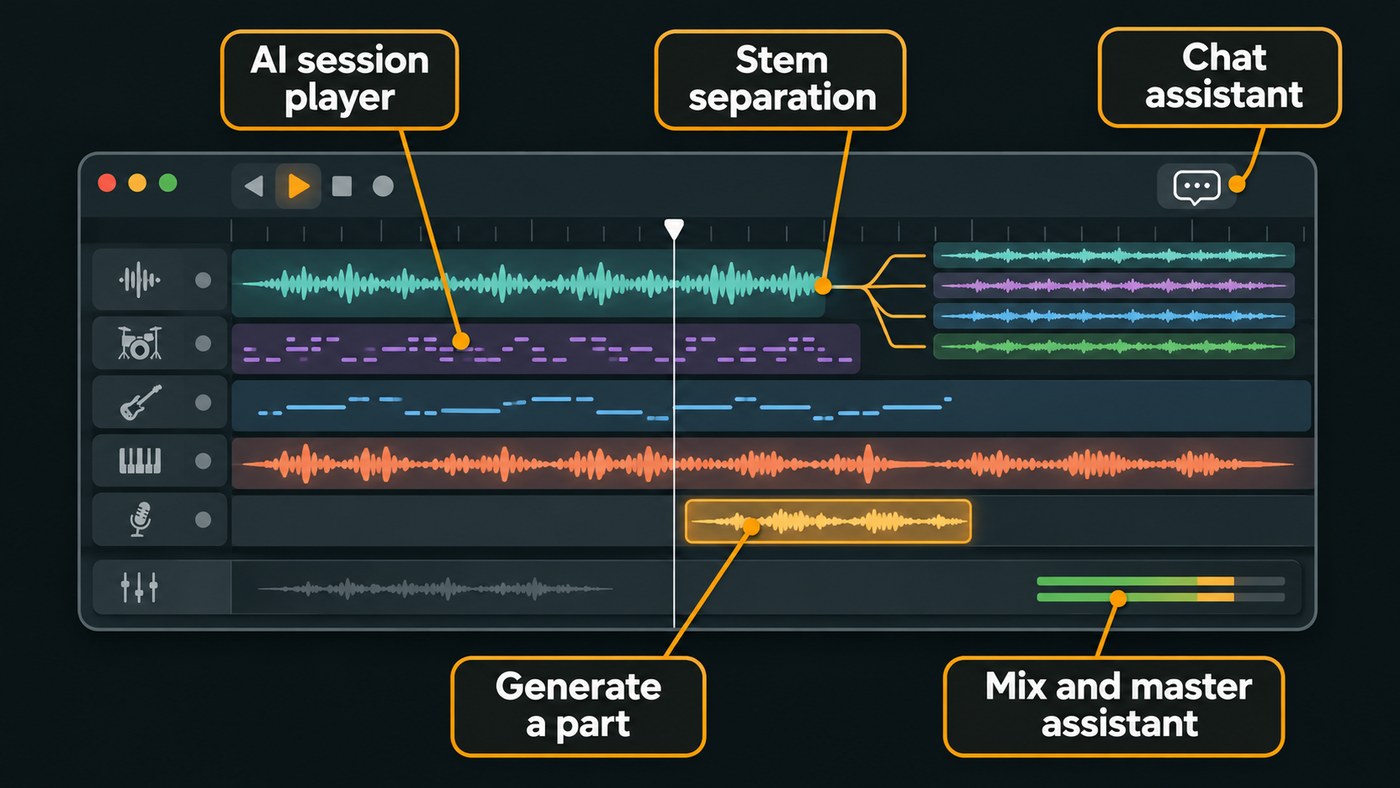
A digital audio workstation (DAW) is the app where you record, arrange, mix and export music. Most DAWs now ship some machine learning, so the term only means something when AI does real work in one of five jobs:
- Generation on the timeline. You describe a part, such as drums, a vocal or a whole song, and it lands as an editable clip.
- AI session players. Virtual musicians that play parts and follow your chords.
- Stem separation. Splitting a finished mix into vocals, drums, bass and other parts.
- Mixing and mastering assistants. Tools that listen to your track and set the processing.
- Chat assistants. Plain-language requests that answer questions or edit your project.
The useful AI DAWs do several of these, and every result stays a track or setting you can overrule.
Logic Pro 13: AI session players and a new assistant
Apple calls the Session Players in Logic Pro AI-powered musicians: synth, bass, keyboard and drum players that follow your Chord Track. Stem Splitter separates drums, bass, vocals, guitar, piano and other instruments, and version 13.0 can split a drum part into kick, snare, hi-hat, toms and cymbals. Mastering Assistant, ChromaGlow and Chord ID round out the set.
New in 13.0 is an Assistant (beta) that takes plain-language requests, from adding a compressor to making the drummer play harder. Apple's release notes, dated November 6, 2026, add: "Your projects and the prompts you send to the Assistant are never used to train models."
- Platform: Mac (Apple silicon) and iPad.
- Price: $199.99 standalone, or in Apple Creator Studio at $12.99 a month or $129 a year, as listed on Apple's site, November 2026.
- Best for: Mac songwriters who want a band on call.
- Where it stops: No Windows or browser version. The Assistant needs an Apple Creator Studio subscription and macOS 27, in English only. Nothing generates vocals or a full song from a prompt.
FL Studio 2026: stem separation, Gopher and cloud mastering
FL Studio has AI-powered stem separation that splits any song into vocals, drums, bass and instruments, from Producer Edition up per Image-Line's edition comparison. FL Studio 2026 (July 7, 2026) adds Remix a song, which loads a track and stem-separates it in one click.
Gopher, the built-in assistant, answers FL Studio and production questions. The FL Studio 2026 notes say it can now control some features in FL Studio and plugins, marked experimental, and write Piano roll scripts on request. AI-powered mastering comes with the FL Cloud Plus and Pro subscriptions.
- Platform: Windows and Mac.
- Best for: beatmakers who sample, chop and flip.
- Where it stops: Mastering needs an FL Cloud subscription, and Loop Starter pulls loops from FL Cloud rather than generating new audio.
Ableton Live 12 Suite: local stem separation and MIDI tools
Live 12.3 (November 25, 2025) gave Live Suite stem separation that runs on your own computer: right-click a clip, choose Separate Stems to New Audio Tracks, and vocals, drums, bass and others land in a new group track. Live 12.4 (May 5, 2026) added separating just a time selection, per the Live 12 release notes.
Live 12's MIDI Generators (Rhythm, Seed, Shape and Stacks) write new notes into a clip. They're rule-based rather than trained models. Live 13, announced November 10, 2026 for early 2027, centres on a Step Sequencer, ARA 2 and Capture Automation.
- Platform: Windows and Mac.
- Best for: electronic producers, remixers and live performers.
- Where it stops: Separation is Suite-only, with four stems, and Live doesn't generate audio from a prompt.
Cubase Pro 16: six-stem separation and a singing synth
Cubase 16 arrived on November 4, 2026. Its improved Stem Separation, built on technology from partner zplane, splits vocals, drums, bass, piano, guitar and other instruments. Omnivocal Basic, powered by Yamaha's Omnivocal NX engine, sings melodies with lyrics you type in the Key Editor. A Waves Illugen integration generates custom samples inside the project, as the Cubase 16 release notes describe.
- Platform: Windows and Mac.
- Best for: songwriters who sketch vocal lines, and anyone already on Cubase.
- Where it stops: Steinberg's edition comparison lists Stem Separation in Cubase Pro 16, not Artist 16. Illugen becomes a Waves subscription after the included two-month voucher.
Fender Studio Pro 8: Moises inside the DAW
Fender Studio Pro added Moises's tools in version 8.1: stem separation, voice transformation and accompaniment generated from one of your own stems, inside the session. The release also added a Studio Assistant for Pro+ subscribers. Announcing the integration on June 9, 2026, Max Gutnik, Chief Product Officer of Fender Electronics, said: "We believe AI should hand players more ways to create, not do the creating for them." Version 8.2 added guitar and piano to the built-in stem separation, Mix reported on October 21, 2026.
- Platform: desktop.
- Best for: guitarists and existing Studio Pro users.
- Where it stops: Full Moises Pro features come as a 14-day trial, and existing Moises subscribers use their own plan. The Studio Assistant needs Pro+.
Suno Studio: a generative DAW in the browser
Suno calls Studio a generative audio workstation. Its launch notes (September 25, 2025) describe starting from any audio, generating vocals, drums and synths that fit it, arranging on a multitrack timeline and exporting stems as audio or MIDI. Studio 2.0 (August 13, 2026) added MIDI editing, a wavetable synth, audio effects, automation and a chat bar that generates instruments and vocals.
- Platform: browser.
- Best for: Suno users who want to rebuild songs part by part.
- Where it stops: Studio is only on Suno's Premier plan, and its release notes don't mention third-party plugins.
Soundverse AI Studio: generation and an agent on one timeline
AI Studio is a multitrack DAW in the browser with audio, MIDI, video and image tracks on one timeline. Right-click an empty part of a track to generate an instrumental, a song, vocals, sound effects or dialogue, or right-click a clip for tools such as Extend Music, Remix Track or Separate Stems. Results land as new clips and never overwrite one.
With its Studio switch on, Agent One writes MIDI beats, basslines, chords, pads and leads on their own tracks, moves and trims clips, and sets volume, pan, EQ and effects when you ask. Mix One places typed tracks from genre templates and Mastering One sets itself toward a loudness target; both are automatic rather than generative.
- Platform: browser. Video export needs a current desktop Chrome or Edge.
- Best for: independent artists who want to generate a song, record over it and finish it in one place, with collaborators editing live.
- Where it stops: No VST or AU plugins, no punch-in or take comping, and browser export is blocked past 15 minutes or 24 tracks. Agent One can't change the project tempo.
BandLab: free AI starters on web and phone
SongStarter, which BandLab calls an AI music generator, offers song ideas by genre and vibe that open as editable MIDI tracks in BandLab Studio. Splitter, its AI-powered stem separator, splits vocals, drums, bass and other instruments for free, and Membership adds guitar and piano. Mastering is free with four presets; Membership adds four more and doubles your Studio track limit.
- Platform: web, iOS and Android.
- Best for: beginners and phone-first artists.
- Where it stops: Splitter caps songs at 100 MB and 15 minutes, and BandLab doesn't describe its preset mastering as AI.
Amped Studio: a lighter browser DAW with an AI assistant
Amped Studio runs in the browser with nothing to install. Its AI assistant builds a composition from a style template, such as Hip-Hop, Jazz or Cinematic, at your tempo and hands you stems to edit. Its Splitter separates a song into instrumental and vocal tracks.
- Platform: browser; Amped says mobile isn't supported yet.
- Price: the assistant and Splitter come with the Pro plan, $9.99 a month billed yearly ($119.99), as listed on Amped Studio's site, November 2026. The free plan gets a one-time demo.
- Best for: beginners who want a simple browser DAW, with VST 3 plugins on paid plans.
- Where it stops: a two-way split only, and no prompt-based generation.
How to choose among the best AI DAWs
- Start from the DAW you know. Logic, FL Studio, Cubase and Live Suite all added AI features in the past year.
- Pick a generative DAW if you want parts written for you. Suno Studio and Soundverse AI Studio generate onto the timeline.
- Check the edition. Stem separation is in Live Suite, Cubase Pro and FL Studio Producer Edition and up. Logic's Assistant needs Apple Creator Studio.
- Decide where your audio goes. Ableton's separation runs locally; browser DAWs work on files you upload.
- Count your plugins. If your sound depends on third-party VST or AU plugins, mix on a desktop DAW.
How we picked
- We checked each feature on the vendor's own pages on November 18, 2026. Fender's site didn't load for us, so its 8.2 detail comes from Mix.
- A DAW made the list if built-in AI does real work and an independent artist could start a song in it today.
- Pro Tools 2026.11 (November 3, 2026) added a local AI Stem Separator to every tier. It's a strong update for engineers, covered in our comparison of DAWs with AI stem separation.
- Bitwig Studio 6.1 and Soundtrap are good DAWs, but we found no AI features on their sites.
Where Soundverse fits
Soundverse is an AI music platform that takes you from idea to audience, built for independent artists who release music. AI Studio is where generation and production meet: songs, vocals and parts land on the timeline you record and mix on, and Agent One makes the edits you ask for. Song generation uses Soundverse v9 on the Pro and Max plans. More on Agent One, the AI agent for music.
It doesn't replace Logic Pro, FL Studio or Cubase for plugin-heavy mixing or detailed recording. A workable split: generate and arrange in AI Studio, export stems on Creator or above, and finish in your main DAW. To use AI Studio as a plain browser DAW for your own samples, see AI Studio with Splice, zero AI.
Licensing is set by plan: the Free plan is for personal use, and the Creator plan comes with a royalty-free license.
In this seven-minute tutorial, producer Mayur Jumani generates a track with Agent One, opens it in AI Studio, records vocals, splits stems, plays Synth One from a MIDI controller, mixes and exports.
FAQ
What is the best free AI DAW? BandLab is the easiest free start: SongStarter, a four-stem Splitter and preset mastering cost nothing on web and phone. Soundverse AI Studio is on the Free plan too, where the studio uses no tokens and AI generation draws on the one-time trial tokens every new account gets.
Can an AI DAW write a whole song? Suno Studio and Soundverse AI Studio can generate songs with vocals onto the timeline. Logic Pro's Session Players write instrumental parts, and Cubase 16's Omnivocal Basic sings lyrics you type. You still choose, edit and mix the parts.
Which AI DAWs process audio on my own computer? Ableton says Live Suite's stem separation runs locally, and Avid says the same of the Pro Tools Stem Separator. Browser DAWs such as Suno Studio, BandLab and Soundverse work on files you upload.
Does Ableton Live 13 add AI features? Ableton announced Live 13 on November 10, 2026, for early 2027, with a public beta running now. The announcement doesn't mention new AI features; stem separation arrived earlier, in Live 12.3 Suite.
Sign up for Soundverse free and open AI Studio in your browser. More production guides on the Soundverse blog.
