How Can AI Models Generate Music Videos That Match the Mood of a Song?
AI music video mood matching explained: how tools read tempo, energy, key and lyrics, then turn them into color, light and camera choices you can steer.
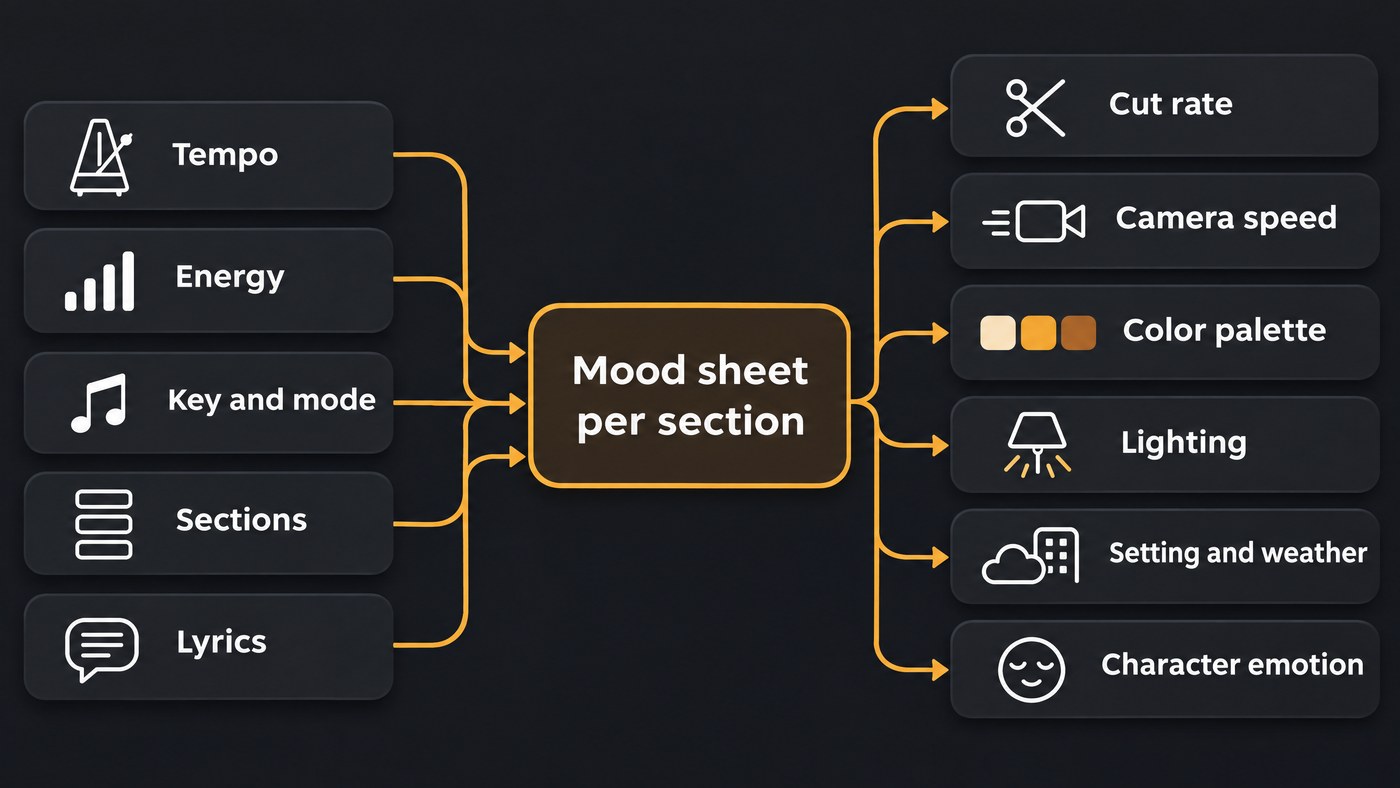
AI music video mood matching happens in two stages. Software first reads the song: tempo and beats, energy, key and mode, sections and lyrics. A language model, a director or both then turn those readings into visual direction, such as color palette, lighting, camera speed, cut rate, setting and character emotion, and write it into shot prompts.
That split explains most mood failures. Most video models never hear your track; the mood reaches them only as words and reference images. Sources here were read on 19 November 2026.
How Do Modern AI Models Interpret Emotional Tone From Audio to Drive Video Generation?
They measure a handful of properties and treat mood as a label or a position on two scales. Music information retrieval (MIR) libraries document the pieces openly.
- Tempo, beats and sections. These set how fast the picture moves and where the look may change. We cover the mechanics in how AI video engines interpret rhythm and tempo.
- Energy. Spotify's audio features documentation describes energy as a 0 to 1 measure of intensity and activity, built from dynamic range, perceived loudness, timbre and onset rate. Spotify closed that endpoint to new apps on 27 November 2024, but the definition still shows what "energy" means to a machine.
- Key and mode. Essentia's KeyExtractor builds harmonic pitch class profiles, correlates them with key profiles and returns a key, a scale (major or minor) and a strength value.
- Mood classifiers. Essentia's pretrained models include yes-or-no classifiers for happy, sad, aggressive, relaxed and party, a five-cluster model trained on the MIREX mood dataset, and regression models that place music on arousal and valence scales from 1 to 9. Valence is how positive the music sounds, arousal how energetic; our explainer on how AI models interpret mood-based text prompts covers both from the music side.
- Lyrics. Xiao Hu and J. Stephen Downie (ISMIR 2010) tested 5,296 songs in 18 mood categories built from last.fm tags. Lyric features significantly outperformed audio spectral features in seven categories; audio beat every lyric feature type in only one. Pipelines now usually have a language model summarize the lyrics.
The useful output is a mood sheet per section, not one tag for the song:
- Verse 1, 0:12 to 0:44: 74 BPM, E minor, low energy, felt piano; theme: an empty flat after a breakup.
- Chorus 1, 0:44 to 1:10: same key, drums enter, energy up; theme: deciding to leave.
A whole-track score can average a grieving verse and a defiant chorus into something middling, and the video comes out middling too.
How the mood becomes visual direction
Video models respond to what a camera can see, so each reading has to become a concrete choice.
- Color palette and grade. Stephen Palmer, Karen Schloss and colleagues (PNAS, 2013) asked US and Mexican listeners to choose colors for 18 orchestral excerpts by Bach, Mozart and Brahms. In both countries, "faster music in the major mode produced color choices that were more saturated, lighter, and yellower whereas slower, minor music produced the opposite pattern (choices that were desaturated, darker, and bluer)." The authors say it is unclear whether this holds for non-Western scales, so test it on a raga- or maqam-based song.
- Lighting. OpenAI's Sora 2 prompting guide (updated March 2026) is direct: "Light determines mood as much as action or setting. Diffuse light across the frame feels calm and neutral, while a single strong source creates sharp contrast and tension." It also suggests naming three to five colors to keep a palette stable across shots.
- Camera speed. Low arousal suits locked-off frames and slow push-ins; high arousal suits handheld and fast tracking. Write the speed into the prompt.
- Cut rate. Count shots in bars. At 74 BPM a 4/4 bar lasts about 3.2 seconds, so a two-bar verse shot runs about 6.5 seconds. At 124 BPM a bar is about 1.9 seconds, and one-bar chorus cuts feel urgent without strobing.
- Setting and weather. Low-valence sections lean toward enclosed rooms, dusk and rain; bright, energetic ones open to horizons, sun and crowds. These are conventions, worth breaking on purpose.
- Character emotion. Palmer's team found the same pattern with faces: sad faces drew darker, desaturated, cool colors, happy faces light, saturated, warm ones, and angry faces dark reds. Write the feeling as an action ("she stops halfway down the stairs and sits"), not an adjective.
How an AI music video pipeline uses the mood
- Analyze the song: sections, tempo, downbeats, key, energy and a lyric summary per section.
- Write the story. Pick the kind of video and give each section a job: setup, build, turn, release. Our guide to matching AI music videos to song structure covers this.
- Write shot prompts: subject, one action, setting, camera move and speed, lighting, three to five palette colors and a look line repeated in every prompt.
- Generate with references for the lead and the location; see keeping faces, clothes and locations the same.
- Cut to the beats: whole bars, cuts on downbeats, the biggest changes at section boundaries.
The research prototype Generative Disco (Vivian Liu, Tao Long, Nathan Raw and Lydia Chilton, revised September 2023) uses a large language model to suggest prompts for the images an interval of music starts and ends on, then interpolates between them to the beat. Its transitions shift color, time, subject or style; its holds keep the video on one subject. Professionals in its study used the pair to build coherent visual narratives.
Where AI music video mood matching goes wrong
- Literal lyric illustration. "My heart is on fire" becomes a burning heart. Summarize each section as a theme and a plain situation, and keep the metaphor out of the prompt.
- Mood whiplash. Sections generated separately can jump from teal night to orange daylight and look like two videos. Keep one palette family and change one lever per section.
- Stock-like imagery. "Sad" gets rain on a window; "happy" gets a field at golden hour. Use specific nouns, a real local setting and one object that belongs to this song.
- Misread tempo. A half-time beat read at double speed doubles the cut rate. Check the BPM against the feel.
How artists steer the mood
- Build a mood board of six to ten images for light, palette, location and wardrobe, and use them as references.
- Give each section one visual motif, such as a red scarf seen at night in the verses and in daylight in the last chorus.
- Name colors and light: "teal shadows, amber practical lamps", never just "moody".
- Change one thing per section and keep the rest. For prompt structure beyond mood, see prompt engineering techniques for AI video.
Three worked examples: from mood to visual prompt
1. Melancholic piano ballad. Reading: 74 BPM, E minor, low energy, lyrics about an empty flat after a breakup. Direction: desaturated cool palette, one soft source, slow dolly-in, two-bar shots.
Medium close-up of a woman in her late twenties on bare floorboards in an almost empty flat at dusk, slowly folding a man's sweater and stopping halfway. Slow dolly-in. Single soft window light from camera left, cool blue-grey shadows. Palette: slate blue, ash grey, one muted mustard cushion. 35 mm film look, fine grain.
2. Euphoric dance-pop chorus. Reading: 124 BPM, A major, high energy, lyrics about a night out with friends. Direction: saturated warm palette, several colored sources, fast handheld, one-bar cuts.
Wide handheld tracking shot following four friends running across a rooftop car park at night toward a glowing skyline, one spinning with arms out. Fast tracking at running pace. Sodium streetlights and pink neon from below. Palette: hot pink, amber, warm gold, deep navy sky.
3. Tense trap verse. Reading: hats at 140 BPM in a half-time feel, F minor, high aggressive score, lyrics about distrust. Direction: dark reds and black, one hard moving source, near-static frames, two-bar holds of about 3.4 seconds, one-bar cuts on the hook.
Low-angle close-up of a young man in a dark hoodie in a parked car at night, watching the rear-view mirror without blinking. Near-static frame with a very slow push-in. One hard red tail light sweeps across his face; everything else stays in shadow. Palette: oxblood red, black, gunmetal grey. Heavy contrast, light grain.
Where Soundverse fits
Soundverse is an AI music platform that takes you from idea to audience, and three of its tools cover the stages above. Section Analysis labels each intro, verse, chorus, bridge and outro with start and end times and detects tempo, beats and downbeats; run Tempo & Key Detector for the key. Music Video Storyteller reads a song's sections and lyrics and writes what happens in each section, with video types including Mood piece and looks such as Live action or Painterly. It writes the story only, not a shot list.
AI Music Video Generator, on Creator and above, has Agent One write a script for your approval, then film the scenes and cut them to the music. Turn off Auto-generate direction to write the characters, setting, camera movement and story yourself, and add up to nine image references for the cast and setting. Licensing is set by plan: the Free plan is for personal use, and the Creator plan comes with a royalty-free license.
This walkthrough shows a song, a character image and a prompt becoming a full music video, with planned scenes, a lip-synced performance and cuts to the music.
FAQ
Can an AI video model hear my song? Usually not. Text- and image-to-video models generate from words and reference images, so the mood has to reach them through the prompt. Lip-sync tools take the vocal, but follow the singer, not the mood.
What colors suit a sad song? In Palmer and colleagues' 2013 study, slower minor-key music drew darker, less saturated, bluer choices. Start there and add one warm accent so the frame doesn't go flat, then check it against your genre.
How do I stop an AI from illustrating my lyrics literally? Give the model a situation instead of the line. Summarize each section's lyric as a theme plus one action, and leave metaphors out of the video prompt.
Should every section of the video look different? No. Keep the palette family, the lead and the location style, and change one lever per section, such as light level, camera speed or cut rate.
Sign up for Soundverse free and map your song's sections before you write a single shot prompt. More guides on the Soundverse blog.

