Are There Specific Prompt Engineering Techniques for Better AI Video Results?
AI video prompt engineering that works: shot structure, concrete nouns, image-to-video, references, negatives, seeds and prompt length, with examples.
Yes. AI video prompt engineering rests on a handful of techniques that Google, OpenAI, Runway, Kling and Luma all describe in their own guides: write one shot in a fixed order, use concrete nouns instead of adjectives, start from an image when you can, reuse references for characters, phrase exclusions positively, and change one thing per retry.
We read each vendor's guide on 19 November 2026; where a guide gives no number, we say so.
A prompt structure that works across AI video models
Kling's text-to-video guide (24 November 2025) gives a formula: subject and its description, its movement and the scene, with camera language, lighting and atmosphere as optional extras. Google's Veo prompt guide lists subject, action, scene, camera, visual style and audio. Runway's prompting guide suggests "[Camera] shot of [a subject/object] [action] in [environment]".
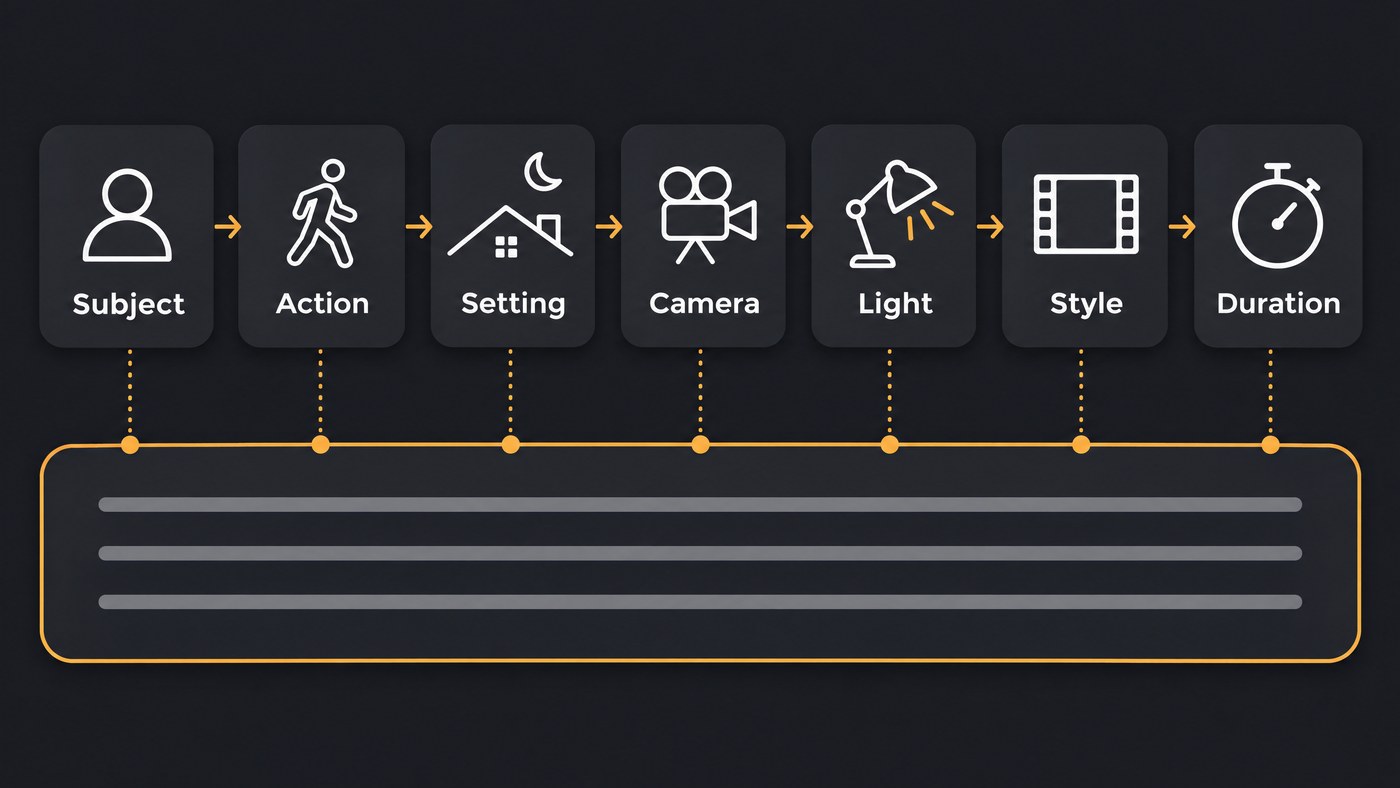
That gives seven slots, in this order:
- Subject. Who or what, with two or three details that never change.
- Action. One verb, in beats: "takes four steps, stops, looks up".
- Setting. Place and time of day.
- Camera. Shot size and at most one move.
- Light. Source, direction and colour.
- Style. Film stock, animation style or era.
- Duration. Set it in the tool's length setting. OpenAI's Sora guide says length and resolution are API parameters that prose can't change.
One action and one camera move per shot
Google's Veo best-practices page (updated 19 November 2026) recommends one focused moment per short video and separate clips for a sequence. OpenAI's Sora guide says the model follows instructions more reliably in shorter clips, and that two 4-second clips cut together can beat one 8-second clip. For the camera half of this rule, see our guide to controlling camera movement in AI video.
Before: A singer walks through the market, buys flowers, dances in the rain and hugs her friend, cinematic, emotional.
After (clip 1 of 3): Medium tracking shot of a woman in her twenties in a mustard raincoat walking through a covered flower market at dusk, holding a paper-wrapped bunch of marigolds. Wet stone floor, warm bulbs overhead, cool blue light from the street beyond. 35mm film look, soft grain.
Use specific nouns, not adjectives
Words like cinematic and epic leave the model guessing. OpenAI's Sora 2 prompting guide (updated March 2026) puts it plainly: "Clarity wins. Instead of vague cues like “a beautiful street,” write “wet asphalt, zebra crosswalk, neon sign reflection.”"
- Swap mood words for objects. Replace "epic lighting" with a lamp or a window, and say where it is.
- Name the palette. The same guide suggests three to five colours to keep a palette steady across shots.
- Avoid counts. Kling's guide notes that video models aren't sensitive to numbers, so "ten dancers" rarely gives ten.
- Keep words off the screen. Veo's best-practices page says to avoid quotation marks so the model doesn't render text.
Before: Beautiful cinematic shot of a guitarist, epic lighting, stunning colours.
After: Close-up of a guitarist's hands on a worn acoustic guitar, steel strings, a silver ring on the left index finger. One tungsten lamp from frame left, deep shadow on the right. Palette: amber, walnut brown, charcoal. Shallow depth of field.
Image-to-video and start and end frames: prompt the motion
An input image already supplies the subject, set and light. Google's best-practices page says to prompt for motion only, since re-describing the image confuses the model, and to call the character "the woman" or "the subject". Runway's guide adds that flaws such as blurry hands or faces in the input image can get worse once it moves, so fix the still first. With start and end frames, the two images fix where the shot begins and lands, and the prompt describes only the journey between them.
Before (portrait of the singer as first frame): A young woman with long black hair in a red scarf stands on a rooftop at sunset with the city behind her, cinematic.
After: The woman turns her head toward the camera and smiles. Her scarf lifts in the wind. The camera holds still.
Use reference images to keep a character consistent
Text descriptions drift between shots. Google's best-practices page says to name the character, paste one fixed description unchanged into every prompt, and reuse the same seed across scenes. Reference inputs go further:
- Google Veo: its reference-to-video docs take up to three images of one person, character or product and preserve its appearance.
- OpenAI Sora: the March 2026 guide adds a Characters API that builds a reusable character from a 2 to 4 second MP4 clip, for animals and objects, with no more than two per generation recommended.
- Kling: its character consistency guide (24 November 2025) describes Elements, uploaded images of a subject, outfit or scene.
Our guide to keeping faces, clothes and locations consistent covers the full workflow.
Negative instructions, and why models often ignore them
Write "no crowd" and a crowd often appears. Runway's guide says most models respond better to positive instructions. One plausible reason: the unwanted word still sits in the prompt, and the model reacts to the words more than to the grammar around them.
- Describe what fills the space. "An empty concrete rooftop" beats "no people".
- Use the negative field where there is one. Veo's prompt guide recommends listing unwanted things as plain nouns, such as "wall, frame", instead of "no walls" or "don't show walls".
- Test on your model. Luma's music video examples include short exclusions such as "No crowd", so vendors don't all agree.
Before: A rapper on a rooftop, no people in the background, no text, don't make it blurry.
After: A rapper alone on an empty concrete rooftop at night, the city skyline sharp in the distance, crisp focus. Negative prompt, where offered: crowd, signage, text, motion blur.
Iterate with seeds, variations and one change at a time
Runway's guide suggests starting simple and adding one element at a time. OpenAI's guide says to strip a misfiring shot back: freeze the camera, simplify the action, clear the background.
- Change one variable per run, such as "same shot, 85mm lens", so you can see what it did.
- Lock the seed where you can. Runway's API reference says the same seed with an identical request produces similar results. Where an app hides the seed, reuse the best take's frame as the next start frame.
How long should an AI video prompt be?
Most vendors give no hard number:
- Runway: the API caps prompt text at 1,000 characters for Gen-4.5, roughly 150 to 180 English words. Its guide warns that extremely complex, multi-paragraph prompts can produce unnatural results.
- OpenAI Sora: shorter prompts give the model more creative freedom; longer ones restrict it and may not be followed reliably. The guide is now marked archived.
- Google Veo: neither page we read gives a length; both ask for clear, specific prompts about one moment.
- Kling: no limit in its guide, which asks for simple words and short sentences.
- Luma: no limit stated; its music video examples run five to seven short sentences, around 50 words.
A sensible default: one to three sentences filling the seven slots for text-to-video, one or two sentences of motion for image-to-video.
AI video prompts for music videos
Luma's music video prompt guide (22 September 2026) sums up the shift: "Most people describe what they feel. Professional prompts describe what the camera sees." It opens each prompt with the song section and its energy.
- Cut to the beat. Runway's guide supports timestamps such as "[00:01] X occurs. [00:03] Y occurs." At 96 BPM a beat lasts 0.625 seconds and a 4/4 bar 2.5 seconds, so put the key action on a bar line, generate slightly long and trim. See how AI video reads rhythm and tempo.
- Keep lip-sync shots calm. Face the camera or a three-quarter view, mouth unblocked, small head movements, a static camera or slow push-in, soft front light. Soundverse's Lip Sync page adds that a clean vocal stem syncs far better than a full mix.
- Give verse and chorus their own motifs. Write one motif line per section, paste it into every prompt for that section, and bring the chorus back to it each time. See AI music videos that match song structure.
Before: Singer performing passionately on stage with a crowd, spinning camera, flashing lights, hair flying.
After (chorus, lip-sync): Medium close-up of the singer in a red scarf facing the camera, mouth fully visible, microphone on a stand below her chin. She sings with small head movements. Static camera, soft key light from front left, warm string lights out of focus behind her. Palette: red, amber, navy.
Where Soundverse fits
Soundverse is an AI music platform that takes you from idea to audience, and its video tools use these techniques. In AI Video Generator, describe the subject, motion, light and camera, let Enhance build out a short idea, add reference media on models that take it, and pin a first and last frame. Multi-Scene Video Builder gives each of up to 10 scenes its own description, frames and a length of 4 to 15 seconds; turn Auto-generate direction off to write the characters, environment, camera movement and story once. AI Music Video Generator takes your song, up to nine image references for the cast and setting, and your own direction, and can make the lead lip-sync. These tools need the Creator plan or above. Licensing is set by plan: the Free plan is for personal use, and the Creator plan comes with a royalty-free license.
This walkthrough shows one prompt becoming a full song and a full music video, with every part left editable in AI Studio afterward.
FAQ
Should I let an AI chatbot write my video prompts? It can help. Google's best-practices page suggests asking Gemini Omni to act as an expert prompter, and Soundverse's AI Video Generator has Enhance. Check the result against the seven slots and cut the adjectives it adds.
Why does my AI video show garbled text? The model tried to draw words from your prompt. Veo's guide says to avoid quotation marks for that reason; add lyrics and titles in your editor.
How many takes should one shot need? No vendor gives a number. OpenAI's guide notes that the same prompt gives a different result each time and the second or third take is sometimes the best, so plan for a few per shot.
Sign up for Soundverse free and put these prompts to work on your next music video. More guides on the Soundverse blog.
