How Do AI Video Engines Interpret Musical Rhythm and Tempo?
AI video rhythm sync explained: how tools find onsets, tempo, beats, downbeats and sections, turn them into cuts, and why swing and tempo shifts trip them.
AI video rhythm sync starts with audio analysis, not with the video model. Software detects onsets (the instant each hit or note begins), estimates the tempo, tracks beats and downbeats, splits the song into sections and measures its energy. The editor or generator then places cuts, transitions and motion on those timestamps.
That split matters when a video feels off. Most text-to-video models never hear your song, so a separate analysis layer decides where each clip starts and ends. When a cut lands late, the analysis usually misread the music, and you can fix that before rendering.
How do AI tools analyze rhythmic patterns to inform visual transitions?
They run a chain of music information retrieval steps. Two open-source Python libraries, librosa and madmom, document each step publicly, a useful window on tools that keep their method private.
1. Onset detection: where something starts
The analyser compares each short slice of the spectrum with the slice before it and adds up only the increases, a measure called spectral flux. Kicks, snares and plucked notes make sharp peaks; pads and slow swells barely register. librosa's onset detector then picks peaks in that curve. Its backtrack option moves each onset back to the quiet point just before it, useful when onsets become edit points.
2. Tempo estimation: how fast the pulse is
The onset curve repeats at the speed of the beat, so the analyser finds the strongest repeating period and converts it to BPM. librosa's tempo function starts from a default guess of 120 BPM, and it can also estimate tempo frame by frame, which shows whether your song drifts.
3. Beat tracking: where each beat falls
A BPM doesn't tell you where beat one is. librosa's beat tracker follows Dan Ellis's 2007 dynamic-programming method in three stages: measure onset strength, estimate tempo from onset correlation, then pick onset peaks that roughly agree with that tempo. Its tightness setting decides how strictly the beats must keep to that tempo.
4. Downbeat tracking: where each bar starts
Edits care most about beat one of each bar. madmom's downbeat tracker runs recurrent neural networks that output beat and downbeat probabilities 100 times a second, then decodes them with a dynamic Bayesian network, following Böck, Krebs and Widmer's ISMIR 2016 paper. You tell it which bar lengths to consider, such as 3 or 4 beats, and by default it searches tempos from 55 to 215 BPM.
5. Sections: intro, verse, chorus
Structure analysis finds where the arrangement changes and names each part. The open-source All-In-One analyser (MIT licence, presented at IEEE WASPAA 2023) separates the track into stems with Demucs, then predicts tempo, beats, downbeats, section boundaries and labels from a fixed set: intro, verse, chorus, bridge, inst, solo, break and outro, plus start and end. A fixed set means a pre-chorus or a drop gets reported under one of those names.
6. Energy curves: how hard each moment hits
The simplest feature is loudness over time, usually RMS energy per frame. Energy climbs into a chorus and drops in a breakdown, so tools use it to scale motion or brightness. It can mislead: a loud sustained pad reads as high energy with no beat in it.
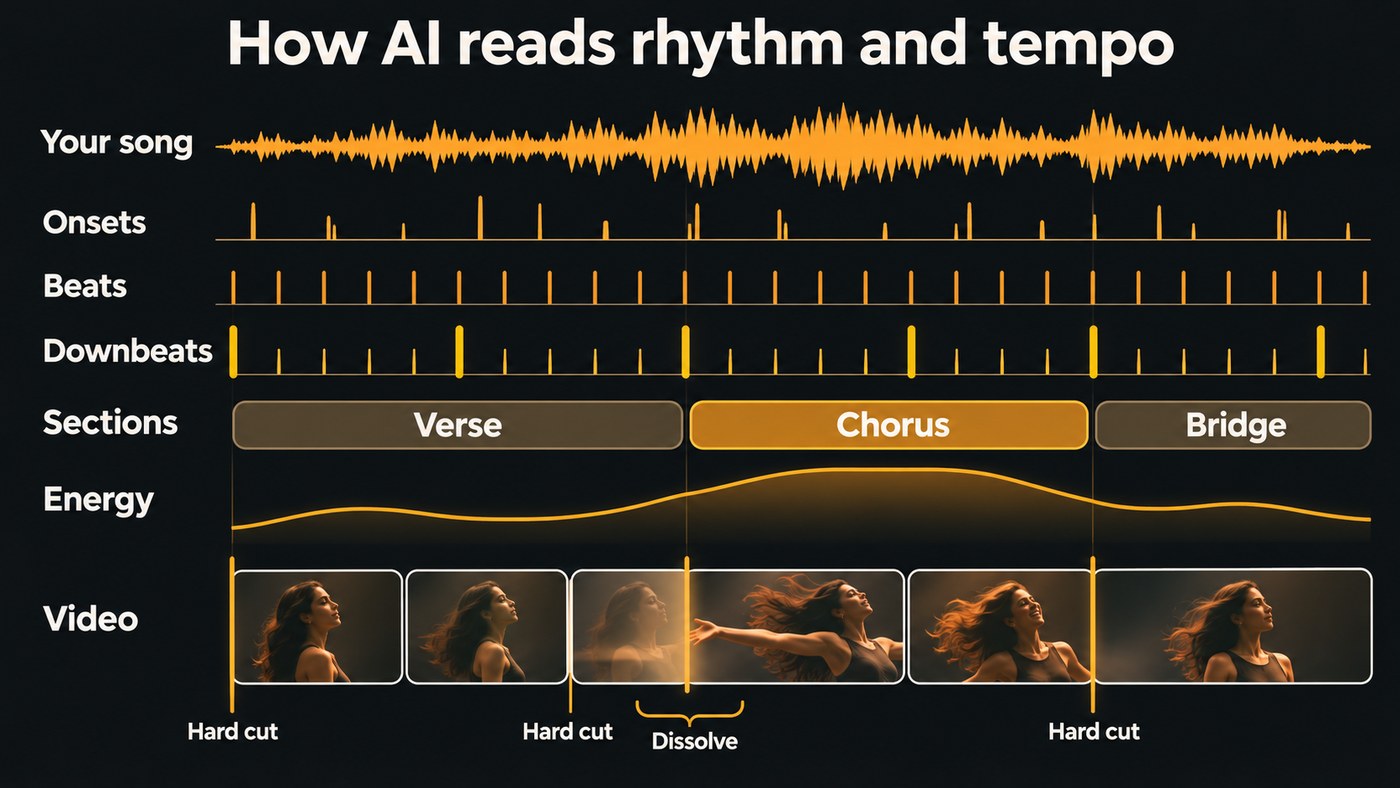
How the analysis becomes cuts, transitions and motion
Mapping timestamps to the picture comes down to a few rules:
- Hard cuts on downbeats. A cut on beat one feels intentional. Bar lines are the safest default; cutting on every beat suits a drop and wears thin elsewhere. Apple's guide for Final Cut Pro 12.4 (checked 14 November 2026) shows how editors expose this: its Beat Detection draws a grid of song parts, bars and beats over a music clip, edit points snap to it, and Apple advises using a 4/4 clip for the most accurate grid.
- Scene changes on section boundaries. A new location, palette or camera style arrives with the chorus. Our guide to matching AI music videos to song structure shows how to plan scenes per section.
- Transitions that cross the bar line. A dissolve, whip pan or morph should finish on the downbeat, so it has to start earlier. At 96 BPM a beat lasts 0.625 seconds, so a two-beat dissolve starts 1.25 seconds before the bar.
- Pulses on onsets. Kick onsets drive zoom punches, flashes or camera shakes, and the energy curve scales them. Tools that split stems first can give drums and bass separate jobs.
- Clip lengths in bars. Video models take a duration in seconds, so a rhythm-aware workflow requests a little more than it needs and trims each clip to a whole number of bars. Lip-sync shots are the exception, because the model takes the vocal itself as input and moves the mouth with it.
Frames versus beats
Beats rarely land on a whole frame. At 24 fps a frame lasts about 41.7 milliseconds, and at 128 BPM a beat lasts 468.75 milliseconds, or 11.25 frames. Round that to 11 frames and keep adding, and each beat arrives a quarter-frame early; after 16 beats the cuts are four frames, about 167 milliseconds, ahead of the music. Place every cut from its own beat timestamp instead. The mir_eval library used to score beat trackers counts a beat as correct within a 70 millisecond window by default. Our plain-language explainer on what beat-accurate editing actually means covers why small offsets show.
Where AI rhythm sync goes wrong
- Swing. The quarter-note pulse in a swung groove stays even, so cuts on the beat usually survive. Effects that pulse on straight sixteenths, though, fire between the swung notes. Drive those from detected onsets instead.
- Tempo changes. One BPM can't describe a song that pushes into its last chorus, and a fixed grid drifts from that point on. librosa's documentation points to its predominant local pulse method for this case, noting that it "may be preferred over the dynamic programming method of beat_track when the tempo is expected to vary significantly over time."
- Half-time and double-time feels. A trap beat with hats at 140 and the snare on beat three can be heard at 70 or 140 BPM. mir_eval's documentation notes that many beat metrics also score other metrical levels because tempo is ambiguous. With a default guess of 120 BPM, a 70 BPM half-time track can come back as 140, and your video cuts twice as often as you meant.
- Rubato and live recordings. Ballads and live takes breathe, so beat spacing changes bar to bar. In madmom, higher transition_lambda values prefer a constant tempo from one beat to the next: strict settings smooth over the push and pull, loose ones follow it but wobble.
- Odd meters and sparse intros. Downbeat trackers need the bar length. A 6/8 or 7/8 song, or an intro with no drums, can get beat one wrong, which shifts every section-aligned cut by a beat.
- Compressed files. The All-In-One README warns about MP3 decoding: "I've observed variations of about 20~40ms, which is problematic for tasks requiring precise timing like beat tracking, where the conventional tolerance is just 70ms."
How to help the tool read your tempo
- Print a click-aligned master. If the song was produced to a grid, export from bar 1 at the session tempo so the file starts on a downbeat with no lead-in.
- Give it WAV, not MP3, for the reason above.
- Set the BPM yourself when you know it. Many analysers accept a known tempo; librosa's beat tracker takes a bpm value that replaces its own estimate.
- State the meter. For 3/4, 6/8 or mixed meters, set the bar length, or confirm beat one by hand at each chorus.
- Mark sections. Drop markers at each section start in your DAW, or correct the analyser's section map before you plan shots.
- Split songs that change tempo. Analyse each tempo section on its own, or follow a tempo map exported from your DAW.
- Listen to the analysis. All-In-One can sonify its results as clicks over your track. One listen tells you whether the downbeats are right.
Where Soundverse fits
Soundverse is an AI music platform that takes you from idea to audience, and its analysis tools handle the listening half of rhythm sync. Section Analysis labels each intro, verse, chorus, bridge and outro with start and end times, detects the tempo, beats and downbeats, and saves the map with the file so Agent One can reuse it on that track. Its page calls the result a starting map rather than a final edit list, so check key boundaries by ear. Tempo & Key Detector reports one BPM and key for the whole file, so a song that changes tempo gets a single overall reading. Both run on the Free plan.
In AI Studio, imported audio is analysed for tempo and key, Follow tempo fits a clip to the project tempo, and video sits on lanes above your tracks. Agent One can't change the project tempo, so set it yourself. Our walkthrough of going from a finished song to a music video in AI Studio shows the rest. Licensing is set by plan: the Free plan is for personal use, and the Creator plan comes with a royalty-free license.
From 1:49, this walkthrough of Soundverse's Analyze tools shows Section Analysis mapping a track's sections and tempo, from input to result.
FAQ
Do AI video generators like Veo or Seedance hear the beat? Mostly not. Text- and image-to-video models render from a prompt, frames or reference images, and the timing comes from the edit. Some take audio as input: in Soundverse, Seedance 2.5 accepts reference audio and can lip-sync a portrait to up to 30 seconds of vocal, which follows the singer rather than the drums.
Why does my video cut on the "and" instead of the beat? The tracker locked onto the off-beat, which can happen when off-beat chords or hats are louder than the kick. Shift the grid by half a beat, or analyse the drum stem on its own and apply the result to the full mix.
How accurate does beat sync need to be? Beat-tracking research counts a beat as correct within 70 milliseconds, mir_eval's default, which is about 1.7 frames at 24 fps. Aim for cuts placed from each beat's own timestamp, then check the downbeats by ear.
Sign up for Soundverse free and map your next track's sections, tempo and downbeats before you cut a single frame. More guides on the Soundverse blog.
