How Can Marketing Agencies Leverage AI Video for Promotional Tracks?
How agencies use AI video to promote tracks: rights and consent at intake, Meta, TikTok and YouTube AI disclosure, ad specs, creative tests, reports.
Marketing agencies get the most from AI video to promote tracks when they run it as a controlled production line: rights and artist consent settled at intake, AI content labeled the way Meta, TikTok and YouTube each require, every cut built to placement specs, hooks tested in a planned matrix, and results reported in listening data, not views alone.
This guide covers the operations side. For the list of assets a release campaign needs, see our guide to AI video tools for music campaigns. We checked every platform rule below on its official page on 23 November 2026. TikTok's sites would not load from our network that day, so TikTok's rules come from Internet Archive copies of TikTok's own pages, dated where we use them. None of this is legal advice.
Client intake: rights before any creative
A track has two separate rights: the master (the recording), usually controlled by the label or a self-releasing artist, and the composition (the song), controlled by its writers and their publishers. Before a frame is generated, get these in writing:
- Who controls the master and the composition, with a named contact for each.
- Approval to use the track in paid ads, naming the platforms, territories, start and end dates, and which section of the song you may cut.
- Artist likeness and voice consent before any AI image, video or lip-sync of the artist. It should name the song, the use (a generated performance, a face on a character, a stylized portrait), the platforms and how long the ads run, and cover the reference photos you will upload.
- The same consent from featured artists, dancers and anyone else on screen.
- The disclosure decision for each planned asset: will it show realistic AI people, places or audio?
Our guide to the ethics of AI music video production goes deeper on consent, including for late performers.
AI disclosure rules for ads and posts, platform by platform
Meta (Facebook and Instagram)
For ads, Meta labels images and videos made or significantly edited with its own generative AI ad tools with "AI info". In an update dated 1 June 2026 to its ads transparency post, Meta wrote: "We will also begin automatically detecting ads created or edited using third-party AI tools through industry-standard signals." Detected ads get an "AI info" label in "About this ad", which Meta is rolling out in each ad's three-dot menu. A Meta ad built with outside AI tools can be labeled even if you never ticked a box.
For organic posts, Meta's labeling announcement of 6 February 2024 says people must use its disclosure tool when they post organic content with photorealistic video or realistic-sounding audio that was digitally created or altered, and that Meta may apply penalties if they don't.
TikTok
TikTok's ad policy on misleading content (Internet Archive copy, 9 August 2026) allows significantly edited media and AI-generated content in ads only with the AIGC label or your own clear disclaimer, caption, watermark or sticker. It counts fully AI-generated images, video or audio, and showing someone doing or saying something they didn't, including with voice cloning. On enforcement: "If we identify AI-generated content that has not been disclosed, your ad will be rejected or restricted." The same page bars using a public figure's likeness without permission.
In Ads Manager, the disclosure is a toggle, "This ad contains AI-generated content". TikTok's help page on ad disclaimers (last updated September 2025, archived 19 May 2026) adds two traps: you can't change the toggle after submitting without changing the video, and creating a new campaign, including by duplicating one, resets it. Spark Ads follow TikTok's organic disclosure rules instead.
YouTube and Google Ads
YouTube's disclosure page requires disclosure of realistic AI content, including content that makes a real person appear to say or do something they didn't, and AI-created music that is the main focus of the video. You set it under "AI use" in YouTube Studio's Attributes. YouTube may also label uploads automatically, for example when a file carries C2PA metadata.
For YouTube ads, Google Ads has a setting for labeling AI assets: you mark each asset "Label this asset as created or edited with AI", and viewers see it under "How this ad was made" in My Ad Center. Campaigns targeting the EU, India, New York, California, South Korea or Vietnam also get a visible overlay on the ad.
Placement specs for paid promos
Build one vertical master, then derive the rest.
- Instagram Reels ads: Meta's Ads Guide lists 9:16 at 1440 × 2560 pixels and suggests leaving at least 14% of the top, 35% of the bottom and 6% on each side free of text, logos and other important elements.
- TikTok In-Feed ads: the In-Feed ads page (last updated June 2026, archived 9 August 2026) recommends vertical 9:16 at 540 × 960 or larger, also accepts 16:9 and 1:1, allows videos up to 10 minutes and 500 MB, and provides downloadable safe-zone files, since the safe area depends on the format and caption length.
- YouTube in-video ads: Google's video ad specs list 16:9 at 1920 × 1080, 9:16 at 1080 × 1920 and 1:1 at 1080 × 1080, with 15 seconds as the recommended length.
Keep lyrics, the artist name and the call to action inside Meta's safe zone, which leaves the bottom 35% clear, and reframe each ratio rather than letterboxing it. Media Converter in Soundverse crops a finished video to 16:9, 9:16, 1:1 or 4:3 and saves the result as a new file, leaving the master untouched.
A creative test structure: hooks, cutdowns, aspect ratios
Change one variable at a time.
- Hooks first. Make three openings for the same song section: the chorus line on screen over a performance shot, a striking AI-generated visual world, and a lyric-led cut. Keep audio, length and ratio identical.
- Then the song section. Run the winning hook against a different part of the track, such as the drop versus the first line of the chorus.
- Then cutdowns. Test 6, 15 and 30 second versions of the winner.
- Ratio per placement, not as a test variable: 9:16 for Reels, TikTok and Shorts, 1:1 or 16:9 where the placement asks for it.
- Name every file the same way, for example CLIENT_TRACK_HOOK-B_15s_9x16_AI-Y_v3, where AI-Y marks an asset that needs a disclosure label.
If the artist appears as an AI character across many cuts, lock the look first; our guide to keeping faces and clothes consistent in AI video shows how.
Approval and versioning with the label and artist
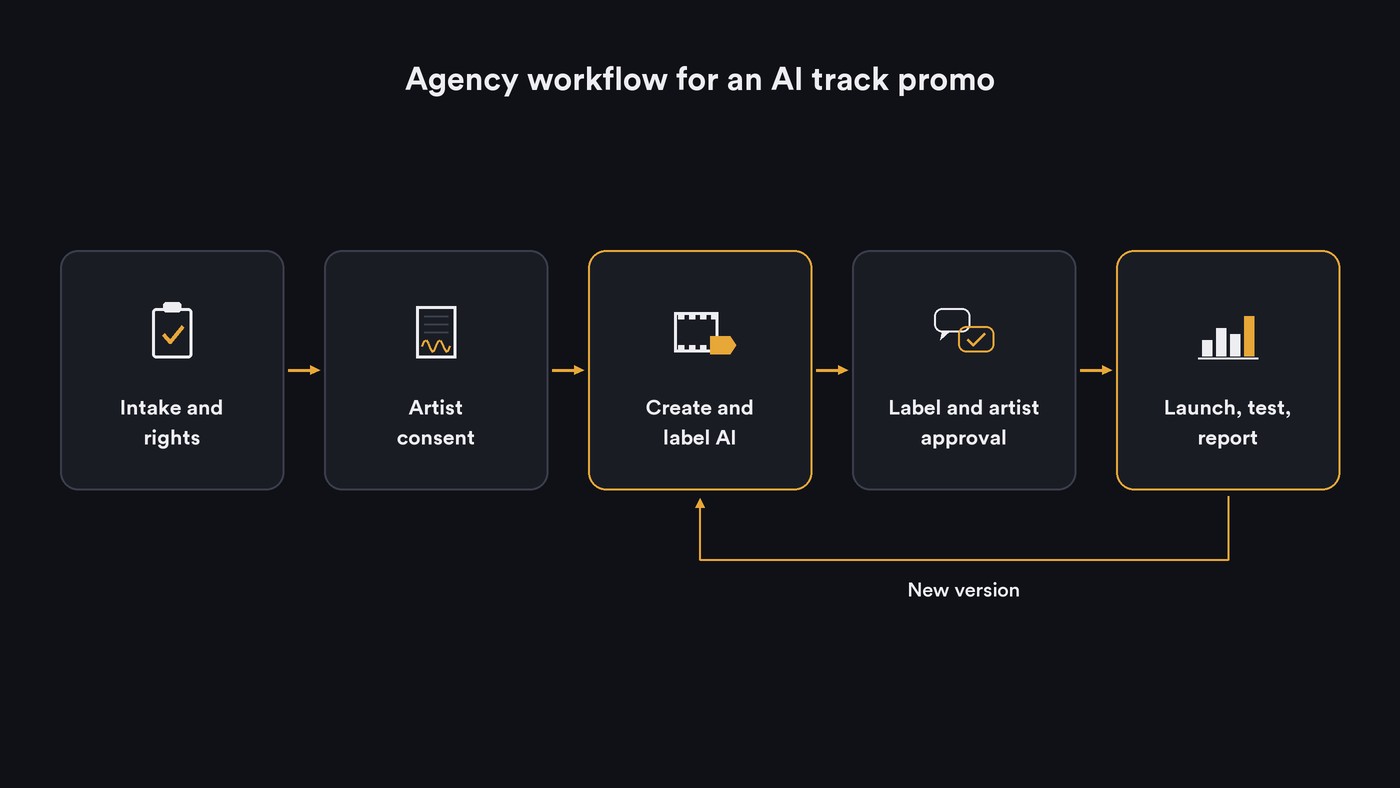
- Script or treatment sign-off by the label and artist before anything is generated.
- Likeness review: the artist approves every shot that shows their AI likeness or voice.
- Rough cut review with timestamped notes in one shared place.
- Disclosure sign-off: the asset log lists, per file and platform, whether the AI disclosure is on.
- Final masters and cutdowns with version numbers. Never overwrite an approved file.
- Launch approval for ad copy, call to action and the landing link, often a pre-save page; see why pre-save campaigns matter.
- A pull plan: who can pause every ad the same day if the artist or label objects.
Re-run steps 2 and 4 for every new version.
What to report to the client
Ad metrics show attention; the client cares about listening.
- Spotify for Artists: ask the client for Reader access, which Spotify's access-levels page says can see music and audience stats. Spotify's audience segments split listeners into monthly active, previously active and programmed, with super listeners as those who streamed intentionally 15 or more times in 28 days. Report movement between segments over the campaign. The same page says that, on average, listeners who actively stream a song play that artist's music four times more over the next six months.
- YouTube: the Analytics page is now called Insights on desktop. Report the Reach tab (impressions, impressions click-through rate, views, unique viewers) and the Engagement tab (watch time, average view duration, engaged views) for each promoted video.
- Ads: spend, reach and click-through rate per hook and cutdown, mapped to your naming convention.
- Disclosure log: which assets carried an AI disclosure, and any label a platform added on its own.
Send a short weekly report during the flight and a full one after it ends.
Where Soundverse fits
Soundverse is an AI music platform that takes you from idea to audience, built for independent artists who release music; agencies working on their releases can use the same tools. AI Music Video Generator, on the Creator plan and above, has Agent One write a script and quote the cost for your approval before any scene is filmed, which fits the sign-off gate above. It outputs 16:9 or 9:16 at up to 1080p, and its optional lip sync should only use a face you own or have permission to use. Asset Studio makes cover art, story backgrounds and a YouTube thumbnail in one look, with no text on the images, so you add copy per market. In AI Studio, the Visualizer renders an audio-reactive video in 16:9, 9:16, 1:1 or 4:5, and you can invite the label as Viewer and pin comments to a track at a bar. Release Planner drafts a dated rollout split by platform.
Licensing is set by plan: the Free plan is for personal use, and the Creator plan comes with a royalty-free license.
This walkthrough shows a song, a character image and a prompt becoming a full music video with planned scenes and a lip-synced performance.
FAQ
Do we need to label AI visuals if the song itself is human-made? Often, yes. TikTok's ad policy covers fully AI-generated imagery, while YouTube and Meta focus on realistic AI people, places and audio. Check each platform's page for the asset in question.
Can we use an AI lip-sync of the artist in ads? Only with the artist's written consent for that use, platform and period, and with the disclosure each platform requires. YouTube and TikTok both treat making a real person appear to say or do something they didn't as content that must be labeled.
Which aspect ratio should we produce first? A 9:16 master with copy inside Meta's safe zone. It covers Reels, TikTok and Shorts, and you can derive 1:1 and 16:9 versions from it.
Sign up for Soundverse free and storyboard your client's next release campaign.
More guides for artists, labels and agencies on the Soundverse blog.