Best AI Video Creation Tools for Music Distribution Campaigns?
AI video tools for music distribution campaigns, graded by asset: Spotify Canvas, Shorts teasers, lyric videos, visualizers and a 3-week schedule.
The best AI video creation tools for music distribution campaigns depend on the asset: Rotor Videos and Kaiber for Spotify Canvas loops, Neural Frames for lyric videos, Soundverse for a music video, a visualizer and matching stills, and Kaiber for batches of beat-synced vertical teasers. Your distributor delivers the song; these tools promote it.
Here, a distribution campaign means promoting a release that your distributor, such as DistroKid, TuneCore or CD Baby, delivers to the stores. Soundverse is not a distributor and doesn't deliver music to stores. We checked each tool's own pages, plus Spotify's and YouTube's help centres, on 21 November 2026. Canva's pages blocked our requests, so it isn't graded.
The assets a release campaign needs
- Spotify Canvas: a short vertical loop that replaces the cover art in Spotify's Now Playing view.
- Vertical teasers for YouTube Shorts, Instagram Reels and TikTok: the hook, the drop or a lyric line, 10 to 30 seconds each.
- Pre-save promo clips: teasers with a "pre-save" call to action, posted before release day. Our guide to pre-save campaigns covers the links themselves.
- Lyric video: the full song with the words on screen, a common first upload on YouTube.
- Visualizer: a looping or audio-reactive visual for the whole song, far cheaper than a music video.
- Music video: the hero asset, if the budget stretches.
- Thumbnails and stills: a YouTube thumbnail, story backgrounds and cover-based posts.
Platform specs to build to
Spotify's Canvas guidelines ask for a clip 3 to 8 seconds long, in vertical 9:16, between 720 and 1080 pixels tall, as an MP4 or JPG. They also steer you away from performance shots: "Choose footage without talking, singing, or rapping. The clips are only 3-8 seconds long, so won’t sync with the lyrics." Spotify's Adding a Canvas page says you can add one to any track, including upcoming releases, in Spotify for Artists.
On YouTube, square or vertical uploads of up to three minutes count as Shorts, and for Official Artist Channels that applies to uploads from 8 December 2025. The same page warns: "Any Short that is over one minute in duration with an active copyright claim of any type, including manual claims, will be blocked globally on YouTube." YouTube says that includes "first-party" claims your own label's Content ID can create, so keep teasers under a minute, and if your distributor collects Content ID for you, ask how it treats your channel. Our guide to how distributors handle Content ID explains why those claims appear.
For Reels and TikTok, build one 9:16 master at 1080 × 1920 and keep captions away from the top, bottom and side edges, where app buttons sit.
AI video tools graded for each campaign asset
Grades are for the asset, not the tool overall. "Strong fit" means the tool's own pages describe that exact job.
Spotify Canvas loops
- Strong fit: Rotor Videos. On Rotor's site, the Canvas maker has you pick a clip, a style and a looping mode, then preview it as fans will see it on Spotify. One credit is $9.99, and Artist Unlimited Streaming is $9.99 a month billed annually.
- Strong fit: Kaiber Loop Video. Kaiber's help centre describes loops from one image, two keyframes or a video, at 720p or 1080p, with a short motion prompt such as "slow zoom in".
- Works: Soundverse AI Video Generator. Start a 9:16 clip on your cover art as the first frame, describe a slow push, and keep it to 8 seconds. Spotify's Rebound loop, which plays a clip forwards then in reverse, hides the join. Creator plan and above.
- Not for this: Soundverse Asset Studio. Its own FAQ says it makes stills, not a Canvas, Reels or lyric videos.
Vertical teasers and pre-save clips
- Strong fit: Kaiber Beat Sync. It cuts your images or clips to the beat in batches of 9:16, 16:9 or 1:1 videos, up to 2 per batch on Creator and 10 on Pro, per Kaiber's batch guide. Kaiber's plans article lists Creator at $29 a month and Pro at $99. Auto-synced lyrics are a toggle, and editing text costs no credits.
- Strong fit: Neural Frames Short-Form Studio. Its pricing page lists it on all three plans, built for TikTok, Reels and Shorts, with Horizontal to Vertical conversion. Plans start at $39 a month, or $26 billed yearly.
- Works: Soundverse Lip Sync. A character image plus up to 15 seconds of vocal gives a 9:16 clip of the character singing the hook. The page notes realistic faces often can't be animated, so it suits illustrated personas. Creator and above.
- Captions: CapCut. Its auto caption generator detects the spoken language, syncs captions and can translate them. Proofread lyrics by hand.
Lyric videos
- Strong fit: Neural Frames. Its lyric video maker writes the lyrics into the scene itself, with optional synced captions in 10 fonts and 10 colours, line by line. Word-by-word karaoke highlighting isn't offered.
- Strong fit: Rotor Videos. Transcribe & Sync times your lyrics, over clips from its library of 17M+ or your own footage.
- Works: Kaiber Lyric Video. It transcribes the song and builds the words into the scene, but Kaiber's help centre caps it at 3 minutes, so check your song length.
- Helper only: Soundverse Translate Lyrics. It translates lyrics into 11 languages, with meaning-first lines suited to subtitles. Soundverse's pages don't list a lyric video maker. Our guide to AI lyric video generators compares more options.
Visualizers
- Strong fit: Soundverse AI Studio. The Visualizer renders an audio-reactive video for your song from 10 scenes, in 16:9, 9:16, 1:1 or 4:5, to MP4. Video export runs in current desktop Chrome or Edge, up to 720p on Free, 1080p on Creator and 4K on Pro.
- Strong fit: Neural Frames. Its pricing page lists audio-reactive effects that pulse with the music, plus stem extraction.
- Works: Rotor Album Artwork Videos, which turn your cover art into a long-form video between bigger releases.
Music videos
- Strong fit: Soundverse AI Music Video Generator. Agent One writes a script, quotes the cost for your approval, then films and cuts the video to your track, with optional lip sync and up to nine image references. Output is 16:9 or 9:16 at up to 1080p, with no 4K, on Creator and above. Every second is filmed, so longer songs cost more.
- Strong fit: Neural Frames Autopilot. Its pricing page recommends Neural Ninja ($99 a month, or $66 yearly) for Autopilot, with 4K upscaling.
- Works: Kaiber Music Video Montage and Sequence (capped at 4 minutes), or a Rotor edit from stock footage.
Thumbnails and stills
- Strong fit: Soundverse Asset Studio, on the Free plan: cover art, story backgrounds, a 16:9 YouTube thumbnail with space for a title, a tour poster and a merch mockup in one look, with no text on the images.
- Works: Soundverse AI Image Generator, for a 16:9 thumbnail at up to 4K.
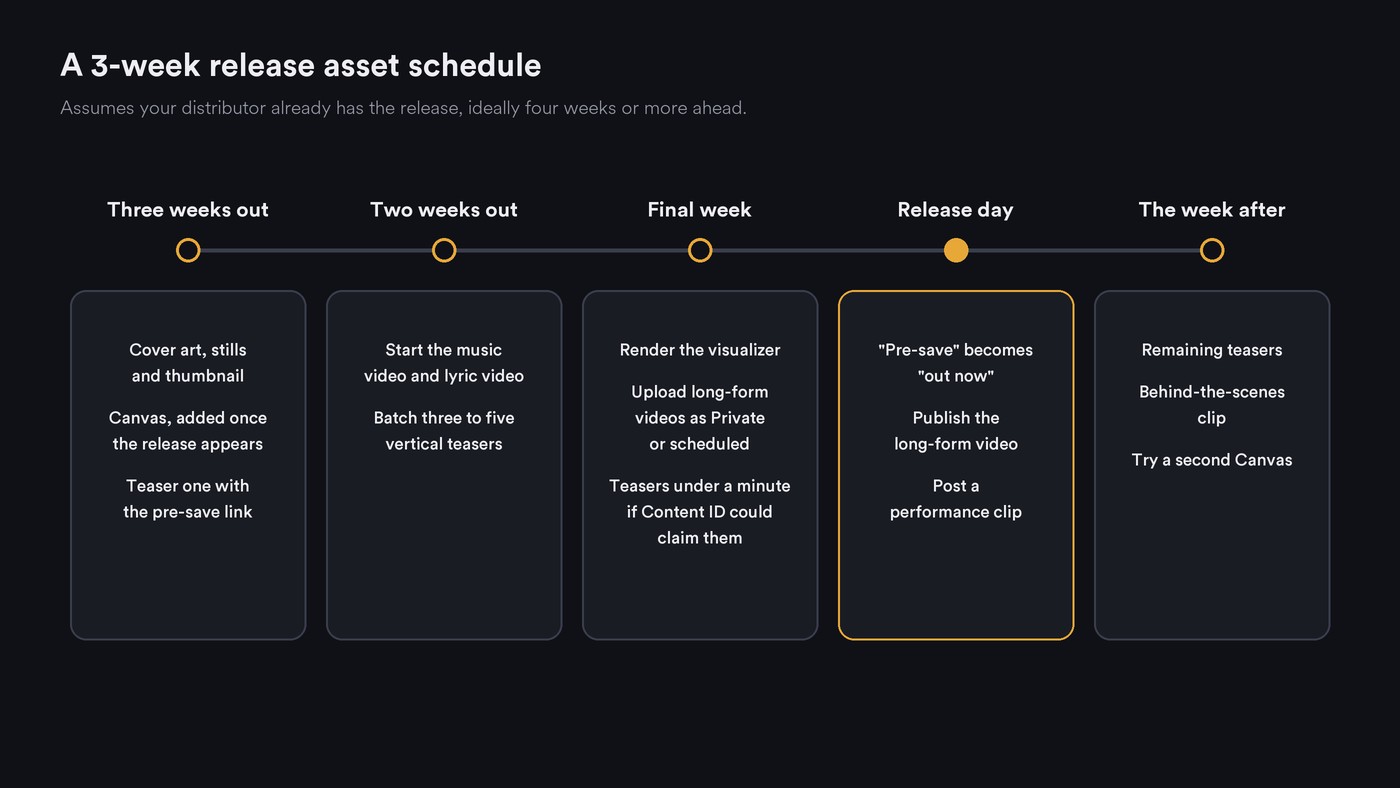
A 3-week campaign asset schedule
This assumes your distributor already has the release, ideally four weeks or more ahead; our guide to delivery timelines in music distribution explains why.
- Three weeks out: lock the cover art, stills and thumbnail. Make the Canvas and add it in Spotify for Artists once the release appears. Post teaser one with the pre-save link.
- Two weeks out: start the long jobs, the music video and lyric video. Batch three to five vertical teasers from the hook and schedule them.
- Final week: render the visualizer. Upload the lyric video, visualizer and music video to YouTube as Private or scheduled, with thumbnails. Keep teasers under a minute if Content ID could claim them.
- Release day: switch every call to action from "pre-save" to "out now", publish the long-form video and post a performance clip.
- The week after: post the remaining teasers and a behind-the-scenes clip, and try a second Canvas, since Spotify suggests keeping it updated.
Where Soundverse fits
Soundverse is an AI music platform that takes you from idea to audience. It makes the videos and visuals around a release; your distributor delivers the music. AI Music Video Generator films and cuts a video to your track, AI Studio renders the visualizer, and Asset Studio makes the cover, thumbnail and story stills in one look. Release Planner turns the track into a dated rollout with pre-save and pitch deadlines, and with the Soundverse for Chrome extension, Agent One can upload a visualizer to YouTube as Private for you to check. For the Canvas and lyric video, pair it with a tool above.
Licensing is set by plan: the Free plan is for personal use, and the Creator plan comes with a royalty-free license.
This walkthrough shows a song, a character image and a prompt becoming a full music video with planned scenes, a lip-synced performance and cuts to the music.
FAQ
What are the Spotify Canvas requirements? Spotify asks for a 3 to 8 second vertical 9:16 clip, 720 to 1080 pixels tall, as an MP4 or JPG. The first main artist, or a team member with Admin or Editor access, adds it in Spotify for Artists, and it can go on an upcoming release.
Does Soundverse distribute my music? No. Soundverse doesn't deliver music to stores. Use a distributor such as DistroKid, TuneCore or CD Baby, and use Soundverse for the videos, visuals and release plan.
Why was my YouTube Short of my own song blocked? YouTube blocks Shorts longer than one minute that carry an active copyright claim, including a first-party claim from your own label's Content ID. Trim it under a minute, or ask whoever manages Content ID for your music to release the claim.
How many videos does one single need? A workable minimum is a Canvas, three to five vertical teasers, one long-form YouTube video such as a lyric video or visualizer, and a thumbnail. Add a music video if the budget allows.
Sign up for Soundverse free and make the stills for your next release in Asset Studio. More release guides on the Soundverse blog.

