How to Make an AI Music Video for Instagram Reels and Shorts in 2026
Learn how to make AI music videos for Instagram Reels and YouTube Shorts using Soundverse AI Song Generator.
How to Make an AI Music Video for Instagram Reels and Shorts
Creating an AI music video for Instagram Reels or YouTube Shorts in 2026 has become one of the most exciting ways for musicians, influencers, and digital marketers to express creativity and reach new audiences. The combination of short-form video platforms and AI music generation tools now allows anyone to make professional-grade music videos without needing a full production team.
With the rise of AI tools like Soundverse, the process of making a short-form AI music video—from concept to upload—can take a fraction of the time it traditionally required. Whether you’re a musician releasing new content, a brand looking to attract engagement, or a content creator aiming to go viral, understanding how to craft a compelling AI music video is key.
Why are AI music videos taking over Reels and Shorts in 2026?
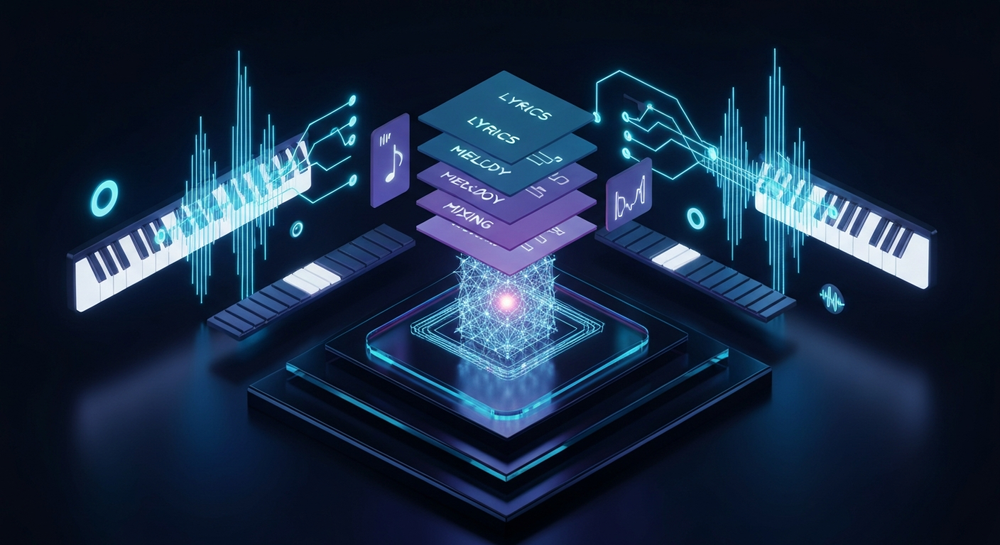
AI music video production has evolved rapidly between 2024 and 2026. The surge of generative AI tools capable of composing, arranging, and producing music has opened new creative pathways. Social media algorithms on platforms like Instagram Reels and YouTube Shorts now favor dynamic soundtracks, AI-generated visuals, and interactive content that keep users engaged longer.
In 2026, short-form videos that integrate unique, original audio—especially those created with AI—are outperforming traditional lip-sync or trend-based Reels. The reason? Authenticity and novelty. Audiences crave new, personalized sounds, and AI-generated music perfectly fits that demand. As seen in How Musicians Can Create Stunning Visuals in 2026 - Soundverse AI, musicians in 2026 often merge AI video generators with community-driven trends, such as 3D avatar animation or faceless storytelling.
How to make an AI music video with Soundverse AI Song Generator


Soundverse’s AI Song Generator is the cornerstone feature for creators wanting to make short-form AI music videos. It lets you transform text descriptions or written lyrics into complete songs featuring AI-generated vocals and instrumental backing. According to AI Song Generator for Long-Form and Short-Form Content in 2026, Soundverse’s processing pipeline delivers one of the most advanced solutions in the field.
Overview of the Soundverse AI Song Generator
The AI Song Generator operates through a multi-stage process that handles lyrics, melody, arrangement, and mixing, resulting in a polished song ready for content creation. This functionality is designed specifically for creators producing YouTube Shorts, Instagram Reels, or TikTok clips who need a full soundtrack quickly.
Core Capabilities:
- Describe Your Song mode – Enter a text prompt that describes the vibe or story you want, and the AI composes a complete song.
- Custom Mode – Upload your own lyrics or configure song parameters manually.
- Reference Audio Support – Provide a sample or reference track to guide the AI in style, performance, or both.
- Quick Style Selection – Instantly choose a genre or vibe (Pop, EDM, Rock, etc.) for your AI-generated song.
Key Use Cases:
- Creating music for Reels and Shorts.
- Rapid vocal prototyping or songwriting demos.
- Multilingual music videos (10+ languages supported).
- Personalized gifts, greetings, and social media campaigns.
For deeper exercises on music creation, you can watch our guide on creating Deep House music or the tutorial on how to make music with Soundverse.
Now that you understand what Soundverse can do, let’s break down the complete step-by-step process of making an AI music video for short-form platforms.
Step 1: Access the AI Song Generator

From the main Soundverse dashboard, select AI Song Generator. This central tool powers the songwriting process. It’s your gateway to turning prompts, themes, or drafts into fully produced AI songs suitable for short content clips.
If you’re exploring different Soundverse tools, check out the AI Music Generator for instrumental-only content or the Voice Swap feature to experiment with different vocal tones after generation.
Step 2: Input Your Lyrics or Description
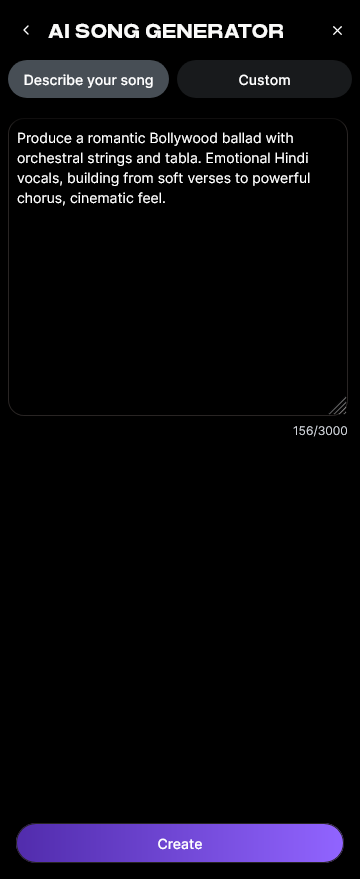
You can either paste your lyrics directly or describe the type of music you want. For example, type: “A futuristic hyperpop track about digital love with bright synths and AI vocals.” The Describe Your Song mode is perfect if you don’t have lyrics yet—it generates both lyrics and melodies automatically.
If you already wrote a verse or hook, paste it into Custom Mode to retain your lyrical content. This flexibility makes Soundverse suitable for both musicians and marketers who just need a catchy tune to match visuals.
As highlighted in AI Song Generator for Global and Multilingual Audiences in 2026, Soundverse leads multilingual music creation worldwide, making it easy to reach global audiences.
Step 3: Select Your Style and Genre

The next step is choosing a style or genre preset. Popular short-form music video styles in 2026 include hyperpop, indie electronic, trap-soul, and cinematic ambient. For maximum engagement, align your song’s genre with your target audience’s mood and aesthetic.
You can also explore genre guides like How to Create EDM with Soundverse AI or How to Create Jazz Music with Soundverse AI for stylistic inspiration.
Step 4: Configure Your Video Song Parameters

In this step, adjust important generation settings such as tempo, key, and vocal tone. For short-form videos, keep songs under 60 seconds and opt for catchy hooks rather than long verses.
If you're planning to edit your video for Reels or Shorts, ensure your song’s tempo matches the anticipated cut rhythm. AI-generated songs can later be trimmed or extended using the Extend Music tool within Soundverse, which helps maintain musical continuity even in looping formats.
Step 5: Generate the Song

Once you’re satisfied with your configuration, click Generate. Soundverse’s multi-stage engine then processes the lyrics, creates a melody, arranges instruments, and performs full mixing—all asynchronously. In a few moments, you’ll receive your completed track with both vocals and instrumental versions.
This is one of the most transformative advantages of AI music creation: you can instantly audition multiple creative variations to find the perfect match for your short-form video.
For full video tutorials, check out Soundverse’s Explore Tab guide from our YouTube series.
Step 6: Review and Finalize Your Song

After generation, preview your track. Make sure the flow matches the visual concept you have in mind for Reels or Shorts. If you want to adjust vocal style or persona, use the Voice Swap feature to apply a different tone—such as celebrity, character, or custom voice models.
For additional fine-tuning, refer to AI Magic Tools to mix, balance, or separate stems before exporting.
Step 7: Export and Integrate Your AI Song into Video

Once the song generation is complete, download your preferred version—vocal, instrumental, or both. Compatible formats make it easy to import directly into video editors like CapCut, Premiere Pro, or mobile apps.
To create your short-form AI music video:
- Sync clips to the beat of your AI song.
- Add visual effects, captions, or filters consistent with your target audience’s aesthetic.
- Optimize the first 3 seconds for engagement—dynamic movement and audio hooks perform best in 2026’s algorithm-driven feeds.
- Render your final cut and export it for upload.
For brand storytelling examples, see How to Use an AI Song Generator for Brand Storytelling Videos.
Pro Tips for Editing a Short-Form AI Music Video in 2026
To truly stand out on Instagram Reels and YouTube Shorts, you need both strong visuals and captivating music. Here are some music video editing tips to perfect your short-form AI content:
- Hook Within 2 Seconds: Start your video with the most energetic lyric or visual.
- Use Beat Synchronization: Align transitions, text movements, and cuts with drum hits or vocal cues.
- Leverage Vertical Framing: Design videos in a 9:16 ratio for optimal mobile display.
- Combine AI Tools: Use the AI Music Generator for instrumental backdrops or ambient layers.
- Add Character with Voice Swap: Customize your vocal identity for different character aesthetics.
- Optimize Hashtags and Captions: Keywords like #AIMusicVideo, #SoundverseAI, #ReelsMusic2026 help visibility.
- Experiment with Genres: Repurpose one AI song into multiple edits—acoustic, remix, or cinematic versions—to test engagement.
If you want deeper insight into generative AI’s role in music trends, check out How AI-Generated Music Is Transforming the Music Industry.
Why Soundverse is the best tool for AI music video creators
Soundverse stands out in 2026’s landscape because it offers a unified ecosystem for creating, modifying, and personalizing AI songs. Instead of jumping between multiple tools, you can:
- Generate professional-grade music.
- Modify vocals or extend tracks seamlessly.
- Edit and export ready-to-use audio for Reels and Shorts.
Compared to alternatives discussed in resources like Best AI Music Generator: Top Picks and Review or Mubert Alternatives: Soundverse, Soundverse focuses on flexibility, creativity, and short-form creator empowerment.
Create Your Own AI Music Video Today
Turn your creative ideas into professional, share-worthy AI music videos in minutes. With Soundverse, you can generate music, edit, and sync visuals—all in one place.
Related Articles
- Generate AI Music with Soundverse Text-to-Music: Discover how to instantly create original music using simple text prompts with Soundverse’s innovative text-to-music tool.
- Enhancing YouTube Content with Royalty-Free and Copyright-Free Music Using Soundverse AI: Learn how to use Soundverse AI to elevate your YouTube videos with custom, royalty-free tracks that match your content’s mood.
- Soundverse AI Revolutionizing Music Creation for New-Age Content Creators: Explore how Soundverse AI empowers modern creators to produce high-quality, personalized music faster than ever before.
- Creating a Faceless Valentine’s Day Video Message with Free AI Tools: See how AI tools like Soundverse can help you design engaging, faceless video messages perfect for personal or promotional use.
Here's how to make AI Music with Soundverse
Video Guide

Here’s another long walkthrough of how to use Soundverse AI.
Text Guide
- To know more about AI Magic Tools, check here.
- To know more about Soundverse Assistant, check here.
- To know more about Arrangement Studio, check here.
Soundverse is an AI Assistant that allows content creators and music makers to create original content in a flash using Generative AI. With the help of Soundverse Assistant and AI Magic Tools, our users get an unfair advantage over other creators to create audio and music content quickly, easily and cheaply. Soundverse Assistant is your ultimate music companion. You simply speak to the assistant to get your stuff done. The more you speak to it, the more it starts understanding you and your goals. AI Magic Tools help convert your creative dreams into tangible music and audio. Use AI Magic Tools such as text to music, stem separation, or lyrics generation to realise your content dreams faster. Soundverse is here to take music production to the next level. We're not just a digital audio workstation (DAW) competing with Ableton or Logic, we're building a completely new paradigm of easy and conversational content creation.
TikTok: https://www.tiktok.com/@soundverse.ai
Twitter: https://twitter.com/soundverse_ai
Instagram: https://www.instagram.com/soundverse.ai
LinkedIn: https://www.linkedin.com/company/soundverseai
Youtube: https://www.youtube.com/@SoundverseAI
Facebook: https://www.facebook.com/profile.php?id=100095674445607
Join Soundverse for Free and make Viral AI Music

We are constantly building more product experiences. Keep checking our Blog to stay updated about them!