Platforms Where You Can Register and Start Distributing Royalty-Free Background Tracks to Music Libraries Today
Where to register and sell royalty-free background tracks to music libraries: Pond5, Music Vine, Shutterstock, Audio Network, their splits and AI rules.
Pond5 is the platform where you can register and start distributing royalty-free background tracks to music libraries today: a free account, an ID check, then non-exclusive WAV uploads at a 30% royalty share. Curated libraries such as Music Vine, Shutterstock/PremiumBeat, Audio Network and Musicbed take applications instead. Most of them refuse AI-generated tracks.
We read each platform's own contributor pages on 19 November 2026. Where a site blocked automated reading, we say so instead of guessing. This guide is the selling side; if you need to make or buy background music, see our guide to easy platforms for generating royalty-free background tracks.
Three routes into music libraries
- Open marketplaces. Sign up, upload, pass a quality review and earn a share of each sale, usually non-exclusively.
- Curated libraries. Apply with a few tracks and wait weeks or months, for better rates and usually some exclusivity.
- Buyouts and sync publishers. Sell the rights for a fixed fee, or sign tracks to someone who pitches them.
"Royalty-free" describes the buyer's license (pay once, use without per-play fees), not your rights as the composer.
Open marketplaces: register and upload today
Pond5
- How to register: create a free account, choose Sell Your Media, upload a copy of your ID for verification and accept the Contributor Agreement. Files can't be submitted for review until your ID is verified.
- Exclusivity: its FAQ says only video contributors can join the Pond5 Exclusivity Program, so music is sold non-exclusively, and you can change prices or remove tracks at any time.
- Revenue share: the Payout Overview lists a 30% royalty share on music; an FAQ answer on the same portal still says 40%, so confirm it in your agreement.
- Files: WAV or AIFF, stereo only, under 10 minutes; MP3 and FLAC are rejected. Alternate versions and loops are uploaded as separate items.
- PRO: there's a PRO field and room for your IPI number, plus Pond5 Publishing, an optional free service that collects broadcast performance royalties through PROs. The pages we read don't address Content ID registration.
- AI policy: the Legal Guidelines say: "Repeated submission of AI-generated content will result in account suspension or termination."
AudioJungle (Envato Market) and Adobe Stock
AudioJungle's terms for authors (exclusivity, author fees and its AI content rules) sit in Envato's author help centre, which returned a 403 error to us on 19 November 2026. Read them there before you build a catalog around it. Adobe Stock's contributor portal names photos, illustrations, videos, vectors and Gen AI among the content it accepts, and its help pages also blocked us, so confirm it takes music before planning on it.
Curated libraries you apply to
Music Vine
- How to apply: fill in the Artist Application form; Music Vine says to expect a full response after about eight weeks.
- Exclusivity and split: it takes both, but at least 50% of your portfolio must be exclusive. You earn 60% on exclusive tracks and 35% on non-exclusive, paid monthly by PayPal once you pass $50 (Become an artist).
- Content ID: its own AutoClear system clears claims for licensed customers, and artists get 50% of Content ID earnings. It won't take tracks already registered for Content ID with a third-party label or publisher unless they're de-registered first.
- PRO: PRO-registered music is accepted, but the site doesn't yet prompt customers to file cue sheets, so your income comes from license sales.
- AI policy (updated 21 July 2025): "We cannot accept music that is fully generated by AI." For tools that may have been trained on copyrighted works without consent, "even partial use of these tools (e.g. for creating samples) is not permitted"; AI-powered mixing or mastering plugins are fine (policy).
Shutterstock and PremiumBeat
- How to apply: send up to five tracks (MP3, 15 MB maximum, ideally 2:30 to 3:00) to the PremiumBeat team. Review "can take up to a few months", and only one submission per artist is reviewed (music contributor guide, 17 February 2026).
- Deal: exclusive only. It's a full transfer of rights for an upfront per-track fee, paid by PayPal or wire within two to four weeks after five tracks are approved, with no further payout from sales.
- PRO: PRO-affiliated composers receive 100% of the writer's share of public performance royalties from broadcasts.
- AI policy: "Shutterstock will not allow AI-generated content to be submitted by contributors for licensing on our platform" (16 July 2025).
Audio Network
Audio Network's roster page has a Send Your Music form for composers and artists in any genre. Its How we use AI page states: "we do not use generative AI to produce our music, and our catalog contains no AI-generated compositions or recordings."
Musicbed
Musicbed's homepage says: "Our in-house team accepts less than 1% of artist submissions." We couldn't find a public submission form or a written AI policy for catalog artists on its site, so contact the team before you send anything.
Epidemic Sound and Artlist
Epidemic Sound's artist FAQ says: "We’re not accepting new artist applications right now." Its model pays a fixed USD 2,000 to 8,000 per track plus a 50/50 streaming split, and asks artists to leave their PRO because it holds the financial rights. Its AI explainer says it doesn't deal in AI-generated music. Artlist's site returned a 403 error to every request we made, so we couldn't verify its submission terms.
Sync agencies and library publishers
Songtradr's help centre (2 October 2026) says its rightsholder service "will focus primarily on music distribution", with "a more curated, high-touch licensing model run by our global creative agencies." Treat it as a pitching relationship rather than an open library.
With a buyout like Shutterstock's, the library owns the track and your ongoing income is the writer's share of performance royalties when it's broadcast. That money only reaches you if you're registered with a PRO. Our step-by-step guide covers registering music with performance rights organizations.
Content ID and PRO rules to settle before you upload
YouTube's Content ID eligibility page says: "You must have exclusive rights to the material in the reference file for the territories where you claim ownership." It also says matches against "royalty free" production music libraries must be routed to manual review before claiming. In practice:
- One Content ID owner per track. Don't also register a library track through your distributor's Content ID, or you may claim your own buyers' videos. Music Vine won't take tracks registered with a third party unless they're de-registered.
- PRO choices differ by library. Epidemic Sound asks you to leave your PRO; Shutterstock pays PRO writers their full writer's share; Music Vine accepts PRO music but doesn't collect cue sheets yet.
AI-generated tracks: where each library stands
Pond5, Shutterstock and Music Vine refuse AI-generated music, and Audio Network and Epidemic Sound say their catalogs contain none. Only Music Vine spells out what's allowed: AI mixing and mastering plugins, and in some cases tools "explicitly trained on opt-in data" for a smaller part of the workflow. If any part of your track came from a generator, ask the library in writing first.
How to prepare a library-ready track
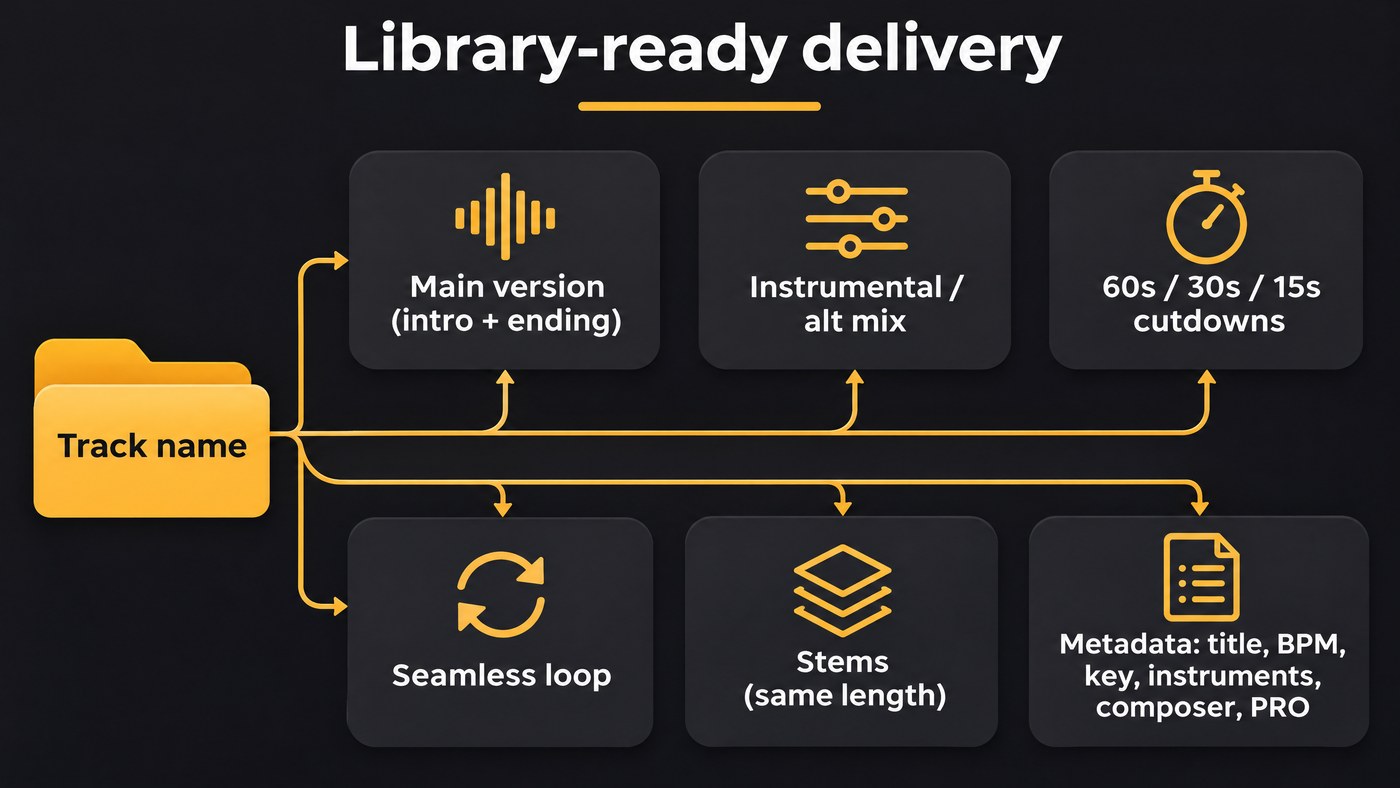
Music Vine's submission guidelines are a good template, and most libraries ask for something similar:
- Main version: a complete mix "with an introduction and an ending", between 15 seconds and 10 minutes. Start on the downbeat with no dead air, and end on a hit or a natural tail so an editor can cut to it.
- Alternate mixes: an instrumental of any vocal track, an underscore without the lead melody, or an acoustic-only version.
- Cutdowns: 15, 30 and 60 second edits, each with its own intro and ending, for ads and broadcast.
- Loops: an edit that repeats without a click, cut on bar lines.
- Stems: sub-mixes such as drums and percussion, bass, strings and lead, each exactly the same length as the main version so they line up in a video timeline. Our guide to exporting stems in Pro Tools shows the bounce settings.
- Format: WAV for Music Vine, WAV or AIFF stereo for Pond5, MP3 for Shutterstock's first review.
- Metadata: Shutterstock asks for title, tempo (BPM), instruments and composer information on every track. Pond5 wants titles, descriptions and keywords in English, and rejects "sounds like" keywords or copyrighted names.
- Paperwork: keep licenses for every sample and loop you used, since you're legally responsible for them.
Where Soundverse fits
Soundverse is an AI music platform that takes you from idea to audience. It doesn't deliver music to libraries; you submit to them yourself. It's useful for preparing a track you wrote and recorded. In AI Studio you can split, trim and fade clips to build cutdowns and loops, and on Creator and above export WAV plus one stem file per track in a ZIP. Mastering One masters toward Streaming −14 or Broadcast −23 LUFS and is free on every plan. Tempo & Key Detector reads BPM and key for your metadata. Copyright Checker fingerprints a master against released recordings before you submit; it's a recognition check, not legal clearance. Tracks generated with AI may be refused by the libraries above, so check each one's rules first.
This walkthrough covers Soundverse's Edit tools; the Stem Separator part starts at 1:28. It can split a final bounce when the session is lost, but stems printed from your own session are safer, and it's worth asking a library whether it accepts separated stems.
FAQ
Can I sell the same track on several libraries? Only non-exclusively. Pond5 music is non-exclusive and Music Vine allows a non-exclusive share, but Shutterstock buys tracks outright. Keep a spreadsheet of where every track lives.
Can I submit tracks I made with an AI music generator? Most libraries in this guide say no: Pond5, Shutterstock and Music Vine reject AI-generated music, and Audio Network and Epidemic Sound say their catalogs contain none. Your generator's own license matters too, including Soundverse's. Licensing is set by plan: the Free plan is for personal use, and the Creator plan comes with a royalty-free license.
Do I need to join a PRO first? Not to apply. Shutterstock works with affiliated and unaffiliated composers, and Pond5 has an optional PRO field. Epidemic Sound requires you to leave your PRO, so decide before you sign.
How long until I see money? Music Vine replies in about eight weeks and pays monthly over $50. Shutterstock pays its upfront fee two to four weeks after five tracks are approved. On Pond5 you earn per sale once tracks pass review.
Sign up for Soundverse free to finish, master and export your next library track. More guides on the Soundverse blog.
