Easy-to-Use Platforms for Generating Royalty-Free Background Tracks for Videos
Royalty-free background music for YouTube, vlogs, ads, podcasts and Shorts: easy AI generators and stock libraries, with each license quoted and dated.
For royalty-free background music, the easiest picks are AI generators you steer by mood and length (Soundverse, Mubert, Soundraw, Beatoven.ai, AIVA, Stable Audio, ElevenLabs Music) and stock libraries with a clear YouTube license (YouTube Audio Library, Epidemic Sound). Below are easy-to-use platforms for generating royalty-free background tracks for videos, sorted by video type and checked on 19 November 2026.
"Easy" here means the steps to a usable track, control over length, loops and stems, and clear terms on commercial and YouTube use. Terms change, so reread them on the day you download.
Royalty-free background music by video type
- YouTube talking-head videos. You need a quiet, vocal-free bed under speech. Start with the YouTube Audio Library (free, with a duration filter), Soundraw with the energy turned down, or Soundverse's AI Music Generator with the Vlogs or Tutorials theme.
- Vlogs. Scenes change, so section control matters. Soundraw shapes energy across the track, Mubert Pro adds a full Track Editor, and Epidemic Sound suits browsing over generating.
- Ads and explainers. Check the advertising row first. Mubert puts digital ads on Pro, Epidemic Sound on Pro or Enterprise, and ElevenLabs Music allows commercial use on paid self-serve plans outside film, TV, radio and Studio Games. Stable Audio fits when the bed must hit an exact length.
- Podcast intros. You want an intro, a bed and an outro that belong together. Soundverse has three Podcast themes for that set, and Beatoven.ai's terms name podcasts in its license.
- Short-form (Shorts, Reels, TikTok). Soundverse has a Loop setting on Creator and above, Mubert lets paid plans set the duration, and AIVA's Standard plan covers monetization on YouTube, TikTok and Instagram.
The AI generators: steps, controls and license terms
Soundverse
- Steps: Open AI Music Generator, describe the music, then add tags: up to two genres, one theme such as Vlogs or Podcast - Intro, up to three vibes, up to five instruments and a tempo. Generate in the chat, or straight onto an AI Studio timeline.
- Controls: Instrumental only, with no vocals or lyrics. Extend Music adds up to two minutes at a time. On Creator and above, one engine has a Type control you can set to Loop, and Score a video takes a clip of up to 10 minutes and writes music to its pace and length. Free downloads are MP3; paid plans add WAV and stems.
- License: Licensing is set by plan: the Free plan is for personal use, and the Creator plan comes with a royalty-free license.
Mubert
- Steps: In Mubert Render, type a prompt or upload an image, pick a track type and generate. On the free Ambassador plan the duration is fixed.
- Controls: Creator makes tracks up to 10 minutes and Pro up to 25, and Pro adds the full Track Editor for structure, sections, stems, duration, BPM and key.
- License: The pricing page lists Ambassador as non-commercial, with attribution and an audible watermark. Its FAQ says "Creator is intended for non-commercial content", so monetized channels and ads need Pro, or Ultra for client work. On every plan: "Tracks cannot be registered in any Content ID systems (e.g., YouTube Content ID)". After you cancel, older tracks can't go into new projects.
Soundraw
- Steps: Pick a genre, set the mood and press Generate, then adjust length, energy or instruments in the editor.
- Controls: Length and energy controls, bar-level mute and solo, and WAV plus stems on Artist Pro and Artist Unlimited.
- License: Soundraw's homepage FAQ puts commercial use on paid plans, and its license page reads "All Plans: Personal and commercial use in all of your projects", with YouTube first in the list. Credit is optional. "Registering content ID" sits on its Not OK list, and video you don't own goes under "Ask SOUNDRAW".
Beatoven.ai
- Steps: Describe the background music your content needs, generate, and download MP3 or WAV, paying per track or with subscription download minutes.
- Controls: Its pricing page returned a "not found" error on 19 November 2026, so we can't list plan limits.
- License: The homepage FAQ describes a non-exclusive perpetual licence for each downloaded track in your video or audio content, with Beatoven.ai keeping ownership. The Terms of Service (last updated 5 June 2024) ask for the credit "Music by Beatoven.ai" wherever practicable. If YouTube claims a track, the FAQ tells you to report it with the track ID in your license.
AIVA
- Steps: Choose one of its 250-plus styles, or upload an audio or MIDI influence, then generate, edit and download.
- Controls: Tracks run up to 3 minutes on Free, 5 on Standard and 5 minutes 30 seconds on Pro, with MP3 and MIDI downloads on Free and WAV export on Pro.
- License: The pricing page says Free needs credit ("Credit must be given to AIVA") and allows no monetization. Standard lets you monetize "only on Youtube, Twitch, Tik Tok and Instagram" without credit. Pro reads "Copyright owned by YOU".
Stable Audio
- Steps and controls: Stability AI's own comparison page, dated 9 September 2026, says Stable Audio 3.0 makes instrumental music and sound effects with no vocals, up to 6 minutes 20 seconds, with per-second length control.
- License: The same page says that under Stability's Community License "you own the audio you generate and can distribute and commercialize it", and organizations above $1 million in annual revenue need an Enterprise license. The stableaudio.com FAQ returned only its title when we fetched it, so check the hosted app's own plan terms before relying on it.
ElevenLabs Music
- Steps: Prompt a track, then select any section and regenerate just that part.
- Controls: Section editing, and stem downloads that vary by plan.
- License: The music page lists Free as personal use only. The Music Terms, updated 9 October 2026, allow commercial use on paid self-serve plans except film, TV, radio and Studio Games, and mark attribution on Free as "Required (denote Eleven Music when distributing)".
Stock libraries for comparison
YouTube Audio Library
Open YouTube Studio, choose Audio library, filter by genre, mood, vocals, BPM, duration and attribution, and download an MP3. The help page says Partner Program members can monetize videos that use it. For Creative Commons tracks, "you must credit the artist in your video’s description", or filter for "Attribution not required". The same page adds a warning worth reading before you pick any other source: "YouTube is not responsible for issues that arise from “royalty-free” music and sound effects from YouTube channels or other music libraries." The trade-off: fixed lengths, and anyone can use the same track.
Epidemic Sound
Browse by genre, mood or theme, then connect your channels to your account, which Epidemic calls safelisting. Its safelisting page says: "All content published during an active subscription will stay cleared forever." Once a subscription lapses, you can't publish new content with its music, even with tracks already downloaded. Ad campaigns need Pro or Enterprise.
Artlist
Artlist's license, pricing and help pages all returned an access error (HTTP 403) when we tried them on 19 November 2026, so we can't quote its terms. Read its license page yourself before subscribing.
Content ID and attribution at a glance
- No Content ID registration: Mubert and Soundraw both forbid it, so you can't claim other people's uploads with their music.
- Attribution required: Mubert's free plan, AIVA Free, ElevenLabs Free and Creative Commons tracks in the YouTube Audio Library. Beatoven.ai's terms ask for credit wherever practicable; Soundraw makes it optional.
- Proof when a claim lands: Mubert's license certificate, Beatoven.ai's track ID, or Epidemic Sound's safelisted channel.
Practical tips for fitting a background track to your edit
- Match the length to the locked edit. Lock picture first and note the exact running time. Generate a little longer and fade out, or extend the track, and cut loops on a bar line so the seam doesn't jump.
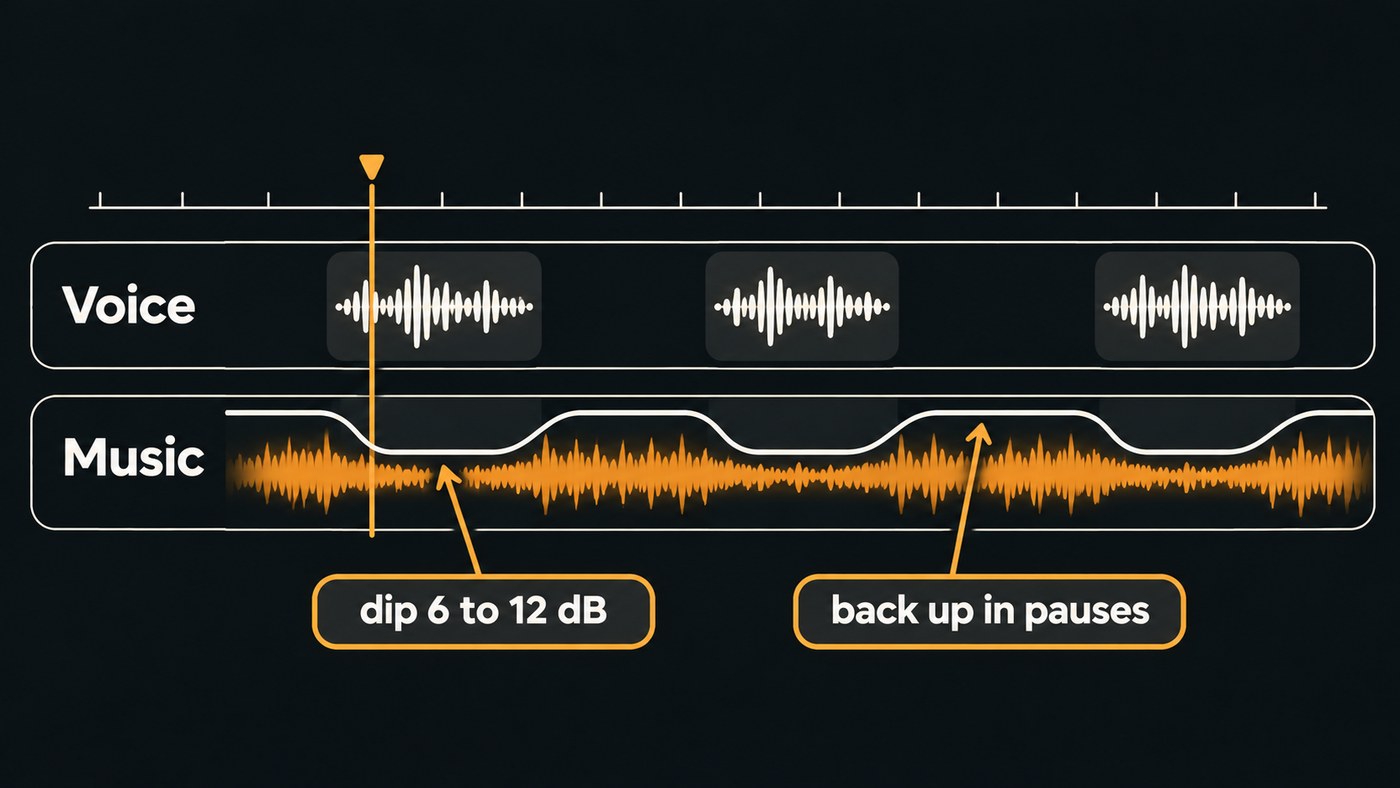
- Duck the music under voice. Dip the bed 6 to 12 dB while someone speaks and bring it back up in the pauses, with volume automation or a compressor keyed from the dialogue track.
- Keep vocals out from under narration. Sung words compete with spoken ones. Choose instrumentals, or use the vocals filter in the YouTube Audio Library.
- Keep the license receipt. Save the certificate or email, a dated copy of the terms, your plan name and the track ID, and safelist your channel before publishing where that applies.
See also our guides to podcast intro music with AI and creating instrumentals with text-to-audio models.
Where Soundverse fits
Soundverse is an AI music platform that takes you from idea to audience, built for artists who release music; its instrumental tools also serve YouTubers and video editors. AI Music Generator makes vocal-free tracks from a prompt and tags, with Vlogs, Tutorials and three Podcast themes. In AI Studio you can put your video on the video lane, build music on the tracks below and draw volume automation to duck it under the voice. On Creator and above, Describe and Generate Audio places music, effects and dialogue on separate tracks, timed to the scenes, so you can pull the music down under the dialogue in the Mixer. Licensing is set by plan: the Free plan is for personal use, and the Creator plan comes with a royalty-free license. If you also make video with AI, read what to check before buying one license for music and video.
This walkthrough shows AI Studio reading a video frame by frame and adding background music, sound effects and dialogue where the scenes need them, synced on the timeline.
FAQ
What is the easiest free source of royalty-free background music for YouTube? The YouTube Audio Library. It sits inside YouTube Studio, filters by duration and attribution, and its help page says Partner Program members can monetize videos that use it. Credit the artist in the description for Creative Commons tracks.
Can I monetize videos that use AI-generated background music? It depends on the plan. AIVA Standard allows monetization on YouTube, Twitch, TikTok and Instagram, and Mubert needs Pro for monetized channels. On Soundverse, licensing is set by plan: the Free plan is for personal use, and the Creator plan comes with a royalty-free license.
Why did a royalty-free track get a Content ID claim? Claims still happen, for example when a channel isn't safelisted. Mubert's FAQ says false-positive claims may occasionally happen and points you to the license certificate. Dispute with that proof.
Sign up for Soundverse free and make your first background track. More guides on the Soundverse blog.
