Compare Top-Rated Digital Audio Workstations That Include AI Stem Separation
DAWs with AI stem separation compared: Logic Pro, Ableton Live Suite, FL Studio, Pro Tools, Cubase Pro and Fender Studio Pro, with stems and editions.
The DAWs with AI stem separation worth comparing in November 2026 are Logic Pro, Ableton Live 12 Suite, FL Studio, Pro Tools, Cubase Pro and Fender Studio Pro. Among these top-rated digital audio workstations that include AI stem separation, Logic Pro and Pro Tools split six parts, while Ableton Live and FL Studio split four.
Below is what each one actually does, which edition you need, and a quick way to test which split sounds best on your own music. The details come from release notes, product pages and announcements, checked on November 7, 2026.
What to compare in a DAW's stem separation
Four things separate one DAW's splitter from another's. Sound quality matters too, but it depends so much on the source that it gets its own section below.
- Stem count. Four stems (vocals, drums, bass and "other") is the baseline. Guitar and piano are the newer additions, and they matter if you play or sample those parts.
- Local or online. A splitter that runs on your computer needs no upload and keeps working offline.
- Edition. Several DAWs keep separation in their top tier, so the cheaper version you own may not have it.
- Where the stems land. The best versions put each stem on its own track, grouped and in sync, and mute the original so nothing doubles.
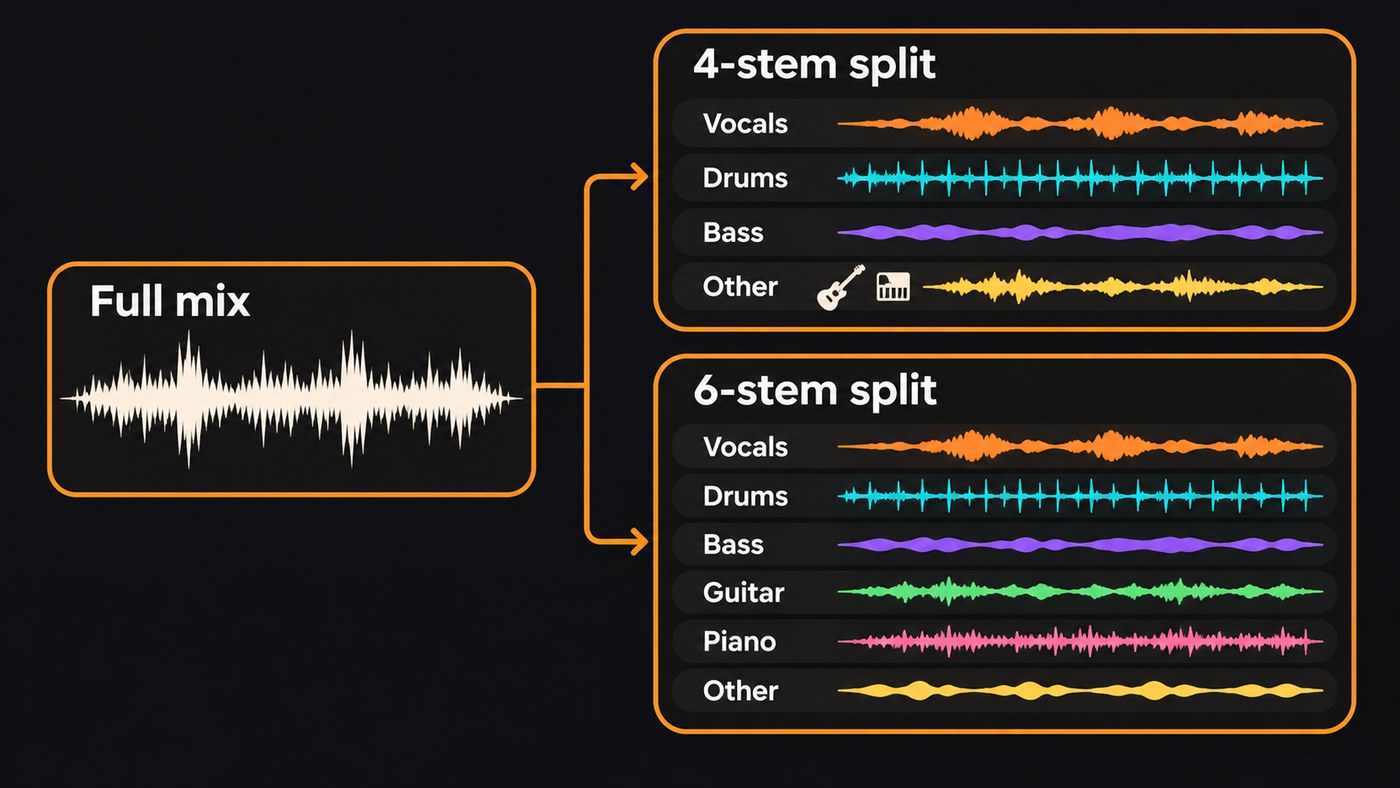
DAWs with AI stem separation, compared
- Logic Pro (Mac and iPad). Apple's Logic Pro for Mac user guide says Stem Splitter extracts vocals, drums, bass, guitar, piano and other instrumental parts, and can split the drum stem further into kick, snare, tom, hi-hat, cymbal and other percussion. Presets decide which stems come out separately and which merge into a submix. It needs a Mac with an M1 or later Apple silicon chip. Apple lists Logic Pro for Mac at $199.99 as a standalone app, or inside its Apple Creator Studio subscription at $12.99 a month or $129 a year. Best for Mac songwriters and producers who want the most detailed split, drum kit pieces included.
- Ableton Live 12 Suite. Live 12.3, released November 25, 2025, added four-stem separation (Vocals, Drums, Bass and Others). Ableton's release notes are plain about it: "Live Suite now features built-in stem separation that runs locally." Right-click a clip and choose Separate Stems to New Audio Tracks, and the stems land in a new Group Track with the source clip muted. High Speed mode runs one pass; High Quality runs separate passes for vocals, drums and bass and takes longer. Live 12.4 (May 5, 2026) added separating just a time selection. Best for electronic producers, remixers and live performers.
- FL Studio (Producer Edition and up). Stem Separation arrived in FL Studio 21.2 on October 26, 2023, listed for Producer Edition and above. Image-Line's features page describes splitting any song into vocals, drums, bass and instruments. The separation component downloads on first use, and Image-Line's support site explains how to install it on an offline computer. Best for beatmakers who sample and flip records.
- Pro Tools 2026.11 (every tier). Avid's Pro Tools 2026.11 release notes (released November 3, 2026) add the Pro Tools Stem Separator, which splits audio into up to six stems: Vocals, Drums, Bass, Guitar, Keys and Other. Avid says all processing happens on your computer with no cloud upload, and it's listed for Intro, Artist, Studio and Ultimate. You preview the stems, then drag them into the session or have new tracks made for you. It's days old, so independent tests are still thin. Best for engineers and artists who already work in Pro Tools sessions.
- Cubase Pro 16. Steinberg's Cubase 16 page lists Stem Separation as a Pro feature, now with dedicated piano and guitar separation and higher-quality stems. Its editions comparison shows Stem Separation in Cubase Pro 16 but not in Artist 16 or Elements 16. Best for composers and mix engineers already on Cubase Pro.
- Fender Studio Pro (formerly PreSonus Studio One). Mix reported on October 21, 2026 that version 8.2 renamed the built-in feature Extended Stem Separation and added guitar and piano isolation. Since version 8.1, Moises's stem separation, stem generation and voice tools are also built into the DAW, with a 14-day trial of Moises Pro features, and existing Moises subscribers can use their plan there. Announcing that integration on June 9, 2026, Max Gutnik, Chief Product Officer of Fender Electronics, said: "We believe AI should hand players more ways to create, not do the creating for them." Best for guitarists, longtime Studio One users and Moises subscribers.
Lighter and browser-based options
- BandLab (free, web and mobile). BandLab's Splitter gives four stems (vocals, drums, bass and others) for free, and BandLab Membership adds guitar and piano for six. You can export the stems into BandLab Studio, which BandLab describes as 100% free. Songs can be up to 100 MB and 15 minutes. Best for beginners and phone-first artists. We cover the limits in is BandLab Splitter free.
- Serato Studio. Serato's beat-making DAW pulls acapella, melody, bassline and drum stems from a track in real time, and you can adjust or automate their levels. Best for DJs building edits and beatmakers working from their DJ library.
- Soundverse AI Studio (browser). Choose Separate Stems on a clip and the stems land on new tracks below it. More on this in the Soundverse section below.
Which DAW has the best AI stem separation?
On paper, Logic Pro has the most detailed split, and Pro Tools now matches its six stems. How those stems sound depends on your material. A sparse acoustic demo is usually easy to split. A dense, reverb-heavy chorus is where the differences show.
So run the same test in every DAW you can get a trial of:
- Start from a WAV or other lossless file. Separation can only work with what's in the file, and MP3 artifacts get split along with the music.
- Pick the hardest 30 seconds. A loud chorus with stacked vocals, cymbals and a busy low end.
- Use the highest-quality mode. In Live, that's High Quality.
- Solo each stem. Listen for hi-hats leaking into the vocal, a watery smear on reverb tails, and kick drum ending up in the bass.
- Null-test the split. Put the original on one track with its polarity flipped and play it against all the stems at unity gain. Whatever you still hear is what the split lost or added.
- Judge the stem you need. If you only want the a cappella, the vocal stem is the only result that counts.
For the technical side of why some parts bleed more than others, see how AI stem separation works. If you'd rather split outside your DAW, we compared standalone tools in the best AI vocal removers and stem splitters.
Can you release a track built from separated stems?
Splitting a song doesn't change who owns it. Stems from your own masters are yours to remix, rebalance or rebuild. Stems from someone else's record are still that record, so a remix, sample or edit you plan to release needs permission from the rights holders, however clean the split sounds.
Where Soundverse fits
Soundverse is an AI music platform that takes you from idea to audience, built for independent artists who release music. AI Studio is its browser studio: open a clip's AI Tools menu, choose Separate Stems, and the stems land on new tracks below the clip, ready to mix. Recording, editing, the built-in instruments and effects cost no tokens; only AI generation does.
Stem Separator offers 2 stems (vocals and backing), 6 stems (vocals, drums, bass, guitar, piano and other) or a maximum split that puts every part on its own with a MIDI file for each. The 2- and 6-stem splits come as WAV, FLAC or MP3, and on the Free plan they run through Agent One. The maximum split needs Creator or above. Songs can be up to 50 MB.
It doesn't replace Logic Pro or Pro Tools. AI Studio doesn't load VST or AU plugins, and recording has no punch-in or take comping. The AI Studio page lists what it does well.
Licensing is set by plan: the Free plan is for personal use, and the Creator plan comes with a royalty-free license.
From 1:28, this walkthrough shows Stem Separator splitting a song, from input to finished stems.
FAQ
Which DAW has the most stem types? Logic Pro splits vocals, drums, bass, guitar, piano and other parts, and can break the drum stem into individual kit pieces. Pro Tools 2026.11 also offers six stems, with keys in place of piano. Ableton Live and FL Studio split four.
Is there a free DAW with AI stem separation? BandLab's Splitter is free for four stems and exports them to BandLab Studio, which is also free. Soundverse's Stem Separator offers 2- and 6-stem splits on its Free plan, run through Agent One with the starter tokens every new account gets. Avid lists its new Stem Separator for every Pro Tools tier, including Pro Tools Intro.
Does Ableton Live Standard include stem separation? Not according to Ableton's 12.3 release notes, which put stem separation in Live Suite. On Live Standard or Intro, you'd need to upgrade or split the audio in a separate tool and import the stems.
Do these DAWs upload my audio to the cloud? Ableton and Avid both say their separation runs locally on your computer. Browser tools such as BandLab and Soundverse work on files you upload. If privacy matters for unreleased music, check this before you choose.
Can stem separation replace the original multitracks? Not fully. It can only separate what's already in the mix, so effects printed on the master and overlapping frequencies come along with the stems. For a mix fix it's often good enough. For a release-grade remix, ask for the session files first.
Sign up for Soundverse free and split your first song into stems. More production guides on the Soundverse blog.
