AI Audio Suites for Instant Stem Separation and Mastering of Your Recordings (With Links)
Links to AI audio suites with stem separation and mastering in one place: SoundBoost, Moises, BandLab, Soundverse and Ozone 12, with plan limits.
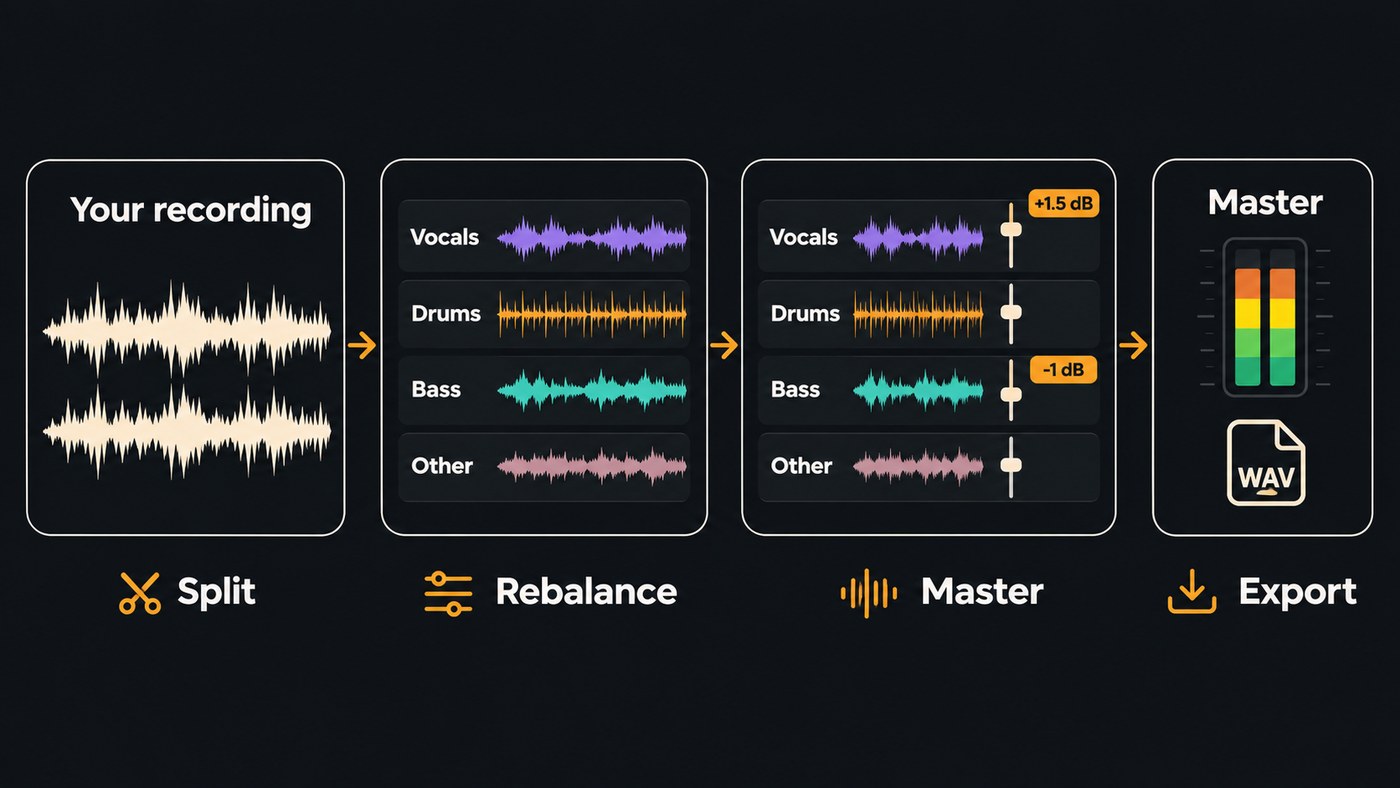
Five AI audio suites handle stem separation and mastering in one place: SoundBoost, Moises, BandLab and Soundverse online, and iZotope Ozone 12 inside your DAW. Each is an AI audio suite that allows for instant stem separation and mastering, though a master takes seconds to a minute and a detailed split takes longer.
The details below come from each company's own pages, checked on 14 November 2026, so confirm limits before you pay. If you only want a splitter inside your DAW, our comparison of DAWs with AI stem separation goes deeper. If you only need masters, see AI audio mastering services with unlimited exports.
Why split stems before you master
Mastering works on the whole stereo mix. If the vocal sits a couple of decibels too low or the kick and bass blur together, a mastering chain moves the whole song, so the problem comes along. A stem split gives you that control back when all you have is the bounce:
- a live or rehearsal recording with no multitrack
- a demo whose session is lost
- a song you generated or recorded as one stereo file
If you still have the session, skip the split and fix the balance in the mix, where nothing bleeds. Our guide to balancing audio levels in a multitrack project covers that route.
SoundBoost describes the combined workflow plainly in its FAQ: "Use the stem splitter to clean up or rebalance a song, then send it through SoundBoost AI mastering for final loudness and polish."
AI audio suites with stem separation and mastering
SoundBoost (web, iPhone, iPad and Android)
Link: soundboost.ai
- Stem split: the free standard mode separates vocals, drums, bass and other, plus a generated metronome track, with guitar and piano left inside "other". The Unlimited Plus membership adds a 7-stem mode with dedicated guitar and piano channels, according to its stem splitter page. Files can be up to 1.5 GB and 22 minutes 30 seconds.
- Mastering: you describe the sound in words, such as "wide stereo field", and each request comes back as a new revision you can A/B. You can also paste a Spotify link as a reference or choose one of six AI engineer profiles. SoundBoost says a render takes about a minute.
- Plan limits that matter: standard splitting is free with no upload quota, but free MP3 stem downloads on the web stop at the third project in a rolling 24 hours. Mastering starts with a free preview, and SoundBoost says every membership includes unlimited mastering and stem splits.
- Best for: artists who mostly need masters and split a song now and then.
Moises (web, desktop and mobile)
Link: moises.ai stem separation
- Stem split: Moises lists 27 stem types, down to kick, snare, hi-hat, lead and backing vocals, and male and female vocals. Standard models are built for speed, and Hi-Fi models are on the Pro plan. Stems export as MP3, WAV, FLAC, M4A or OGG, lossless at up to 192 kHz, and Moises says they load straight into Moises Studio to edit, arrange, generate new parts and master.
- Mastering: Moises mastering offers Auto, Advanced and Reference modes, with loudness presets for platforms like Spotify and YouTube.
- Plan limits that matter: Auto and Advanced are Pro only, mastering runs only in the web and desktop apps, and exporting a master needs Pro. You can separate your first track free.
- Best for: players and producers who want very detailed splits, such as single drum pieces, and want to master in the same app.
BandLab (web, iOS and Android)
Link: bandlab.com/splitter
- Stem split: Splitter gives four stems free: vocals, drums, bass and other instruments. Membership adds guitar and piano for six. Each song can be up to 100 MB and 15 minutes, and you can export the stems into BandLab Studio.
- Mastering: BandLab Mastering is free with a set of presets, and you can compare the original and mastered versions side by side. You can drag in several files to master an EP or album. Membership, BandLab says, lets you customize your sound and master as many tracks as you want.
- Plan limits that matter: the split, the rebalance and the master happen in three separate tools, all inside one free account.
- Best for: beginners, phone-first artists and anyone who wants to try the whole workflow without paying.
Soundverse (browser)
Links: Stem Separator and Mastering One
- Stem split: choose 2 stems (vocals and backing), 6 stems (vocals, drums, bass, guitar, piano and other) or a maximum split with every part on its own and a MIDI file for each. Songs can be up to 50 MB, and the 2- and 6-stem splits come as WAV, FLAC or MP3. In AI Studio, the stems land on new tracks below the clip.
- Mastering: Mastering One sits on the master bus of every AI Studio project. Pick a genre and a loudness target from Club −7 to Broadcast −23 LUFS, press Master while the song plays, and it listens for two seconds and sets tone, dynamics, width and loudness, which you can then adjust.
- Plan limits that matter: the 2- and 6-stem splits work on the Free plan, run through Agent One, while the maximum split with MIDI needs Creator. Mastering One uses no tokens on any plan. Free AI Studio projects hold 3 tracks and export MP3, and Creator raises that to 8 tracks with WAV, FLAC and stem export.
- Best for: artists who want to split, rebalance, mix and master in one browser project.
iZotope Ozone 12 (plugin inside your DAW)
Link: Ozone 12
- Stem split: Ozone doesn't hand you stem files; it separates inside the mastering chain. Master Rebalance changes the level of drums, bass or vocals in a bounced mix, the new Stem EQ lets you EQ vocals, bass, drums and instruments separately, and Stem Focus applies the Ozone chain to a single stem.
- Mastering: Master Assistant builds a starting chain. Its new Custom flow lets you pick a genre target, upload references, set a LUFS target and choose which modules to use.
- Plan limits that matter: Elements includes Master Assistant and Assistive Vocal Balance but no individual modules. Master Rebalance is in Standard and Advanced, while Stem EQ and Stem Focus are Advanced only. You need a DAW, and there's a free trial.
- Best for: producers who master in their own DAW and only need separation to fix the balance, not to export parts.
If you already work in Logic on a Mac, Apple's Logic Pro page lists both jobs: Stem Splitter separates drums, bass, vocals, guitar, piano and other instruments, and Mastering Assistant listens to your track and shapes a master you can adjust.
How to split and master a recording in one session
- Start from your best file. Use a WAV bounce rather than an MP3.
- Split only as far as the fix needs. Two stems are enough to move a vocal. You need four or six to touch the bass, drums or guitar.
- Make small moves. Raise or lower a stem by a decibel or two and judge it in the full mix, not soloed.
- Leave headroom. Keep the limiter off the rebalanced mix and let the mastering stage set the final loudness.
- Pick the target for where the song is going. Streaming, club and broadcast want different loudness, and most of these tools have presets for each.
- Compare at matched loudness. The louder version always sounds better at first, so use each tool's A/B or bypass and match levels before you decide.
- Export a WAV for release and keep the stems. You'll want them for a remix, a live backing track or a re-master.
What AI stem separation and mastering can't fix
- Recording problems. Clipping, room echo and a noisy vocal move into a stem when you split; they don't disappear. Clean them up first.
- Artifacts made louder. Mastering adds level and brightness, so a faint swirl on a separated vocal can become audible. Check the master on headphones.
- Judgment. Moises answers its own FAQ question about whether AI can replace an engineer with: "No. AI mastering is a powerful way to save time and bring some of the benefits of mastering to a larger audience. This doesn't replace the skills and experience of a professional mastering engineer." For vinyl or a big release, a human engineer is still worth booking.
- Rights. These tools are for your own recordings. Splitting someone else's song gives you its parts, not permission to release them.
Where Soundverse fits
Soundverse is an AI music platform that takes you from idea to audience, built for independent artists who release music. For this job, it keeps the chain in one AI Studio project: run Separate Stems on a clip, let Mix One place each typed track by genre, then finish with Mastering One. Recording, editing, the built-in effects, Mix One and Mastering One use no tokens; AI tools such as Stem Separator do.
The limits: AI Studio doesn't load VST or AU plugins, export is blocked for projects longer than 15 minutes or with more than 24 tracks, and the Free plan exports MP3 only.
Licensing is set by plan: the Free plan is for personal use, and the Creator plan comes with a royalty-free license.
This video shows Mix One placing a project's stems by genre, then Mastering One finishing the song toward a chosen target.
FAQ
Is there a free AI audio suite for stem separation and mastering? BandLab is the most complete free option, with four free stems and free mastering presets in one account. SoundBoost's standard split is free with a free mastering preview, and Soundverse's Free plan covers 2- and 6-stem splits plus Mastering One with MP3 export.
How instant is "instant"? Mastering is the fast part: Mastering One listens for two seconds, and SoundBoost quotes about a minute per render. Splits take longer, and high-quality models such as Moises's Hi-Fi trade speed for cleaner stems.
Should I master the stems or the full mix? These suites master a stereo mix. Split, rebalance and bounce first, then master the result. Ozone 12 is the exception that works the other way round, letting you adjust drums, bass and vocals inside the mastering chain without exporting stems.
Will splitting hurt the sound of my master? Small moves usually don't. Large moves, like pulling a vocal up 6 dB, expose more of the bleed the split left behind, and mastering then makes it louder. A fix that big belongs in the original mix.
Sign up for Soundverse free and split, mix and master your next recording in one project. More production guides on the Soundverse blog.
