Which AI Software Offers the Most Realistic Vocal Synthesis for Singer-Songwriters?
Which software gives singer-songwriters the most realistic AI vocal synthesis? Voice conversion, Synthesizer V, ACE Studio and full-song tools, tested.
For realistic AI vocal synthesis, singer-songwriters get the most convincing results from software that keeps a human performance at its core: a voice converter that re-sings your own take, or a note-based synth like Synthesizer V Studio 2 Pro or ACE Studio, where you shape every breath and bend. Full-song generators sound polished but give you less say over phrasing.
This guide sticks to realism: what makes a synthetic vocal pass for a person on a quiet acoustic song, which software gets closest, and how to test it. Product details were checked on each maker's own site on 7 November 2026.
What makes an AI vocal sound realistic
Listeners judge a voice on three layers, usually in this order:
- Timbre. The tone of the voice. Most current tools get close here.
- Diction. Consonants, vowel shapes and word stress. "Lights" needs a crisp "ts" at the end, and "because" has to land on its second syllable.
- Performance. A small scoop into a note, vibrato that arrives late on a held vowel, a breath before a phrase, a line that softens as the singer runs out of air.
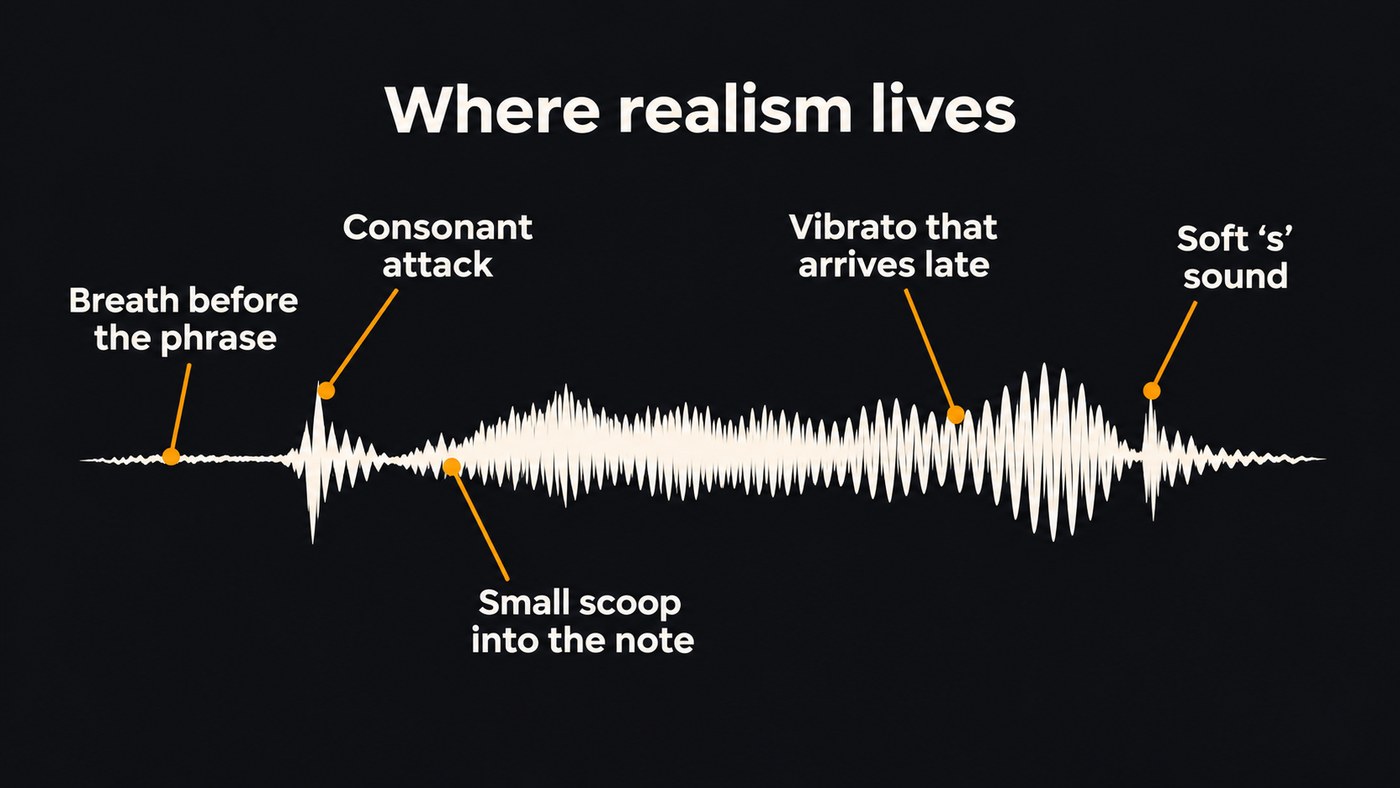
Performance is where synthetic vocals give themselves away. Dreamtonics, the company behind Synthesizer V, writes on its product page that early neural singing models suffered from an "oversmoothing" problem: they learned to predict an averaged version of the sung lyrics. Its breakthrough, the page says, came from understanding that "given the same score, there is more than one 'right answer' to perform it." An averaged performance is correct on paper and flat in the ear.
Finished productions already fool most people. In a survey Deezer published on 12 November 2025, Ipsos asked 9,000 adults in eight countries to listen to three tracks, two fully AI-generated and one human-made, and 97% couldn't tell the difference. Those were full productions, though. A voice with one guitar behind it gives the ear far more to inspect.
Why singer-songwriter vocals are the hardest to synthesize
A dense pop chorus hides a lot. An intimate verse hides almost nothing.
- Sparse arrangements. One guitar or piano leaves the vocal exposed from the first word.
- Close, dry delivery. Breath noise and soft consonants are part of the sound, and synthesis smooths them out first.
- The lyric carries the song. One wrong stress or swallowed word, and the listener stops believing the story.
- Personal phrasing. Singer-songwriters sit behind the beat, half-speak a line, hold back in the first verse. Default AI phrasing rarely does.
So test any tool in the arrangement you'll actually release, not over a busy demo beat.
The most realistic AI vocal software, by how you work
Realism depends mostly on where the performance comes from. For a broader feature comparison, see our guide to the best AI singing generator platforms for independent artists.
You can sing the song: voice conversion keeps your phrasing
If you can sing a decent take, voice conversion gives the most natural-sounding result, because the timing, breaths and phrasing come from a person and only the voice changes.
- Soundverse Voice Swap re-sings a vocal in another voice model while keeping the original performance. Pick a Community or Public voice, or your own model from Train Voice Model, which trains on at least 10 minutes of clean, dry solo recordings on the Creator plan and up. Pitch shifts up to 24 semitones either way.
- Kits.ai converts audio you upload or record from a mic into a voice from its voice changer library or a custom voice you build.
The catch: conversion copies your take, flaws included, so a flat note stays flat. Soundverse's Train Voice Model page notes that background music, noise, reverb and takes that stay on a few notes all lower quality, so record training material dry and across your range.
You write in MIDI: Synthesizer V Studio 2 Pro or ACE Studio
If you'd rather not sing the part, a note-based synth gives you the most control over the details that make a vocal believable.
- Synthesizer V Studio 2 Pro has the deepest set of realism controls we found. Dreamtonics lists pitch deviation, vibrato, gender, breathiness, mouth opening, consonant and vowel strength and phoneme timing, plus AI Retakes for pitch, timbre and timing and several Vocal Modes per voice. Its voices come from professional singers who gave explicit consent and are paid. It runs offline, works as a plugin in your DAW, and is a one-time purchase with a 14-day trial.
- ACE Studio turns MIDI and lyrics into a sung vocal, with 140+ voices in 8 languages listed on its homepage. Its vocal parameter docs put the realism point plainly: "Just like human singers, taking a breath before a phrase makes a vocal performance sound more natural." Air, Falsetto, Tension and Energy controls shape the delivery, and the docs advise keeping changes small.
The catch: realism here is manual work. A default render sounds clean; a believable one means drawing breaths, bends and dynamics phrase by phrase.
You want to hear the finished record: full-song generators
Full-song generators produce the vocal together with the arrangement, so it sits in the mix with reverb, doubles and dynamics that suit the track. Soundverse v9, on the Pro and Max plans, can follow a hummed melody or a MIDI file you give it, and Suno's homepage says its newest model, v6, brings fuller vocals. The trade-off is control: the model decides much of the phrasing, and every take comes out differently.
You want your own voice without singing every draft
A voice clone sings new songs in a voice like yours. Soundverse Train Voice Clone, on the Creator plan and up, needs one take with at least 15 seconds of singing, and Suno's Voices feature works from a few seconds of your voice. A clone can only be as natural as its reference, so give it a clean, dry take across a range of notes. One tip from Soundverse's Voice Clone page: train one clone from a breathy take and another from a belted one, then pick per song.
How to test vocal realism before you commit
Product-page demos are picked to impress, so run your own blind test.
- Pick eight bars that are hard to fake: a quiet verse line and a chorus line with one long held vowel. Use the same key, tempo and lyric in every tool.
- Keep the first two takes from each, so no tool wins by cherry-picking.
- Loudness-match the clips, for example to −14 LUFS, so the louder one doesn't win.
- Put every vocal over the same guitar or piano part, plus one real singer's take for reference.
- Shuffle and play them to someone who doesn't know the order, once on headphones and once on a phone speaker.
- Listen for the tells:
- "s" and "t" sounds that smear, hiss or turn metallic
- no breaths, or the same breath pasted before every line
- vibrato that starts at the same moment on every long note
- held notes that sit dead on pitch with no drift
- wrong word stress or a swallowed final consonant
- a vowel that thins out or changes colour on the highest note
This blind test plays loudness-matched first takes from Soundverse v9 and Suno v6 on the same prompts, from pop to a Hindi duet: good practice for spotting the tells.
How to make an AI vocal sound more human in the mix
- Write a melody someone could breathe through. A long line with no rest sounds machine-made however good the voice is.
- Comp like you would with a real singer, keeping the best phrase from several takes of each section.
- Add something real. Your own harmony or a whispered double under the AI lead makes the whole vocal more believable.
- Leave timing loose. Don't snap every syllable to the grid; let a few verse phrases start a hair late.
- Process gently. De-ess first, ride the level with automation instead of heavy compression, and use a short room reverb; a long, bright plate exaggerates sibilance artifacts.
- Double only where a singer would, on the chorus rather than every verse line.
For doubles and harmonies, see our guide to layering vocals for a professional sound, and how to mix vocals like a pro for processing in more depth.
Realism raises the stakes on voice rights
The more convincing the vocal, the more it matters whose voice it sounds like. Use your own voice or a singer who agreed in writing; Soundverse won't start training a voice clone until you confirm the voice is yours or the singer has given explicit consent. Note the tool, voice and date for every vocal, so you can answer your distributor's AI questions accurately.
Where Soundverse fits
Soundverse is an AI music platform that takes you from idea to audience, built for independent artists who release music. For realism, the strongest path is the one that starts with your own performance: train your voice with Train Voice Model, then use Voice Swap to re-sing guide vocals in it, with the timing and phrasing of the take intact. When you'd rather not sing every draft, Train Voice Clone turns one take with 15 seconds or more of singing into a voice the AI Song Generator can sing new songs in, and Pro and Max start on Soundverse v9.
Soundverse doesn't let you draw breath and vibrato curves note by note; for that, Synthesizer V Studio 2 Pro or ACE Studio is the better tool.
Licensing is set by plan: the Free plan is for personal use, and the Creator plan comes with a royalty-free license.
FAQ
Is a clone of my own voice realistic enough to release? It can be, and the recording you train from matters most: a clean, dry take across your range, with no music or reverb behind it. For the most natural result, keep your own performance and change only the voice, rather than letting a model invent the performance as well.
Do I need to sing to get a realistic AI vocal? No. Synthesizer V Studio 2 Pro and ACE Studio sing from MIDI and lyrics, and you add the breaths and bends yourself. If you can sing in tune but want a different tone, voice conversion of your own take usually sounds the most human.
Which AI vocal works best for acoustic and folk songs? The one that lets you control the quiet details: breaths, soft consonants, a held note that drifts slightly. That points to voice conversion of your own take, or a note-based synth with breath controls.
Sign up for Soundverse free and run your first realism test on your own lyrics. More vocal guides on the Soundverse blog.
